
1. Johdanto
The UNI-T UT251A is a high-accuracy, high-sensitivity leakage current clamp meter designed for precise testing of AC leakage current. This high-resolution meter is suitable for various applications, including checking leakage current in motors, home appliances, and other electrical equipment up to 600A. It features a 4-digit LCD digital display with 10000 display count, auto-ranging capabilities, a 2/s sampling rate, peak hold function, and the ability to store 99 sets of data. The device also includes an RS-232 interface for data transmission, data hold, auto power-off, overload indication, and low battery indication.
2. Turvallisuustiedot
Lue ja ymmärrä kaikki turvallisuusohjeet ennen laitteen käyttöä. Näiden ohjeiden noudattamatta jättäminen voi aiheuttaa sähköiskun, tulipalon tai vakavan vamman.
- Käytä aina asianmukaisia henkilönsuojaimia (PPE) työskennellessäsi sähköjärjestelmien kanssa.
- Älä käytä mittaria, jos se näyttää vaurioituneelta tai toimii epänormaalisti.
- Varmista, että paristolokero on suljettu tiiviisti ennen käyttöä.
- Älä ylitä minkään toiminnon enimmäistulotehoa.
- Avoid touching live circuits with bare hands or conductive materials.
- Pidä laite kuivana ja puhtaana.
- Refer to local and national safety codes for proper electrical work procedures.
3. Tuote ohiview
The UNI-T UT251A is a compact and robust leakage current clamp meter. Key features include:
- 4-digit LCD Digital Display: Provides clear readings with a 10000 display count.
- Automaattinen toimintasäde: Valitsee automaattisesti sopivan mittausalueen.
- 2/s Sampling hinta: Ensures quick and responsive measurements.
- Huippupito: Captures and displays the maximum measured value.
- Tiedon kirjaus: Stores up to 99 sets of data for later analysis.
- RS-232-liitäntä: Allows connection to a PC for data transfer and analysis.
- Tietojen pito: Jäädyttää nykyisen lukeman näytössä.
- Automaattinen virrankatkaisu: Säästää akun käyttöikää sammumalla automaattisesti tietyn käyttämättömyysajan jälkeen.
- Ylikuormitusmerkki: Alerts the user when the measurement exceeds the range.
- Alhaisen akun ilmoitus: Notifies the user when the battery needs replacement.

Kuva 3.1: Etuosa view of the UNI-T UT251A Leakage Current Clamp Meter, showing the display, clamp jaw, and control buttons.
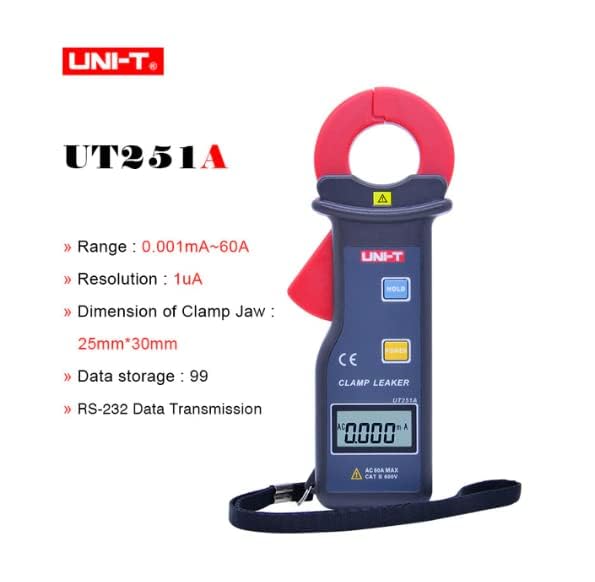
Figure 3.2: The UNI-T UT251A Clamp Meter highlighting its range, resolution, clamp jaw dimension, data storage, and RS-232 data transmission capabilities.
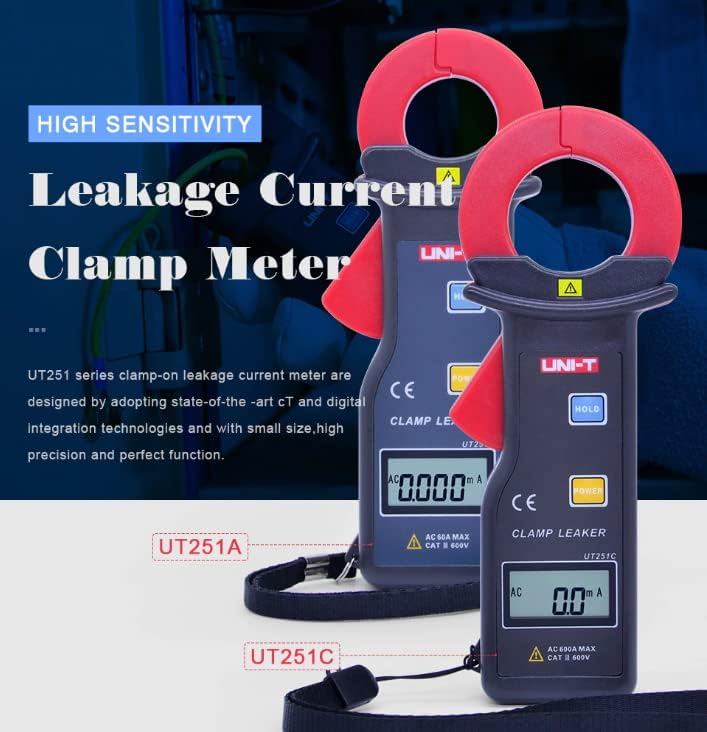
Figure 3.3: Comparison of UT251A and UT251C models, emphasizing their high sensitivity for leakage current measurement.
4. Asennus
4.1 Akun asennus
- Paikanna paristolokeron kansi mittarin takaa.
- Löysää ruuvi(t) ruuvimeisselillä ja poista kansi.
- Insert the 9V battery (6F22) into the compartment, observing correct polarity.
- Sulje paristolokeron kansi ja kiristä ruuvi(t).
4.2 Ensimmäinen tarkistus
- Press the POWER button to turn on the meter.
- Verify that the LCD display shows "0.000mA" or a similar low reading in a stable environment.
- If a low battery indicator appears, replace the battery before use.
5. Käyttöohjeet
5.1 Measuring AC Leakage Current
- Käynnistä mittari painamalla POWER -painiketta.
- Avaa clamp leuka painamalla liipaisinta.
- Varovasti clamp the meter around a single conductor (live, neutral, or ground wire) of the circuit you wish to measure. Ensure the jaw is completely closed.
- Read the leakage current value displayed on the LCD. The meter will automatically select the appropriate range.
- For accurate readings, ensure no other conductors are within the clamp leuka.
5.2 Tietojen säilytystoiminto
- Paina mittauksen aikana PIDÄ -painiketta pysäyttääksesi nykyisen lukeman näytössä.
- Paina PIDÄ -painiketta uudelleen vapauttaaksesi datan pidon ja jatkaaksesi reaaliaikaista mittausta.
5.3 Huippuarvon pitotoiminto
- The meter automatically captures peak values. Refer to the specific manual for detailed instructions on accessing and clearing peak hold readings.

Figure 5.1: The UNI-T UT251A Clamp Meter in use, measuring current on an electrical wire.

Figure 5.2: A user wearing protective gloves operating the UNI-T UT251A Clamp Meter within an electrical panel, demonstrating a typical application.
6. Data Logging and RS-232 Interface
The UT251A can store up to 99 sets of measurement data. This data can be retrieved and analyzed using the RS-232 interface and the provided PC software.
6.1 Tietojen tallentaminen
- During a measurement, press the appropriate button (refer to the specific manual for button identification, often labeled "MEM" or similar) to save the current reading.
- The meter will indicate successful data storage, often by displaying a memory location number.
6.2 Connecting to PC via RS-232
- Install the PC software from the provided CD onto your computer.
- Connect the RS-232 interface cable to the meter's RS-232 port and to your computer's serial port (or a USB-to-serial adapter).
- Launch the PC software.
- Follow the software's instructions to establish communication with the meter and download the stored data.
Video 6.1: An official product video demonstrating the features and usage of the UNI-T UT251A/UT251C clamp meters, including a comparison of the two models and their accessories.
7. Huolto
7.1 Puhdistus
- Pyyhi mittarin c-levyasing mainoksellaamp liinalla ja miedolla pesuaineella. Älä käytä hankaavia aineita tai liuottimia.
- Säilytä clamp jaw clean and free of debris to ensure accurate measurements.
7.2 Pariston vaihto
- When the low battery indicator appears, replace the 9V battery as described in the "Battery Installation" section.
- Remove the battery if the meter will not be used for an extended period to prevent leakage.
7.3 Varastointi
- Säilytä mittaria viileässä, kuivassa paikassa, poissa suorasta auringonvalosta ja äärimmäisistä lämpötiloista.
- Use the provided carrying bag for protection during storage and transport.
8. Vianmääritys
| Ongelma | Mahdollinen syy | Ratkaisu |
|---|---|---|
| Mittari ei käynnisty. | Tyhjä tai väärin asennettu akku. | Tarkista pariston napaisuus tai vaihda 9 V:n paristo. |
| Epätarkkoja lukemia. | Likainen clamp jaw; external magnetic fields; multiple conductors in jaw. | Puhdista clamp jaw; move away from strong magnetic fields; ensure only one conductor is clamptoim. |
| Näytössä näkyy "OL" (ylikuormitus). | Measured current exceeds the meter's range. | Ensure the current is within the meter's specified range (up to 60A for UT251A). |
| Ei voi muodostaa yhteyttä tietokoneeseen. | Incorrect cable connection; software not installed or configured properly. | Verify RS-232 cable connection; reinstall PC software; check software communication settings. |
9. Tekniset tiedot
| Ominaista | Yksityiskohta |
|---|---|
| Malli | UT251A |
| Range (Leakage Current) | 0.001 mA ~ 60 A |
| Resoluutio | 1 uA |
| Näytön määrä | 10000 |
| Sampling korko | 2 kertaa sekunnissa |
| Clamp Jaw Dimension | 25mm x 30mm |
| Tietojen tallennus | 99 sarjaa |
| Käyttöliittymä | RS-232 |
| Tehoa | 9V akku (6F22) |
| Näytön koko | 32mm x 15mm |
| Tuotteen nettopaino | 120 g |
| Tuotteen koko | 175mm x 70mm x 38mm |
| Turvallisuusluokitus | CATIII 600V |
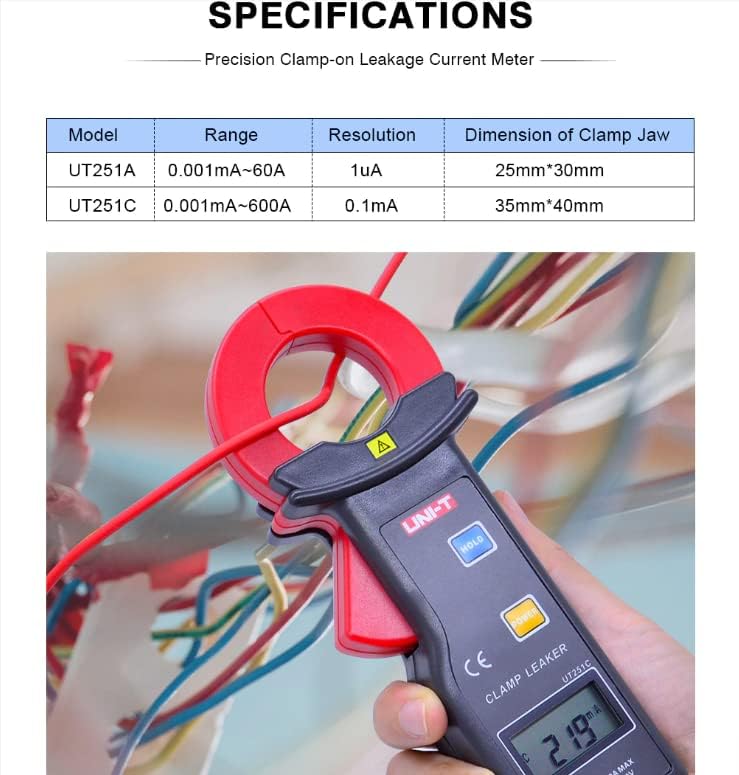
Figure 9.1: Detailed specifications table comparing the UT251A and UT251C models, including range, resolution, and clamp koko.
10. Mitä laatikossa on
The standard package for the UNI-T UT251A includes:
- UNI-T UT251A Leakage Current Clamp Mittari
- 9V Battery (6F22)
- RS-232-liitäntäkaapeli
- PC-ohjelmisto-CD
- Lahjapaketti
- Kantolaukku
- Englanninkielinen käsikirja
- Työkalulaatikko

Figure 10.1: The UNI-T UT251A Clamp Meter shown with its packaging and included accessories, such as the RS-232 cable and software CD.
11. Takuu ja tuki
For warranty information and technical support, please refer to the documentation included with your product or contact UNI-T customer service directly. Details can typically be found on the official UNI-T websivuston kautta tai ostopaikkasi kautta.