
BOYA BY-DMR7
BOYA BY-DMR7 On-Camera Shotgun Microphone User Manual
Model: BY-DMR7
Johdanto
The BOYA BY-DMR7 is a broadcast-quality supercardioid condenser microphone designed for use with DSLR cameras and camcorders. It features an integrated flash recorder capable of capturing 24-bit/48 kHz WAV audio files directly to a MicroSDHC card (up to 32 GB, sold separately). This manual provides comprehensive instructions for setting up, operating, and maintaining your BY-DMR7 microphone to ensure optimal performance.

Image: The BOYA BY-DMR7 microphone with its foam windscreen, showcasinsen kompaktin rakenteen ja integroitujen ohjauslaitteiden ansiosta.
Mitä laatikossa on
Tarkista pakkauksen sisältö varmistaaksesi, että kaikki osat ovat mukana:
- BOYA BY-DMR7 Shotgun Microphone
- Vaahto tuulilasi
- 3.5mm Gold-Plated Audio Cable
- Käyttöopas (tämä asiakirja)

Image: All components included with the BY-DMR7: the microphone unit, the foam windscreen, and the coiled 3.5mm audio cable.
Tuote loppuview
Familiarize yourself with the various parts and controls of the BY-DMR7 microphone:
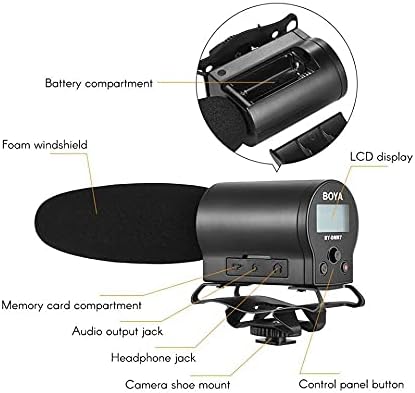
Image: Detailed diagram highlighting key components of the BY-DMR7, including the battery compartment, LCD display, control panel, and various input/output jacks.
- Vaahto tuulilasi: Reduces wind noise and plosives.
- Microphone Barrel: Houses the supercardioid condenser microphone element.
- LCD-näyttö: Shows recording status, battery level, and menu options.
- Ohjauspaneelin painikkeet: For menu navigation, recording, and playback.
- Kuulokeliitäntä (3.5 mm): Reaaliaikaiseen äänen seurantaan.
- Audio Output Jack (3.5mm): Connects to camera's audio input.
- Memory Card Compartment: For MicroSDHC card insertion.
- Akkulokero: Tilaa 2 AA-paristolle.
- Integrated Shockmount: Reduces handling noise.
- Camera Shoe Mount: Attaches to standard camera hot/cold shoe.
Asennus
1. Akun asennus
The BY-DMR7 requires two (2) AA batteries for operation.
- Locate the battery compartment on the side of the microphone unit.
- Liu'uta paristokotelon kansi auki.
- Aseta kaksi AA-paristoa paristolokeroon varmistaen oikean napaisuuden (+/-) lokeron sisällä olevien merkkien mukaisesti.
- Sulje paristolokeron kansi kunnolla.
2. MicroSDHC Card Installation
A MicroSDHC card (up to 32 GB) is required for recording audio.
- Locate the memory card compartment.
- Gently insert a MicroSDHC card into the slot until it clicks into place. Ensure the card is oriented correctly.
- Irrota kortti painamalla sitä hieman sisäänpäin, kunnes se ponnahtaa ulos.
3. Mikrofonin kiinnittäminen
The BY-DMR7 can be mounted on a camera's hot/cold shoe.
- Slide the camera shoe mount of the microphone onto your camera's hot/cold shoe.
- Tighten the locking wheel on the shoe mount to secure the microphone in place.

Image: The BY-DMR7 microphone securely attached to a DSLR camera, ready for use.

Image: The BY-DMR7 microphone mounted on a different camera body, demonstrating its versatility.

Image: The BY-DMR7 microphone attached to a camcorder, illustrating its compatibility with various video recording devices.
4. Yhdistäminen kameraan
Use the supplied 3.5mm audio cable to connect the microphone to your camera's audio input.
- Liitä 3.5 mm:n äänikaapelin toinen pää liitäntään Äänilähtöliitin on the BY-DMR7.
- Liitä kaapelin toinen pää Mikrofonin sisääntulo jack on your camera or camcorder.
5. Attaching Foam Windscreen
Slide the foam windscreen over the microphone barrel to reduce unwanted wind noise during outdoor recordings or plosives from close-up speech.
Käyttöohjeet
1. Virta päälle / pois
- To power on the device, press and hold the power button (usually part of the control panel) until the LCD display illuminates.
- Sammuta virta painamalla virtapainiketta uudelleen ja pitämällä sitä painettuna, kunnes näyttö sammuu.
2. Äänen tallennus
The BY-DMR7 features one-button recording for ease of use.
- Ensure a MicroSDHC card is inserted and batteries are charged.
- Paina tarkoitukseen varattua Tallentaa button (often marked with a red dot or 'REC'). The recording indicator on the LCD will show that recording is active.
- Lopeta nauhoitus painamalla Tallentaa painiketta uudelleen. The file will be saved automatically to the MicroSDHC card.
3. Äänen valvonta
Use the 3.5mm headphone output to monitor your audio in real-time.
- Connect a pair of headphones to the Kuulokeliitäntä mikrofonissa.
- Adjust the monitoring volume if available through the menu system.
4. Using the Low-Cut Filter
The low-cut filter helps reduce unwanted low-frequency noise such as rumble or air conditioning hum.
- Access the menu system via the control panel buttons.
- Navigate to the audio settings or filter options.
- Enable or disable the low-cut filter as needed for your recording environment.
5. Valikon navigointi ja asetukset
The LCD display and control panel buttons allow you to adjust various settings.
- Use the navigation buttons (e.g., up/down arrows, 'Menu', 'OK') to browse through options on the LCD.
- Common settings include input gain, headphone volume, low-cut filter, and file hallinta.
6. Toisto ja File Siirtää
- Toisto: Use the control panel buttons to navigate to recorded files and initiate playback directly on the device through the headphone jack.
- File Siirtää: To transfer recorded WAV files, remove the MicroSDHC card from the BY-DMR7 and insert it into a compatible card reader connected to a computer. The files can then be copied like any other data.
Huolto
- Puhdistus: Puhdista mikrofonin ulkopinta pehmeällä, kuivalla liinalla. Älä käytä nestemäisiä puhdistusaineita tai liuottimia.
- Varastointi: When not in use for extended periods, remove the batteries to prevent leakage. Store the microphone in a cool, dry place, away from direct sunlight and extreme temperatures.
- Vaahto tuulilasi: Vaahtomuovituulilasi voidaan puhdistaa varovasti miedolla saippualla ja vedellä, jos se likaantuu. Varmista, että se on täysin kuiva ennen takaisinkiinnittämistä.
Vianetsintä
| Ongelma | Mahdollinen syy | Ratkaisu |
|---|---|---|
| Mikrofoni ei käynnisty. | Tyhjät tai väärin asetetut paristot. | Vaihda paristot uusiin AA-paristoihin varmistaen oikean napaisuuden. |
| Ei äänitallennusta. | No MicroSDHC card inserted, card full, or card error. | Insert a MicroSDHC card, check available space, or try formatting the card (this will erase all data). |
| Huono äänenlaatu / liikaa kohinaa. | Wind noise, low-cut filter off, incorrect gain settings, or environmental noise. | Ensure foam windscreen is used. Enable low-cut filter. Adjust input gain. Record in a quieter environment. |
| No audio monitoring through headphones. | Headphones not connected properly, headphone volume too low, or faulty headphones. | Check headphone connection. Increase headphone volume. Test with another pair of headphones. |
| Microphone not recognized by camera. | Audio cable not connected properly, or camera audio input settings. | Ensure 3.5mm audio cable is securely connected to both microphone and camera. Check camera's audio input settings (e.g., external mic enabled). |
Tekniset tiedot
| Ominaisuus | Yksityiskohta |
|---|---|
| Mikrofonin muototekijä | Haulikko |
| Napainen kuvio | Superkardioidi (yksisuuntainen) |
| Audio Herkkyys | 45 dB |
| Signaali-kohinasuhde | 78 dB |
| Melutaso | 110 dB |
| Tallennusmuoto | 24-bit/48 kHz WAV audio files |
| Tallennusvälineet | MicroSDHC card (up to 32 GB) |
| Kuulokkeiden lähtö | 3.5 mm stereoliitäntä |
| Äänilähtö | 3.5mm liitin |
| Virtalähde | 2 AA-paristoa |
| Tuotteen mitat (P x L x K) | 9.8 x 3.86 x 1.97 tuumaa |
| Tuotteen paino | 5.3 unssia (noin 150 grammaa) |
| Materiaali | Vaahtomuovi (tuulilasi) |
| Yhteensopivat laitteet | DSLR cameras, camcorders, MiniSDHC cards |
Takuu ja tuki
Tässä käyttöoppaassa ei ole tietoja tuotteen takuusta ja asiakastuesta. Katso lisätietoja valmistajan virallisesta website or contact your retailer for details on warranty coverage, technical support, and service options for your BOYA BY-DMR7 microphone.
Lisätietoja saat osoitteesta BOYA-kauppa Amazonissa.
Ask a question about this manual
Ask about setup, troubleshooting, compatibility, parts, safety, or missing instructions. Manuals+ will review the question and use this page’s manual context to help answer it.