
1. Johdanto
Thank you for choosing the AMORTEK Google WiFi Wall Mount. This product is designed to provide a clean, space-saving, and efficient solution for mounting your Google WiFi 1st Generation router. By integrating your router directly into an electrical outlet, this mount helps optimize Wi-Fi signal placement and eliminates unsightly cable clutter.
This manual provides essential information for the proper installation, operation, and maintenance of your AMORTEK wall mount. Please read it thoroughly before installation.
2. Tärkeitä turvallisuustietoja
- Ensure the electrical outlet is in good condition and properly grounded.
- Älä ylikuormita pistorasiaa.
- Keep the mount and your Google WiFi device away from water or excessive moisture.
- Do not attempt to modify or disassemble the mount.
- Tämä tuote on tarkoitettu vain sisäkäyttöön.
- Pidä poissa lasten ulottuvilta.
3. Pakkauksen sisältö
- 3 x AMORTEK Google WiFi Wall Mounts (White)
Note: Google WiFi 1st Generation routers and their power adapters are not included.
4. Yhteensopivuus
This AMORTEK wall mount is exclusively designed for the Google WiFi 1st Generation Router. It is not compatible with Google Nest Wifi Router/Point or other Google WiFi models that use a different power adapter or form factor.

This diagram visually indicates the mount's compatibility. Please note, as per product specifications, this mount is designed exclusively for the Google WiFi 1st Generation Router. The image shows a 'Google WiFi 2020 model (Round plug)' as compatible, and 'Nest Wifi Router/Point' and 'Google WiFi 2016 modle (Rectangle plug)' as incompatible. Users should verify their Google WiFi model to ensure compatibility with the 1st Generation.
5. Asennus ja asennus
Follow these steps to install your Google WiFi 1st Generation router into the AMORTEK wall mount:
- Pura pakkauksesta: Carefully remove the wall mount from its packaging.
- Prepare Router: Take your Google WiFi 1st Generation router and its power adapter.
- Reittikaapeli: Insert the power adapter cable into the designated channel within the mount. Wrap the excess cable neatly around the internal spool to manage length and prevent clutter.
- Insert Router: Place your Google WiFi 1st Generation router securely into the mount. Ensure it fits snugly.
- Kytke: Plug the mount, with the router and adapter installed, directly into an available electrical outlet. The design allows the top outlet to remain accessible.
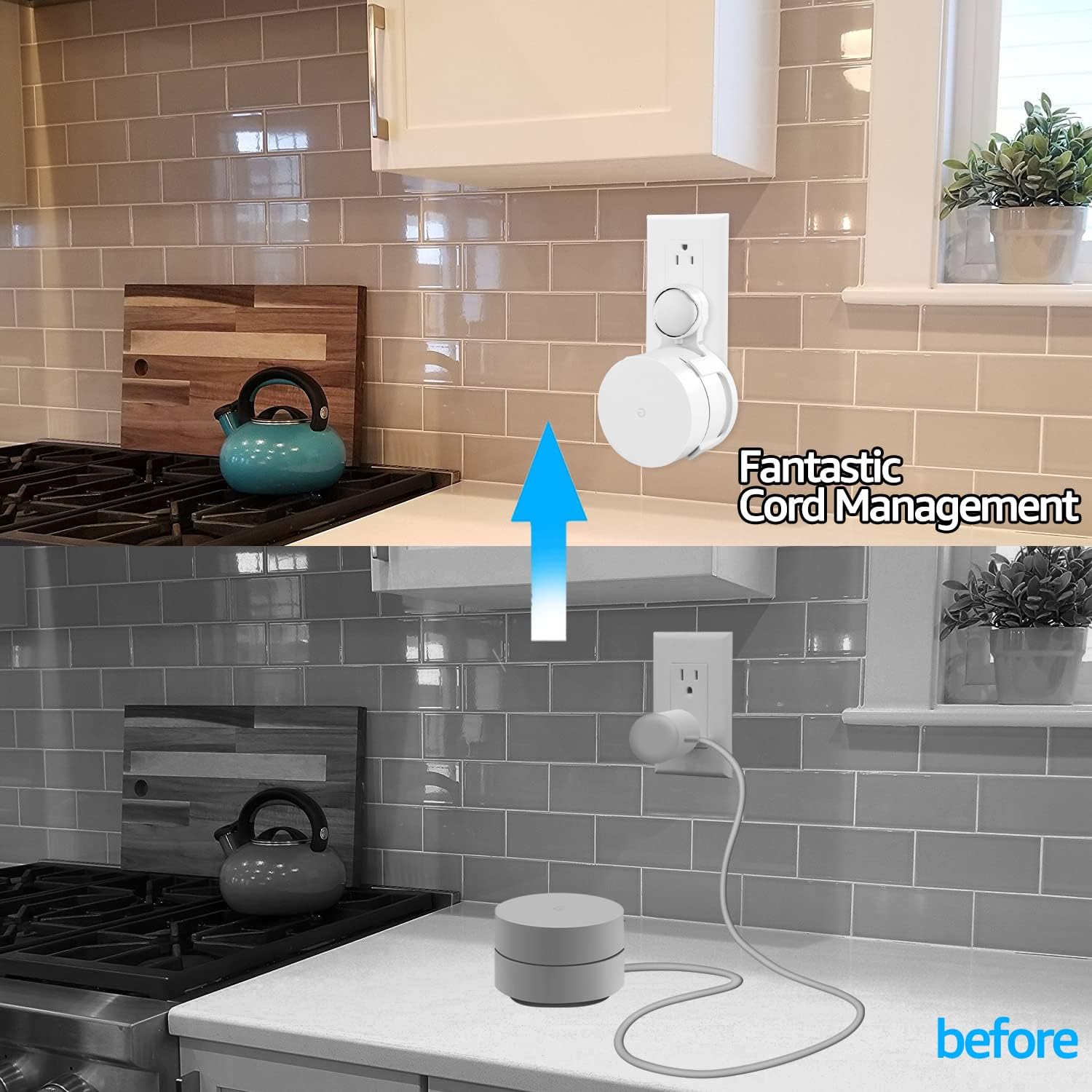
This image demonstrates the effective cord management provided by the wall mount. The 'before' section shows a Google WiFi router on a kitchen counter with visible, tangled cables. The 'after' section shows the same router neatly mounted on a wall outlet, with all cables concealed within the mount, resulting in a clean and organized appearance.

This image shows the AMORTEK wall mount installed in a standard electrical outlet. The design ensures that the top outlet remains fully accessible for other devices, highlighting the mount's space-saving and functional design.
6. Käyttöohjeet
Once installed, your Google WiFi 1st Generation router will operate as usual. The AMORTEK wall mount enhances its functionality by:
- Improving Signal: Mounting the router higher on a wall can help reduce signal obstructions and improve Wi-Fi coverage and performance.
- Lisääasing Mobility: The plug-in design allows for easy relocation of your Google WiFi device to different outlets, optimizing network coverage as needed without complex re-wiring.
- Estetiikan ylläpitäminen: The mount keeps your router off surfaces, providing a clean and organized environment.

This image depicts a Google WiFi router, secured by the AMORTEK wall mount, installed in a bathroom. The visual representation of Wi-Fi signals emanating from the device illustrates its function in extending network coverage throughout the home.
7. Huolto
The AMORTEK wall mount requires minimal maintenance:
- Puhdistus: To clean the mount, first unplug it from the electrical outlet. Use a soft, dry cloth to wipe away dust. Do not use abrasive cleaners or solvents.
- Tarkastus: Periodically check the mount and the electrical outlet for any signs of damage or wear. If any damage is observed, discontinue use.
8. Vianmääritys
If you encounter any issues with your AMORTEK Google WiFi Wall Mount, consider the following:
- Mount Does Not Fit Google WiFi Device: Ensure you have a Google WiFi 1st Generation router. This mount is not compatible with Nest Wifi or other models.
- Power Adapter Cable Too Tight: Some users have reported the opening for the power cord being snug. Gently guide the adapter through the opening. Do not force it excessively.
- Mount Feels Loose in Outlet: Ensure the mount is fully inserted into a standard, functional electrical outlet. If the outlet itself is loose, it may need professional inspection.
- Wi-Fi Signal Issues: While the mount can improve signal placement, it does not directly affect the router's internal performance. For Wi-Fi connectivity issues, refer to your Google WiFi router's instruction manual or Google's support resources.
9. Tekniset tiedot
| Merkki | AMORTEK |
| Mallinumero | B07DL4CWVX |
| Tuotteen paino | 7.2 unssia (0.2 kiloa) |
| Pakkauksen mitat | 6.81 x 5.25 x 3.7 tuumaa |
| Väri | Valkoinen |
| Yhteensopivat laitteet | Google WiFi 1st Generation Router |
| UPC | 657390463481 |
10. Takuu ja tuki
Specific warranty information for this AMORTEK product is not provided in the available data. Please refer to the retailer's return policy or contact AMORTEK directly for warranty details and customer support inquiries.