
1. Johdanto
This manual provides detailed instructions for the installation, operation, and maintenance of your UHPPOTE 2-Channel Color Quad System Video Splitter. This device is designed to process and display video feeds from up to two analog security cameras, offering various display modes and image adjustments. Please read this manual thoroughly before using the product to ensure proper functionality and safety.
Huomautus: This device is only compatible with AHD/TVI analog cameras.
2. Turvallisuustiedot
- Varmista virtalähteen voltage vastaa laitteen vaatimuksia (12 V tasavirta).
- Älä altista laitetta kosteudelle tai äärilämpötiloille.
- Vältä sijoittamasta laitetta suoraan auringonpaisteeseen tai lämmönlähteiden lähelle.
- Älä yritä avata tai korjata laitetta itse. Jätä kaikki huoltotyöt pätevän henkilöstön tehtäväksi.
- Pidä laite poissa vahvoista magneettikentistä.
3. Pakkauksen sisältö
Varmista, että pakkauksessasi on kaikki alla luetellut tuotteet:
- 1 x UHPPOTE 2-Channel Video Splitter/Processor
- 1 x kaukosäädin
- 1 x englanninkielinen käyttöohje
- 1 x virtalähde
- 3 x BNC Adapters
4. Tuote ohiview
Etupaneeli
The front panel features control buttons and indicators for managing video inputs and display modes.

Kuva 4.1: Edessä view of the video splitter. It displays buttons for MENU, ENTER, A/B, PB, directional arrows, ZOOM, FREEZE, MODE, AUTO, and a POWER switch.
Takapaneeli
The rear panel provides all necessary connection ports for video input, video output, and power.

Kuva 4.2: Takaosa view of the video splitter. It shows two BNC video input ports labeled VIDEO1 and VIDEO2, one BNC monitor output port, and a DC 12V power input jack.
Pohja View
The bottom of the device features rubber feet for stability and ventilation holes.
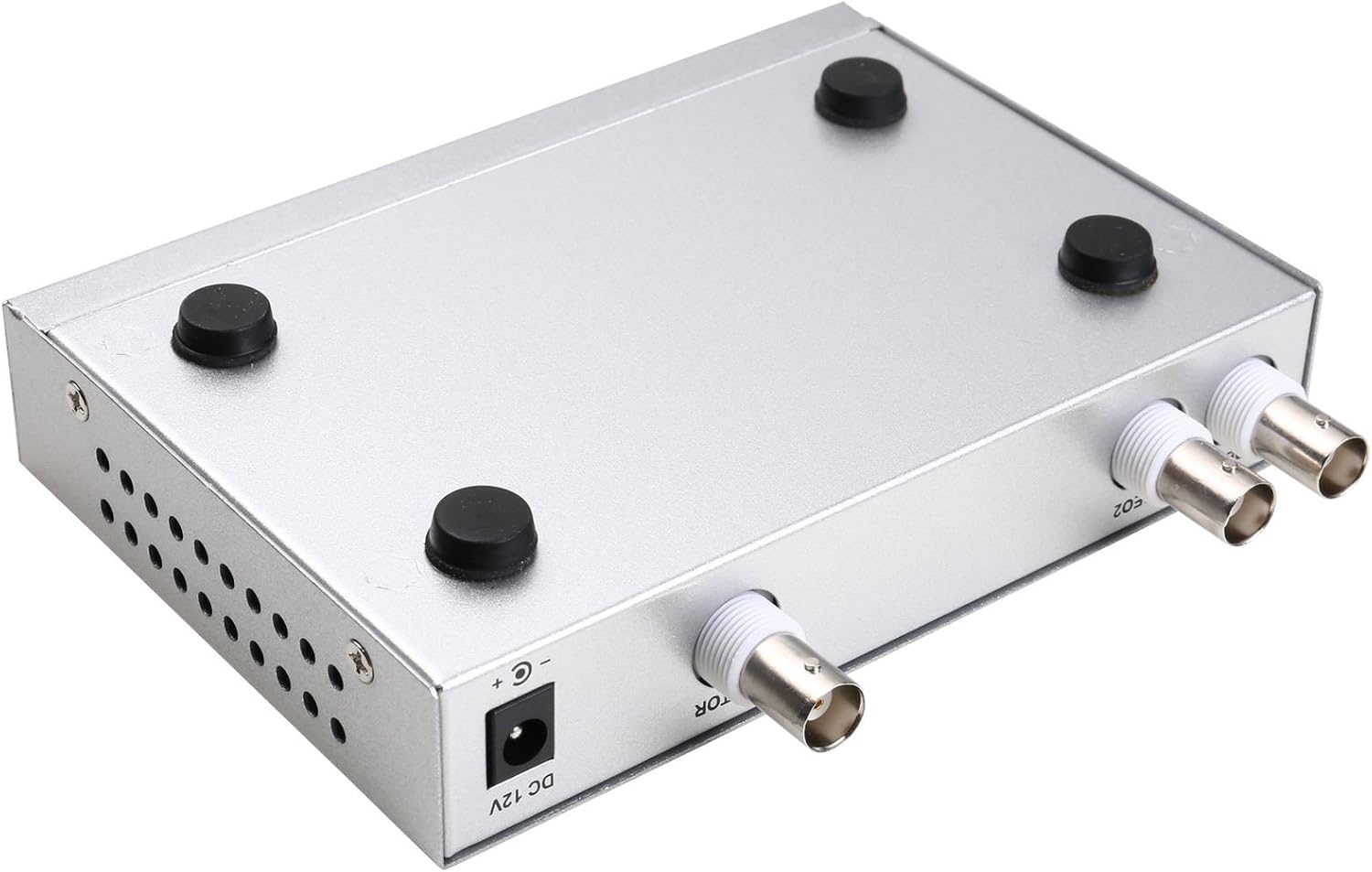
Kuva 4.3: Pohja view of the video splitter, highlighting the four rubber feet for stable placement.
Virtalähde
The included power adapter supplies the necessary DC 12V power to the unit.

Kuva 4.4: The power adapter provided with the unit, rated for DC 12V output.
5. Asennus
Follow these steps to connect your video splitter:
- Yhdistä kamerat: Connect your AHD/TVI analog cameras to the VIDEO1 and VIDEO2 BNC input ports on the rear panel of the splitter. Use the provided BNC adapters if necessary.
- Yhdistä näyttö: Connect your display monitor to the MONITOR OUT BNC port on the rear panel.
- Liitä virta: Plug the DC 12V power adapter into the DC 12V input jack on the rear panel, then plug the adapter into a power outlet.
- Virta päälle: Flip the POWER switch on the front panel to the 'ON' position.

Kuva 5.1: Connection schematic. (1) Video input from cameras (CAM1, CAM2) to VIDEO1, VIDEO2. (2) Video output from MONITOR OUT to a display monitor. (3) Power input to DC 12V.
6. Käyttöohjeet
The video splitter offers various display modes and image adjustment features. Use the front panel buttons or the remote control to operate the device.
6.1. Näyttötilat
Paina MODE button to cycle through different display layouts:
- Single Channel Display: View one camera feed in full screen (Full 1, Full 2).
- Dual Panoramic Display: View two camera feeds side-by-side (left/right split) or top/bottom split.
- Kuva kuvassa (PIP): View one main camera feed with a smaller inset window of the second camera. PIP positions are switchable (top-left, top-right, bottom-left, bottom-right).
6.2. Kuvan säädöt
You can adjust image parameters for each camera channel:
- Paina MENU button to access the on-screen display (OSD) menu.
- Use the directional arrow buttons (▲ / ▼ / ◀ / ▶) to navigate through menu options.
- Paina ENTER valitaksesi vaihtoehdon tai vahvistaaksesi asetuksen.
- Säädä parametreja, kuten Brightness, Contrast, Saturation, Hue, ja Terävyys for each camera channel individually.
- Paina MENU uudelleen poistuaksesi OSD-valikosta.
6.3. Erikoistoiminnot
- JÄÄTY: Paina PYSÄYTÄ button to pause the current video frame. Press again to resume live video.
- ZOOMAUS: Paina ZOOM button to activate electronic zoom. Use the directional arrows to select the enlarged area. Press ZOOM uudelleen poistuaksesi.
- AUTO: Paina AUTO button to enable auto-cruise mode, which cycles through different camera views or display modes automatically. Each channel can be set for auto-cruise.
- A/B: Switch between camera inputs.
- PB: Playback function (if supported by connected DVR/NVR, otherwise may not be active).
7. Huolto
- Puhdistus: Puhdista laitteen ulkopinta pehmeällä, kuivalla liinalla. Älä käytä nestemäisiä puhdistusaineita tai aerosoleja.
- Ilmanvaihto: Varmista, että tuuletusaukot eivät ole tukossa ylikuumenemisen estämiseksi.
- Varastointi: Kun laitetta ei käytetä pitkään aikaan, säilytä sitä viileässä, kuivassa paikassa, poissa suorasta auringonvalosta ja pölystä.
8. Vianmääritys
If you encounter issues with your video splitter, refer to the following common problems and solutions:
- Ei virtaa:
- Tarkista, että virtalähde on kytketty kunnolla laitteeseen ja pistorasiaan.
- Ensure the power switch on the front panel is in the 'ON' position.
- Varmista, että pistorasia toimii.
- Ei videolähtöä:
- Confirm that cameras are properly connected to the VIDEO IN ports.
- Ensure the monitor is correctly connected to the MONITOR OUT port and is powered on.
- Check the video cables for damage or loose connections.
- Verify that the cameras are AHD/TVI analog cameras, as other types are not supported.
- Try cycling through display modes using the MODE button.
- Huono kuvanlaatu:
- Adjust Brightness, Contrast, Saturation, Hue, and Sharpness settings via the OSD menu.
- Ensure video cables are of good quality and not excessively long.
- Check the camera's own settings and lens focus.
- Kaukosäädin ei toimi:
- Tarkista ja vaihda kaukosäätimen paristot.
- Varmista, ettei kaukosäätimen ja laitteen infrapunavastaanottimen välissä ole esteitä.
9. Tekniset tiedot
| Ominaisuus | Erittely |
|---|---|
| Merkki | UHPPPOTE |
| Mallinumero | 402 |
| Materiaali | Metalli kuori |
| Väri | Hopea |
| Videotulo | 2-way (BNC) |
| Videolähtö | 1-way (BNC) |
| PAL Resolution | 720 x 576 @ 50 Hz |
| NTSC Resolution | 720 x 480 @ 60 Hz |
| Tuotteen paino | 0.88 kiloa |
| Yhteensopivuus | AHD/TVI Analog Cameras Only |
10. Takuu ja tuki
For warranty information or technical support, please refer to the contact details provided with your purchase or visit the official UHPPOTE websivusto. Säilytä ostokuitti ostotodistuksena mahdollisten takuuvaatimusten varalta.