
Johdanto
This manual provides detailed instructions for the installation, operation, and maintenance of your Whistler WBU900 Digital Wireless Backup Camera with Solar Panels. Please read this manual thoroughly before using the product to ensure proper function and safety.
The Whistler WBU900 is designed to enhance vehicle safety by providing a clear view of the area behind your vehicle, reducing blind spots. Its wireless design and solar charging capabilities offer convenient and easy installation.
Pakkauksen sisältö
Varmista, että kaikki osat ovat mukana ennen asennuksen aloittamista:
- Wireless Backup Camera with Solar Panels
- Monitor
- Vehicle Power Adapter (for monitor)
- AC Charger (for initial camera charging)
- Asennuslaitteisto
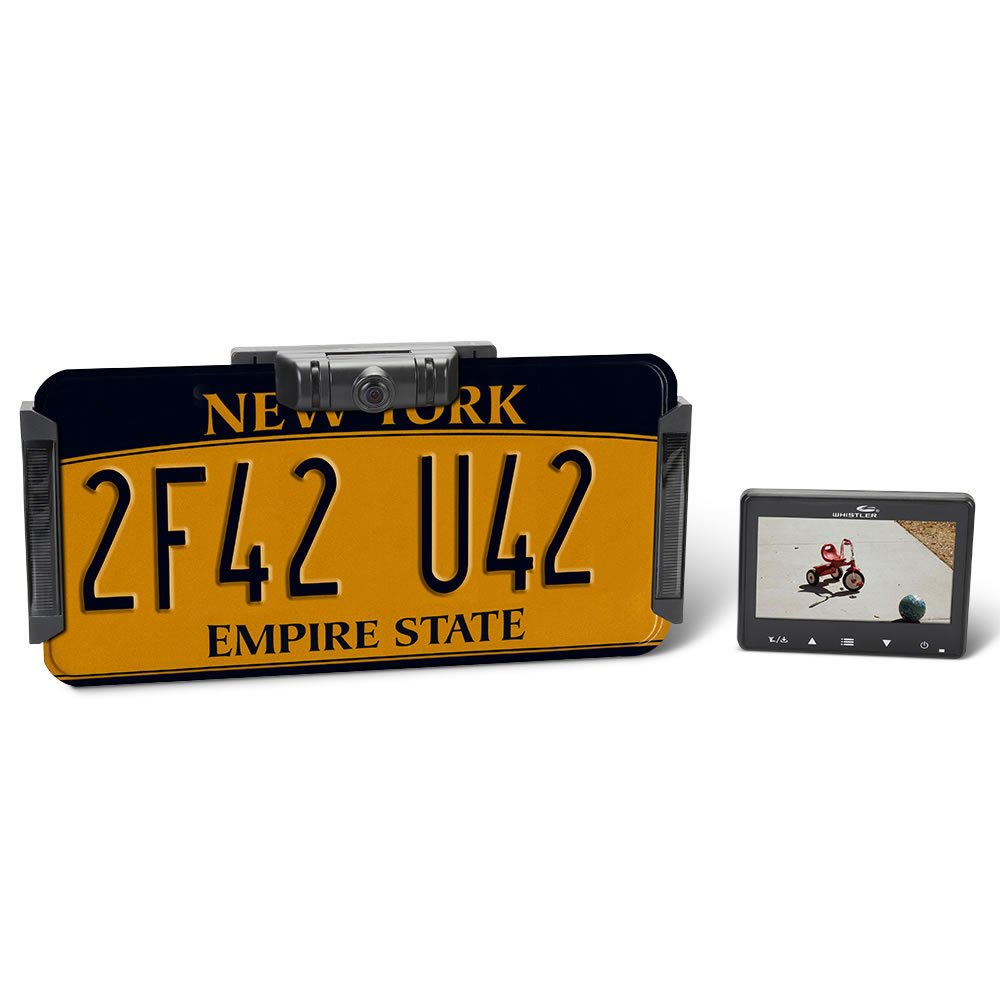
Image: The main components of the Whistler WBU900 Digital Wireless Backup Camera system, including the camera unit with solar panels, the display monitor, and power cables.
Asennus ja asennus
- Initial Camera Charging: Before installation, fully charge the camera battery using the provided AC charger. Connect the AC charger to the camera and a standard wall outlet. The charging indicator will show when charging is complete.
- Kameran asennus:
- Attach the camera to your vehicle's license plate frame. Ensure the solar panels are exposed to direct sunlight for optimal recharging.
- Secure the camera using the provided mounting hardware.
- Näytön asennus:
- Valitse kojelaudasta tai tuulilasista sopiva paikka, joka ei peitä view tai häiritä ajo-ohjaimia.
- Use the included suction cup mount or adhesive mount to secure the monitor.
- Näytön virransyöttö:
- Connect the vehicle power adapter to the monitor and plug it into your vehicle's 12V accessory outlet (cigarette lighter socket).
- Paritus (tarvittaessa): The camera and monitor are typically pre-paired. If they do not connect automatically, refer to the troubleshooting section for pairing instructions.

Image: A person installing the Whistler WBU900 backup camera by attaching it to the vehicle's rear license plate frame.
Käyttöohjeet
Kytkeminen päälle/pois
- Kytke näyttö päälle painamalla virtapainiketta.
- To turn off the monitor, press and hold the power button.
- The camera will automatically activate when the vehicle is in reverse or when the monitor is powered on.
Viewing the Camera Feed
Once the monitor is on and the camera is active, the live video feed from the backup camera will be displayed. The monitor may display a "Whistler" logo briefly before showing the live feed.

Image: The Whistler WBU900 monitor displaying a live feed from the backup camera, showing a clear view of a residential area.
Näyttöasetusten säätäminen
The monitor typically includes buttons for adjusting brightness, contrast, and other display settings. Refer to the on-screen menu for specific options.
Camera Time Durations
The system offers 2 user-selectable camera time durations, allowing you to choose how long the camera feed remains active after the initial trigger (e.g., shifting into reverse). Consult the monitor's menu for these settings.
Huolto
- Puhdistus: Regularly clean the camera lens and solar panels with a soft, damp cloth to ensure clear visibility and efficient solar charging. Avoid abrasive cleaners.
- Akun lataus: The camera's battery is primarily recharged by the integrated solar panels. For optimal performance, ensure the solar panels are exposed to sunlight. If the vehicle is stored in a garage or experiences prolonged periods without sunlight, use the provided AC charger to maintain battery levels.
- Turvallinen asennus: Periodically check that both the camera and monitor are securely mounted to prevent dislodgement during vehicle operation.
Vianetsintä
| Ongelma | Mahdollinen syy | Ratkaisu |
|---|---|---|
| Ei kuvaa näytössä |
|
|
| Kuva on epäselvä tai epäselvä |
|
|
| Camera turns off automatically after a short period |
|
|
Tekniset tiedot
- Mallinumero: WBU900
- Tuotteen mitat: 10 x 3.15 x 4.25 tuumaa
- Tuotteen paino: 1.5 kiloa
- Akut: 1 tuotekohtainen akku (mukana)
- Asennustyyppi: Langaton
- Voitage: 12 volttia
- Optinen anturitekniikka: CMOS
- Linssin tyyppi: Laaja kulma
- Liittimen tyyppi: Wireless with RCA receiver
- UPC: 052303408618
- Valmistaja: Whistler
Takuutiedot
Whistler products are covered by a limited warranty. For specific warranty terms, duration, and claim procedures, please refer to the warranty card included with your product or visit the official Whistler websivusto. Säilytä ostokuitti ostotodistuksena.
Asiakastuki
For technical assistance, troubleshooting, or further inquiries, please contact Whistler customer support. Contact information can typically be found on the product packaging, the official Whistler website, or in the full product manual.
Note: Always refer to the complete product manual for the most up-to-date and comprehensive information.