
1. Johdanto
This manual provides comprehensive instructions for the installation, operation, and maintenance of your BlueBird A1390 Automatic Irrigation Tap Programmer. This device is designed to automate your garden watering schedule, ensuring efficient and consistent irrigation. Please read this manual thoroughly before using the product to ensure correct operation and to prevent damage.
2. Turvallisuustiedot
- Do not immerse the unit in water. The unit is designed to be weather-resistant, but not submersible.
- Käytä vain 1.5 V:n AA-alkaliparistoja. Älä sekoita vanhoja ja uusia paristoja tai erityyppisiä paristoja.
- Poista paristot vuotojen estämiseksi, jos laitetta ei käytetä pitkään aikaan.
- Pidä poissa lasten ulottuvilta.
- Älä yritä purkaa tai korjata laitetta itse. Ota yhteyttä pätevään huoltohenkilöstöön.
- Varmista, että kaikki liitännät ovat tiukasti kiinni vuotojen estämiseksi.
3. Pakkauksen sisältö
Tarkista pakkauksesta seuraavat tuotteet:
- 1x BlueBird A1390 Automatic Irrigation Tap Programmer
- 1x Käyttöohje (tämä asiakirja)
Note: 2 AA 1.5V batteries are required for operation and are not included in the package.
4. Tuote ohiview
The BlueBird A1390 features two main rotary dials for setting irrigation frequency and duration, along with a battery indicator and an ON/OFF switch.
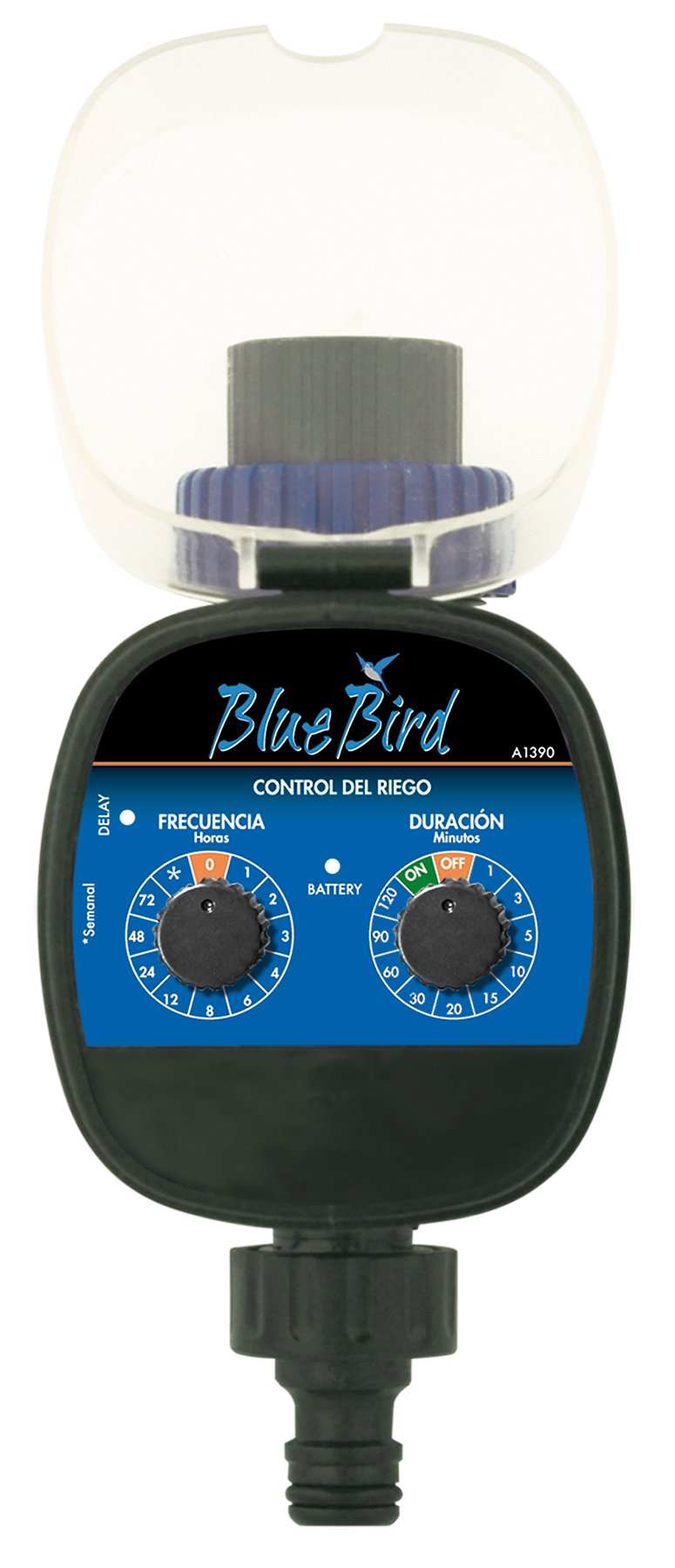
Kuva 1: Edessä view of the BlueBird A1390 Irrigation Programmer. The left dial controls irrigation frequency, and the right dial controls irrigation duration. A battery indicator light is located between the dials.
Komponentit:
- Frequency Dial (Frecuencia): Sets how often the irrigation occurs. Options include 0 (off), 1, 2, 3, 4, 6, 8, 12, 24, 48, 72 hours, and a '*' setting for manual or weekly operation.
- Duration Dial (Duración): Sets how long each irrigation cycle lasts. Options include 0 (off), 1, 3, 5, 10, 15, 20, 30, 60, 90, 120 minutes.
- On / off kytkin: Located on the Duration Dial, allows for manual override or turning the unit off.
- Pariston ilmaisin: A light that indicates battery status.
- Akkulokero: Located at the rear of the unit (not visible in Figure 1).
- Veden tulo/lähtö: Standard tap and hose connections.
5. Asennus
5.1 Akun asennus
- Paikanna paristolokeron kansi laitteen takaa.
- Remove the cover by twisting or sliding it open.
- Insert two (2) new 1.5V AA alkaline batteries, ensuring correct polarity (+/-).
- Sulje paristolokeron kansi tiiviisti, jotta laite pysyy vesitiiviinä.
5.2 Connecting to the Tap
- Ensure your outdoor tap is turned off.
- Screw the BlueBird A1390 programmer onto your tap. Hand-tighten only to prevent damage.
- Connect your garden hose or irrigation system to the outlet of the programmer. Ensure a tight connection to prevent leaks.
- Slowly turn on your outdoor tap. Check for any leaks at the connections.
6. Käyttöohjeet
The BlueBird A1390 is designed for simple, intuitive programming using its two rotary dials.
6.1 Setting Irrigation Frequency
- Kierrä Taajuusvalinta (left dial) to your desired irrigation interval.
- Käytettävissä olevat asetukset ovat:
- 0: No irrigation (off).
- 1, 2, 3, 4, 6, 8, 12, 24, 48, 72: Irrigation every X hours.
- *: This setting typically indicates a manual mode or a weekly cycle, depending on the specific model's internal logic. Refer to the example below for common usage.
6.2 Setting Irrigation Duration
- Kierrä Duration Dial (right dial) to your desired watering time per cycle.
- Käytettävissä olevat asetukset ovat:
- OFF: No irrigation.
- PÄÄLLÄ: Continuous irrigation (use with caution).
- 1, 3, 5, 10, 15, 20, 30, 60, 90, 120: Irrigation for X minutes.
6.3 Esimample Ohjelmointi
To water every 6 hours for 10 minutes:
- Aseta Taajuusvalinta to 6 (tuntia).
- Aseta Duration Dial to 10 (minuuttia).
The programmer will automatically begin the cycle based on these settings. The first cycle will typically start shortly after programming, or after a short delay.
6.4 Manual ON/OFF
To manually turn on the water, rotate the Duration Dial to the ON position. To stop manual watering, rotate the dial back to POIS or a timed setting.
7. Huolto
7.1 Pariston vaihto
When the battery indicator light dims or the unit stops functioning, it's time to replace the batteries. Follow the steps in Section 5.1 for battery installation.
7.2 Puhdistus
Clean the exterior of the programmer with a damp cloth. Do not use abrasive cleaners or solvents. Ensure no water enters the battery compartment or internal electronics.
7.3 Talvisäilytys
Before the first frost, disconnect the programmer from the tap and hose. Remove the batteries. Store the unit indoors in a dry, frost-free location to prevent damage from freezing water.
8. Vianmääritys
| Ongelma | Mahdollinen syy | Ratkaisu |
|---|---|---|
| Unit does not turn on/display. | Tyhjät tai väärin asennetut paristot. | Vaihda paristot ja varmista oikea napaisuus. |
| Vesi ei virtaa. | Tap is off; programmer set to '0' or 'OFF'; low water pressure; clogged filter. | Ensure tap is fully open. Check frequency/duration settings. Verify water pressure. Clean any filters. |
| Unit leaks at connections. | Löysät liitokset; puuttuva tai vaurioitunut aluslevy. | Tighten connections. Check and replace washers if necessary. |
| Irrigation schedule is incorrect. | Incorrect frequency or duration settings. | Re-check and adjust the Frequency and Duration Dials according to your desired schedule. |
9. Tekniset tiedot
- Malli: A1390
- Merkki: Sinikka
- Valmistaja: Altadex
- Virtalähde: 2 x AA 1.5 V alkaliparistoa (eivät sisälly toimitukseen)
- Kastelutiheys: 0, 1, 2, 3, 4, 6, 8, 12, 24, 48, 72 hours, or '*' (manual/weekly)
- Kastelun kesto: OFF, ON, 1, 3, 5, 10, 15, 20, 30, 60, 90, 120 minutes
- Tuotteen mitat: Noin 19.4 x 10.6 x 10 cm
- Tuotteen paino: Noin 280 g
- GTIN-koodi (UPC): 8426375113909
10. Takuu ja tuki
This product is covered by a standard manufacturer's warranty. For specific warranty details, please refer to the documentation provided at the time of purchase or contact your retailer. For technical support or inquiries, please contact the seller or manufacturer directly.