
Brecknell LPS150
Brecknell LPS150 kannettavan lähetysvaa'an käyttöohje
Model: LPS150 | Brand: Brecknell
1. Johdanto
This manual provides essential instructions for the proper setup, operation, and maintenance of your Brecknell LPS150 Portable Shipping Scale. Please read this manual thoroughly before using the scale to ensure safe and efficient operation. The LPS150 is designed for shipping, warehouse, and general-purpose weighing applications, offering portability and ease of use.
2. Turvallisuustiedot
- Älä ylikuormita vaakaa yli sen enimmäiskuormituskyvyn, joka on 68 kg.
- Avoid dropping the scale or subjecting it to severe shocks.
- Do not immerse the scale or its components in water or other liquids.
- Käytä ainoastaan toimitettua verkkolaitetta tai määritettyjä akkuja.
- Pidä vaaka poissa voimakkaista sähkömagneettisista kentistä.
- Varmista, että vaaka on käytön aikana vakaalla ja tasaisella alustalla.
3. Mitä laatikossa on
Pura kaikki osat huolellisesti pakkauksesta ja varmista, että olet vastaanottanut seuraavat tuotteet:
- Weighing Platform with Indicator and Bracket
- Verkkolaite
- 4 x AAA-paristot
- RS-232-kaapeli
- Käyttöopas (tämä asiakirja)

Image 3.1: All components included with the Brecknell LPS150 Portable Shipping Scale.
4. Tuote ohiview
4.1 Komponentit
The Brecknell LPS150 scale consists of a stainless steel weighing platform and a remote LCD indicator connected by a coiled cable. The indicator features a digital display and control buttons.

Image 4.1: Labeled diagram of the LPS150 scale components.
4.2 Näyttö ja hallintalaitteet
The indicator features a 0.63-inch, 5-digit LCD display. The operator keys include:
- ON / OFF / ZERO: Powers the scale on or off, and zeros the display.
- YKSIKÖT: Changes the weighing unit (lb, kg, lb/oz).
- TAARA: Subtracts the weight of a container.
- HOLD / PRINT: Holds the displayed weight or sends data via RS-232.
5. Asennus
5.1 Sijoitus
Place the weighing platform on a firm, level, and stable surface. Ensure there are no obstructions around the platform that could interfere with accurate weighing. The indicator can be placed on a desk or mounted to a wall using the included bracket.

Kuva 5.1: Esim.ample of scale placement with wall-mounted indicator.
5.2 Virtaliitäntä
The LPS150 scale can be powered by either the included AC adapter or four AAA batteries.
- AC-sovitin: Connect the AC adapter to the power input port on the indicator and plug it into a standard electrical outlet.
- Paristot: Open the battery compartment on the back of the indicator and insert four AAA batteries, observing correct polarity.
5.3 Connecting the Indicator to the Platform
Connect the coiled cable from the weighing platform to the corresponding port on the indicator. Ensure the connection is secure.
6. Käyttöohjeet
6.1 Peruspunnitus
- Paina ON / OFF / ZERO button to power on the scale. The display will show "0.00" when ready.
- Aseta punnittava esine varovasti punnitusalustan keskelle.
- Read the weight displayed on the LCD.
- Remove the item from the platform. The display should return to zero. If not, press ON / OFF / ZERO to re-zero.
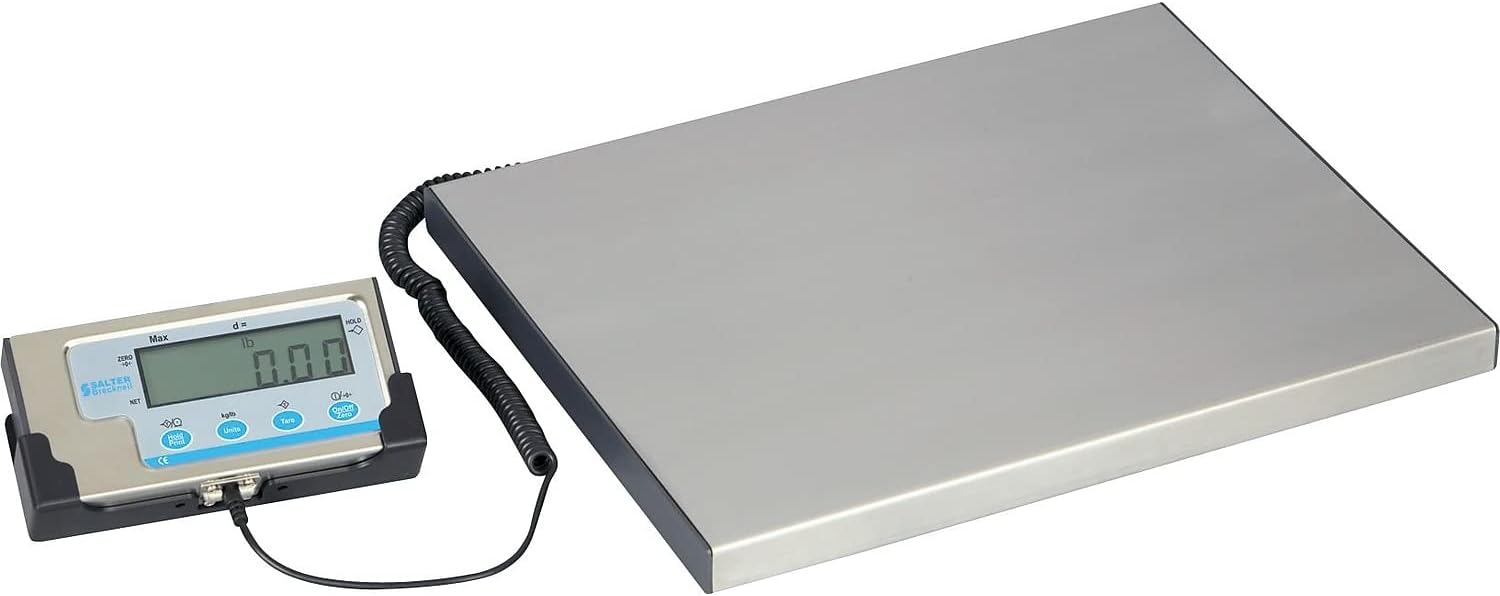
Image 6.1: The LPS150 scale ready for weighing.
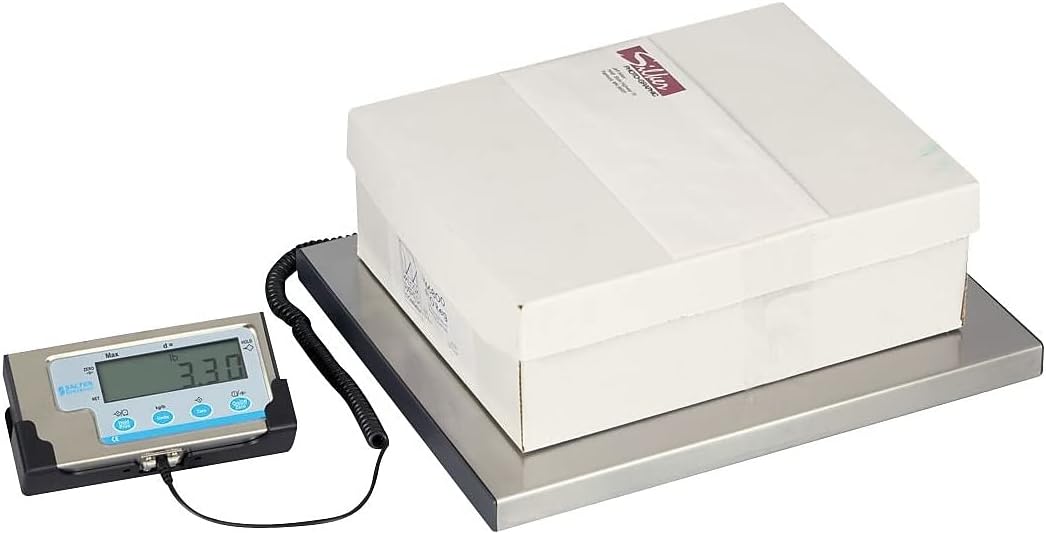
Image 6.2: Weighing a package on the LPS150 scale.
6.2 Yksikkömuunnos
To change the weighing unit:
- With the scale on and displaying weight, press the YKSIKÖT -painiketta.
- The display will cycle through available units: pounds (lb), kilograms (kg), and pounds/ounces (lb/oz).
- Release the button when the desired unit is shown.
6.3 Taaratoiminto
The Tare function allows you to subtract the weight of a container, so only the net weight of the contents is displayed.
- Aseta tyhjä astia punnitusalustalle.
- Odota, että paino vakautuu.
- Paina TAARA button. The display will return to "0.00" and the TARE indicator will illuminate.
- Add items to the container. The display will show only the weight of the added items.
- Tyhjennä taara poistamalla säiliö alustalta ja painamalla TAARA painiketta uudelleen.
6.4 Hold-toiminto
The Hold function allows you to temporarily freeze the displayed weight, which is useful for weighing large or awkwardly shaped items that might obscure the display.
- Aseta esine alustalle.
- Kun paino on vakaa, paina HOLD / PRINT button. The displayed weight will be held, and the HOLD indicator will illuminate.
- To release the held weight, press the HOLD / PRINT painiketta uudelleen.
6.5 RS-232 Communication Setup (for UPS Worldship)
The LPS150 scale includes an RS-232 port for data communication with compatible software, such as UPS Worldship. Correct configuration of both the scale and your computer's serial port is crucial for proper functionality.
6.5.1 Skaalauskokoonpano
- Ensure the scale is powered off.
- Paina ja pidä painettuna ON / OFF / ZERO -painiketta ja YKSIKÖT button simultaneously until the display shows "P1". This enters the setup menu.
- Paina TAARA button repeatedly to cycle through the programming parameters (P1, P2, P3, etc.) until you reach P4.
- At P4, press the YKSIKÖT button to change the setting to 7 (NCI protocol).
- Paina TAARA button to save the P4 setting and advance to P5.
- At P5, press the YKSIKÖT button to change the setting to 2 (4800 baud rate).
- Paina TAARA button to save the P5 setting and advance to P6.
- At P6, press the YKSIKÖT button to change the setting to 2 (7E1 data format).
- Paina ON / OFF / ZERO button to save all settings and exit the setup menu.
6.5.2 Computer Serial Port Configuration (Windows PC)
- Connect the RS-232 cable from the scale indicator to an available serial port on your computer. If your computer does not have a serial port, a USB-to-serial adapter may be required.
- Open Device Manager (search for "Device Manager" in the Windows search bar).
- Expand the "Ports (COM & LPT)" section.
- Identify the COM port assigned to your scale (e.g., COM1, COM3). Double-click on it to open its Properties.
- Go to the "Port Settings" tab and configure as follows:
- Bittejä sekunnissa: 4800
- Databitit: 7
- Pariteetti: Jopa
- Stop-bittiä: 1
- Virtauksen ohjaus: Ei yhtään
- Click "OK" to save the settings and close Device Manager.
6.5.3 UPS Worldship Configuration
- Open UPS Worldship software.
- Navigate to the "Tools" tab.
- Select "System Preferences" and then click on "Hardware".
- Under the Scale settings, change the "Scale port" to the COM port you identified in Device Manager (e.g., COM1).
- Change the "Scale Type" to "NCI 3835".
- Click "Test Scale" to verify communication. The weight from the scale should now be reported in Worldship.
7. Huolto
7.1 Puhdistus
To maintain accuracy and prolong the life of your scale:
- Wipe the platform and indicator with a soft, damp kangas.
- Älä käytä hankaavia puhdistusaineita, liuottimia tai voimakkaita kemikaaleja.
- Ensure no liquids enter the indicator or the gaps around the platform.
7.2 Pariston vaihto
If the scale is powered by batteries and the display becomes dim or erratic, it's time to replace the batteries. Open the battery compartment on the back of the indicator, remove the old batteries, and insert four new AAA batteries, ensuring correct polarity.
8. Vianmääritys
| Ongelma | Mahdollinen syy | Ratkaisu |
|---|---|---|
| Vaaka ei käynnisty. | No power (AC adapter unplugged, batteries dead/incorrectly installed). | Tarkista verkkolaitteen liitäntä. Vaihda paristot ja varmista oikea napaisuus. |
| Epätarkat tai epävakaat lukemat. | Scale not on a level surface; item touching something else; overload; environmental factors (vibrations, drafts). | Ensure scale is level and stable. Re-zero the scale. Remove any obstructions. Do not exceed capacity. |
| Näytössä näkyy "Err" tai virhekoodi. | Overload condition; internal error. | Remove weight from platform. Power cycle the scale. If error persists, contact support. |
| RS-232 communication not working with UPS Worldship. | Incorrect scale settings; incorrect computer serial port settings; incorrect Worldship settings; faulty cable. | Review Section 6.5 for detailed configuration steps for the scale, computer, and UPS Worldship. Ensure RS-232 cable is securely connected and not damaged. |
9. Tekniset tiedot
| Ominaisuus | Yksityiskohta |
|---|---|
| Malli | LPS150 |
| Kapasiteetti | 150 lbs (68 kg) |
| Punnitusyksiköt | lb, kg, lb/oz |
| Näyttö | 0.63" (16 mm), 5-digit LCD |
| Alustan koko | 15" L x 12" W (381 mm x 305 mm) |
| Rakentaminen | Stainless Steel Platform, Mild Steel Understructure, Stainless Steel/ABS Indicator |
| Tehoa | 4 x AAA Batteries or 6 VDC AC Adapter (both included) |
| Käyttöliittymä | RS-232 |
| Tuotteen paino | 11 lbs (5 kg) |
| Tuotteen mitat | 17 x 15 x 2.3 inches (overall) |
10. Takuu ja tuki
Brecknell products are manufactured to high standards and are warranted against defects in materials and workmanship. For specific warranty terms and conditions, please refer to the warranty card included with your product or visit the official Brecknell websivusto.
For technical assistance, troubleshooting, or spare parts, please contact Brecknell customer support. Have your model number (LPS150) and purchase information ready when contacting support.
Brecknell Contact Information:
Please refer to the official Brecknell webKatso ajantasaisimmat yhteystiedot verkkosivustoltasi tai tuotepakkauksesta.
Ask a question about this manual
Ask about setup, troubleshooting, compatibility, parts, safety, or missing instructions. Manuals+ will review the question and use this page’s manual context to help answer it.