
1. Johdanto
This manual provides instructions for the installation, operation, and maintenance of the Nexxt Solutions Naxos800 8-Port Fast Ethernet Network Switch. The Naxos800 is an unmanaged compact desktop switch designed for small office/home office (SOHO) environments, student dormitories, and small enterprises, offering reliable network connectivity.
2. Tärkeimmät ominaisuudet
- 8 nopeaa Ethernet-porttia: Provides 8 UTP/STP 10/100Mbps ports with auto MDI/MDIX.
- Plug and Play: Simple setup requiring no software configuration.
- Hallitsematon kytkin: Operates without requiring complex management interfaces.
- Store-and-Forward Technology: Ensures efficient packet transmission.
- MAC-osoitteen oppiminen: Supports auto-learning and aging with a built-in 1000 MAC address table.
- Kompakti muotoilu: Suitable for desktop or wall mounting.
- Energiansäästö: Alhainen virrankulutus muotoilu.
- Flow Control: Full duplex and half duplex back pressure flow control.
- Kestävyys: Integrated lightning protection and a sturdy metal case.
- Hiljainen toiminta: Fanless design for silent performance.
3. Pakkauksen sisältö
Varmista, että paketti sisältää seuraavat kohteet:
- One (1) Nexxt Solutions Naxos800 8-Port Fast Ethernet Switch
- Yksi (1) virtalähde

Image: The Nexxt Solutions Naxos800 switch, its power adapter, and product packaging.
4. Tuote ohiview

Kuva: Edessä view of the Naxos800 switch, showing the Nexxt logo and eight green LED indicators for port activity.
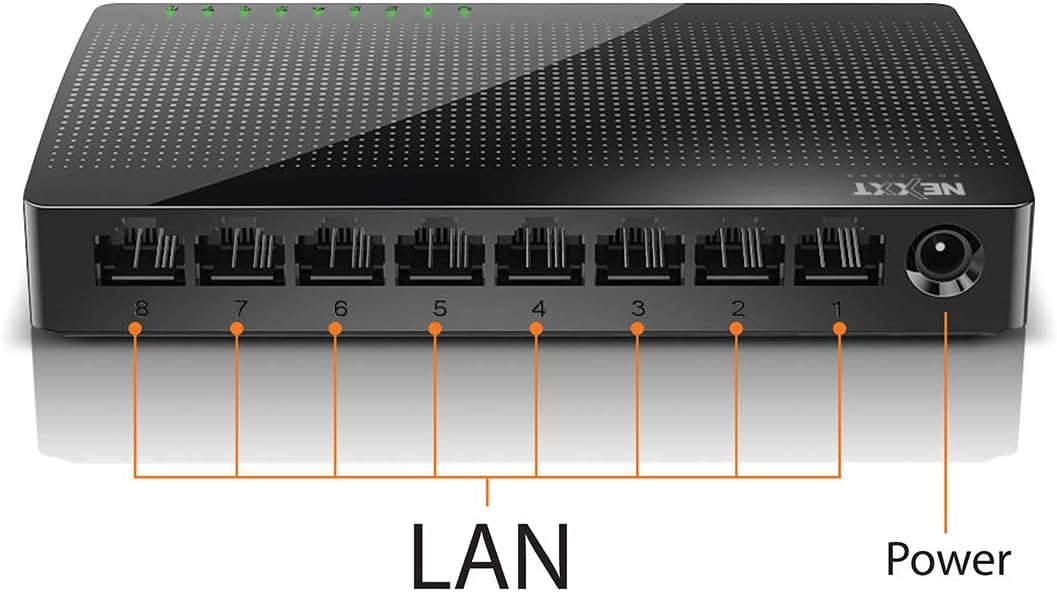
Kuva: Takaosa view of the Naxos800 switch, highlighting the eight LAN ports (numbered 1-8) and the power input port.
LED-ilmaisimet
The front panel features LED indicators for each port, providing visual status:
- Vihreä LED (palaa tasaisesti): Indicates a stable link connection.
- Vihreä LED (vilkkuu): Indicates data activity on the corresponding port.
- LED ei pala: No link or connection detected.
5. Asennus ja asennus
The Naxos800 switch is designed for simple plug-and-play installation. No software or complex configuration is required.
- Sijoitus: Place the switch on a stable, flat surface or mount it on a wall using appropriate hardware (not included). Ensure adequate ventilation around the device.
- Liitä virtalähteeseen: Connect the provided power adapter to the power input port on the switch and then plug the adapter into a standard electrical outlet. The power LED (if present, or the port LEDs will light up) should illuminate.
- Yhdistä verkkoon:
- Connect your router or modem to any of the 8 LAN ports on the Naxos800 switch using an Ethernet cable.
- Connect your network devices (e.g., computers, gaming consoles, IP cameras, Smart TVs, printers) to the remaining LAN ports on the Naxos800 switch using an Ethernet cable.
- Tarkista yhteys: Once devices are connected, the corresponding LED indicators on the switch's front panel should light up green (solid for link, flashing for activity).

Image: Diagram illustrating a typical network setup. An ADSL or Cable Modem connects to a Router, which then connects to the Naxos800 switch. Various devices like laptops, media players, game consoles, IP cameras, Smart TVs, and IP phones are connected to the Naxos800 switch.
6. Kytkimen käyttö
The Naxos800 is an unmanaged switch, meaning it operates automatically without user intervention once connected. It functions as an internet splitter, expanding the number of wired network connections available from your router or modem.
- Automatic Speed Detection: Each port automatically detects the speed of the connected device (10Mbps or 100Mbps) and adjusts accordingly.
- Automaattinen MDI/MDIX: Eliminates the need for crossover cables; the switch automatically detects and corrects for straight-through or crossover cable types.
- Tiedonsiirto: Data packets are forwarded between connected devices at Fast Ethernet speeds. The store-and-forward architecture ensures data integrity.
7. Huolto
The Naxos800 switch requires minimal maintenance.
- Puhdistus: Puhdista kytkimen ulkopinta pehmeällä, kuivalla liinalla. Älä käytä nestemäisiä tai aerosolipuhdistusaineita.
- Ilmanvaihto: Varmista, että tuuletusaukot eivät ole tukossa ylikuumenemisen estämiseksi.
- Tehosykli: If the device experiences issues, a simple power cycle (unplugging and replugging the power adapter) can often resolve minor problems.
8. Vianmääritys
If you encounter issues with your Naxos800 switch, refer to the following common problems and solutions:
| Ongelma | Mahdollinen syy | Ratkaisu |
|---|---|---|
| Ei virtaa / Laite ei käynnisty. | Virtasovitin ei ole kytketty tai viallinen; pistorasia ei toimi. | Varmista, että virtalähde on kytketty kunnolla kytkimeen ja toimivaan pistorasiaan. Kokeile toista pistorasiaa. |
| No link light for a connected device. | Ethernet cable faulty or improperly connected; device not powered on or faulty; incorrect port. |
|
| Hidas verkkoyhteys. | Network congestion; faulty cable; device limitations. |
|
9. Tekniset tiedot
| Attribuutti | Arvo |
|---|---|
| Mallinumero | ASIDT084U3 |
| Portit | 8 x 10/100Mbps Fast Ethernet (UTP/STP) |
| Taustasivun kaistanleveys | 1.6 Gbps |
| MAC-osoitetaulukko | 1000 merkintää |
| Kulunvalvonta | CDMA |
| Flow Control | Full duplex and half duplex back pressure |
| Mitat (P x L x K) | 12.4 x 5.9 x 2.3 cm |
| Paino | 140 g |
| Virransyöttö | Ulkoinen virtalähde (mukana) |
Huomautus: Tekniset tiedot voivat muuttua ilman ennakkoilmoitusta.
10. Takuu ja tuki
The Nexxt Solutions Naxos800 8-Port Fast Ethernet Network Switch comes with a 5 vuoden rajoitettu takuu. For warranty claims or technical support, please contact Nexxt Solutions customer service. Refer to the official Nexxt Solutions websivustolta löydät ajankohtaisimmat tukitiedot ja yhteystiedot.
Nexxt Solutions is a US company committed to quality and customer service.