
1. Johdanto
Thank you for choosing the XTUGA BK510 Single Channel Wireless In-Ear Monitor System. This system is designed to provide professional-grade audio monitoring for musicians, performers, and presenters. It features UHF wireless technology with 100 selectable channels, ensuring clear and reliable sound transmission. This manual will guide you through the setup, operation, and maintenance of your new in-ear monitor system.
2. Turvallisuustiedot
Please read and understand all safety instructions before operating this device. Keep this manual for future reference.
- FCC-yhteensopivuus: Most users do not need a license to operate this wireless microphone system. However, operation is subject to certain restrictions: the system must not cause harmful interference, must operate at a low power level (not exceeding 50 milliwatts), and has no protection from interference received from any other device.
- FCC:n säännöt: Purchasers should be aware that the FCC is currently evaluating the use of wireless microphone systems, and these rules are subject to change. For more information, contact the FCC at 1-888-CALL-FCC (TTY: 1-888-TELL-FCC) or visit the FCC's wireless microphone websivusto: fcc.gov/cgb/wirelessmicrophones.
- Sähköturvallisuus: To prevent electric shock, do not open the device casing. Anna kaikki huoltotoimenpiteet pätevän henkilöstön tehtäväksi.
- Virtalähde: Käytä ainoastaan laitteen mukana toimitettua virtalähdettä. Varmista, että äänenvoimakkuus ontage vastaa laitevaatimuksia.
- Vesi ja kosteus: Älä altista laitetta vedelle, sateelle tai liialliselle kosteudelle.
- Lämpö: Pidä laite poissa lämmönlähteistä, kuten pattereista, lämmitysvastuksista, liesistä tai muista lämpöä tuottavista laitteista.
- Ilmanvaihto: Ensure proper ventilation around the transmitter unit. Do not block any ventilation openings.
- Kuulokkeiden äänenvoimakkuus: Vältä kuuntelua suurella äänenvoimakkuudella pitkiä aikoja kuulovaurioiden estämiseksi.
3. Pakkauksen sisältö
Varmista, että pakkauksessasi on kaikki alla luetellut tuotteet. Jos jokin tuote puuttuu tai on vaurioitunut, ota yhteyttä jälleenmyyjään.
- 1x XTUGA BK510 Transmitter Unit
- 1x XTUGA BK510 Bodypack Receiver
- 1x Detachable Antenna
- 1x Power Adapter (DC 12V-18V)
- 2x Audio Cables (1/4" TS to 1/4" TS)
- 1x Pair of Earbud Headphones (White)

Kuva: XTUGA BK510 Single Channel Wireless In-Ear Monitor System package contents, showing the transmitter, bodypack receiver, antenna, power adapter, two audio cables, and white earbud headphones.
4. Tuote ohiview
4.1 Lähetinyksikkö
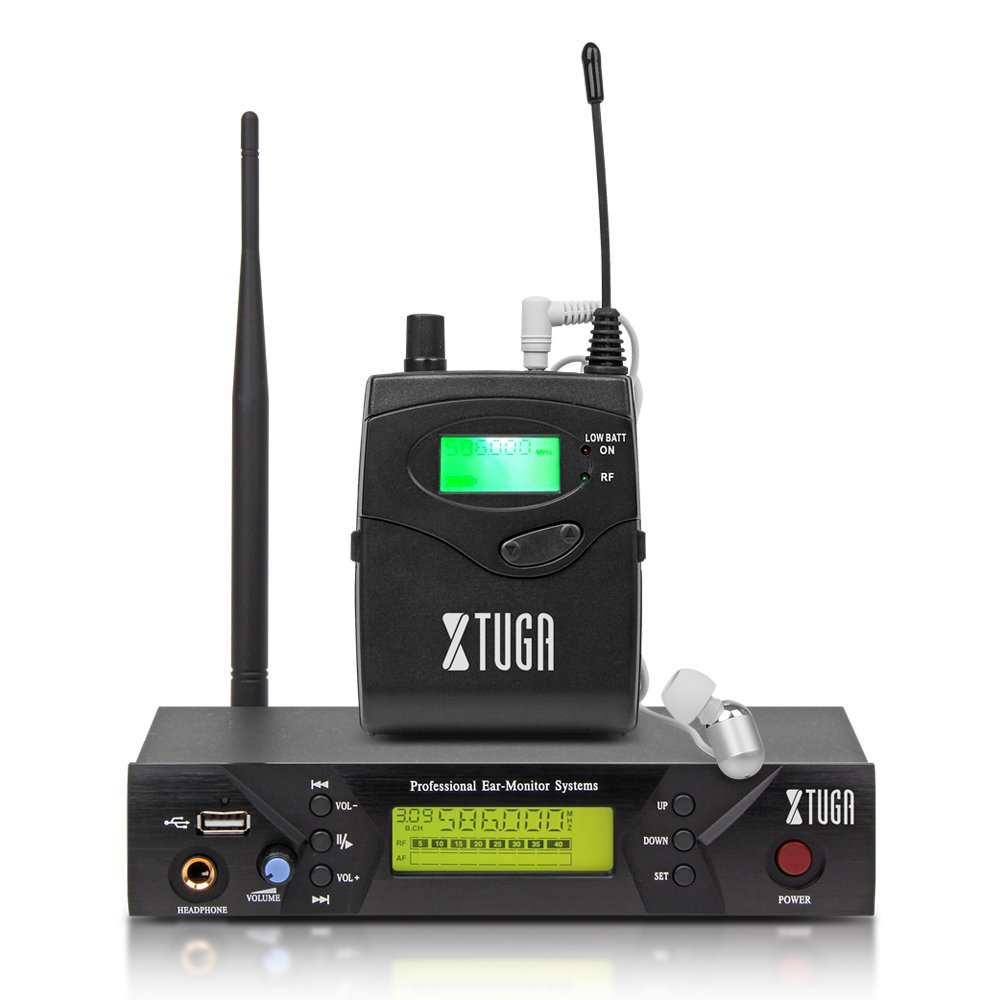
Kuva: Front panel of the XTUGA BK510 transmitter unit, featuring a USB port, headphone output, volume control, channel selection buttons (UP/DOWN), SET button, power button, and an LCD display.
- USB-portti: For connecting USB devices (e.g., for playback or recording, specific functionality may vary).
- KUULOKELOULOSULOSTULO: 3.5mm jack for wired headphone monitoring directly from the transmitter.
- VOLUME -nuppi: Adjusts the output volume for the HEADPHONE output.
- YLÖS/ALAS-painikkeet: Used to navigate and select channels or frequencies.
- SET -painike: Vahvistaa valinnat tai siirtyy asetusvalikoihin.
- Virtanappi: Turns the transmitter unit on or off.
- LCD-näyttö: Shows current channel, frequency, and other operational information.

Kuva: Rear panel of the XTUGA BK510 transmitter unit, showing the DC IN power input, AF IN (L) and AF IN (R) combo XLR/TRS inputs, AF LEVEL (Left/Right) adjustment knobs, and the ANTENNA connector.
- DC IN (12V-18V): Mukana tulevan virtalähteen virransyöttö.
- AF IN (L)/(R): Combo XLR/TRS inputs for connecting audio sources (e.g., mixer output).
- AF LEVEL (Left/Right): Rotary knobs to adjust the input audio level for each channel.
- ANTENNA Connector: For attaching the detachable antenna.
4.2 Kehopakkausvastaanotin

Kuva: Edessä view of the XTUGA BK510 bodypack receiver, showing the LCD display, LOW BATT indicator, RF indicator, and control buttons.
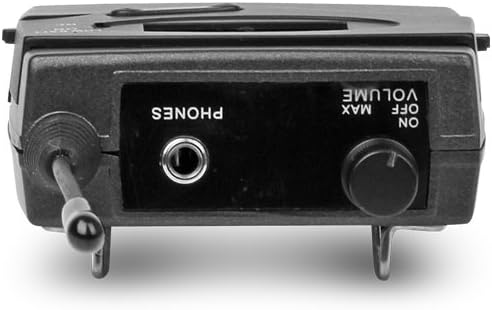
Kuva: Yläosa view of the XTUGA BK510 bodypack receiver, showing the PHONES output jack and the ON/OFF/VOLUME knob.

Kuva: XTUGA BK510 bodypack receiver with the battery compartment open, showing slots for two AA batteries and the belt clip on the back.
- LCD-näyttö: Shows current channel, frequency, and battery status.
- Akun heikon varauksen ilmaisin: Syttyy, kun akun varaus on vähissä.
- RF-ilmaisin: Illuminates when receiving a radio frequency signal from the transmitter.
- ON/OFF/VOLUME Knob: Turns the receiver on/off and adjusts the headphone volume.
- PHONES-lähtö: 3.5mm jack for connecting in-ear headphones.
- Akkulokero: Pitää sisällään kaksi AA-paristoa.
- Vyön solki: For attaching the bodypack to clothing or a belt.
5. Asennusopas
- Connect Transmitter Antenna: Screw the detachable antenna onto the ANTENNA connector on the rear panel of the transmitter unit. Ensure it is securely fastened.
- Lähettimen virransyöttö: Connect the provided power adapter to the DC IN (12V-18V) port on the rear of the transmitter, then plug the adapter into a suitable power outlet.
- Liitä äänilähde: Use the included 1/4" TS cables (or XLR cables, not included) to connect your audio source (e.g., mixer's auxiliary output, monitor send) to the AF IN (L) and/or AF IN (R) inputs on the transmitter's rear panel. For mono operation, typically use AF IN (L).
- Vastaanottimen paristojen asentaminen: Open the battery compartment on the bodypack receiver and insert two AA batteries, observing correct polarity (+/-). Close the compartment securely.
- Kuulokkeiden liittäminen vastaanottimeen: Plug your in-ear headphones into the PHONES output jack on the bodypack receiver.
6. Käyttöohjeet
- Lähettimen käynnistys: Press the POWER button on the transmitter's front panel. The LCD display will illuminate.
- Virta kytketty vastaanotin: Rotate the ON/OFF/VOLUME knob on the bodypack receiver clockwise until it clicks and the LCD display illuminates.
- Select Channel/Frequency (Transmitter):
- Use the UP/DOWN buttons on the transmitter to browse through the available 100 UHF channels.
- Press the SET button to confirm your desired channel. The display will show the selected frequency.
- Choose a channel that is clear of interference in your operating environment.
- Sync Receiver to Transmitter: The bodypack receiver should automatically sync to the transmitter's frequency. If not, consult the receiver's specific instructions (often involves holding a SET or SYNC button on the receiver while the transmitter is broadcasting). Ensure the RF indicator on the receiver is lit, indicating a successful connection.
- Adjust Audio Input Level (Transmitter): Play audio through your connected source. Adjust the AF LEVEL (Left/Right) knobs on the rear of the transmitter until the audio level is appropriate without clipping (distortion). Monitor the audio through the transmitter's HEADPHONE output if desired.
- Adjust Monitoring Volume (Receiver): Put on your in-ear headphones. Slowly rotate the ON/OFF/VOLUME knob on the bodypack receiver to adjust the listening volume to a comfortable level. Avoid excessively high volumes to protect your hearing.
- Aloita seuranta: Your XTUGA BK510 system is now ready for use.
7. Huolto
- Puhdistus: Pyyhi yksiköt pehmeällä, kuivalla liinalla. Älä käytä nestemäisiä puhdistusaineita tai liuottimia.
- Akun vaihto: When the LOW BATT indicator on the bodypack receiver illuminates, replace both AA batteries with fresh ones. Remove batteries if the receiver will not be used for an extended period.
- Varastointi: Säilytä järjestelmää viileässä, kuivassa paikassa, poissa suorasta auringonvalosta ja äärimmäisistä lämpötiloista.
- Antennihoito: Käsittele antennia varovasti, jotta se ei taivu tai katkea.
8. Vianmääritys
| Ongelma | Mahdollinen syy | Ratkaisu |
|---|---|---|
| Ei ääntä vastaanottimesta. |
|
|
| Häiriöitä tai staattista sähköä. |
|
|
| Low audio quality (e.g., lack of bass). |
|
|
| LOW BATT indicator on receiver is lit. | Paristot ovat vähissä. | Vaihda molemmat AA-paristot välittömästi. |
9. Tekniset tiedot
| Ominaisuus | Yksityiskohta |
|---|---|
| Malli | BK510 |
| Merkki | XTUGA |
| Yhteystekniikka | Wired, Wireless (RF) |
| Langaton viestintä | UHF (100 Channels) |
| Transmitter Material | Metalli |
| Bodypack Receiver Batteries | 2 AA-paristoa (tarvitaan) |
| Lähettimen tehonsyöttö | DC 12V-18V |
| Lähettimen mitat | 17.72 x 11.81 x 4.72 tuumaa |
| Tuotteen paino (noin) | 3.34 paunaa (kokonaispaketti) |
| Erikoisominaisuudet | Lightweight (receiver), Volume Control |
| Valmistaja | Valmistettu Kiinassa |
10. Takuu ja tuki
Takuu: No specific warranty information is provided within this user manual. For details regarding warranty coverage, terms, and conditions, please refer to the product packaging, the purchase receipt, or contact the manufacturer directly.
Tukea: For technical assistance, troubleshooting beyond this guide, or inquiries about your XTUGA BK510 system, please contact XTUGA customer support. You may find contact information on the official XTUGA websivustoltasi tai alkuperäisestä ostopaikastasi.
FCC -tiedot: For regulatory questions concerning wireless microphone systems, you can contact the FCC at 1-888-CALL-FCC (TTY: 1-888-TELL-FCC) or visit fcc.gov/cgb/wirelessmicrophones.