
Johdanto
Kiitos, että valitsit Lepro LED Desk L:namp. Tämä lamp is designed to provide versatile and comfortable lighting for various tasks, featuring adjustable brightness, multiple color temperatures, a flexible design, and convenient additional functions.

Lepro LED-pöytä Lamp provides versatile illumination for your workspace.
- Säädettävä valaistus: Choose from 3 color temperatures (3000K Warm White, 4700K Natural White, 6000K Cool White) and stepless dimming from 5% to 100% brightness.
- Joustava muotoilu: Lamp features a multi-angle adjustable arm and head, allowing for precise light positioning. The base rotates 90 degrees, and the lamp head adjusts 180 degrees.
- Integroitu USB-portti: A 5V/1A USB output port is located on the back of the base for convenient charging of your electronic devices.
- Älykkäät toiminnot: Includes a memory function to recall your last lighting setting and a 30-second timer for automatic shut-off.
- Kestävä rakenne: Made with a brushed aluminum alloy stand and shade, ensuring excellent heat dissipation and longevity, with ABS plastic articulations for flexibility.
Asennusohjeet
- Pura pakkauksen sisältö: Irrota varovasti lamp, power adapter, and cleaning cloth from the packaging.
- Aseta Lamp: Aseta lamp on a stable, flat surface such as a desk or table.
- Liitä virta: Insert the power adapter's DC plug into the power input port on the back of the lamp base. Then, plug the power adapter into a standard electrical outlet.
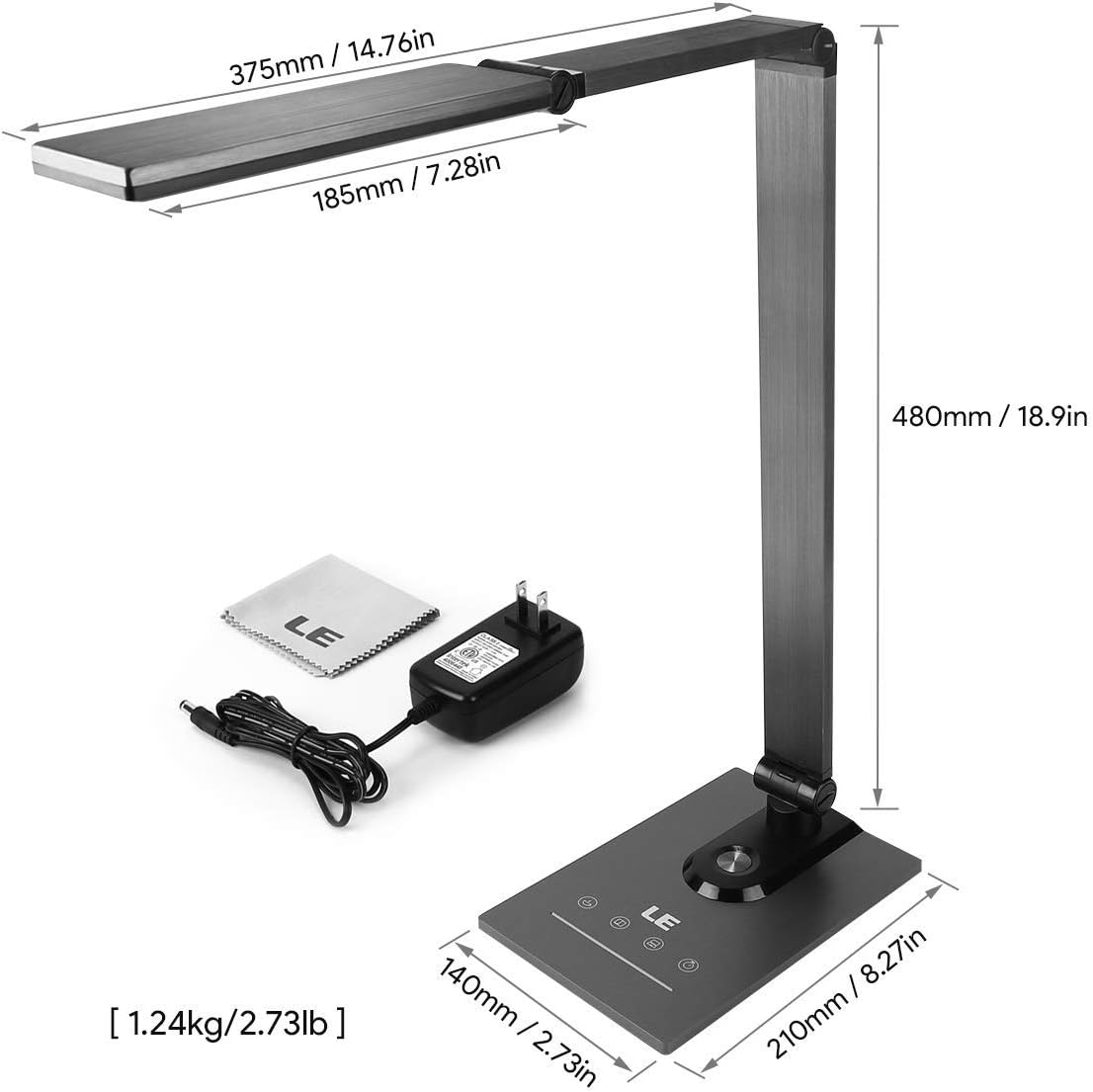
Ensure all components, including the power adapter and cleaning cloth, are present.
Käyttöohjeet
1. Virta päälle/pois
Gently touch the power symbol (O) l:lläamp pohja kääntääksesi lamp päälle tai pois päältä.
2. Kirkkauden säätäminen
Slide your finger along the touch panel (indicated by a horizontal line with sun icons) on the lamp base to adjust the brightness level from 5% to 100%. The lamp offers stepless dimming for precise control.
3. Värilämpötilan muuttaminen
Touch the mode symbol (icons resembling a coffee cup, book, and computer) on the lamp base to cycle through the three available color temperature modes:
- 3000K (lämmin valkoinen): Ideal for relaxation or a cozy atmosphere.
- 4700K (luonnonvalkoinen): Suitable for general reading and daily tasks.
- 6000K (viileä valkoinen): Best for focused work and concentration.

Easily switch between three color temperatures and adjust brightness with the touch controls.
4. USB -latausportti
Connect your smartphone, tablet, or other USB-powered devices to the 5V/1A USB output port located on the rear of the lamp alusta kätevää latausta varten.

Charge your devices efficiently using the integrated 5V/1A USB port.
5. Muistitoiminto
Lamp muistaa automaattisesti viimeksi käyttämäsi kirkkaus- ja värilämpötila-asetukset. Kun kytket l-valitsimen päälleamp on again, it will resume with these previous settings.
6. 30-Second Timer
Touch the clock symbol (KELLO) l:lläamp base to activate the 30-second timer. The lamp will dim to a low light level and automatically turn off after 30 seconds, providing a convenient delay for leaving a room or falling asleep.

Utilize the timer and memory functions for enhanced convenience.
7. Adjusting Lamp asema
Lamp's design allows for extensive adjustment to direct light precisely where needed:
- Pohjan kierto: Lamp base can be rotated up to 90 degrees horizontally.
- Käsivarren säätö: The main arm of the lamp can be adjusted to various angles.
- Pään säätö: Lamp head can be tilted and rotated up to 180 degrees vertically.

Säädä lamp's arm and head to achieve optimal lighting angles.

The flexible design allows for precise light direction, suitable for various scenarios.
Huolto
- Puhdistus: Use the provided cleaning cloth or a soft, dry cloth to wipe the lampÄlä käytä hankaavia puhdistusaineita, liuottimia tai voimakkaita kemikaaleja, sillä ne voivat vahingoittaa pintakäsittelyä tai elektronisia komponentteja.
- Varastointi: Jos säilytät lamp pitkään, varmista, että se on puhdas ja kuiva. Säilytä sitä viileässä, kuivassa paikassa, poissa suorasta auringonvalosta ja äärimmäisistä lämpötiloista.
- LED: it: LED-valonlähde on integroitu eikä käyttäjä voi vaihtaa sitä. Älä yritä purkaa sitä.amp pää.
Vianetsintä
| Ongelma | Mahdollinen syy | Ratkaisu |
|---|---|---|
| Lamp ei käynnisty. | Ei virtalähdettä tai löysä liitäntä. | Varmista, että verkkolaite on liitetty kunnolla molempiin lamp ja toimiva pistorasia. |
| Light flickers or brightness is inconsistent. | Unstable power supply or dirty touch panel. | Check the power source. Clean the touch control panel with a dry cloth. |
| USB-latausportti ei toimi. | Device incompatibility or faulty cable. | Ensure your device is compatible with 5V/1A USB charging. Try a different USB cable. |
| Lamp does not hold its adjusted position. | Joints may be loose or over-extended. | Gently readjust the lamp to a stable position. Avoid forcing joints beyond their intended range of motion. |
Tekniset tiedot
| Ominaisuus | Yksityiskohta |
|---|---|
| Mallinumero | 3100030-EU |
| Mitat (P x L x K) | 14P x 21l x 48H cm (5.5 x 8.3 x 18.9 inches) |
| Paino | 1450 grammaa (3.2 lbs) |
| LED teho | 9 wattia |
| USB-lähtö | 5V/1A (10 Watts) |
| Tulo Voltage | 240 volttia |
| Värilämpötilat | 3000K, 4700K, 6000K |
| Kirkkauden säätö | Portaaton himmennys (5–100 %) |
| Valvontamenetelmä | Kosketa Ohjaus |
| Materiaalit | Brushed Metal (Base, Shade), ABS Plastic (Articulations) |
| Mukana olevat komponentit | Työpöytä L.amp, Power Adapter, Cleaning Cloth |
Takuu ja tuki
This product comes with a 1-year availability of spare parts, indicating a commitment to product support.
For any questions, technical assistance, or warranty claims, please contact the retailer where you purchased the product or visit the official Lepro websivusto asiakastukitietojen saamiseksi.
Säilytä ostokuittisi takuun voimassaoloa varten.