
Johdanto
This manual provides detailed instructions for the safe and proper installation and operation of your iMounTEK Tilting TV Wall Mount Bracket. Please read this manual thoroughly before installation and retain it for future reference. This mount is designed to securely hold LED, LCD, OLED, and Plasma flat screen TVs ranging from 37 to 70 inches and weighing up to 99 lbs.
Tärkeitä turvallisuustietoja
VAROITUS: Näiden ohjeiden lukematta jättäminen ja noudattamatta jättäminen voi johtaa vakaviin henkilövahinkoihin, omaisuusvahinkoihin tai takuun raukeamiseen. Jos et ymmärrä näitä ohjeita tai epäilet asennuksen turvallisuutta, ota yhteyttä pätevään asentajaan.
- Älä asenna tätä tuotetta rakenteellisesti epävakaille seinille.
- Varmista, että kiinnityspinta kestää turvallisesti telineen ja television yhteispainon.
- Always use a stud finder to locate wall studs for secure mounting.
- Älä ylitä suurinta sallittua painokapasiteettia, joka on 45 kg (99 lbs).
- Tämä tuote on tarkoitettu vain sisäkäyttöön.
- Pidä lapset ja lemmikkieläimet loitolla asennuksen aikana.
- Käytä asennuksen aikana asianmukaisia henkilönsuojaimia.
Pakkauksen sisältö
Verify that all components are present and undamaged before beginning installation. If any parts are missing or defective, contact iMounTEK customer service.

Image: All components included in the iMounTEK TV wall mount package. This includes the main wall plate, two vertical TV brackets, and multiple bags containing different sizes of screws, washers, spacers, and wall anchors for various TV models and wall types.
Mukana oleva laitteisto:
- Seinälevyn kokoonpano
- TV-telineen varret (2)
- Various Lag Bolts and Anchors for wall mounting
- Assorted M4, M6, M8 TV Screws and Washers
- Välikappaleet
- Kuusioavain
Asennus ja asennus
Tarvittavat työkalut: Stud finder, drill, level, pencil, measuring tape, Phillips head screwdriver, socket wrench.
Step 1: Prepare the Wall Plate
- Määritä television haluttu korkeus.
- Use a stud finder to locate two adjacent wooden studs in your wall. Mark the center of each stud.
- Position the wall plate against the wall, aligning the mounting holes with the marked stud centers. Use a level to ensure it is perfectly horizontal.
- Mark the drill points through the wall plate holes.
- Drill pilot holes into the wall studs. The size of the drill bit will depend on the lag bolts provided.
- Secure the wall plate to the wall using the lag bolts and washers. Tighten firmly but do not overtighten.

Image: The main wall plate component of the TV mount, featuring its articulating arms. This part attaches directly to the wall studs.
Vaihe 2: Kiinnitä kiinnikkeet televisioon
- Aseta televisio varovasti kuvaruutu alaspäin pehmeälle ja puhtaalle alustalle, jotta näyttö ei vaurioidu.
- Tunnista television takana olevat VESA-kiinnitysreiät.
- Select the appropriate screws, washers, and spacers from the provided hardware kit that fit your TV's VESA pattern.
- Attach the two vertical TV bracket arms to the back of your TV. Ensure they are securely fastened and evenly spaced.

Image: The TV mount's wall plate and the two vertical TV brackets. The brackets are shown attached to the back of a TV, illustrating how the TV connects to the mount.
Step 3: Mount the TV to the Wall Plate
- Nosta televisiota varovasti kiinnitettyjen kiinnikkeiden avulla avustajan avulla.
- Align the hooks on the TV brackets with the corresponding slots on the wall plate.
- Gently lower the TV, ensuring the brackets engage securely with the wall plate.
- Once the TV is hanging, secure it in place using the safety screws or locking mechanisms on the bottom of the TV brackets.
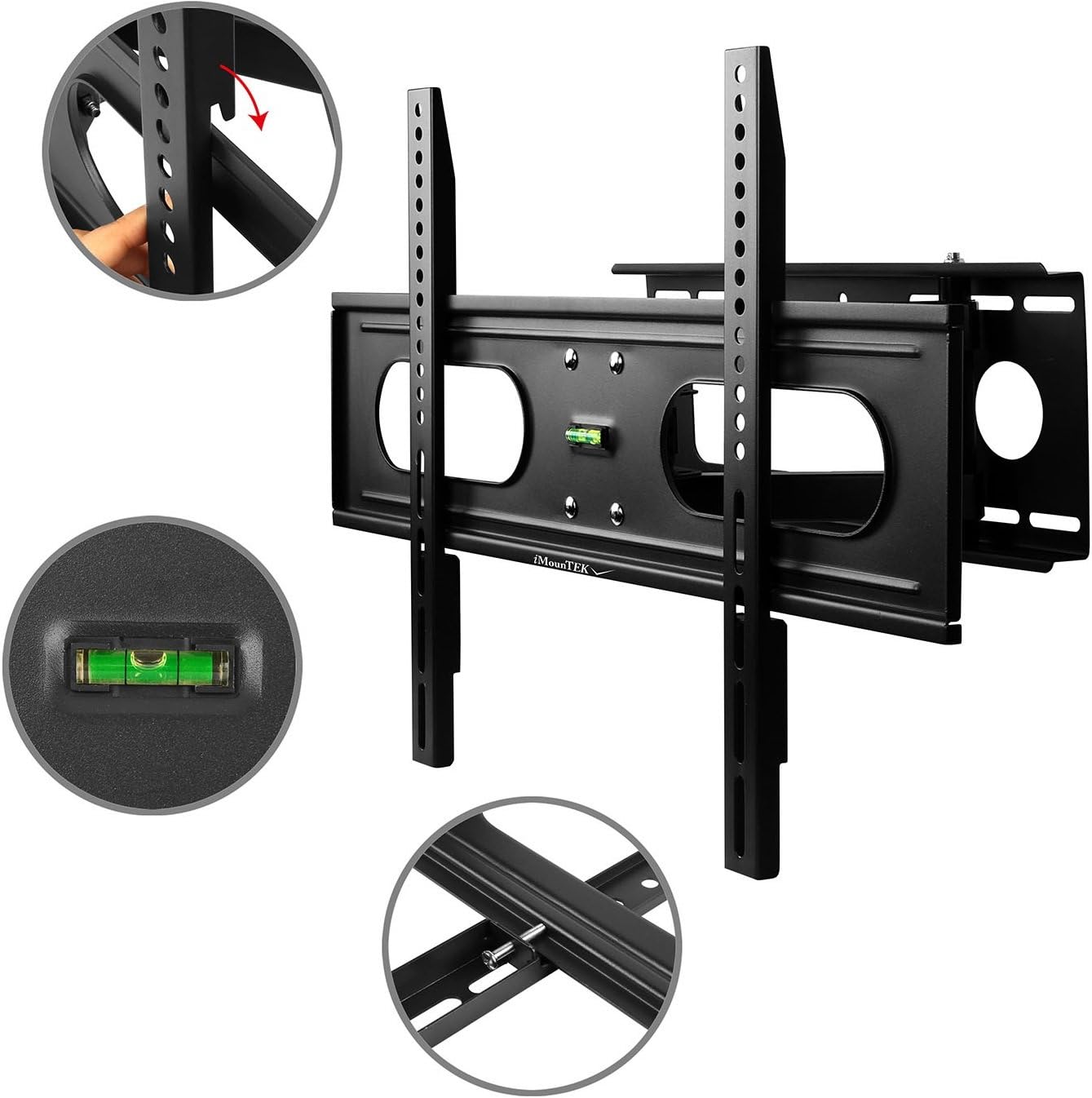
Image: A flat-screen TV securely mounted on the iMounTEK wall mount. The mount is extended from the wall, demonstrating its articulating capabilities, allowing the TV to be positioned for optimal viewing.
Käyttöohjeet
This full-motion TV mount allows for flexible positioning of your television to achieve the best viewkulma.
- Laajennus: Gently pull the TV away from the wall to extend the articulating arms. The mount extends up to 18 inches.
- Peruutus: Push the TV gently back towards the wall until it folds to a 3-inch depth.
- Kääntyvä: Carefully pivot the TV left or right to adjust the horizontal viewing angle. The mount allows for 90° rotation for landscape or portrait viewing.
- Kallistaa: Loosen the tilt adjustment knobs on the TV brackets, adjust the TV to the desired vertical angle (up to +/-20° forward), and then re-tighten the knobs to secure the position.
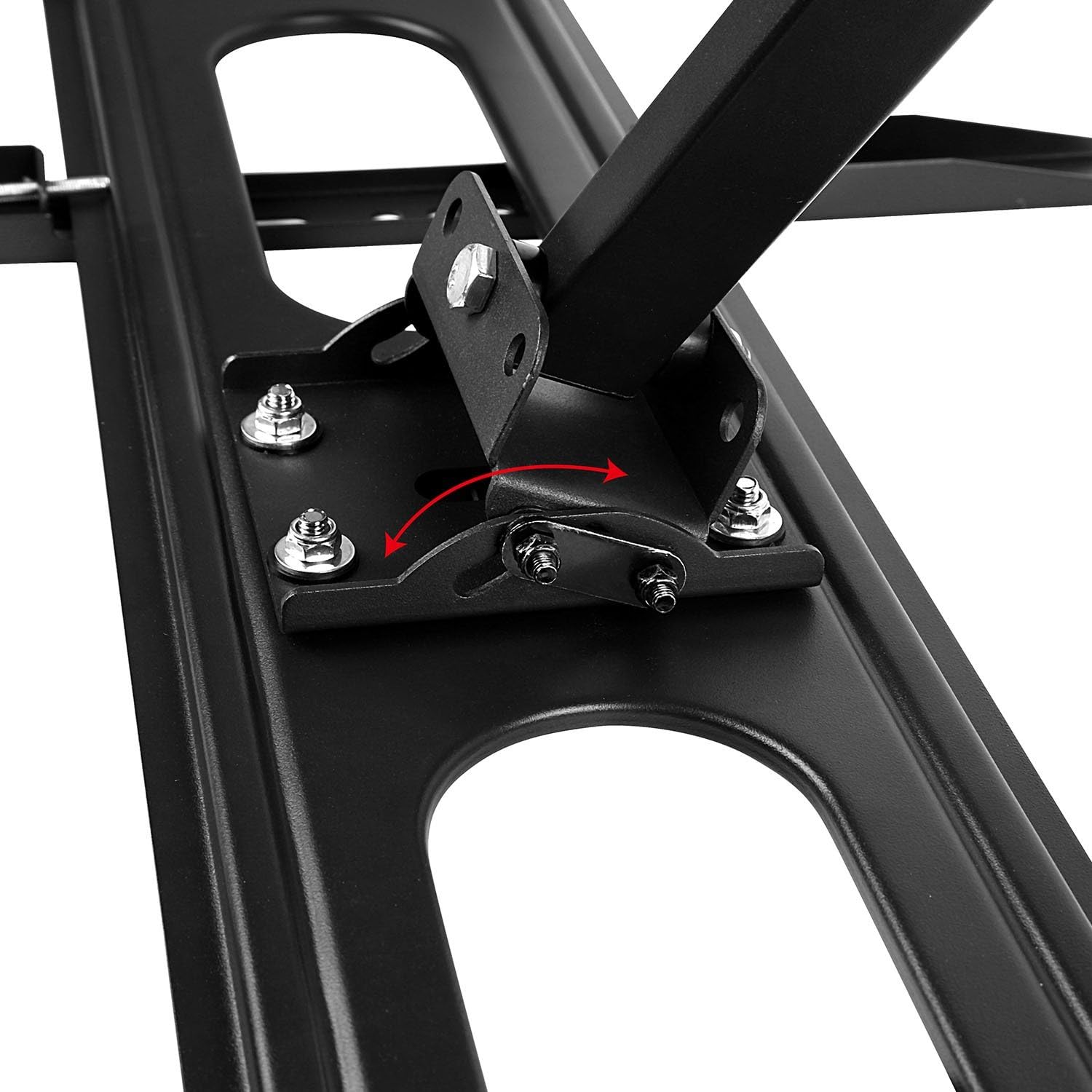
Kuva: Yksityiskohtainen view of the tilting mechanism on the iMounTEK TV mount. An arrow illustrates the range of motion for tilting the TV up or down, highlighting the adjustable bolts that secure the tilt angle.
Huolto
Säännöllinen huolto varmistaa TV-telineesi pitkän käyttöiän ja turvallisen toiminnan.
- Säännöllinen tarkastus: Annually, check all screws and bolts to ensure they are securely tightened. Re-tighten if necessary.
- Puhdistus: Wipe the mount with a soft, dry cloth. Avoid using abrasive cleaners or solvents.
- Voitelu: The articulating joints are designed for smooth movement. If movement becomes stiff, a small amount of silicone-based lubricant can be applied to the pivot points.
Vianetsintä
If you encounter issues with your TV mount, refer to the following common problems and solutions.
- Televisio ei ole vaakasuorassa:
- Check the wall plate installation with a level. If the wall plate is not level, it may need to be re-installed.
- Some mounts have a post-installation leveling adjustment. Refer to the specific mechanism on your mount.
- Mount feels wobbly:
- Ensure all lag bolts securing the wall plate to the wall studs are fully tightened.
- Verify that the TV is correctly seated on the wall plate and secured with safety screws.
- Confirm that the wall studs are solid and capable of supporting the weight.
- Kallistuksen/käännön säätäminen on vaikeaa:
- For tilt, ensure the tilt adjustment knobs are sufficiently loosened before attempting to adjust, then re-tighten.
- For swivel/extension, ensure no cables are snagged or restricting movement.
- Puuttuva laitteisto:
- Review the "Package Contents" section. If parts are genuinely missing, contact iMounTEK customer support.
Tuotteen tekniset tiedot
| Ominaisuus | Yksityiskohta |
|---|---|
| Merkki | iMounTEK |
| Mallinumero | 4330178596 |
| Yhteensopivat TV-koot | 37–70 tuumaa |
| Suurin painokapasiteetti | 99 lbs (45 kg) |
| Asennustyyppi | Seinäteline |
| Liikkeen tyyppi | Articulating, Rotate, Swivel, Tilt |
| Kallistuskulma | +/-20° forward |
| Jatko seinästä | 3" (sisäänvedettynä) - 18" (levitettynä) |
| Materiaali | Seosteräs |
| Väri | Musta |
| Tuotteen paino | 11.16 puntaa (5.06 kg) |
| Tuotteen mitat | 27 x 7.48 x 3.03 tuumaa |
| UPC | 616043300498 |
Takuu ja asiakastuki
For warranty information or technical assistance, please contact iMounTEK customer service. Keep your purchase receipt as proof of purchase.
Yhteystiedot: Refer to the contact details provided with your product packaging or visit the official iMounTEK websivustolta ajantasaisimmat tukitiedot.