
1. Johdanto
This user manual provides detailed instructions for the installation, operation, and maintenance of the Cooler Master Elite RC-342 Mini-Tower Computer Case. This chassis is designed to support Micro-ATX motherboards and offers efficient cooling with its front mesh design. Please read this manual thoroughly before beginning installation to ensure proper setup and optimal performance.
2. Tuotteen ominaisuudet
- Mini-Tower Design: Compact form factor supporting Micro-ATX motherboards.
- Optimoitu ilmanvaihto: Front mesh panel ensures superior airflow for component cooling.
- Easy Access I/O: Conveniently located front panel with USB ports and audio jacks.
- Mukana virtalähde: Comes with a 400W power supply unit.
- Drive Bay Flexibility: Features internal 3.5" drive bays, including a removable bay for easier installation.
3. Asennus ja asennus
Before starting, ensure you have a clean, static-free workspace. Refer to your motherboard and component manuals for specific installation details.
3.1. Kotelon avaaminen
To access the interior, remove the two thumbscrews located at the rear of the case on the left side panel. Slide the side panel backward and lift it off.

Kuva 3.1: Left side panel of the case. Remove thumbscrews to open.
3.2. Emolevyn asennus
The Elite RC-342 supports Micro-ATX motherboards. Install the necessary standoffs into the motherboard tray according to your motherboard's mounting holes. Carefully place the motherboard onto the standoffs and secure it with screws.
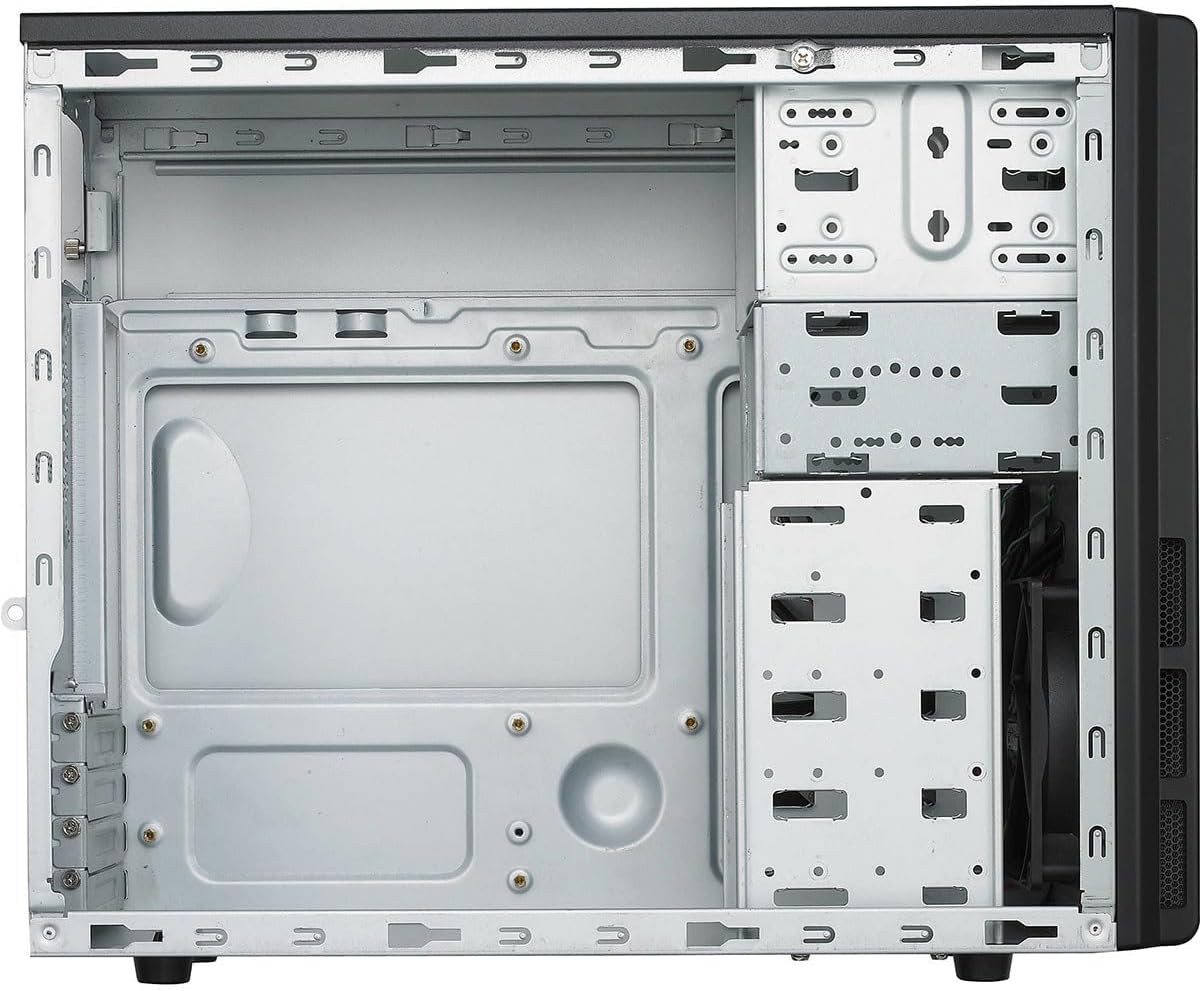
Kuva 3.2: Sisustus view of the case, illustrating the motherboard mounting area and drive bays.
3.3. Kiintolevyn asennus (kiintolevy/SSD)
The case features multiple 3.5-inch internal drive bays. One of these bays is removable to facilitate easier installation of hard drives. For 2.5-inch SSDs, use the provided 2.5-inch to 3.5-inch adapter if necessary. Secure drives with screws.

Kuva 3.3: Removable drive cage for hard drive installation.
3.4. Virtalähteen (PSU) asennus
The Cooler Master Elite RC-342 includes a 400W power supply unit. Install the PSU into the designated bottom-mount area at the rear of the case. Secure it with screws from the exterior. Connect the necessary power cables to your motherboard and components.

Kuva 3.4: The included 400W power supply unit.
3.5. Etupaneelin I/O-liitännät
Connect the front panel cables (USB 3.0, audio, power switch, reset switch, power LED, HDD LED) to the corresponding headers on your motherboard. Refer to your motherboard manual for header locations.

Kuva 3.5: Front panel with USB 3.0 ports, audio jacks, and power/reset buttons.

Kuva 3.6: Takaosa view of the case, showing the I/O shield area and expansion slots.
4. Käyttöön liittyviä näkökohtia
The Elite RC-342 is designed for optimal airflow through its front mesh panel. Ensure that the case is placed in an area with adequate ventilation to allow for proper air intake and exhaust. Avoid blocking the front, rear, or side vents.
The front I/O panel provides convenient access to two USB 3.0 ports and audio jacks for headphones and microphones.
5. Huolto
Regular maintenance helps maintain optimal cooling performance and extends the lifespan of your components.
- Pölynpuhdistus: Periodically clean the front mesh panel and any fan filters to prevent dust buildup, which can restrict airflow. Use compressed air or a soft brush.
- Sisätilojen puhdistus: With the system powered off and unplugged, carefully clean the interior of the case to remove accumulated dust from components and surfaces.
6. Vianmääritys
Jos asennuksen aikana tai sen jälkeen ilmenee ongelmia, ota huomioon seuraavat seikat:
- Component Fit: Ensure all components, especially the motherboard and expansion cards, are properly seated and secured.
- Kaapelin hallinta: Verify that internal cables are routed efficiently and do not obstruct airflow or prevent side panel closure. Poor cable management can sometimes hinder component installation or cooling.
- Virtaongelmat: Double-check all power connections from the PSU to the motherboard and other components. Ensure the PSU switch is in the 'ON' position.
- Etupaneelin toiminnot: If front USB ports or audio jacks are not working, confirm that their respective cables are correctly connected to the motherboard headers.
7. Tekniset tiedot
| Ominaisuus | Yksityiskohta |
|---|---|
| Merkki | Viileämpi mestari |
| Mallin nimi | Eliitti |
| Mallinumero | RC342KKR400U3 |
| Asian tyyppi | mini torni |
| Emolevyn yhteensopivuus | Micro-ATX |
| Väri | Musta |
| Materiaali | Akryylinitriilibutadieenistyreeni (ABS), seosteräs |
| Tuotteen mitat (S x L x K) | 17.3" x 7.1" x 13.9" (43.9 cm x 18.0 cm x 35.3 cm) |
| Tuotteen paino | 9 puntaa (4.08 kg) |
| Virtalähteen kiinnitystyyppi | Pohjakiinnitys |
| Mukana virtalähde | 400 wattia |
| Jäähdytysmenetelmä | ilmaa |
| Total USB 3.0 Ports | 2 (Etupaneeli) |
| Sisäiset asemapaikat | 4 x 3.5 tuumaa |
| UPC | 884102029349 |

Kuva 7.1: Product dimensions (Depth x Width x Height).
8. Takuutiedot
The Cooler Master Elite RC-342 Computer Case comes with a 2 vuoden takuu ostopäivästä lukien. Tämä takuu kattaa materiaali- ja valmistusvirheet normaalissa käytössä. Säilytä ostokuitti takuuvaatimuksia varten.
9. Tukea
For technical assistance, troubleshooting, or warranty inquiries, please visit the official Cooler Master support websivustolla tai ota yhteyttä heidän asiakaspalveluunsa.
Cooler Masterin virallinen Websivusto: www.coolermaster.com