
1. Tuote ohiview
The ADATA XPG EX500 is a tool-free external enclosure designed to convert any 2.5-inch SATA III hard disk drive (HDD) or solid state drive (SSD) into a portable storage solution. It supports USB 3.1 connectivity, offering fast data transfer speeds, and is backward compatible with USB 2.0 and USB 3.0. Its robust, shock-resistant design provides protection for your valuable data.
Tärkeimmät ominaisuudet:
- Suitable for 2.5-inch SSD and 2.5-inch Hard Disk Drive
- Tool-less design for quick installation process
- Plug and Play -toiminto
- Shock resistant construction
- USB 3.1 connectivity (backward compatible with USB 3.0 and USB 2.0)
2. Pakkauksen sisältö
Varmista, että pakkauksessasi on kaikki tarvittavat osat:
- XPG EX500 External Enclosure
- USB 3.1 -kaapeli
- Käyttöopas (tämä asiakirja)
3. Asennusohjeet
Installing a 2.5-inch Drive:
The XPG EX500 features a tool-free design for easy installation of your 2.5-inch SATA HDD or SSD.
- Avaa kotelo: Gently slide the top cover of the XPG EX500 enclosure in the direction indicated by the arrows until it detaches.
- Aseta asema: Align your 2.5-inch SATA HDD or SSD with the SATA connector inside the enclosure. Carefully push the drive into the connector until it is firmly seated. Ensure the drive is oriented correctly.
- Sulje kotelo: Place the top cover back onto the enclosure, aligning the tabs. Slide the cover until it clicks securely into place.
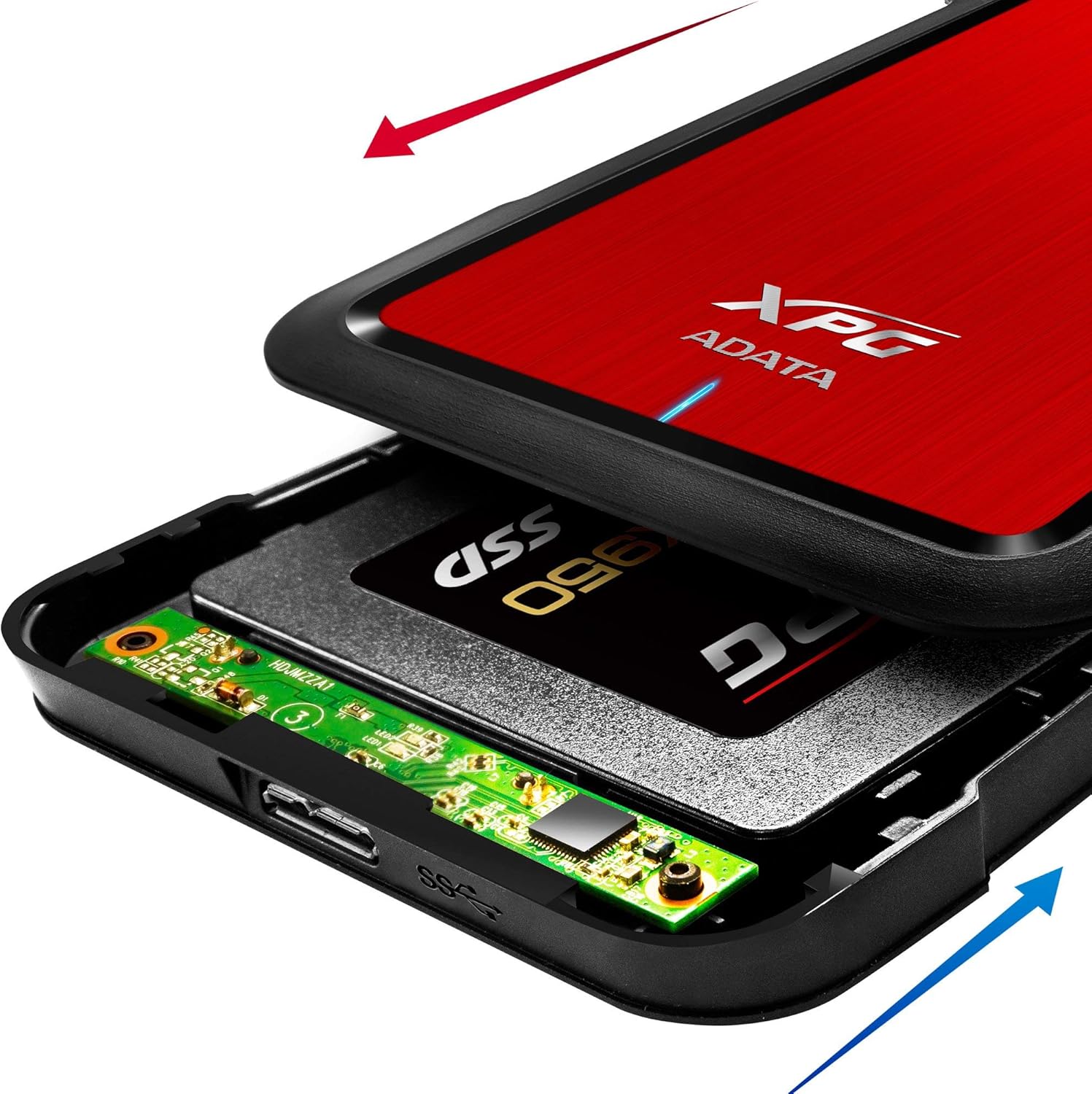
Image: The XPG EX500 enclosure shown open, with a solid state drive (SSD) being inserted into the internal SATA connector. Red and blue arrows indicate the sliding motion for opening and closing the cover.
4. Käyttöohjeet
Yhdistäminen laitteeseen:
Once your drive is installed, connect the XPG EX500 to your computer or gaming console.
- Liitä USB-kaapeli: Plug one end of the provided USB 3.1 cable into the USB port on the XPG EX500 enclosure.
- Yhdistä isäntälaitteeseen: Plug the other end of the USB cable into an available USB port on your PC, notebook, Mac, PlayStation 4, Xbox 360, or Xbox One. For optimal performance, use a USB 3.1 (or USB 3.0) port.
- Plug and Play: The enclosure is plug-and-play. Your operating system should automatically detect the drive. If it's a new drive, you may need to initialize and format it through your operating system's disk management tools before use.
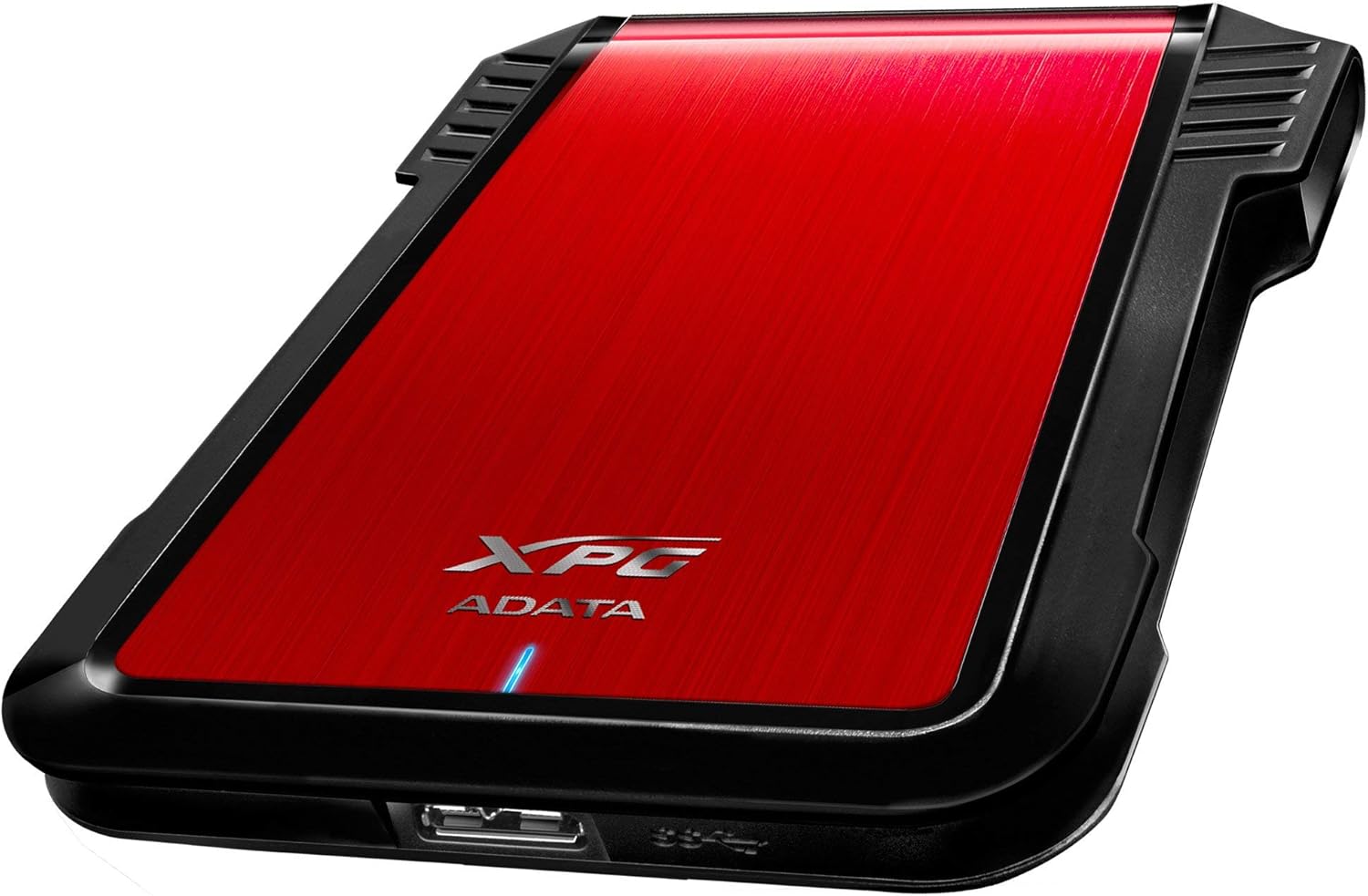
Kuva: Puoli view of the XPG EX500 external enclosure, highlighting the USB 3.1 port for connecting to a host device.
Tiedonsiirto:
The XPG EX500 supports USB 3.1, providing high-speed data transfer. Actual speeds may vary depending on the connected device, the drive installed, and the type of data being transferred.
5. Huolto
To ensure the longevity and optimal performance of your XPG EX500 enclosure:
- Puhdistus: Puhdista kotelon ulkopinta pehmeällä, kuivalla liinalla. Vältä nestemäisten puhdistusaineiden tai liuottimien käyttöä.
- Käsittely: While the enclosure is shock-resistant, avoid dropping it or subjecting it to severe impacts, as this can still damage the internal drive.
- Ympäristö: Store and operate the enclosure in a dry environment, away from extreme temperatures, direct sunlight, and humidity.
- Yhteyden katkeaminen: Irrota asema aina turvallisesti käyttöjärjestelmästä ennen USB-kaapelin irrottamista tietojen vioittumisen estämiseksi.
6. Vianmääritys
If you encounter issues with your XPG EX500, please refer to the following common solutions:
- Asemaa ei havaittu:
- Varmista, että USB-kaapeli on kytketty kunnolla sekä koteloon että isäntälaitteeseen.
- Yritä yhdistää tietokoneesi toiseen USB-porttiin.
- Verify that the 2.5-inch drive is properly seated within the enclosure's SATA connector.
- If it's a new drive, check your operating system's Disk Management (Windows) or Disk Utility (macOS) to see if the drive needs to be initialized and formatted.
- Hidas tiedonsiirtonopeus:
- Ensure you are connected to a USB 3.1 or USB 3.0 port on your host device. USB 2.0 ports will result in significantly slower speeds.
- Check the condition of the USB cable. Try using a different USB 3.1 compatible cable if available.
- Sisäisen aseman suorituskyky voi vaikuttaa siirtonopeuksiin.
- Kotelo tuntuu lämpimältä:
- It is normal for the enclosure to feel warm during extended use, especially during heavy data transfers. Ensure adequate airflow around the device.
7. Tekniset tiedot
| Ominaisuus | Erittely |
|---|---|
| Mallinumero | AEX500U3-CRD |
| Yhteensopivat asemat | 2.5 tuuman SATA-kiintolevy/SSD-levy |
| Käyttöliittymä | USB 3.1 (backward compatible with USB 3.0, USB 2.0) |
| Tiedonsiirtonopeus | Up to 1 Gigabits Per Second (USB 3.1 theoretical max) |
| Yhteensopivat laitteet | PC, Notebook, Mac, PlayStation 4, Xbox 360, Xbox One |
| Materiaali | Muovi |
| Tuotteen mitat | 4.92 x 3.54 x 0.67 tuumaa (125 x 90 x 17 mm) |
| Tuotteen paino | 2.43 unssia (0.07 kiloa) |
8. Takuutiedot
The ADATA XPG EX500 External Enclosure comes with a 1 vuoden rajoitettu takuu from the date of purchase. This warranty covers manufacturing defects and workmanship under normal use. It does not cover damage caused by misuse, accident, unauthorized modification, or external causes.
Please retain your proof of purchase for warranty claims. For detailed warranty terms and conditions, refer to the official ADATA websivustolla tai ota yhteyttä asiakastukeen.
9. Tukea
For further assistance, technical support, or to download the latest drivers and firmware (if applicable), please visit the official ADATA websivusto:
You may also contact ADATA customer service directly through the contact information provided on their websivusto.