
1. Tuote ohiview
The GeoVision GV-EFD4700-0F is an indoor, fixed, mini-sized network camera designed for day and night surveillance. It features an automatic IR-cut filter and integrated IR LEDs to ensure clear imaging in various lighting conditions. This model offers an entry-level surveillance solution with essential features and high image quality.
Keskeisiä ominaisuuksia ovat:
- 1/3" progressive scan super low lux CMOS sensor for minimal illumination at 0.02 lux.
- Dual streams supporting H.265, H.264, and MJPEG codecs.
- Video resolutions up to 20 fps at 2592 x 1520, 25 fps at 2560 x 1440, and 30 fps at 2048 x 1520.
- Intelligent IR with a distance of up to 15 meters (50 ft).
- Wide Dynamic Range Pro (WDR Pro) for clear images in high-contrast scenes.
- 3D noise reduction for improved image clarity.
- Built-in microphone for audio monitoring.
- 2-axis mechanism (pan / tilt) for flexible positioning.
- Power options: DC 12V or Power over Ethernet (PoE IEEE 802.3af).
2. Pakkauksen sisältö
Varmista avatessasi paketin, että kaikki osat ovat mukana ja hyvässä kunnossa:
- GeoVision GV-EFD4700-0F Mini Fixed IP Dome Camera
- Kiinnitysruuvisarja
- Asennusmalli
- Pikaopas / Käyttöohje (tämä asiakirja)
3. Turvallisuustiedot
Read these instructions carefully before installation and operation. Keep this manual for future reference.
- Virtalähde: Use only the specified power adapter (DC 12V) or a compliant PoE (IEEE 802.3af) switch. Incorrect voltage voi vahingoittaa laitetta.
- Asennus: Varmista, että kamera on kiinnitetty tukevasti, jotta se ei putoa. Asennuksen saa tarvittaessa suorittaa pätevä henkilöstö.
- Ympäristö: Tämä kamera on suunniteltu sisäkäyttöön. Älä altista sitä vedelle, kosteudelle tai äärimmäisille lämpötiloille.
- Puhdistus: Katkaise virta ennen puhdistamista. Käytä pehmeää, kuivaa liinaa. Älä käytä nestemäisiä tai aerosolipuhdistusaineita.
- Huolto: Älä yritä huoltaa tätä tuotetta itse. Anna kaikki huoltotoimenpiteet pätevän huoltohenkilöstön tehtäväksi.
4. Asennus ja asennus
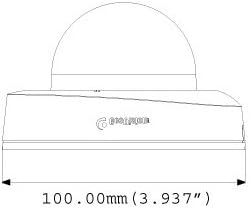
4.1 Fyysiset mitat
Understand the camera's dimensions for proper placement and mounting.

4.2 Asennusvaihtoehdot
The GV-EFD4700-0F supports both ceiling and wall-surface mounting.


4.3 Asennusvaiheet
- Valitse sijainti: Choose a suitable indoor location for optimal surveillance coverage.
- Valmistele pinta: Use the provided installation template to mark drilling points on the ceiling or wall.
- Poraa reikiä: Drill pilot holes according to the template. Insert wall anchors if necessary.
- Suojattu kamera: Attach the camera base to the mounting surface using the supplied screws.
- Kytke kaapelit: Connect the Ethernet cable for network and PoE, or a DC 12V power adapter and a separate Ethernet cable.
- Säädä kulmaa: Loosen the adjustment screws to pan and tilt the camera lens to the desired viewKiristä ruuvit säädön jälkeen.
4.4 Alkukokoonpano
Kun olet fyysisesti asentanut ja kytkenyt virran, avaa kameran web interface for initial setup:
- Verkkoyhteys: Ensure the camera is connected to your network. It will typically obtain an IP address via DHCP.
- Tutustu kameraan: Use GeoVision's IP Device Utility software or a network scanner to find the camera's IP address.
- Pääsy Web Käyttöliittymä: Avaa a web selaimessa ja anna kameran IP-osoite.
- Kirjaudu sisään: Enter the default username and password (refer to the Quick Start Guide or GeoVision documentation for default credentials). Change these immediately for security.
- Perus asetukset: Configure network settings, date/time, video resolution, and recording preferences.
5. Kameran käyttö
5.1 Livenä View ja Tallennus
Once configured, you can access the live video feed through the web interface or compatible NVR/VMS software. The camera supports continuous recording, scheduled recording, and event-triggered recording (e.g., motion detection).
- H.265-pakkaus: Utilizes H.265 video codec for efficient storage and reduced network bandwidth while maintaining high image quality.
- WDR Pro: Wide Dynamic Range Pro enhances image visibility in scenes with both very bright and very dark areas.
- IR-toiminnallisuus: The built-in IR LEDs automatically activate in low-light conditions, providing clear black and white images up to 15 meters.
5.2 Liiketunnistus ja hälytykset
Configure motion detection zones and sensitivity within the camera's web interface. The camera can be set to trigger recordings, send email alerts, or notify your VMS upon detecting motion.
5.3 Äänen monitorointi
The integrated microphone allows for audio monitoring of the surveillance area. Audio settings can be adjusted via the web käyttöliittymä.
6. Huolto
6.1 Puhdistus
Regularly clean the camera lens and housing to ensure optimal image quality. Use a soft, lint-free cloth. For stubborn dirt, a slightly damp Voit käyttää miedolla pesuaineella kostutettua liinaa ja sen jälkeen kuivaa liinaa. Vältä hankaavia puhdistusaineita tai liuottimia.
6.2 laiteohjelmistopäivitystä
Periodically check the GeoVision website for firmware updates. Firmware updates can provide new features, performance improvements, and security enhancements. Follow the instructions provided with the firmware update package carefully to avoid damaging the device.
7. Vianmääritys
If you encounter issues with your GV-EFD4700-0F camera, refer to the following common problems and solutions:
- Ei virtaa:
- Check if the power adapter is securely connected and providing 12V DC.
- If using PoE, ensure the Ethernet cable is connected to a PoE-enabled switch or injector and that the switch port is active.
- Ei videosyötettä:
- Verify network connectivity. Ping the camera's IP address.
- Ensure the camera's IP address, subnet mask, and gateway settings are correct.
- Check if the video stream settings (e.g., resolution, frame rate) are compatible with your viewing software or NVR.
- Restart the camera by disconnecting and reconnecting power.
- Huono kuvanlaatu:
- Puhdista kameran linssi.
- Tarkista, onko kameran kuvausalueella esteitä view.
- Adjust WDR Pro settings in the web interface for high-contrast scenes.
- Ensure sufficient lighting for optimal color images; IR will provide black and white in low light.
- Ei pääse Web Käyttöliittymä:
- Confirm the camera's IP address is correct.
- Varmista, että tietokoneesi on samassa verkkosegmentissä kuin kamera.
- Kokeile toista web selain.
- Poista tilapäisesti käytöstä kaikki tietokoneesi palomuuriohjelmistot.
If problems persist, contact GeoVision technical support.
8. Tekniset tiedot
| Ominaisuus | Yksityiskohta |
|---|---|
| Mallin nimi | GV-EFD4700-0F |
| Kuvan anturi | 1/3" progressive scan super low lux CMOS |
| Tehokas Still-resoluutio | 4 MP |
| Minimaalinen valaistus | 0.02 luksia |
| Videon pakkaus | H,265, H.264, MJPEG |
| Maks. Ruudunpäivitysnopeus | 30 fps at 2048 x 1520 |
| IR-etäisyys | Jopa 15 m (50 jalkaa) |
| Linssi | 2.8 mm (kiinteä) |
| Dynaaminen alue | WDR Pro |
| Melunvaimennus | 3D kohinanvaimennus |
| Audio | Sisäänrakennettu mikrofoni |
| Pan/Tilt Mechanism | 2-akselinen |
| Virransyöttö | DC 12 V / PoE (IEEE 802.3af) |
| Yhteystekniikka | Wired (Ethernet), Wi-Fi (for certain functions/protocols) |
| Sisä-/ulkokäyttö | Sisätiloissa |
| Mitat (tuote) | 3.9 x 3.9 x 2.4 tuumaa (100 x 100 x 60.8 mm) |
| Paino (tuote) | 5.28 unssia |
| Väri | Valkoinen |
| Valmistaja | USA Vision Systems |
9. Takuutiedot
GeoVision products typically come with a limited manufacturer's warranty. Specific warranty terms, conditions, and duration may vary by region and retailer. Please refer to the warranty card included with your purchase or visit the official GeoVision websivustolta löydät yksityiskohtaiset takuutiedot ja rekisteröintimenettelyt. Säilytä ostokuitti takuuvaatimuksia varten.
10. Tukea
For technical assistance, product inquiries, or further support, please utilize the following resources:
- GeoVisionin virkamies Websivusto: Vierailla www.geovision.com.tw for product documentation, FAQs, software downloads, and support contact information.
- Tekninen tuki: Contact GeoVision's technical support team through their website or the contact details provided in your product's packaging.
- Verkkoresurssit: Explore online forums and communities for user-generated tips and solutions.