
Johdanto
This manual provides detailed instructions for the setup, operation, maintenance, and troubleshooting of your Carlsbro CSD120 Electronic Drum Set. Please read this manual thoroughly before using the product to ensure proper function and longevity.

Image: The complete Carlsbro CSD120 Electronic Drum Set, showcasing the drum pads, cymbals, and module.
Tuotteen komponentit
The Carlsbro CSD120 Electronic Drum Set includes the following main components:
- Drum Module (Commander 120 brain)
- Drum Pads (Snare, Tom x3)
- Cymbal Pads (Hi-Hat, Crash, Ride)
- Hi-Hat ohjauspedaali
- Potkurumpupedaali
- Drum Rack and Mounting Hardware
- Cables for connecting pads to module
- Virtalähde
The drum module features 20 preset drum kits, 10 user preset kits, 250 drum and percussion samples, and 20 onboard songs.
Kuva: Kulmikas view of the Carlsbro CSD120 Electronic Drum Set, highlighting the compact design.
Asennusohjeet
- Purkaminen: Poista kaikki osat varovasti pakkauksesta. Varmista, että kaikki "Tuotteen osat" -osiossa luetellut osat ovat mukana.
- Kokoa rumputeline: Follow the diagrams provided in the quick start guide (not included in this manual) to assemble the main drum rack frame. Ensure all clamps on kiristetty kunnolla.
- Kiinnitystyynyt ja symbaalit: Attach the drum pads (snare, toms) and cymbal pads (hi-hat, crash, ride) to the drum rack using the provided mounting hardware. Position them ergonomically for comfortable playing.
- Asenna polkimet: Place the kick drum pedal and hi-hat control pedal on the floor in their respective positions.
- Liitä rumpumoduuli: Mount the Commander 120 drum module to the rack.
- Kaapeliliitännät: Connect each drum pad, cymbal pad, and pedal to the corresponding input on the drum module using the included cables. Refer to the module's rear panel for correct port identification.
- Virtaliitäntä: Connect the power adapter to the DC IN port on the drum module and then to a suitable power outlet.
- Äänilähtö: For sound, connect headphones to the PHONES output or connect the OUTPUT (L/Mono, R) jacks to an ampnostin tai PA-järjestelmä.

Kuva: Takaosa view of the Commander 120 drum module, showing various input and output ports for connections.

Kuva: Lähikuva view of the Commander 120 drum module's connection ports, including USB, MIDI IN/OUT, AUX IN, OUTPUT, PHONES, and DC IN.
Käyttöohjeet
Drum Module Overview
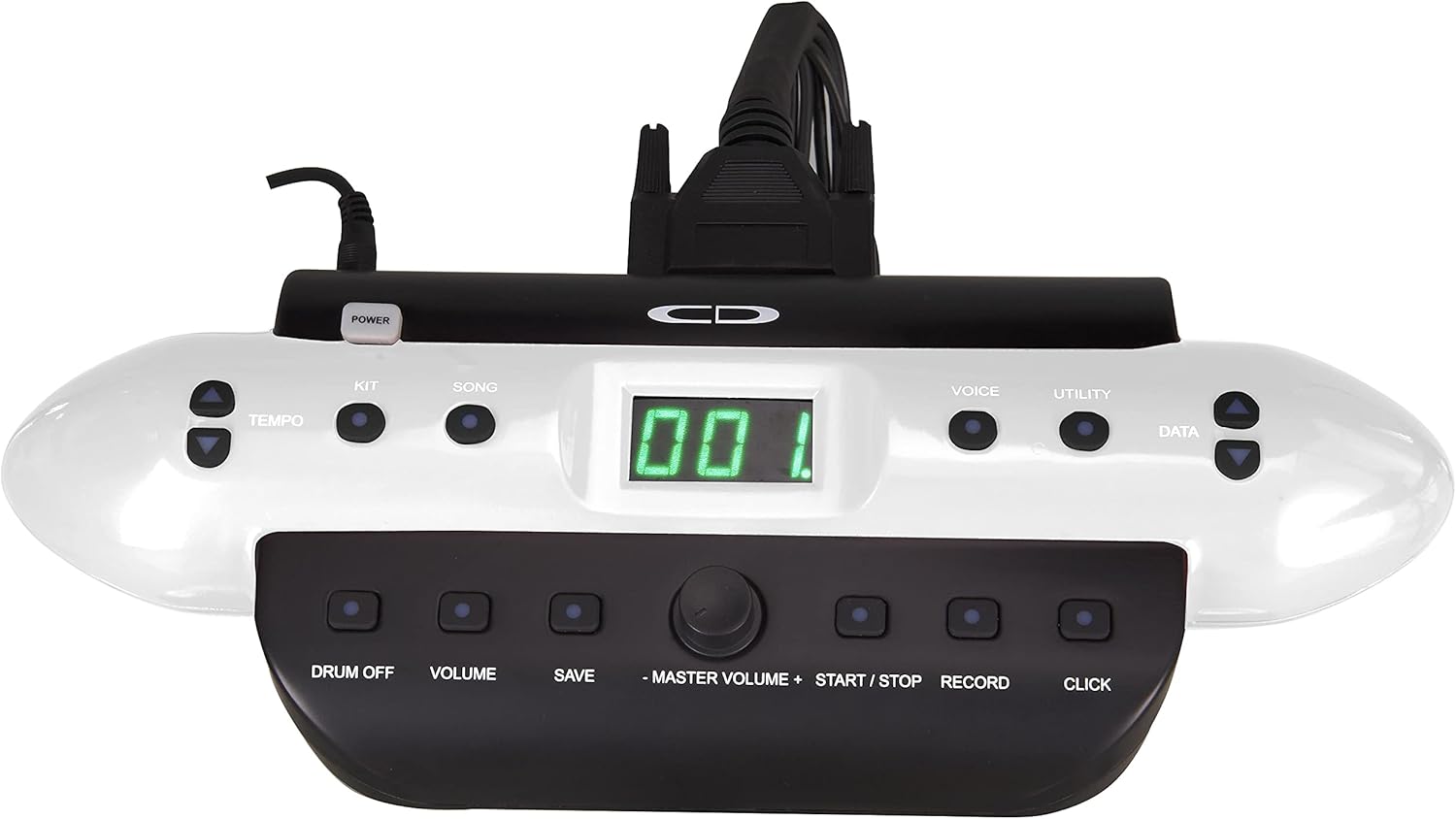
The Commander 120 drum module is the central control unit for your electronic drum set. It features a clear display and intuitive buttons for navigation and sound control.

Kuva: Edessä view of the Commander 120 drum module, showing the display, control buttons, and master volume knob.
Peruskäyttö
- Virta päälle/pois: Paina POWER button located on the module to turn the unit on or off.
- Pää-äänenvoimakkuus: Säädä kokonaisäänenvoimakkuutta käyttämällä suurta PÄÄ-ÄÄNENVOIMAKKUUS nuppi.
- Pakkauksen valinta: Paina PAKKI button to enter Kit selection mode. Use the TIEDOT buttons (up/down arrows) or the master volume knob to scroll through the 20 preset kits or 10 user kits.
- Äänen valinta: Paina ÄÄNI button to select individual drum or percussion sounds. Use the TIEDOT buttons to choose a voice.
- Kappaleen toisto: Paina LAULU button to access the onboard songs. Use the TIEDOT buttons to select a song. Press START/STOP pelata tai keskeyttää.
- Tempon säätö: Paina TEMPO -painiketta ja käytä TIEDOT painikkeita kappaleiden tai metronomin tempon säätämiseen.
- Metronome (Click): Paina NAPSAUTA -painiketta metronomin aktivoimiseksi tai deaktivoimiseksi.
- Tallennus: Paina TALLENTAA button to start recording your performance. Press again to stop.
- Asetusten tallentaminen: After making changes to a user kit or other settings, press the TALLENTAA button to store them. Follow the on-screen prompts.
- Apuohjelmatoiminnot: Paina APUOHJELMA button to access advanced settings such as sensitivity, trigger curves, and MIDI parameters.
Huolto
- Puhdistus: Use a soft, dry cloth to clean the drum module, pads, and cymbals. For stubborn dirt, a slightly damp liinaa voidaan käyttää ja sen jälkeen kuivaa liinaa. Vältä hankaavia puhdistusaineita tai liuottimia.
- Kaapelin hallinta: Varmista, että kaikki kaapelit on vedetty siististi eivätkä ole jännityksessä vaurioiden välttämiseksi.
- Varastointi: Kun rumpusettiä ei käytetä pitkään aikaan, säilytä sitä viileässä, kuivassa paikassa, poissa suorasta auringonvalosta ja äärimmäisistä lämpötiloista.
- Tyynyjen hoito: Avoid hitting the pads with excessive force, as this can reduce their lifespan.
Vianetsintä
| Ongelma | Mahdollinen syy | Ratkaisu |
|---|---|---|
| Ei ääntä kuulokkeista/kaiuttimista. |
|
|
| Specific pad not triggering sound. |
|
|
| Kaksinkertainen laukaisu tai epäonnistuneet laukaisut. |
|
|
Tekniset tiedot
| Ominaisuus | Yksityiskohta |
|---|---|
| Mallin nimi | 120 CSD |
| Rumpusarjat | 20 esiasetusta, 10 käyttäjäasetusta |
| Äänet | 250 Drum & Percussion Samples |
| Onboard Songs | 20 |
| Yhteydet | USB, MIDI In/Out, Aux In, Output (L/Mono, R), Phones, DC In |
| Materiaali | Muovia, metallia |
| Väri | Musta |
| Tuotteen paino | 33 puntaa (14.97 kg) |
| Tuotteen mitat (P x L x K) | 20 x 8 x 17 tuumaa (50.8 x 20.32 x 43.18 cm) |
| Valmistaja | Samson Technologies |
Takuutiedot
Carlsbro products are typically covered by a limited manufacturer's warranty. Please refer to the warranty card included with your product or visit the official Carlsbro website for specific terms and conditions, including warranty duration and coverage details. Keep your proof of purchase for warranty claims.
Asiakastuki
For technical assistance, spare parts, or further inquiries regarding your Carlsbro CSD120 Electronic Drum Set, please contact Carlsbro customer support through their official website. You may also refer to the retailer where the product was purchased for support options.