
1. Johdanto
This manual provides detailed instructions for the installation, operation, and maintenance of the RISCO RP296E04000A Output Expansion Module. This module is designed to expand the output capabilities of compatible security systems, offering flexible programming options for various applications.
The RP296E04000A module allows for programmable outputs, configurable as Normally Closed (N.C.) or Normally Open (N.O.), and can be set for latched or pulsed operation. Activation of these outputs can be triggered by system status, specific partitions, events, zones, or user actions, providing versatile control within your security setup.
2. Tuote ohiview
The RISCO RP296E04000A is a crucial component for enhancing the functionality of your security system. Below are images of the module to help with identification and installation.
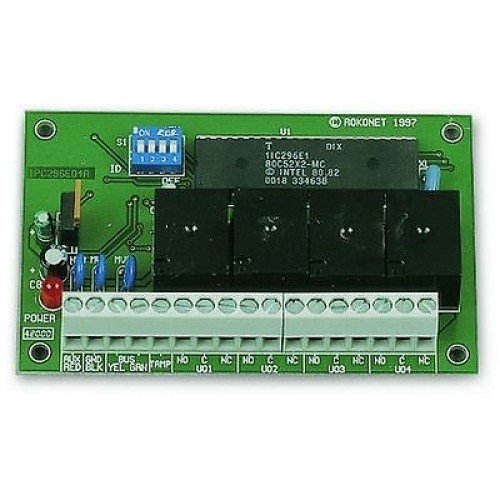
Kuva 1: Etuosa view of the RISCO RP296E04000A Output Expansion Module. This image shows the compact design of the module, typically used for expanding system outputs.

Figure 2: RISCO RP296E04000A Output Expansion Module, illustrating the connection terminals. This view is essential for understanding wiring and installation points.
3. Asennus ja asennus
Tärkeää: Installation should only be performed by qualified personnel in accordance with all local and national electrical codes. Disconnect power to the main control panel before beginning installation.
- Asennus: Select a suitable location within the control panel enclosure or a dedicated auxiliary enclosure. Ensure adequate ventilation and protection from environmental factors. Secure the module using appropriate fasteners.
- Johdotus:
- Connect the module to the main control panel's data bus (e.g., RS485) using shielded cable, following the system's wiring diagram.
- Connect the power supply to the module, ensuring correct polarity and voltage as specified in the technical documentation.
- Wire the devices to be controlled (e.g., sirens, strobes, access control relays) to the module's output terminals. Refer to the system's wiring diagram for specific output assignments.
- Kokoonpano: After physical installation, power on the main control panel. Access the system's programming menu to configure the RP296E04000A module. This typically involves:
- Assigning a unique address to the module on the data bus.
- Defining each output as Normally Closed (N.C.) or Normally Open (N.O.).
- Setting the output behavior (latched or pulsed).
- Specifying the activation triggers (e.g., alarm event, system arm/disarm, specific zone status, user code entry).
- Testaus: Thoroughly test all configured outputs to ensure they function correctly according to their programmed triggers.
4. Moduulin käyttö
The RISCO RP296E04000A module operates as an extension of your main security control panel. Once configured, its outputs will activate automatically based on the programmed conditions. There are no direct user controls on the module itself; all operation is managed through the main control panel's interface.
Keskeisiä operatiivisia näkökohtia ovat:
- Output States: Outputs will switch between their N.C. (Normally Closed) or N.O. (Normally Open) states as programmed.
- Latched Outputs: An output configured as latched will remain in its activated state until a specific reset condition is met (e.g., system disarm, manual reset).
- Pulsed Outputs: An output configured as pulsed will activate for a predefined duration and then return to its normal state automatically. This is useful for momentary actions like triggering a gate opener.
- Laukaisuehdot: The module's outputs respond to various triggers defined during configuration, such as:
- Järjestelmän tila: Arming/disarming, alarm conditions.
- Partition Status: Specific partition armed/disarmed or in alarm.
- Tapahtumat: Specific system events (e.g., tamper, fault, fire).
- Alueen tila: A particular zone being violated or restored.
- Käyttäjän toimet: Entry of a specific user code, or activation via a user menu.
Refer to your main security system's user manual for details on how to monitor and manage output states and events.
5. Huolto
The RISCO RP296E04000A Output Expansion Module is designed for reliable, long-term operation with minimal maintenance. However, periodic checks are recommended to ensure optimal performance.
- Silmämääräinen tarkastus: Periodically inspect the module and its wiring for any signs of damage, loose connections, or corrosion. Ensure the module is securely mounted.
- Puhdistus: If necessary, gently clean the exterior of the module with a soft, dry cloth. Do not use liquid cleaners or solvents, as these can damage the electronic components.
- Laiteohjelmistopäivitykset: Check with your security system installer or RISCO support for any available firmware updates for the module. Updates may improve performance or add new features.
- Järjestelmän testaus: Regularly test the functionality of the outputs connected to the module as part of your overall security system maintenance routine.
For any complex maintenance or repair, contact a qualified security technician.
6. Vianmääritys
If you experience issues with your RP296E04000A Output Expansion Module, refer to the following common troubleshooting steps:
| Ongelma | Mahdollinen syy | Ratkaisu |
|---|---|---|
| Lähtö ei aktivoidu |
|
|
| Module not recognized by control panel |
|
|
| Output activates unexpectedly |
|
|
If the problem persists after attempting these steps, contact your installer or RISCO technical support for further assistance.
7. Tekniset tiedot
| Ominaisuus | Yksityiskohta |
|---|---|
| Mallinumero | RP296E04000A |
| Merkki | Risko |
| Tuotetyyppi | Output Expansion Module (Security Electronics) |
| Lähtöasetukset | Normally Closed (N.C.) or Normally Open (N.O.) |
| Lähtökäyttäytyminen | Latched or Pulsed |
| Aktivointikäynnistimet | System Status, Partition, Event, Zone, User |
| Valmistaja | RISKI |
| Paristot vaaditaan | Ei |
| Mukana paristot | Ei |
| ASIN | B01NA6OLEL |
| tuotteen tila | Currently in production |