
MIDAS DM16
MIDAS DM16 -käyttöohje
16 Input Analogue Live ja Studio Mixer
1. Johdanto
This manual provides comprehensive instructions for the operation and maintenance of your MIDAS DM16 16 Input Analogue Live and Studio Mixer. The DM16 is designed for both live performance and studio recording environments, featuring award-winning MIDAS microphone preamplifiers and robust construction.
Please read this manual thoroughly before operating the device to ensure proper usage and to maximize its lifespan.
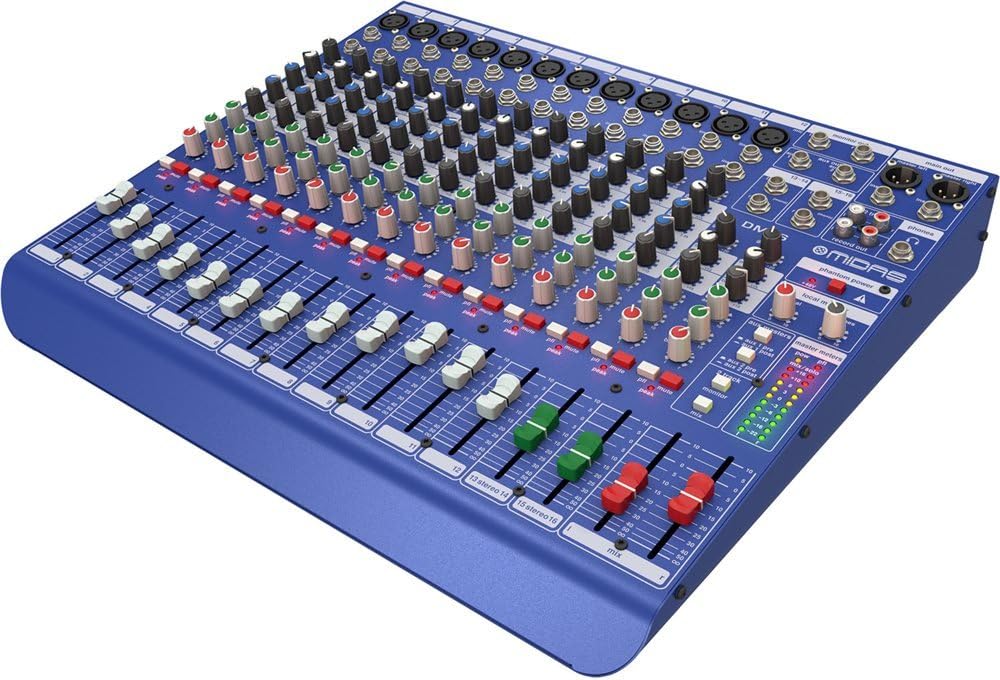
Kuva 1.1: Edestä kulmassa view of the MIDAS DM16 mixer.
2. Asennus
2.1 Pakkauksesta purkaminen ja tarkastus
Upon receiving your MIDAS DM16, carefully unpack the unit and inspect it for any signs of damage that may have occurred during transit. Retain the original packaging materials for future transport or storage.
Laatikon mukana:
- MIDAS DM16 16-tuloinen analoginen live- ja studiomikseri
- Virtajohto
- Käyttöopas (tämä asiakirja)
2.2 Virtaliitäntä
The DM16 operates on a standard AC power supply. Connect the provided power cord to the AC inlet on the rear panel of the mixer and then to a suitable power outlet. Ensure the power switch is in the 'Off' position before connecting to power.
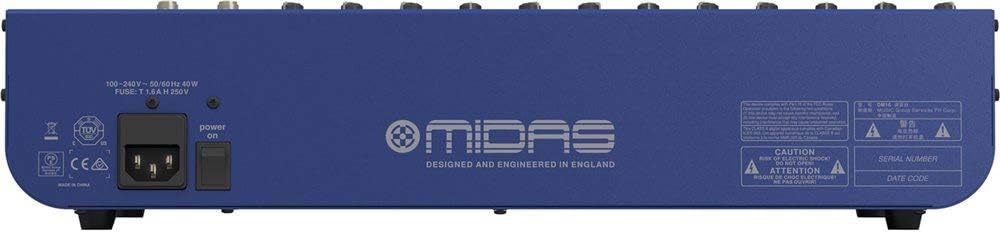
Figure 2.1: Rear panel of the MIDAS DM16 showing power input and warnings.
2.3 Tulo- ja lähtöliitännät
The DM16 features a variety of input and output options for connecting microphones, instruments, and other audio devices.
- Mikrofonitulot: 12 mono input channels with XLR connectors for microphones. These channels feature MIDAS microphone preamppelastajia.
- Rivitulot: 2 electronically-balanced stereo line input channels on 1/4" TRS connectors for instruments or line-level devices.
- Päälähdöt: Yhdistä pää-PA-järjestelmään tai äänitysliitäntään.
- Aux Sends: For monitor mixes or effects sends.
- Kuulokkeiden lähtö: Äänen monitorointiin.
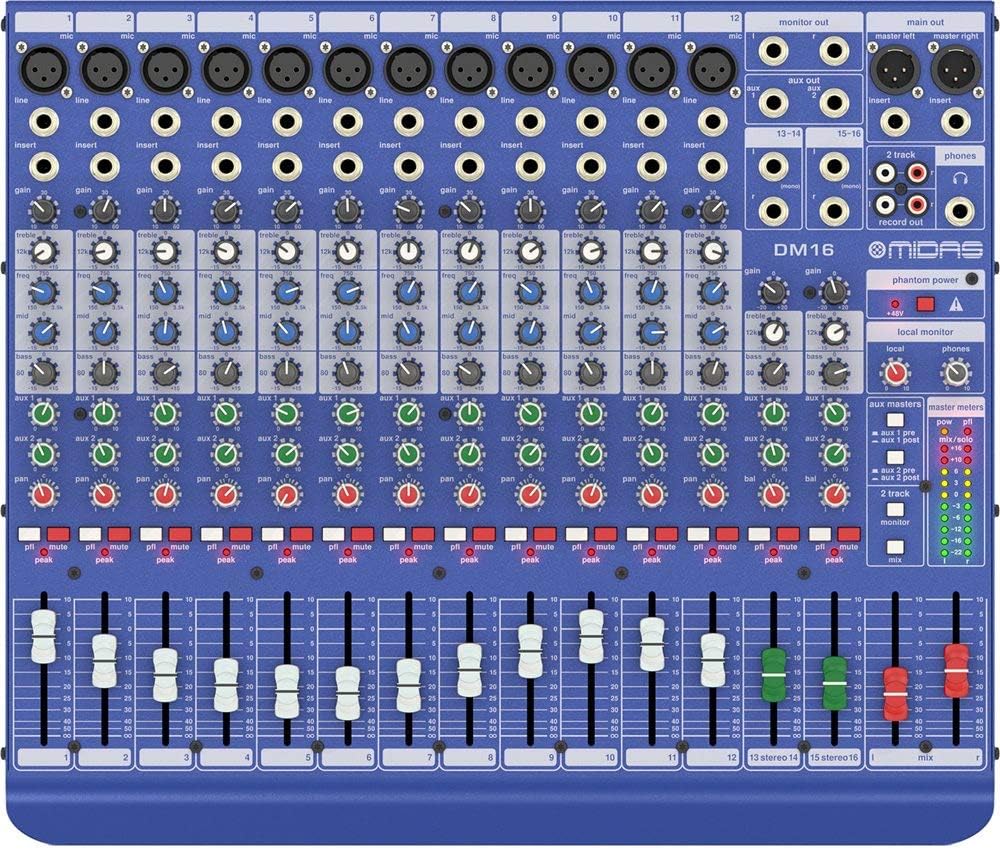
Kuva 2.2: Yläosa view of the MIDAS DM16 showing all input/output connections and controls.
3. Käyttöohjeet
3.1 Kanavaohjaimet
Each mono input channel on the DM16 features the following controls:
- SAADA: Adjusts the input sensitivity for the microphone preampelävämpi.
- EQ: A 3-band equalizer with a swept mid-band for precise tone shaping.

Kuva 3.1: Yksityiskohtainen view of the 3-band EQ section on a mono channel.
- AUX 1/2: Controls the level sent to the auxiliary outputs. These can be switched pre/post fader.

Figure 3.2: Aux masters section with pre/post fader switching.
- PANOROIDA: Säätää kanavan stereosijaintia.
- MYKISTÄ: Hiljentää kanavan.
- PEAK LED: Ilmaisee, milloin tulosignaali leikkautuu.
- FADER: Säätää kanavan lähtötasoa päämiksaukseen nähden.

Figure 3.3: Channel faders for precise level control.
3.2 Phantom Power
The DM16 provides +48V phantom power for condenser microphones. This is a global switch, meaning it applies to all microphone inputs simultaneously. Ensure all connections are made before activating phantom power to prevent damage to non-phantom powered devices.

Figure 3.4: Phantom power switch.
3.3 Valvonta
Use the headphone output and monitor controls to listen to the main mix or specific auxiliary sends. The monitor section includes controls for local monitor and phones output levels.

Figure 3.5: Monitor and headphone controls.
4. Huolto
Proper maintenance ensures the longevity and optimal performance of your MIDAS DM16 mixer.
- Puhdistus: Use a soft, dry cloth to clean the exterior of the mixer. Avoid abrasive cleaners or solvents that could damage the finish or controls.
- Pölysuojaus: Keep the mixer covered when not in use to prevent dust accumulation, especially around faders and knobs.
- Ilmanvaihto: Varmista riittävä ilmankierto laitteen ympärillä ylikuumenemisen estämiseksi. Älä tuki tuuletusaukkoja.
- Varastointi: Store the mixer in a cool, dry environment away from direct sunlight and extreme temperatures.
5. Vianmääritys
This section addresses common issues you might encounter with your DM16 mixer.
- Ei virtaa:
- Check if the power cord is securely connected to both the mixer and the power outlet.
- Varmista, että pistorasia toimii.
- Varmista, että takapaneelin virtakytkin on 'On'-asennossa.
- Ei äänilähtöä:
- Tarkista kaikki tulo- ja lähtökaapeliliitännät.
- Ensure channel faders and the main mix fader are raised.
- Verify that the MUTE buttons on active channels are not engaged.
- Check the gain settings for each channel.
- Confirm that your connected speakers or monitoring system are powered on and functioning correctly.
- Vääristynyt ääni:
- Reduce the GAIN setting on the input channel if the PEAK LED is frequently illuminating.
- Lower the output level of the connected source device.
- Tarkista vialliset kaapelit.
- Hurina tai kohina:
- Varmista, että kaikki kaapelit ovat asianmukaisesti suojattuja ja hyvässä kunnossa.
- Tarkista maadoitussilmukat; kokeile kytkeä kaikki äänilaitteet samaan jatkojohtoon.
- Pidä äänikaapelit erillään virtakaapeleista.
Jos kohtaat ongelmia, joita ei ole käsitelty tässä, katso tukiosio.
6. Tekniset tiedot
| Ominaisuus | Yksityiskohta |
|---|---|
| Tuotetyyppi | Analoginen live- ja studiomikseri |
| Tulokanavat | 16 (12 mono, 2 stereo) |
| Mikrofoni Preamppelastajia | Award-winning MIDAS preamppelastajia |
| EQ on Mono Channels | 3-band with swept mid band |
| Aux lähettää | 2 (with pre/post fader switching) |
| Virtalähde | Johdollinen sähkö |
| Tuotteen paino | 11.02 puntaa (5.0 kg) |
| Tuotteen mitat (P x L x K) | 17.24 x 14.57 x 3.74 tuumaa (438 x 370 x 95 mm) |
| Alkuperämaa | Kiina |
| Mallinumero | 16 DM |
| Yhteystekniikka | Ylimääräinen |
7. Takuu ja tuki
7.1 Takuutiedot
Your MIDAS DM16 mixer is covered by a limited warranty against defects in materials and workmanship. Please refer to the warranty card included with your product or visit the official MIDAS websivustolta tarkemmat takuuehdot.
Huomautus: The warranty may not cover damage caused by improper use, unauthorized modifications, or natural disasters.
7.2 Asiakastuki
For technical assistance, troubleshooting, or service inquiries, please contact MIDAS customer support through their official websivustolla tai tuotedokumentaatiossa annetuissa yhteystiedoissa.
Verkkoresurssit:
- Official MIDAS Websivusto: www.midasconsoles.com
- Product Support Page: (Specific link if available, otherwise general websivusto)
When contacting support, please have your product model number (DM16) and serial number ready.
Ask a question about this manual
Ask about setup, troubleshooting, compatibility, parts, safety, or missing instructions. Manuals+ will review the question and use this page’s manual context to help answer it.