
Johdanto
This manual provides comprehensive instructions for the setup, operation, and maintenance of your GPX Digital AM/FM Clock Radio, model C224B. Please read this manual thoroughly before using the device to ensure proper functionality and to maximize your user experience. Keep this manual for future reference.
Tuote loppuview
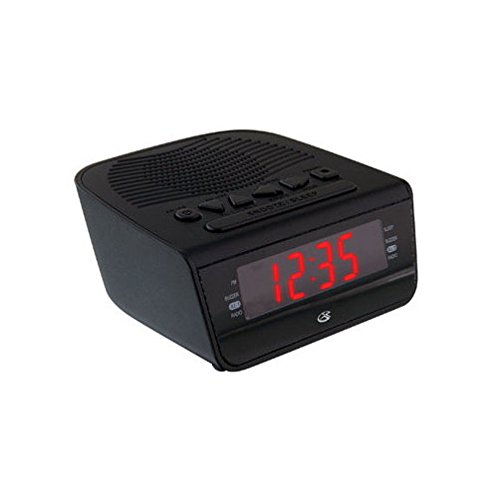
Kuva 1: Edessä view of the GPX Digital AM/FM Clock Radio. This image shows the compact black unit with its digital display and control buttons.
The GPX Digital AM/FM Clock Radio (C224B) is designed for reliable timekeeping and audio entertainment. Key features include a clear multi-display clock, AM/FM radio tuner, dual alarm functionality, and a battery backup option to ensure continuous operation during power interruptions. Its compact and modern design makes it suitable for various indoor settings.
Asennus
1. Purkaminen
Carefully remove the clock radio from its packaging. Ensure all components are present: the clock radio unit and the power adapter.
2. Virtaliitäntä
- Plug the power adapter into the DC input jack located on the back of the clock radio.
- Plug the other end of the power adapter into a standard wall outlet (AC 120V, 60Hz).
- The display will illuminate, indicating the unit is receiving power.
3. Varavirtalähteen asennus (valinnainen)
Varavirtaa varten ulkonatages, install batteries (not included).
- Paikanna paristolokero laitteen pohjasta.
- Avaa paristolokeron kansi.
- Insert the required batteries (e.g., 2 x AAA, check unit for specific type) according to the polarity markings (+ and -).
- Sulje paristolokeron kansi kunnolla.
Huomautus: Batteries are for backup only and will not power the display or radio functions continuously. They preserve time and alarm settings during a power interruption.
Käyttöohjeet
1. Ajan asettaminen
- Paina ja pidä painettuna AJAN ASETUS -painiketta, kunnes näyttö vilkkuu.
- Käytä TUNNIN ja MINUUTI painikkeita ajan säätämiseksi.
- Paina AJAN ASETUS uudelleen vahvistaaksesi ja poistuaksesi ajan asetustilasta.
2. Hälytysten asettaminen (Hälytys 1 ja hälytys 2)
This unit features dual alarms, allowing you to set two independent wake-up times.
- Paina ja pidä painettuna HÄLYTYS 1 SET (tai HÄLYTYS 2 SET) button until the alarm time flashes.
- Käytä TUNNIN ja MINUUTI -painikkeita halutun hälytysajan säätämiseksi.
- Paina HÄLYTYS 1 SET (tai HÄLYTYS 2 SET) again to confirm the time.
- Immediately after confirming the time, use the HÄLYTYSTILA button to select the alarm source: SUMMERI or RADIO.
- The alarm icon (e.g., AL1 or AL2) will appear on the display, indicating the alarm is active.
To turn off an alarm, press the corresponding HÄLYTYS 1 ON/OFF (tai HÄLYTYS 2 ON/OFF) button. The alarm icon will disappear.
3. AM/FM-radion käyttö
- Paina RADIO PÄÄLLE/POIS painiketta radion käynnistämiseksi.
- Paina BAND -painiketta vaihtaaksesi AM- ja FM-taajuusalueiden välillä.
- Käytä TUNE + or VIRITYS - painikkeita virittääksesi manuaalisesti halutulle asemalle.
- To automatically scan for the next available station, press and hold TUNE + or VIRITYS - muutaman sekunnin ajan.
- Säädä äänenvoimakkuutta VOLUME + or ÄÄNENVOIMAKKUUS - painikkeita.
- Sammuta radio painamalla RADIO PÄÄLLE/POIS painiketta uudelleen.
4. Torkkutoiminto
Kun hälytys soi, paina TORKUTA -painiketta mykistääksesi hälytyksen tilapäisesti noin 9 minuutiksi. Hälytys soi uudelleen torkkujakson jälkeen.
5. Lepotilatoiminto
The sleep function allows the radio to play for a set duration before automatically turning off.
- Kun radio soi, paina NUKKUA -painiketta toistuvasti selataksesi käytettävissä olevia uniaikoja (esim. 90, 60, 30, 15 minuuttia, POIS PÄÄLTÄ).
- Radio sammuu automaattisesti valitun ajan kuluttua.
Huolto
1. Puhdistus
To clean the unit, wipe the exterior with a soft, slightly damp cloth. Do not use abrasive cleaners or solvents, as these may damage the finish. Ensure the unit is unplugged before cleaning.
2. Pariston vaihto
If the battery backup function is not working, or if the unit loses time during a power outage, the backup batteries may need replacement. Follow the "Battery Backup Installation" steps in the Setup section to replace them.
Vianetsintä
| Ongelma | Mahdollinen syy | Ratkaisu |
|---|---|---|
| Yksikkö ei käynnisty. | Virtasovitin ei ole kytketty tai pistorasia on viallinen. | Varmista, että virtalähde on kytketty kunnolla laitteeseen ja toimivaan pistorasiaan. Kokeile toista pistorasiaa. |
| Hälytys ei soi. | Herätystä ei ole asetettu, hälytyksen äänenvoimakkuus on liian alhainen tai hälytys on pois päältä. | Verify alarm time and source (buzzer/radio) are set correctly. Ensure alarm is activated (icon visible). Increase radio volume if alarm source is radio. |
| Huono radiovastaanotto. | Heikko signaali tai häiriö. | Adjust the position of the unit or the antenna (if external). Move away from other electronic devices that may cause interference. |
| Aika/asetukset katoavat virrankatkoksen jälkeentage. | Varmuuskopioparistot ovat tyhjentyneet tai niitä ei ole asennettu. | Install fresh backup batteries or replace existing ones. |
Tekniset tiedot
- Malli: C224B
- Virtalähde: AC 120V, 60Hz (main); Battery Powered (backup)
- Näyttötyyppi: LED digitaalinen näyttö
- Radioyhtyeet: AM/FM
- Mitat (noin): 5.12 cm L x 5.12 cm K
- Paino (noin): 3 puntaa
- Väri: Musta
- Materiaali: Muovi
Takuu ja tuki
For warranty information or technical support, please refer to the warranty card included with your product or visit the official GPX website. Do not attempt to repair this unit yourself, as this may void your warranty.
GPX Official Websivusto: www.gpx.com