
1. Johdanto
This manual provides instructions for the proper use and maintenance of your Casio GX-12B Value Series Desk Top/Compact Desk Type Calculator. Please read this manual thoroughly before using the calculator to ensure optimal performance and longevity.
Tärkeimmät ominaisuudet:
- Extra Large 12-Digit Display
- Two-Way Power (Solar and Battery)
- 2 Independent Memories
- Item Counter Function
- Mark-up Percentage Toiminto
- Durable Plastic Keys
- Compact Desk Type Design
2. Asennus ja virtalähde
Virtalähde:
The Casio GX-12B calculator operates on a two-way power system, utilizing both solar power and a single LR44 button-cell battery. For optimal performance, ensure the solar panel is exposed to sufficient light. In low-light conditions, the battery automatically takes over.
Akun asennus/vaihto:
- Varmista, että laskin on sammutettu.
- Etsi laskimen takaa paristolokeron kansi.
- Using a small screwdriver, carefully remove the screw and open the battery compartment cover.
- Remove the old LR44 battery (if replacing) and insert a new LR44 battery with the positive (+) side facing up.
- Aseta paristolokeron kansi takaisin paikalleen ja kiinnitä se ruuvilla.
- Paina AC (All Clear) button to reset the calculator.
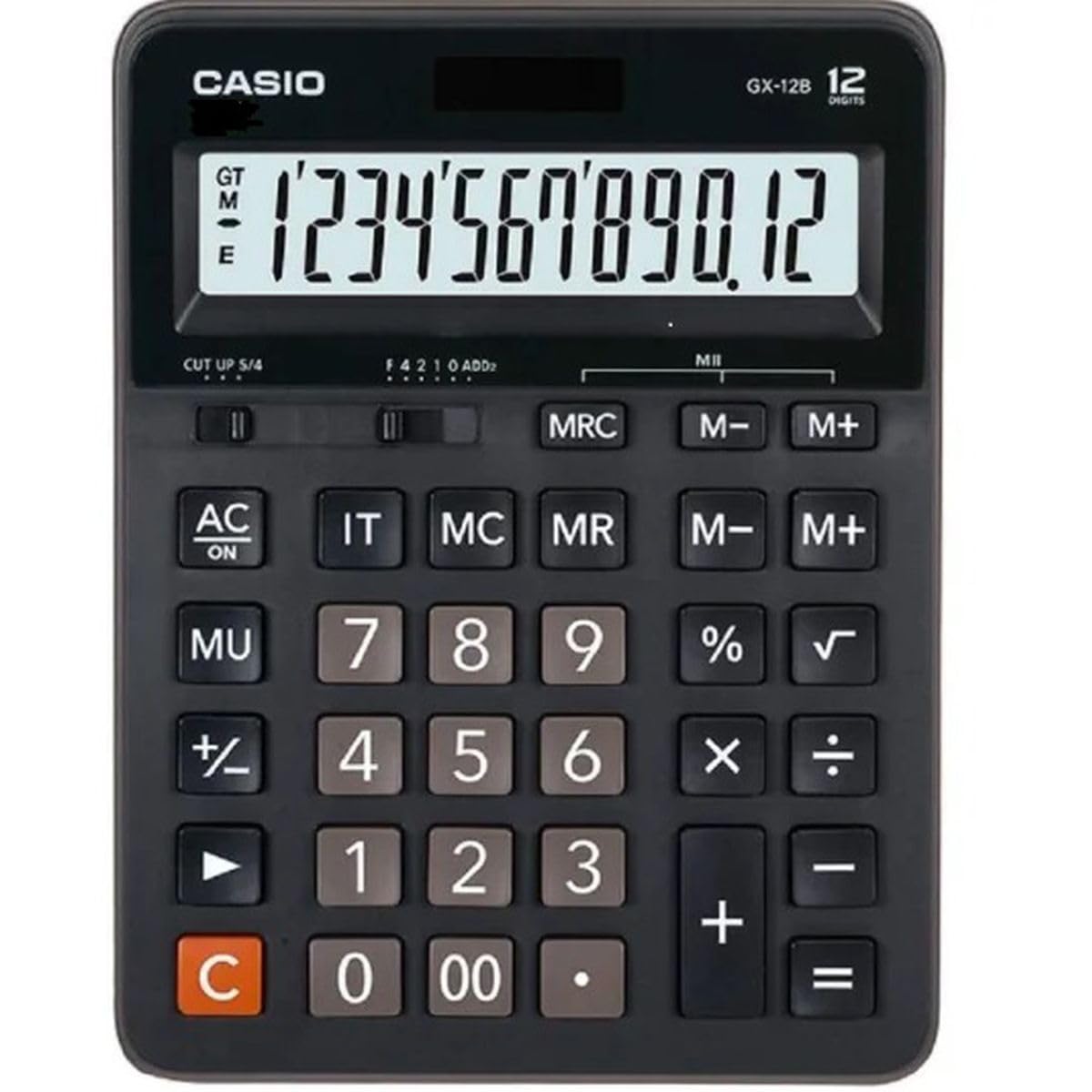
This image displays the Casio GX-12B calculator, highlighting its approximate length of 8.8 inches (22 cm) for scale. The calculator features a large display and clearly labeled keys.
3. Perustoiminnot
Familiarize yourself with the key functions to perform calculations efficiently.
Avaintoiminnot ohiview:
- AC: All Clear. Clears all values and operations, resetting the calculator.
- C: Clear Entry. Clears the last entered number.
- + / - / × / ÷: Basic arithmetic operations.
- =: Executes the pending calculation.
- %: Prosenttiatage key. Used for percentage calculations (e.g., 100 + 10% = 110).
- MU: Mark-up key. Used for profit margin calculations.
- M+: Lisää näytetyn arvon muistiin.
- M-: Vähentää näytetyn arvon muistista.
- MRC: Memory Recall/Clear. Press once to recall the memory value. Press twice to clear the memory.
- IT: Item Counter. Counts the number of entries in a series of calculations.
Example Calculations:
- Lisäys: To calculate 123 + 456:
- Paina AC
- Enter 123
- Paina +
- Enter 456
- Paina = (Tulos: 579)
- Prosenttitage: To add 10% to 200:
- Paina AC
- Enter 200
- Paina +
- Enter 10
- Paina % (Tulos: 220)
- Muistin toiminto: To calculate (5 × 3) + (8 × 2):
- Paina AC
- Enter 5 × 3 M+ (15 is added to memory)
- Enter 8 × 2 M+ (16 is added to memory)
- Paina MRC (Tulos: 31)
- Paina MRC again to clear memory.
4. Hoito ja huolto
- Puhdistus: Wipe the calculator with a soft, dry cloth. For stubborn dirt, use a cloth lightly dampened with water and a mild detergent, then wipe dry immediately. Avoid using strong solvents or abrasive cleaners.
- Varastointi: Säilytä laskinta viileässä, kuivassa paikassa, poissa suorasta auringonvalosta ja äärimmäisistä lämpötiloista.
- Vältä vaikutusta: Älä pudota laskinta tai altista sitä voimakkaille iskuille, sillä se voi vahingoittaa sen sisäisiä komponentteja tai näyttöä.
- Akun kesto: If the display becomes dim or unresponsive, replace the LR44 battery.
5. Vianmääritys
| Ongelma | Mahdollinen syy | Ratkaisu |
|---|---|---|
| Näyttö on tyhjä tai himmeä. | Riittämätön valo aurinkopaneelille tai akun varaus on heikko. | Move the calculator to a brighter area. Replace the LR44 battery if the issue persists. |
| Virheelliset laskutulokset. | Incorrect key input, or memory not cleared. | Paina AC to clear all operations and memory, then re-enter the calculation. Ensure correct order of operations. |
| Näppäimet eivät reagoi. | Low battery, or internal malfunction. | Replace the LR44 battery. If the problem continues, contact customer support. |
6. Tekniset tiedot
- Malli: GX-12B
- Näyttö: 12-Digit Extra Large LCD
- Virtalähde: Two-Way Power (Solar and 1 x LR44 Battery)
- Mitat (P x L): Noin 20.8 cm x 15.9 cm (8.2 tuumaa x 6.3 tuumaa)
- Paino: Noin 0.32 kg (0.7 lbs)
- Materiaali: Muovi
- Toiminnot: Basic arithmetic, Percentage, Mark-up, Memory (M+, M-, MRC), Item Counter
7. Takuutiedot
This Casio product is covered by a Limited Warranty. For specific terms, conditions, and duration of the warranty, please refer to the warranty card included with your purchase or visit the official Casio websivusto. Säilytä ostokuitti takuuvaatimuksia varten.
8. Asiakastuki
If you encounter any issues not covered in this manual or require further assistance, please contact Casio customer support. Contact details can typically be found on the official Casio websivustolla tai tuotepakkauksessa.