
UNIC UC46 IDSP-011
UNIC UC46 Mini Projector User Manual
Model: UC46 IDSP-011
1. Johdanto
This user manual provides detailed instructions for the operation, setup, and maintenance of your UNIC UC46 Mini Projector. Please read this manual thoroughly before using the product to ensure proper and safe operation. Keep this manual for future reference.
Turvallisuustiedot
- Älä katso suoraan projektorin linssiin, kunamp on päällä.
- Ensure proper ventilation around the projector to prevent overheating. It is recommended to rest the projector after 4-5 hours of continuous operation.
- Pidä projektori poissa vedestä tai muista nesteistä.
- Käytä ainoastaan projektorin mukana toimitettua virtalähdettä.
- Älä yritä purkaa tai korjata projektoria itse. Ota yhteyttä pätevään huoltohenkilöstöön saadaksesi apua.
- This projector is designed for home entertainment and is not suitable for professional teaching, meetings, or business presentations.
2. Tuotteen ominaisuudet
- Kannettava muotoilu: Compact and lightweight, ideal for home use, camping, and outdoor parties.
- Suuri kirkkaus: 1200 lumens LED lamp for clear and vibrant images.
- Alkuperäinen resoluutio: 800x480 pixels, supporting up to 1920x1080 (Full HD) via input.
- Suuri projektiokoko: Heijastaa kuvia 34 - 130 tuuman kokoisina.
- Useita yhteysvaihtoehtoja: HDMI, VGA, USB, AV, SD Card, and IR.
- Langaton yhteys: Supports WiFi, Miracast, and DLNA for seamless smartphone integration (iOS, Android, Windows).
- Pitkä LED-käyttöikä: Lamp käyttöikä noin 20,000 tuntia.
3. Pakkauksen sisältö
Valitse seuraavat kohdat rastittamalla ruutu:
- UNIC UC46 Mini Projector
- Virtakaapeli
- 3-in-1 AV-kaapeli
- Kaukosäädin
- Käyttöopas (tämä asiakirja)
4. Tuote ohiview
Familiarize yourself with the different parts and controls of your UNIC UC46 Mini Projector.
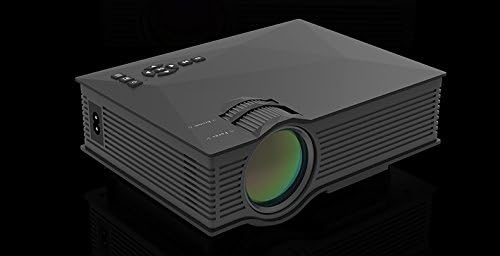
Kuva 4.1: Edessä ja sivulla View of the UNIC UC46 Mini Projector. Shows the main lens, focus wheel, and ventilation grilles.

Kuva 4.2: Takaosa View of the Projector. Displays various input ports including HDMI, USB, AV, SD card slot, and audio output.

Kuva 4.3: Yläosa View of the Projector. Shows the control panel buttons for navigation, power, and input selection.

Figure 4.4: Lens Focus and Keystone Adjustment Diagram. Illustrates the location of the lens focus and keystone correction wheels, along with a diagram of the remote control functions.
5. Asennus
5.1 Sijoitus
Place the projector on a stable, flat surface. Ensure there is adequate space around the projector for ventilation. The projection distance will determine the screen size. Refer to the specifications for recommended distances.
5.2 Virtaliitäntä
- Connect the power cable to the projector's AC power input port.
- Plug the other end of the power cable into a standard electrical outlet (100-240V, 50/60Hz).
- Projektorin virran merkkivalo syttyy.
5.3 Ensimmäinen käynnistys
- Käynnistä laite painamalla projektorin tai kaukosäätimen virtapainiketta.
- Projektori näyttää aloitusnäytön.
5.4 Kuvan säätö
- Painopiste: Rotate the focus wheel (located near the lens) until the projected image is clear and sharp.
- Keystone-korjaus: If the image appears trapezoidal, adjust the keystone correction wheel (usually next to the focus wheel) to square the image.
6. Käyttöohjeet
6.1 Laitteiden liittäminen
The UNIC UC46 projector supports various input sources:
- HDMI: Connect a PC, laptop, DVD player, game console (PS3, PS4), or Smart TV box using an HDMI cable. Select "HDMI" as the input source.
- VGA: Connect a PC or laptop using a VGA cable. Select "VGA" as the input source.
- USB: Aseta USB-muistitikku toistaaksesi mediaa files (videos, photos, music, text). Select "USB" as the input source and navigate through the files.
- AV: Use the included 3-in-1 AV cable to connect devices with AV output (e.g., older DVD players, VCRs). Select "AV" as the input source.
- SD-kortti: Insert an SD card into the slot to play media files. Select "SD" as the input source.
6.2 Wireless Connectivity (WiFi)
The projector supports WiFi connectivity for screen mirroring from smartphones (iOS, Android, Windows) and DLNA.
- Go to the "WiFi" or "Wireless" menu on the projector.
- Select your WiFi network and enter the password to connect the projector to your home network.
- For screen mirroring (Miracast/AirPlay):
- Ensure your smartphone and the projector are connected to the same WiFi network.
- On your smartphone, enable screen mirroring (e.g., "Screen Mirroring," "Smart View," "AirPlay," "Wireless Display").
- Valitse projektori käytettävissä olevien laitteiden luettelosta.
- For DLNA:
- Ensure your smartphone and the projector are connected to the same WiFi network.
- Use a DLNA-compatible app on your smartphone to stream media to the projector.
6.3 Äänilähtö
The projector has a built-in speaker. For enhanced audio, you can connect external speakers or a sound system via the 3.5mm audio output port.
7. Huolto
7.1 Linssin puhdistaminen
Pyyhi projektorin linssi varovasti pehmeällä, nukkaamattomalla liinalla, joka on suunniteltu erityisesti optisille linsseille. Älä käytä hankaavia puhdistusaineita tai liuottimia.
7.2 Projektorin rungon puhdistaminen
Pyyhi projektorin ulkopinta pehmeällä, kuivalla liinalla. Pinttyneeseen likaan käytä hieman kuivaa liinalla.amp liinaa voidaan käyttää, ja sen jälkeen kuivaa liinaa.
7.3 Ilmanvaihto
Regularly check that the ventilation grilles are not blocked by dust or debris. Use a soft brush or compressed air to clean them if necessary. Proper airflow is crucial for preventing overheating and extending the projector's lifespan.
7.4Lamp Elämä
LED lamp has an estimated life of 20,000 hours. To maximize lamp life, avoid frequent on/off cycles and allow the projector to cool down properly after use.
8. Vianmääritys
| Ongelma | Mahdollinen syy | Ratkaisu |
|---|---|---|
| Ei kuvaa projisoituna | Power cable not connected; Projector not turned on; Incorrect input source selected; Input device not connected or powered on. | Check power connection; Press power button; Select correct input source (HDMI, VGA, USB, AV, SD); Ensure input device is connected and powered on. |
| Kuva on epäselvä | Lens out of focus; Incorrect projection distance. | Adjust the focus wheel; Adjust the projection distance. |
| Kuva on puolisuunnikkaan muotoinen | Projektori ei ole kohtisuorassa valkokankaaseen nähden. | Adjust the keystone correction wheel. |
| Ei ääntä | Volume too low; Muted; External audio device not connected or powered on; Audio format not supported. | Increase volume; Unmute; Check external audio connection; Ensure audio format is supported. |
| Kaukosäädin ei toimi | Batteries dead or incorrectly inserted; Obstruction between remote and IR receiver. | Vaihda paristot; varmista, että projektorin infrapunavastaanottimeen on esteetön näköyhteys. |
| Overheating / Shuts down automatically | Tukkeutunut ilmanvaihto; Pitkäaikainen käyttö. | Ensure ventilation grilles are clear; Allow projector to rest after 4-5 hours of use. |
9. Tekniset tiedot

Figure 9.1: Detailed Specifications of the UNIC UC46 Mini Projector.
| Ominaisuus | Yksityiskohta |
|---|---|
| Kuvajärjestelmä | LCD |
| Lamp | LED |
| Alkuperäinen resoluutio | 800 x 480 pikseliä |
| Tuettu enimmäisresoluutio | 1920 x 1080 pikseliä (Full HD) |
| Kirkkaus | 1200 lumenia |
| Kontrastisuhde | 800:1 |
| Virrankulutus | 50 - 55 XNUMX wattia |
| Virtalähde | 100-240V, 50/60Hz |
| Melutaso | <25dB |
| Projektion koko | 34–130 tuumaa |
| Heittoetäisyys | 1.07-3.8 metriä (3.51-12.47 jalkaa) |
| Kuvasuhde | 4:3 / 16:9 |
| Nettopaino | 1 kg |
| Linssi | Multi-layer coated glass lens |
| Tuloliittimet | USB, SD, HDMI, AV, VGA, IR |
| Lähtöpääte | Kuuloke, kaiutin |
| Langaton | 2.4G WiFi |
| Tuotteen mitat | 201mm x 153mm x 67.5mm |
10. Takuu ja tuki
Takuutietoja ja teknistä tukea varten katso tuotteen pakkauksesta tai ota yhteyttä jälleenmyyjään. Säilytä ostokuitti ostotodistuksena.