
1. Johdanto
Thank you for choosing the UNIC UC18 Mini Projector. This compact and portable projector is designed to provide a versatile viewing experience for home entertainment, presentations, and more. Featuring an LED lighting system, built-in speaker, and multiple input options, the UC18 offers convenience and functionality. Please read this manual thoroughly to ensure proper setup, operation, and maintenance of your device.
2. Turvallisuustiedot
- Virtalähde: Käytä ainoastaan määritettyä virtalähdettä. Varmista, että äänenvoimakkuus ontage vastaa projektorin vaatimuksia.
- Ilmanvaihto: Älä tuki tuuletusaukkoja. Varmista, että projektorin ympärillä on riittävästi tilaa asianmukaiselle ilmanvaihdolle ja ylikuumenemisen estämiseksi.
- Kosteus: Keep the projector away from water, rain, and excessive humidity. Do not operate with wet hands.
- Puhdistus: Disconnect power before cleaning. Use a soft, dry cloth. Avoid liquid or aerosol cleaners.
- Käsittely: Käsittele projektoria varoen. Vältä sen pudottamista tai voimakkaita iskuja.
- Silmien suojaus: Älä katso suoraan projektorin linssiin, kunamp on päällä, sillä kirkas valo voi aiheuttaa silmien rasitusta tai vaurioittaa niitä.
- purkaminen: Älä yritä purkaa tai korjata projektoria itse. Jätä kaikki huoltotyöt pätevän henkilöstön tehtäväksi.
3. Pakkauksen sisältö
Tarkista pakkauksen sisältö purkamisen jälkeen. Jos jokin puuttuu tai on vaurioitunut, ota yhteyttä jälleenmyyjään.
- UNIC UC18 Mini Projector
- Virtakaapeli
- 3-in-1 AV-kaapeli
- Remote Control (requires lithium battery, not included)
- Käyttöopas
4. Tuote ohiview
Projector Layout
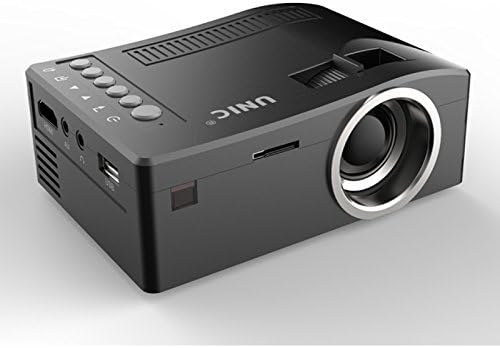
Etu ja sivu view of the UNIC UC18 Mini Projector, showing the lens, ventilation, and various ports.
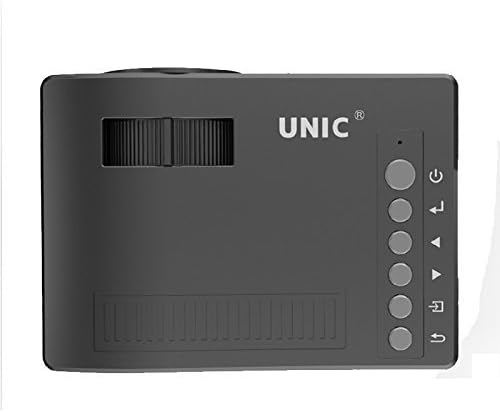
Yläosa view of the UNIC UC18 Mini Projector, highlighting the control buttons and focus wheel.
Portit ja säätimet
The UNIC UC18 Mini Projector features a range of ports and controls for easy connectivity and operation:
- Linssi: Heijastaa kuvan näytölle.
- Tarkennuspyörä: Manuaalinen säätö kuvan selkeyden parantamiseksi.
- Virtapainike: Kytkee projektorin päälle tai pois päältä.
- Valikkopainike: Avaa projektorin asetusvalikon.
- Navigointipainikkeet (ylös/alas/vasemmalle/oikealle): Käytetään valikoissa navigointiin ja asetusten muuttamiseen.
- OK -painike: Vahvistaa valikon valinnat.
- Lähde-painike: Selects the input source (HDMI, USB, AV, TF).
- USB-portti: Yhdistää USB-tallennuslaitteet median toistoa varten.
- HDMI-portti: Connects to HDMI-enabled devices like laptops, gaming consoles, or media players.
- AV-portti: Connects to devices using the included 3-in-1 AV cable.
- TF-korttipaikka: Inserts a TF (Micro SD) card for media playback.
- 3.5 mm: n kuulokeliitäntä: Connects external headphones or speakers.
- IR-vastaanotin: Vastaanottaa kaukosäätimen signaaleja.
5. Asennus
5.1 Virtaliitäntä
- Liitä virtajohto projektorin virransyöttöporttiin.
- Liitä virtajohdon toinen pää sopivaan pistorasiaan.
- Projektorin virran merkkivalo syttyy.
5.2 Syöttölaitteiden kytkeminen
- HDMI: Connect an HDMI cable from your source device (e.g., laptop, DVD player) to the projector's HDMI port.
- USB: Aseta USB-muistitikku USB-porttiin.
- AV: Use the provided 3-in-1 AV cable to connect to devices with AV output. Match the yellow, white, and red connectors.
- TF-kortti: Insert a TF (Micro SD) card into the TF card slot.
5.3 Projektorin sijoittaminen
Place the projector on a stable, flat surface. For optimal image quality, position the projector perpendicular to the projection surface (wall or screen). The throw distance can range from 0.48 to 2.43 meters, producing a picture size from 12 to 66 inches.
6. Käyttöohjeet
6.1 Virran kytkeminen päälle/pois
Press the Power button on the projector or the remote control to turn the device on or off.
6.2 Tarkennuksen säätäminen
After powering on, if the image appears blurry, rotate the manual focus wheel located near the lens until the image becomes clear and sharp.

Close-up of the manual focus wheel on the UNIC UC18 Mini Projector, located near the lens.
6.3 Tulolähteen valitseminen
Press the 'Source' button on the projector or remote control. Use the navigation buttons to select your desired input source (HDMI, USB, AV, TF) and press 'OK' to confirm.
6.4 Navigointi valikossa
Press the 'Menu' button to access the projector's settings. Use the navigation buttons to browse options and 'OK' to select. Press 'Menu' again to exit.
6.5 Äänilähtö
The projector has a built-in speaker. For private listening or connecting to external audio systems, plug headphones or external speakers into the 3.5mm headphone jack.
7. Huolto
7.1 Linssin puhdistaminen
Käytä pehmeää, nukkaamatonta liinaa, joka on erityisesti suunniteltu optisille linsseille. Pyyhi linssi varovasti pölyn tai tahrojen poistamiseksi. Vältä hankaavien materiaalien tai voimakkaiden kemikaalien käyttöä.
7.2 Projektorin rungon puhdistaminen
Wipe the exterior of the projector with a soft, dry cloth. Do not use liquid cleaners or solvents.
7.3 Varastointi
Kun projektoria ei käytetä pitkään aikaan, säilytä sitä viileässä ja kuivassa paikassa, poissa suorasta auringonvalosta ja äärimmäisistä lämpötiloista. Peitä linssi suojataksesi sitä pölyltä.
8. Vianmääritys
| Ongelma | Mahdollinen syy | Ratkaisu |
|---|---|---|
| Kuvaa ei näy | Power not connected; Incorrect input source; Loose cable connection | Check power cable; Select correct input source; Reconnect cables securely |
| Kuva on epäselvä | Tarkennusta ei ole säädetty; Projektori on liian lähellä/kaukana | Adjust the focus wheel; Reposition the projector within recommended throw distance |
| Ei ääntä | Volume too low; Muted; Audio cable not connected; Source device audio issue | Increase volume; Unmute; Check audio cable connection; Verify audio output on source device |
| Kaukosäädin ei toimi | Batteries low/incorrectly inserted; Obstruction between remote and projector | Replace batteries (lithium battery required); Ensure clear line of sight to IR receiver |
| Projektori ylikuumenee | Tukkeutunut ilmanvaihto; Pitkäaikainen käyttö kuumassa ympäristössä | Ensure ventilation openings are clear; Operate in a well-ventilated area; Allow to cool down |
9. Tekniset tiedot
Tekniset tiedot
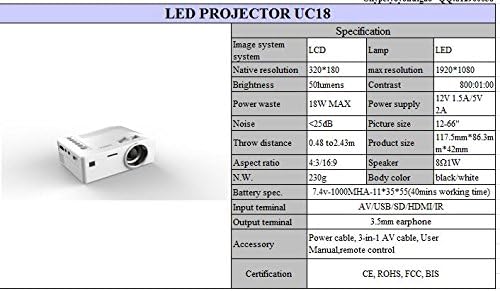
Detailed technical specifications for the UNIC UC18 Mini Projector, including resolution, contrast, and dimensions.
| Ominaisuus | Erittely |
|---|---|
| Merkki | UNIC |
| Mallin nimi | UC18 |
| Näyttötekniikka | QVGA (LCD) |
| Alkuperäinen resoluutio | 320 x 240 pikseliä |
| Suurin tuettu resoluutio | 1920 x 1080 pixels (1080P) |
| Kirkkaus | 50 lumenia |
| Kontrastisuhde | 500:1 |
| Kuvasuhde | 16:9 (also supports 4:3) |
| Heittoetäisyys | 0.48–2.43 m (1.57–7.97 jalkaa) |
| Kuvan koko | 12–66 tuumaa |
| Tuloliittimet | AV, USB, SD (TF), HDMI, IR |
| Lähtöpääte | 3.5 mm kuulokeliitin |
| Erikoisominaisuudet | Sisäänrakennettu kaiutin, kannettava |
| Virrankulutus | 24 wattia (enintään 18 wattia) |
| Virtalähde | 12V 1.5A / 5V 2A |
| Melutaso | <25dB |
| Tuotteen mitat (P x L x K) | 117.5mm x 86.3mm x 42mm |
| Nettopaino | 230 g |
| Asennustyyppi | Seinäteline |
| Kaukosäädin | Yes (battery not included) |
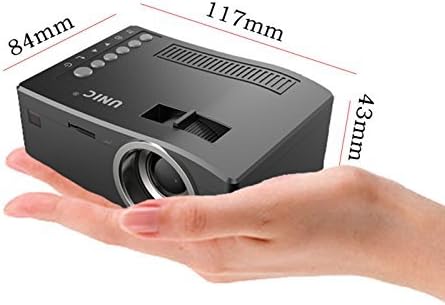
The UNIC UC18 Mini Projector held in a hand, illustrating its compact size and dimensions (117mm x 84mm x 43mm).
10. Takuu ja tuki
Jos tarvitset takuutietoja tai teknistä tukea, katso ostohetkellä toimitettuja asiakirjoja tai ota yhteyttä jälleenmyyjään. Säilytä ostokuittisi mahdollisten takuuvaatimusten varalta.