
Johdanto
This manual provides detailed instructions for the setup, operation, and maintenance of your Theater Solutions TS212 by Goldwood Bluetooth 2.1 Speaker System. Please read this manual thoroughly before using the product to ensure proper function and to maximize your listening experience. Keep this manual for future reference.
Mitä laatikossa on
Pura kaikki osat huolellisesti pakkauksesta ja varmista, että kaikki osat ovat mukana. Jos jokin puuttuu tai on vaurioitunut, ota yhteyttä asiakaspalveluun.
- Virtakäyttöinen subwoofer-kaiutin
- 2 Passive Wired Satellite Speakers
- Täysitoiminen kaukosäädin
- 3.5 mm: n RCA-äänikaapeli
- Käyttöopas (tämä asiakirja)

Image: All components included in the TS212 system package.
Tuote loppuview
Subwoofer Front Panel

Kuva: Edessä view of the TS212 subwoofer.
- Bassokaiutin: Front-firing for enhanced bass response.
- Portti: Bass reflex port for optimized airflow.
- Control Panel (Top): Includes volume, mode selection, and playback controls.
Subwoofer Top Panel (USB/SD)

Image: Top panel of the TS212 subwoofer with media inputs.
- SD/MMC-korttipaikka: Äänen toistamiseen files from an SD or MMC card.
- U Disk (USB) Port: Äänen toistamiseen files from a USB drive or charging devices.
Subwooferin takapaneeli

Kuva: Takaosa view of the TS212 subwoofer.
- Virtakytkin: Toggles the system power ON/OFF.
- AC IN: Mukana tulevan virtajohdon virransyöttö.
- Diskantti VOL: Säätää korkeataajuista lähtöä.
- Basso VOL: Säätää matalataajuista lähtöä.
- INPUT/OUTPUT: RCA stereo input and output jacks for connecting audio sources and satellite speakers.
Satelliittikaiutin

Image: One of the TS212 satellite speakers.
- Täyden alueen kuljettaja: Delivers clear mid-range and high-frequency audio.
- Kiinteä yhteys: Connects directly to the subwoofer via integrated RCA cables.
Kaukosäädin
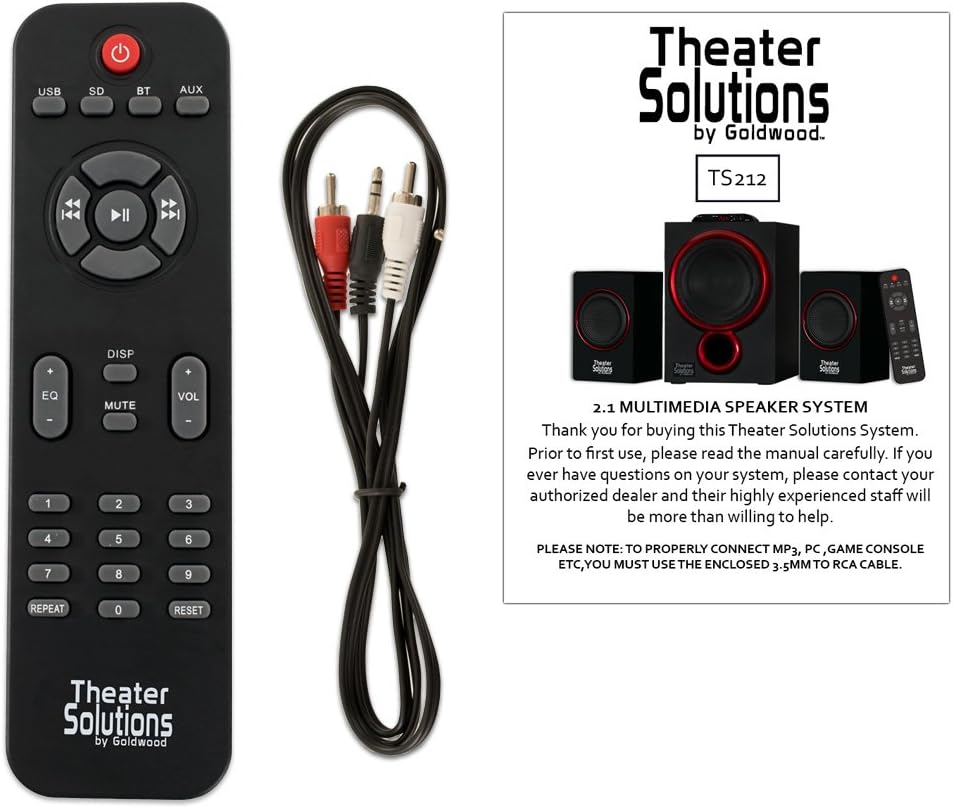
Image: Remote control for the TS212 system.
- Virtapainike: Kytkee järjestelmän päälle tai pois päältä.
- Tilapainike: Cycles through input modes (Bluetooth, AUX, USB, SD).
- Äänenvoimakkuus +/-: Säätää päääänenvoimakkuutta.
- Toistosäätimet: Play/Pause, Skip Forward/Backward.
- EQ: Valitsee taajuuskorjaimen esiasetukset.
- Mykistä: Mykistää äänilähdön.
- Numeronäppäimistö: For direct track selection in USB/SD mode.
Asennus
1. sijoitus
- Aseta subwoofer vakaalle ja tasaiselle alustalle, mieluiten lattialle, bassotoiston optimoimiseksi.
- Position the satellite speakers to the left and right of your listening area, facing towards you, for optimal stereo imaging. Ensure they are on a stable surface.
2. Connecting Satellite Speakers
- Connect the RCA cables from the two satellite speakers to the corresponding RCA output jacks on the rear panel of the subwoofer. Match the colors (typically red for right, white/black for left).
3. Connecting Audio Source
- For devices with a 3.5mm audio output (e.g., smartphones, laptops, MP3 players), use the included 3.5mm to RCA cable. Connect the 3.5mm end to your device and the RCA ends to the INPUT jacks on the subwoofer's rear panel.
- For devices with RCA audio outputs (e.g., DVD players, some TVs), use a standard RCA to RCA cable (not included) to connect to the INPUT jacks on the subwoofer.
4. Virtaliitäntä
- Ensure the power switch on the rear of the subwoofer is in the OFF position.
- Connect the power cord to the AC IN port on the subwoofer and then plug it into a standard 110V grounded wall outlet.
Käyttöohjeet
1. Virta päälle / pois
- Flip the power switch on the rear of the subwoofer to the ON position. The LED display on the subwoofer will illuminate.
- To turn off the system, flip the power switch to the OFF position.
2. Tilan valinta
- Press the 'MODE' button on the subwoofer's top panel or the remote control to cycle through available input modes: Bluetooth (BT), Auxiliary (AUX), USB, and SD. The selected mode will be shown on the LED display.
3. Bluetooth-käyttö
- Select 'BT' mode using the 'MODE' button. The system will enter pairing mode, indicated by a flashing 'BT' on the display.
- On your Bluetooth-enabled device (e.g., smartphone), search for Bluetooth devices and select 'TS212' from the list.
- Once paired, the 'BT' indicator will stop flashing, and you can play audio from your device through the speaker system.
4. Lisälaitetulo (AUX)
- Select 'AUX' mode using the 'MODE' button.
- Ensure your audio source is connected to the RCA INPUT jacks on the subwoofer's rear panel.
- Toista ääntä yhdistetystä laitteesta.
5. USB/SD-kortin toisto
- Insert a USB drive into the 'U DISK' port or an SD/MMC card into the 'SD/MMC CARD' slot on the subwoofer's top panel.
- Järjestelmä vaihtaa automaattisesti USB- tai SD-tilaan ja alkaa toistaa yhteensopivaa ääntä files. If not, select the appropriate mode using the 'MODE' button.
- Use the playback controls on the subwoofer or remote to manage your music.
6. Äänenvoimakkuuden, basson ja diskantin säätäminen
- Pää-äänenvoimakkuus: Use the 'VOL +/-' buttons on the subwoofer's top panel or the remote control.
- Basso/diskantti: Use the 'BASS VOL' and 'TREBLE VOL' knobs on the rear panel of the subwoofer to fine-tune the low and high frequencies.
Huolto
- Puhdistus: Use a soft, dry cloth to clean the surfaces of the speakers. Do not use liquid cleaners or abrasive materials.
- Ilmanvaihto: Ensure the subwoofer has adequate ventilation and its vents are not blocked to prevent overheating.
- Varastointi: Kun järjestelmää ei käytetä pitkään aikaan, säilytä sitä viileässä, kuivassa paikassa, poissa suorasta auringonvalosta ja äärimmäisistä lämpötiloista.
Vianetsintä
| Ongelma | Mahdollinen syy | Ratkaisu |
|---|---|---|
| Ei virtaa | Power cord not connected; Power switch off; Outlet not working | Ensure power cord is securely plugged in; Turn power switch ON; Test outlet with another device |
| Ei ääntä | Incorrect mode selected; Volume too low; Audio cable loose/incorrect; Device not playing audio | Select correct input mode; Increase volume; Check all cable connections; Ensure audio is playing on source device |
| Bluetooth ei muodosta yhteyttä | Not in Bluetooth mode; Device too far; Already paired with another device | Select 'BT' mode; Move device closer (within 10 meters); Disconnect from other devices and try pairing again |
| USB/SD-kortti ei toistu | Väärä tila; Yhteensopimaton file format; Corrupted media; Media not inserted correctly | Select USB/SD mode; Ensure files are compatible (e.g., MP3); Try different USB/SD media; Reinsert media |
| Vääristynyt ääni | Volume too high; Source audio quality poor; Incorrect bass/treble settings | Reduce volume on both system and source; Use high-quality audio files; Adjust Bass/Treble knobs |
Tekniset tiedot
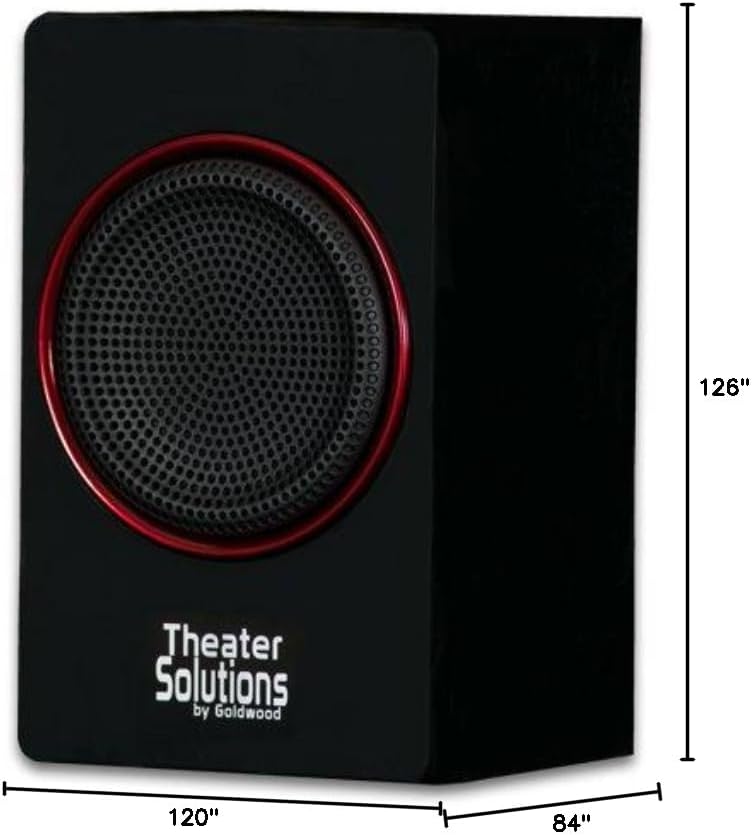
Image: Dimensions of the TS212 subwoofer.
| Ominaisuus | Yksityiskohta |
|---|---|
| Mallinumero | TS212 |
| Merkki | Teatteriratkaisut |
| Kaiuttimen asetukset | 2.1 kanava |
| Suurin lähtöteho | 600 XNUMX wattia (huippu) |
| Yhteystekniikka | Lisälaite, Bluetooth, RCA, USB |
| Bluetooth-alue | 10 metriä |
| Äänilähtötila | Stereot |
| Subwooferin halkaisija | 10 tuumaa |
| Satelliittikaiuttimen koko | 5.25 tuumaa |
| Virtalähde | Corded Electric (110V US Standard) |
| Tuotteen paino | 12 puntaa |
| Subwooferin mitat (S x L x K) | 84"D x 120"W x 126"H (Note: These dimensions appear to be for packaging or an illustrative image, actual product dimensions are typically smaller: Subwoofer 10.5" x 7" x 10", Satellites 6" x 3.75" x 3.5" each) |
| Yhteensopivat laitteet | Kannettava tietokone, MP3-soitin, älypuhelin, tabletti, televisio |
Takuu ja tuki
This Theater Solutions TS212 by Goldwood speaker system comes with a Lifetime Warranty against manufacturer's defects. For warranty claims or technical support, please contact Goldwood Sound, Inc. or your authorized dealer. Please retain your proof of purchase for warranty validation.