
Vivolink VL120007
Vivolink HDBaseT VL120007 70m 4K HDMI -jatkojohtosarja Käyttöohje
Malli: VL120007
1. Johdanto
This user manual provides detailed instructions for the installation, operation, and maintenance of the Vivolink HDBaseT VL120007 70m 4K HDMI Extender Kit. This kit is designed to extend 4K HDMI signals up to 70 meters over a single Cat5e/6 cable, supporting bi-directional IR and CEC.
The Vivolink VL120007 is a premium quality product, ensuring reliable and high-performance signal transmission for various professional and home theater applications.
2. Tuote ohiview
The Vivolink VL120007 kit consists of a Transmitter unit and a Receiver unit. Both units are compact and designed for easy integration into existing setups.
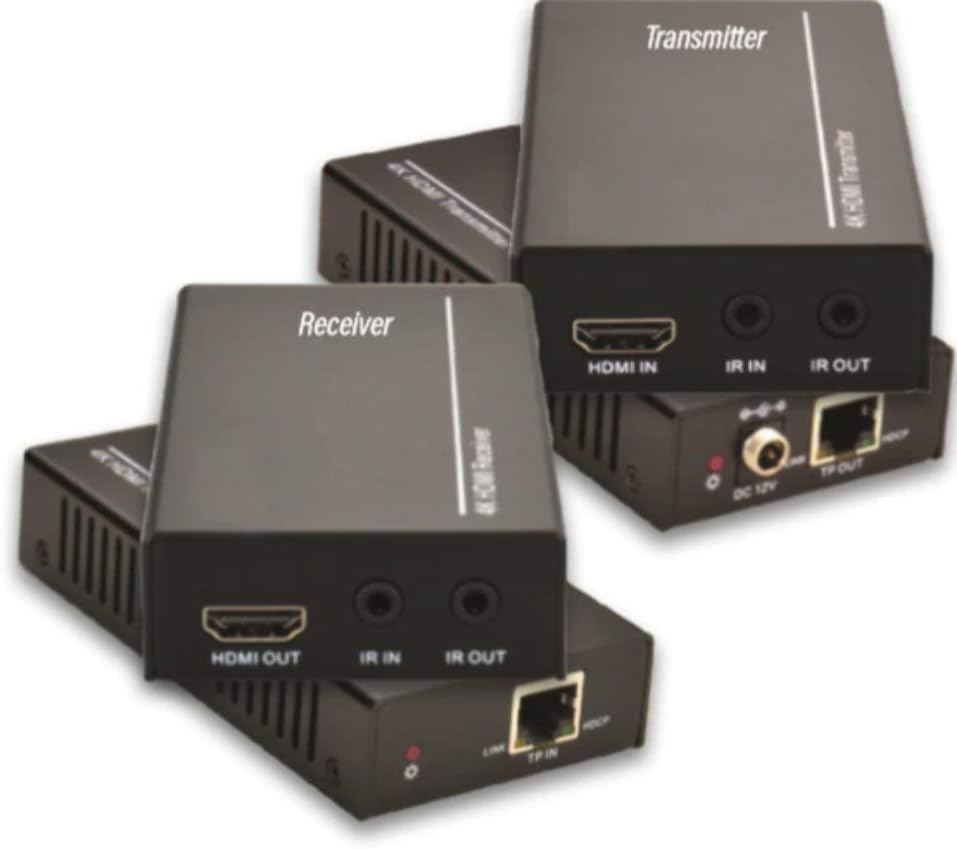
Figure 2.1: Vivolink HDBaseT VL120007 Transmitter (top) and Receiver (bottom) units. The Transmitter unit features HDMI IN, IR IN, IR OUT, DC 12V power input, and TP-OUT (HDBaseT) ports. The Receiver unit features HDMI OUT, IR IN, IR OUT, and TP-IN (HDBaseT) ports.
2.1. Tärkeimmät ominaisuudet
- Extends 4K HDMI signals up to 70 meters (230 feet) over a single Cat5e/6 cable.
- Supports HDMI 1.4 and HDCP 2.2 compliant.
- Bi-directional IR pass-through for controlling source or display devices.
- Supports CEC (Consumer Electronics Control) functionality.
- Kompakti muotoilu helppoa asennusta varten.
- Includes one Power Supply Unit (PSU).
3. Pakkauksen sisältö
Please verify that all items are present and in good condition upon opening the package. If any items are missing or damaged, please contact your vendor.
- 1x Vivolink HDBaseT Transmitter Unit (VL120007-TX)
- 1x Vivolink HDBaseT Receiver Unit (VL120007-RX)
- 1x 12V DC Power Supply Unit
- 1x IR Blaster -kaapeli
- 1x IR-vastaanotinkaapeli
- 1x Käyttöohje (tämä asiakirja)
4. Asennus ja asennus
Before beginning installation, ensure all devices are powered off and disconnected from their power sources.
4.1. Kytkentäkaavio
The following diagram illustrates a typical connection setup for the Vivolink VL120007 extender kit.
(A detailed connection diagram would typically be placed here. For illustration, imagine a diagram showing Source -> Transmitter -> Cat Cable -> Receiver -> Display.)
4.2. Asennusvaiheet
- Connect an HDMI cable from your source device (e.g., Blu-ray player, media streamer) to the HDMI-IN portti päällä Lähetin yksikkö.
- Connect a single Cat5e/6 cable (recommended Cat6 for optimal performance) from the TP-OUT portti päällä Lähetin yksikköön TP-IN portti päällä Vastaanotin unit. Ensure the cable is properly terminated with RJ45 connectors following TIA/EIA-568B wiring standards.
- Liitä HDMI-kaapeli laitteesta HDMI OUT portti päällä Vastaanotin unit to your display device (e.g., TV, projector).
- IR-ohjausta varten liitä IR Blaster -kaapeli IR OUT port on the unit that will send the IR signal (e.g., Transmitter for controlling source, Receiver for controlling display). Position the IR emitter head directly over the IR sensor of the device to be controlled.
- Liitä infrapunavastaanottimen kaapeli IR SISÄÄN port on the unit that will receive the IR signal. Position the IR receiver head in a location where it can receive signals from your remote control.
- Connect the included 12V DC Power Supply Unit to the DC 12V port on either the Transmitter or Receiver unit. The system supports Power over Cable (PoC), meaning only one power supply is needed for both units.
- Power on all connected devices (source, display, and extender units).
5. Käyttöohjeet
Once all connections are made and power is supplied, the Vivolink VL120007 extender kit should automatically establish a connection and transmit the HDMI signal.
5.1. LED-ilmaisimet
Both the Transmitter and Receiver units feature LED indicators to show their status:
- Virran merkkivalo: Palaa, kun laite saa virtaa.
- Linkin LED: Illuminates when a stable HDBaseT link is established between the Transmitter and Receiver units.
- Data-LED: May flash to indicate active HDMI data transmission.
5.2. IR-ohjaus
The bi-directional IR pass-through allows you to control your source device from the display location or your display device from the source location. Ensure the IR Blaster and IR Receiver cables are correctly positioned.
5.3. CEC Functionality
The extender kit supports CEC (Consumer Electronics Control), allowing compatible devices to communicate and control each other over the HDMI connection. This feature typically works automatically if supported by your source and display devices.
6. Huolto
The Vivolink VL120007 extender kit requires minimal maintenance.
- Keep the units in a cool, dry place, away from direct sunlight, heat sources, and excessive moisture.
- Clean the units with a soft, dry cloth. Do not use liquid or aerosol cleaners.
- Varmista yksiköiden ympärillä oleva asianmukainen ilmanvaihto ylikuumenemisen estämiseksi.
- Tarkista kaapeliliitännät säännöllisesti varmistaaksesi, että ne ovat tukevasti kiinni.
7. Vianmääritys
If you encounter issues with your Vivolink VL120007 extender kit, please refer to the following common troubleshooting steps:
| Ongelma | Mahdollinen syy | Ratkaisu |
|---|---|---|
| Ei video-/äänilähtöä. |
|
|
| IR-ohjaus ei toimi. |
|
|
| Katkonainen signaali tai välkkyminen. |
|
|
If the problem persists after trying these steps, please contact Vivolink customer support for further assistance.
8. Tekniset tiedot
| Ominaisuus | Yksityiskohta |
|---|---|
| Mallinumero | VL120007 |
| Merkki | Vivolink |
| HDMI-yhteensopivuus | HDMI 1.4 |
| HDCP-yhteensopivuus | HDCP 2.2 |
| Maksimaalisen resoluution tuki | 4K (UHD) |
| Lähetysetäisyys | Up to 70 meters (230 feet) for 4K over Cat5e/6 |
| Kaapelivaatimus | Single Cat5e/6/7 cable |
| IR-läpivienti | Kaksisuuntainen |
| CEC-tuki | Kyllä |
| Virtalähde | 12V DC (PoC supported) |
| Tuotteen paino | 1.21 kiloa (noin 2.67 paunaa) |
| Valmistaja | Vivolink |
9. Takuutiedot
Specific warranty details are not provided in the product information. Please refer to the warranty card included with your product or contact your point of purchase for detailed warranty terms and conditions.
10. Asiakastuki
For technical support, troubleshooting assistance beyond this manual, or warranty inquiries, please contact Vivolink customer support or your authorized dealer.
Please have your model number (VL120007) and purchase information ready when contacting support.
Ask a question about this manual
Ask about setup, troubleshooting, compatibility, parts, safety, or missing instructions. Manuals+ will review the question and use this page’s manual context to help answer it.