
1. Johdanto
The GAMDIAS Hermes GKB3000 is a mechanical gaming keyboard designed for enhanced durability and performance. It features GAMDIAS Certified Blue Switches with a 50 million actuation lifecycle, a 7-color spectrum backlight with 14 lighting effects, and various functional keys for an optimized gaming and typing experience. This manual provides instructions for setting up, operating, and maintaining your keyboard.
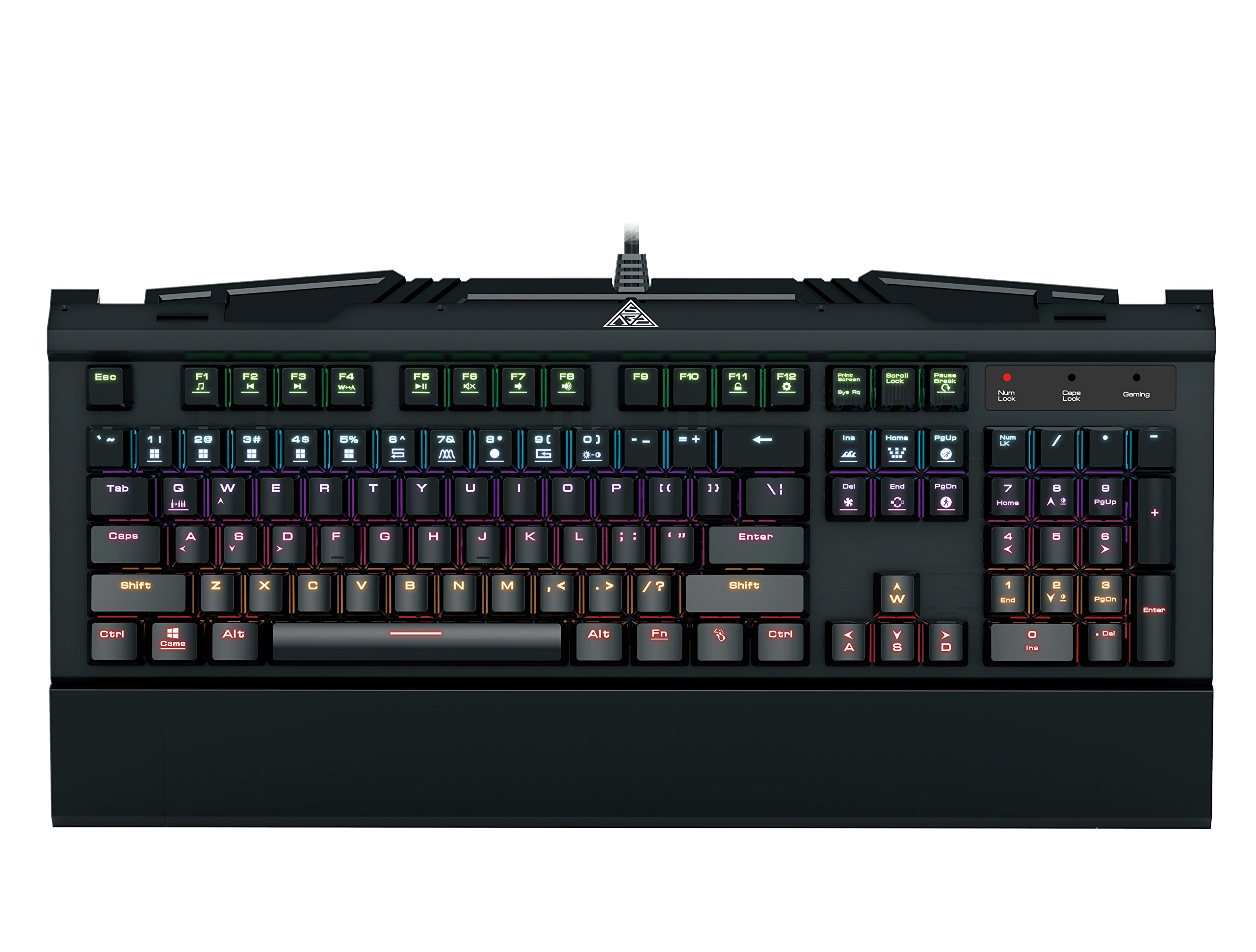
Image 1.1: The GAMDIAS Hermes GKB3000 Mechanical Gaming Keyboard. This image displays the full keyboard with its key layout and design, highlighting its compact yet robust build.
2. Pakkauksen sisältö
Tarkista pakkauksen sisältö purkamisen yhteydessä varmistaaksesi, että kaikki osat ovat mukana ja vahingoittumattomia.
- GAMDIAS Hermes GKB3000 Mechanical Gaming Keyboard
- Käyttöopas (tämä asiakirja)
3. Asennus
Follow these steps to set up your GAMDIAS Hermes GKB3000 keyboard:
- Avaa näppäimistö: Poista näppäimistö varovasti pakkauksestaan.
- Yhdistä tietokoneeseen: Plug the USB-A connector of the keyboard cable into an available USB port on your computer.
- Ohjaimen asennus: The keyboard is plug-and-play. Your operating system (e.g., Windows) will automatically detect and install the necessary drivers. No additional software installation is typically required for basic functionality.
- Sijoitus: Place the keyboard on a stable, flat surface for comfortable use.
4. Käyttöohjeet
4.1. Valotehosteet
The Hermes GKB3000 features a 7-color spectrum backlight with 14 sets of lighting effects. These include 9 preset effects and 5 customizable patterns.
- Vaihtovaikutukset: Use the dedicated function keys (often combined with the Fn key) to cycle through the preset lighting effects. Refer to the keyboard's keycap legends for specific combinations.
- Tehosteiden mukauttaminen: The keyboard supports 5 customizable lighting patterns. Instructions for programming these patterns are typically found in the full software suite available for download from the GAMDIAS website, if applicable.
- Kirkkauden säätö: Adjust backlight brightness using designated function key combinations.
4.2. Multimedia Control Keys
Access multimedia functions quickly using the dedicated multimedia control keys, often activated by holding the Fn -näppäintä yhdessä F-näppäinten (F1–F12) kanssa.
- Äänenvoimakkuuden säätö: Increase, decrease, or mute audio.
- Median toisto: Play/pause, stop, previous track, next track.
- Muut toiminnot: May include opening default browser, email client, or calculator.
4.3. Special Gaming Functions
- WASD-Arrow Key Swap: This feature allows you to swap the functionality of the WASD keys with the arrow keys. This is useful for certain games or user preferences. Activate this function using a specific Fn key combination (e.g., Fn + W).
- Consecutive Attack Mode: This mode enhances rapid key input for gaming. Refer to the keyboard's specific documentation or GAMDIAS software for activation and configuration details.
- Näppäimistön lukitus: Temporarily disable the keyboard input to prevent accidental presses. Activate using a Fn näppäinyhdistelmä.
- Windows Key Disable: Prevent accidental presses of the Windows key during gaming, which can minimize your game. Activate using a Fn key combination (e.g., Fn + Win key).
- N-näppäimen vieritys: The GKB3000 supports N-key rollover, meaning multiple keys can be pressed simultaneously without ghosting or missed inputs. This ensures accurate and responsive commands during intense gaming sessions.
5. Huolto
Asianmukainen huolto varmistaa näppäimistösi pitkän käyttöiän ja optimaalisen suorituskyvyn.
- Puhdistus:
- Irrota näppäimistö tietokoneesta ennen puhdistamista.
- Käytä pehmeää, nukkaamatonta liinaa hieman damppyyhi pinta vedellä tai miedolla puhdistusliuoksella.
- Käytä paineilmaa näppäinten välisten pölyn ja roskien poistamiseen.
- Vältä voimakkaiden kemikaalien, hankaavien puhdistusaineiden tai liuottimien käyttöä.
- Varastointi: Säilytä näppäimistöä viileässä, kuivassa paikassa, poissa suorasta auringonvalosta ja äärimmäisistä lämpötiloista, kun sitä ei käytetä pitkään aikaan.
- Käsittely: Avoid dropping the keyboard or exposing it to excessive force, as this can damage the mechanical switches or internal components.
6. Vianmääritys
If you encounter issues with your GAMDIAS Hermes GKB3000 keyboard, refer to the following common solutions:
| Ongelma | Mahdollinen ratkaisu |
|---|---|
| Näppäimistö ei vastaa. |
|
| Taustavalo ei toimi tai on himmeä. |
|
| Tietyt näppäimet eivät toimi. |
|
| WASD keys are acting as arrow keys. |
|
If the problem persists after trying these solutions, please contact GAMDIAS customer support for further assistance.
7. Tekniset tiedot
The following are the technical specifications for the GAMDIAS Hermes GKB3000 Mechanical Gaming Keyboard:
| Ominaisuus | Yksityiskohta |
|---|---|
| Merkki | GAMDIAS |
| Mallinumero | GKB3000 |
| Kytkimen tyyppi | GAMDIAS Certified Mechanical Blue Switches |
| Actuation Lifecycle | 50 miljoonaa näppäinpainiketta |
| Taustavalo | 7-Color Spectrum, 14 Lighting Effects (9 preset, 5 customizable) |
| Anti-Ghosting | N-näppäimen kiertäminen |
| Yhteydet | USB-A |
| Käyttöjärjestelmä | Windows |
| Tuotteen paino | 2.42 paunaa (noin 1.1 kg) |
| Tuotteen mitat (PxLxK) | 18.8 x 10.5 x 2 tuumaa (noin 47.75 x 26.67 x 5.08 cm) |
| Materiaali | Plastic with Elegant Metal Plate Design |
8. Takuu ja tuki
GAMDIAS products are manufactured to the highest quality standards. For information regarding warranty coverage, terms, and conditions, please refer to the warranty card included with your product or visit the official GAMDIAS websivusto.
For technical support, troubleshooting assistance, or any product-related inquiries, please contact GAMDIAS customer support through their official websivustolla tai tuotepakkauksessa olevissa yhteystiedoissa.
GAMDIAS-virallinen Websivusto: www.gamdias.com