
Johdanto
The NAXA NDC-405 is a rugged, waterproof HD action camera designed to capture your adventures in high definition. This manual provides essential information on how to set up, operate, maintain, and troubleshoot your device, ensuring optimal performance and longevity. Please read this manual thoroughly before using your camera.
Tuote loppuview
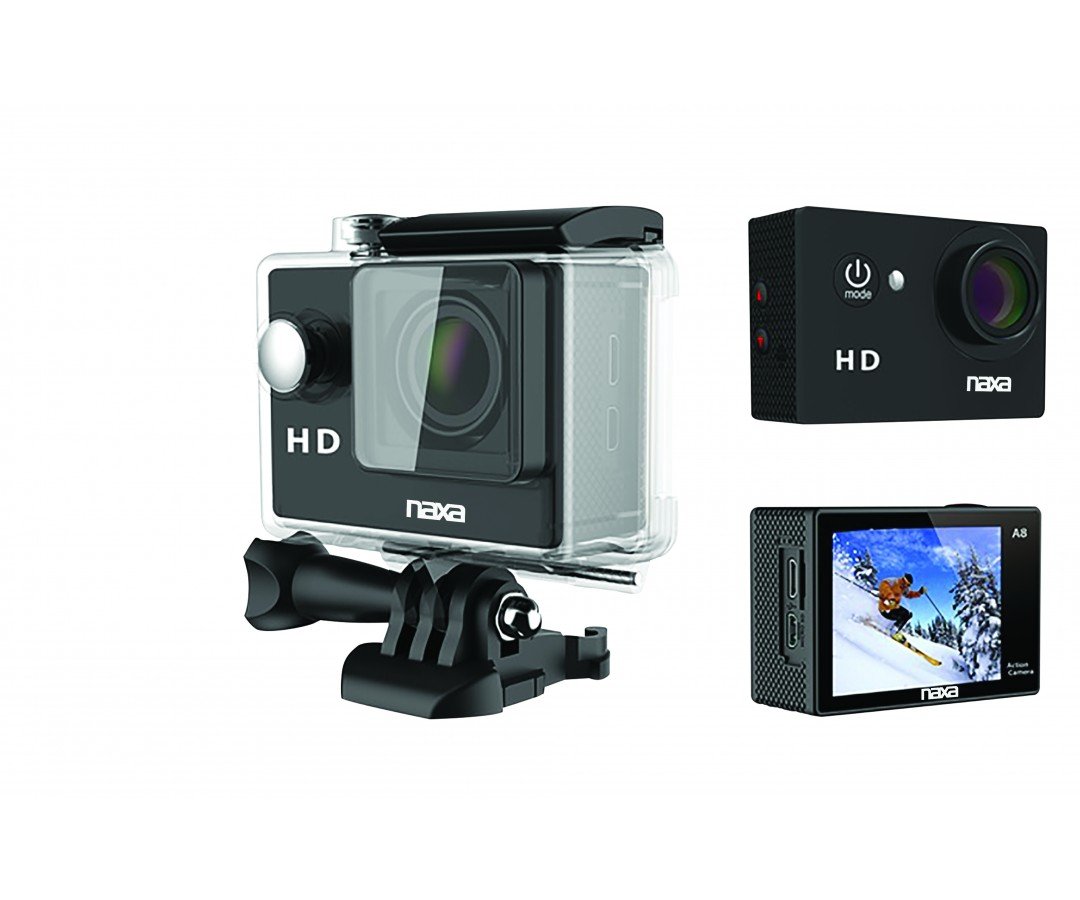
Kuva 1: Edessä view of the NAXA NDC-405 Waterproof HD Action Camera. This image displays the camera's compact design, lens, and front-facing controls, highlighting its readiness for action.
Kameran osat
A detailed diagram illustrating the various components of the NDC-405 camera, including the lens, power button, mode button, shutter/record button, 2-inch LCD screen, microphone, speaker, USB port, and microSD card slot, would typically be placed here. This visual aid helps users identify each part for easier operation.
Pakkauksen sisältö
Varmista, että pakkauksessa on kaikki tarvittavat osat:
- NAXA NDC-405 Action Camera
- USB-latauskaapeli
- Assorted Mounting Accessories (e.g., helmet mount, bicycle mount, adhesive mounts)
- Käyttöopas
Asennus
Akun lataaminen
The camera is equipped with a built-in 900mAh rechargeable battery. Before first use, fully charge the battery.
- Liitä USB-latauskaapelin pienempi pää kameran USB-porttiin.
- Liitä USB-kaapelin suurempi pää USB-virtalähteeseen (ei sisälly toimitukseen) tai tietokoneen USB-porttiin.
- The charging indicator light will illuminate during charging and turn off once fully charged. Charging typically takes 2-3 hours.
Inserting and Removing the MicroSD Card
A microSD or microSDHC card (up to 32GB, Class 10 recommended) is required to store photos and videos. The card is not included.
- Asettaa: Locate the microSD card slot on the side of the camera. Gently push the microSD card into the slot with the gold contacts facing the back of the camera until it clicks into place.
- Poistaminen: Gently push the microSD card inward until it clicks, then release. The card will spring out slightly, allowing you to pull it out.
Note: Ensure the camera is powered off before inserting or removing the microSD card to prevent data corruption.
Attaching Mounts and Accessories
The NDC-405 comes with various mounting accessories to suit different activities. Refer to the specific accessory instructions for proper attachment. Generally, mounts attach to the camera via a standard tripod screw thread or a clip-on mechanism. Ensure all connections are secure before use.
Kameran käyttö
Virran kytkeminen päälle ja pois päältä
- Virran kytkeminen: Press and hold the Power/Mode button for approximately 3 seconds until the LCD screen illuminates.
- Virran sammuttaminen: Press and hold the Power/Mode button for approximately 3 seconds until the LCD screen turns off.
Tilan vaihtaminen
After powering on, repeatedly press the Power/Mode button to cycle through the available modes: Video Recording, Photo Capture, and Playback. The current mode icon will be displayed on the LCD screen.
Videon tallennus
- Ensure the camera is in Video Recording mode (indicated by a video camera icon).
- Press the Shutter/Record button once to start recording. A red dot or timer will appear on the screen, indicating recording is in progress.
- Press the Shutter/Record button again to stop recording. The video file tallennetaan microSD-kortille.
Valokuvien ottaminen
- Ensure the camera is in Photo Capture mode (indicated by a camera icon).
- Frame your shot using the 2-inch LCD viewlöytäjälle.
- Press the Shutter/Record button once to take a photo. The photo will be saved to the microSD card.
Toisto
- Switch the camera to Playback mode (indicated by a play icon).
- Use the navigation buttons (if available, or cycle through with Mode button) to browse through your recorded videos and photos.
- Press the Shutter/Record button to play a selected video or view valokuva.
Yhdistäminen tietokoneeseen
Siirtämään files, connect the camera to your computer using the provided USB cable. The camera will appear as a removable disk drive, allowing you to access and copy your photos and videos.
Waterproof Usage Guidelines
The NDC-405 is designed to be waterproof up to 30 meters (IP68 rated) without additional housing. Ensure all ports (USB, microSD slot) are securely closed before submerging the camera in water. After use in saltwater, rinse the camera with fresh water and dry thoroughly.
Huolto
Kameran puhdistaminen
- Puhdista kameran runko pehmeällä, nukkaamattomalla liinalla.
- For the lens, use a specialized lens cleaning cloth and solution. Avoid abrasive materials.
- Do not use strong chemical cleaners, as they may damage the camera's finish or seals.
Varastointi
When not in use, store the camera in a cool, dry place away from direct sunlight and extreme temperatures. Remove the microSD card if storing for extended periods.
Vianetsintä
| Ongelma | Mahdollinen ratkaisu |
|---|---|
| Kamera ei käynnisty. | Varmista, että akku on täyteen ladattu. Liitä laite virtalähteeseen ja yritä uudelleen. |
| Videon tallennus tai valokuvien ottaminen ei onnistu. | Check if a microSD card is inserted and has sufficient free space. Ensure the card is formatted correctly (FAT32). |
| Videon laatu on huono. | Ensure the lens is clean. Check lighting conditions. Use a high-speed microSD card (Class 10 or higher). |
| Kamera jumiutuu tai lakkaa reagoimasta. | Press and hold the Power/Mode button for 10 seconds to force a shutdown. Restart the camera. |
| Files not recognized on computer. | Ensure the USB cable is properly connected. Try a different USB port or computer. The camera saves files in standard formats (e.g., JPEG, AVI). |
Tekniset tiedot
| Ominaisuus | Yksityiskohta |
|---|---|
| Malli | NDC-405 |
| Videon resoluutio | 720p nopeudella 30 fps |
| Pysäytyskuvan tarkkuus | 12 MP |
| Optinen anturi | CMOS 720p 1/4" |
| Viewetsijä | 2 tuuman LCD |
| Vesitiivis luokitus | IP68 (jopa 30 metriä) |
| Akku | 900mAh ladattava |
| Varastointi | Micro SD/SDHC up to 32GB |
| Kenttä View | 120 astetta |
| Mitat | 5.92 x 2.87 x 4.09 cm |
| Paino | 127.01 g |
Takuu ja tuki
For warranty information and technical support, please refer to the warranty card included with your product or visit the official NAXA Electronics website. Keep your purchase receipt as proof of purchase for any warranty claims. Do not attempt to repair the device yourself, as this may void the warranty.

