
WASABI MANGO UHD430 SE
Wasabi Mango UHD430 4K Monitor User Manual
Model: UHD430 SE
Johdanto
The Wasabi Mango UHD430 Real 4K HDMI 2.0 Monitor is a high-performance display featuring a 43-inch LG AH-IPS panel, delivering stunning 3840 x 2160 UHD 4K resolution. Designed for clarity and vibrant colors, this monitor supports 10-bit color depth and offers wide viewkulmat.
Keskeisiä ominaisuuksia ovat:
- 43-inch LG AH-IPS LED Backlit Panel for superior image quality.
- UHD 4K (3840 x 2160) resolution for incredibly detailed visuals.
- 1.06 billion colors (10-bit) for rich and accurate color reproduction.
- Multiple connectivity options: HDMI 2.0 (x2), HDMI 1.4a (x2), DisplayPort 1.2 (x1), D-Sub, USB 3.0 Hub.
- 60Hz refresh rate via DisplayPort 1.2 and HDMI 2.0 for smooth motion.
- Built-in 10W + 10W speakers for integrated audio.

Kuva: Edessä view of the Wasabi Mango UHD430 4K monitor, showcasing its sleek design and a remote control for operation.
Pakkauksen sisältö
Valitse seuraavat kohdat rastittamalla ruutu:
- Wasabi Mango UHD430 Monitor
- DisplayPort-kaapeli
- HDMI kaapeli
- Remote Control (Note: Text on remote may be in Korean)
- Power Cable (110~240V adapter + US plug)
- USB-keskittimen kaapeli
- Screws for stand
- Optinen äänikaapeli
- Käyttöopas
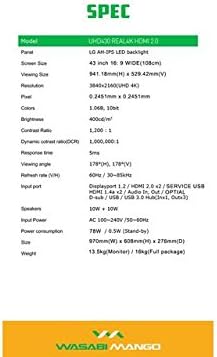
Image: A visual representation of the monitor's dimensions and a list of all accessories included in the package, such as various cables, remote control, and stand screws.
Asennus
1. Jalustan kokoaminen
- Aseta näyttö varovasti kuvaruutu alaspäin pehmeälle ja puhtaalle alustalle naarmujen välttämiseksi.
- Attach the stand base to the monitor using the provided screws. Ensure it is securely fastened.
2. Virtalähteeseen kytkeminen
- Liitä virtajohto näytön virransyöttöporttiin.
- Kytke virtajohdon toinen pää maadoitettuun pistorasiaan.
3. Lähdelaitteeseen kytkeminen
The monitor supports various input types. Choose the appropriate cable for your device:
- DisplayPort 1.2: For optimal 4K @ 60Hz performance, use the included DisplayPort cable. Connect one end to the monitor's DisplayPort input and the other to your computer's DisplayPort output.
- HDMI 2.0: For 4K @ 60Hz, use an HDMI 2.0 cable. Connect to one of the HDMI 2.0 ports on the monitor.
- HDMI 1.4a: Supports 4K @ 30Hz. Connect to one of the HDMI 1.4a ports.
- D-Sub: For analog connections.
- USB 3.0 -keskitin: Connect the USB Hub cable from your computer to the monitor's USB 3.0 input to enable the monitor's USB ports.
Note: Using a longer (over 1.5m) or low-quality DisplayPort/HDMI cable may limit the refresh rate to 30Hz at 4K resolution.
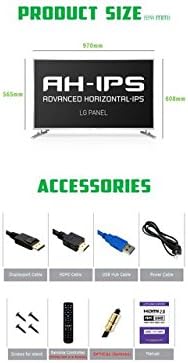
Image: The back panel of the monitor, illustrating the arrangement of power input, DisplayPort, HDMI, D-Sub, and USB ports for connection.
Näytön käyttö
Virta päälle/pois
- Press the power button on the monitor or the remote control to turn the monitor on or off.
Tulon valinta
- Use the "Input" button on the remote control to cycle through available input sources (DisplayPort, HDMI1, HDMI2, HDMI3, HDMI4, D-Sub).
On-Screen Display (OSD) -valikko
The OSD menu allows you to adjust various display settings. Use the remote control to navigate:
- Press the "Menu" button to open the OSD.
- Use the arrow keys (Up/Down/Left/Right) to navigate through menu options.
- Press "OK" or "Enter" to select an option or confirm a setting.
- Press "Exit" or "Menu" again to close the OSD.
Yleisiä näyttövalikkoasetuksia ovat:
- Kuva-asetukset: Brightness, Contrast, Color Temperature, Sharpness.
- Ääniasetukset: Äänenvoimakkuus, Mykistä.
- Tulon valinta: Manual input source selection.
- OSD-asetukset: OSD-kieli, OSD:n läpinäkyvyys, OSD:n aikakatkaisu.
- Muut asetukset: Aspect Ratio, ECO Mode.

Image: The monitor displaying content, with the remote control visible, indicating its use for navigating the monitor's functions and settings.
Huolto
Näytön puhdistaminen
- Irrota aina näyttö pistorasiasta ennen puhdistamista.
- Käytä pehmeää, nukkaamatonta liinaa hieman dampvedellä tai hankaamattomalla näytönpuhdistusaineella.
- Älä suihkuta puhdistusainetta suoraan näytölle.
- Avoid using benzene, thinner, ammonia, or abrasive cleaners, as these can damage the display surface.
- Pyyhi näyttö varovasti pölyn ja tahrojen poistamiseksi.
Yleinen hoito
- Pidä näyttö poissa suorasta auringonvalosta, lämmönlähteistä ja liiallisesta pölystä.
- Varmista näytön ympärillä asianmukainen tuuletus ylikuumenemisen estämiseksi.
- Älä aseta raskaita esineitä näytön tai sen kaapeleiden päälle.
- Vältä näytön pudottamista tai voimakkaiden iskujen kohteeksi altistamista.
Vianetsintä
| Ongelma | Mahdollinen syy | Ratkaisu |
|---|---|---|
| Ei Virtaa | Virtajohto ei ole kytketty; pistorasia ei toimi. | Varmista, että virtajohto on kytketty kunnolla näyttöön ja pistorasiaan. Testaa pistorasiaa toisella laitteella. |
| Ei signaalia / Tyhjä näyttö | Incorrect input source selected; Video cable loose or faulty; Source device not powered on. | Press "Input" button on remote to select correct source. Check video cable connections. Ensure source device is on and outputting video. |
| Kuva on vääristynyt tai epäselvä | Incorrect resolution setting; Faulty video cable; Graphics card driver issue. | Set display resolution to 3840x2160. Try a different video cable. Update graphics card drivers. |
| Ei ääntä | Volume too low or muted; Audio cable not connected (if using external speakers); Incorrect audio output selected on source device. | Increase volume or unmute. Ensure audio is routed correctly from source device to monitor. |
| Kaukosäädin ei toimi | Batteries are dead or incorrectly inserted; Obstruction between remote and monitor. | Replace batteries. Ensure clear line of sight to the monitor's IR receiver. |
Tekniset tiedot
| Ominaisuus | Yksityiskohta |
|---|---|
| Mallin nimi | UHD430 Real 4K HDMI 2.0 |
| Paneelin tyyppi | LG AH-IPS LED Backlight |
| Näytön koko | 43 inches (109.2 cm), 16:9 Wide |
| Resoluutio | 3840 x 2160 UHD 4K |
| värit | 1.06 Billion (10-bit) |
| Kontrastisuhde | 1200:1 |
| Dynaaminen kontrastisuhde | 1,000,000:1 |
| Kirkkaus | 400 cd/m² |
| Vastausaika | 5 ms (G - G) |
| Viewkulma | 178 astetta vaakatasossa, 178 astetta pystysuorassa |
| Päivitystaajuus | 60 Hz (DisplayPort 1.2 & HDMI 2.0), 30 Hz (HDMI 1.4a) |
| Tuloportit | DisplayPort 1.2 x1, HDMI 2.0 x2, HDMI 1.4a x2, D-Sub x1, USB 3.0 Hub (In x1, Out x3) |
| Audio | 10W + 10W Speakers |
| Virransyöttö | AC 100--240 V / 50-60 Hz |
| Virrankulutus | 78W (Operating) / 0.5W (Stand-by) |
| Mitat (L x K x S) | 970 mm x 608 mm x 276 mm (jalustan kanssa) |
| Paino | 13.5 kg (Monitor) / 18 kg (Full package) |
Image: A graphic detailing the technical specifications of the UHD430 monitor, such as screen size, resolution, and refresh rate.
Takuu ja tuki
The Wasabi Mango UHD430 monitor comes with a manufacturer's warranty. Please refer to the warranty card included in your package for specific terms and conditions.
Defective Pixel Policy: For the UHD430 SE model, 0-15 defective pixels (including dead/stuck/sub pixels) are permitted under the warranty policy.
For technical support or service inquiries, please contact your retailer or the official Wasabi Mango support channels. Keep your purchase receipt and product serial number handy for faster service.
Ask a question about this manual
Ask about setup, troubleshooting, compatibility, parts, safety, or missing instructions. Manuals+ will review the question and use this page’s manual context to help answer it.