
Johdanto
The Reflexion PS07BT is a versatile mobile karaoke system designed for portable entertainment. This unit combines powerful audio output with various connectivity options, including Bluetooth, USB, and AUX-in, along with microphone and guitar inputs. It features integrated light effects and a rechargeable battery, making it suitable for both indoor and outdoor use. This manual provides essential information for the safe and effective operation of your PS07BT system.
Turvallisuustiedot
Lue kaikki turvallisuusohjeet huolellisesti ennen laitteen käyttöä. Säilytä tämä käyttöohje myöhempää tarvetta varten.
- Älä altista laitetta sateelle, kosteudelle tai äärimmäisille lämpötiloille.
- Vältä laitteen sijoittamista lämmönlähteiden, kuten pattereiden, liesien tai muiden lämpöä tuottavien laitteiden, lähelle.
- Käytä vain laitteen mukana toimitettua virtalähdettä.
- Älä avaa c:täasing. Anna kaikki huoltotoimenpiteet pätevän henkilöstön tehtäväksi.
- Pidä laite poissa vahvoista magneettikentistä.
- Varmista asianmukainen ilmanvaihto äläkä tuki mitään tuuletusaukkoja.
- Handle the microphone and cables with care to prevent damage.
Pakkauksen sisältö
Varmista, että pakkauksessa on kaikki tarvittavat osat:
- Reflexion PS07BT Mobile Karaoke System
- Mikrofoni
- Käyttöopas
- Power Adapter (not explicitly listed but implied for charging)
Tuote loppuview
Familiarize yourself with the components and controls of your Reflexion PS07BT system.

Kuva 1: Etuosa view of the Reflexion PS07BT Mobile Karaoke System, showcasing the speaker grille and blue LED light effects.

Kuva 2: Päättynytview of the PS07BT system, highlighting its dimensions (49cm height, 20cm width), LCD display, and karaoke function.
Ohjauspaneeli
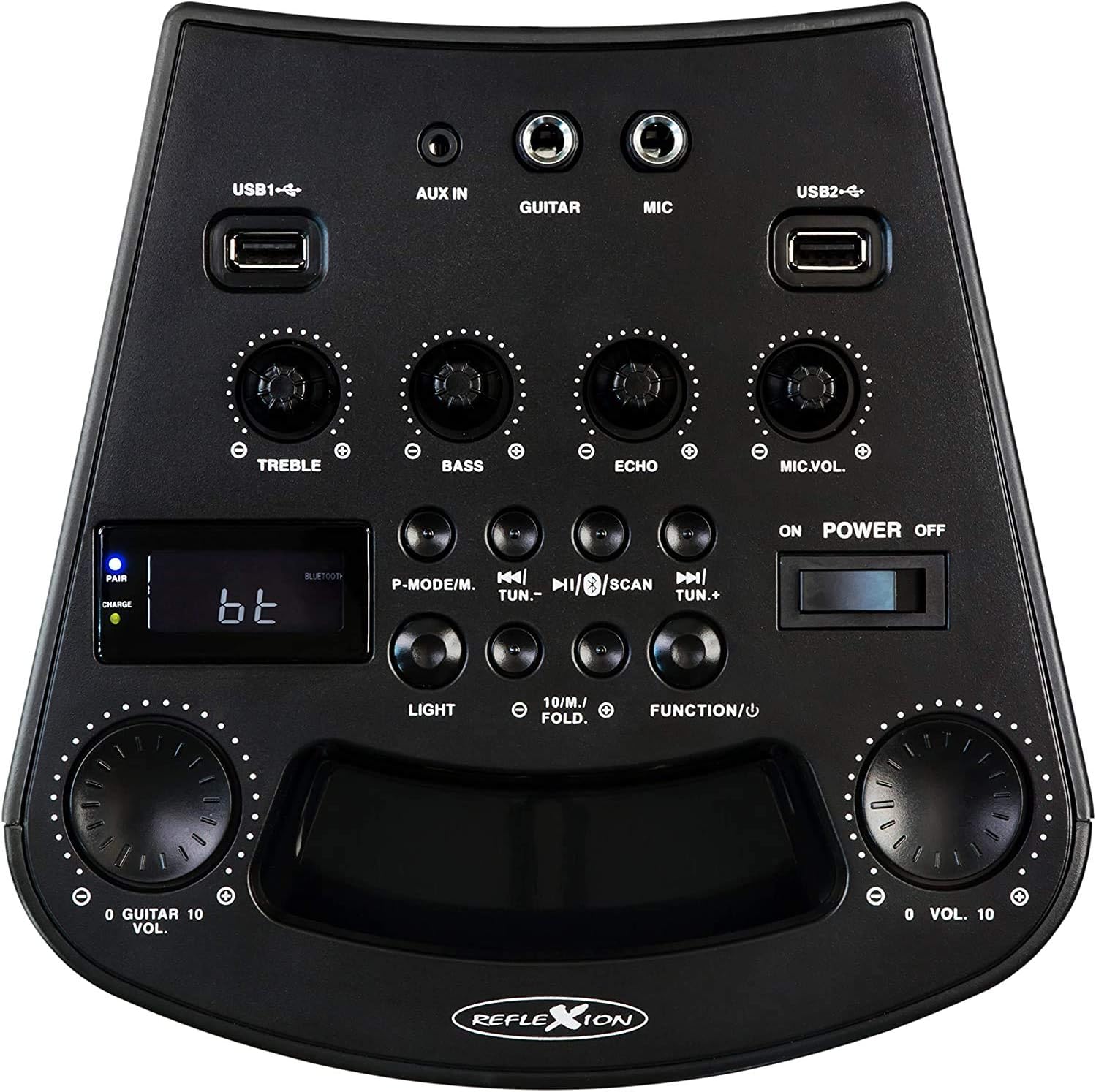
Kuva 3: Yksityiskohtainen view of the PS07BT control panel, showing input ports, sound adjustment knobs, and function buttons.
- USB1 / USB2 Ports: Äänen toistamiseen USB-tallennuslaitteista.
- AUX IN: 3.5mm input for external audio sources.
- KITARA: 6.3 mm:n tuloliitäntä kitaran kytkemistä varten.
- MIC: 6.3mm input for connecting the microphone.
- TREBLE nuppi: Säätää korkeataajuisia ääniä.
- BASS-nuppi: Säätää matalataajuisia ääniä.
- ECHO-nuppi: Säätää mikrofonitulon kaikuefektiä.
- Mikrofonin äänenvoimakkuuden säätö: Säätää mikrofonin äänenvoimakkuutta.
- P-MODE/M Button: Program mode / Mode selection.
- TUN.- / TUN.+ Buttons: Tune down / Tune up for FM radio.
- SCAN-painike: Skannaa FM-radioasemia.
- VALO -painike: Ohjaa LED-valotehosteita.
- FUNCTION/U Button: Switches between input modes (Bluetooth, USB, AUX, FM).
- VOL. Knob: Master-äänenvoimakkuuden säätö.
- VIRTA PÄÄLLE/POIS-kytkin: Kytkee laitteen päälle tai pois päältä.
- LCD-näyttö: Näyttää nykyisen tilan, kappaleen tiedot tai FM-taajuuden.
- PAIR/CHARGE Indicators: Bluetooth pairing status and battery charging status.
Takapaneeli

Figure 4: Rear panel of the PS07BT, displaying the AC power input and product information label.
- Verkkovirta: Connect the power adapter here for charging and operation.
- Tuotemerkki: Contains model number, serial number, and electrical specifications.
Asennus
Akun lataaminen
The PS07BT features a built-in rechargeable battery. Before first use, fully charge the unit.
- Connect the supplied power adapter to the AC power input on the rear of the unit.
- Liitä verkkolaite pistorasiaan.
- The CHARGE indicator light will illuminate during charging.
- A full charge takes approximately 4 hours. The CHARGE indicator may change or turn off once fully charged (refer to specific indicator behavior in the quick start guide if available).
Täyteen ladattu akku tarjoaa jopa 4 tuntia toistoaikaa.
Connecting Microphone and Guitar
To use the karaoke or instrument features:
- Liitä mikrofonin kaapeli MIC input on the control panel.
- If connecting a guitar, insert its cable into the KITARA syöttö.
- Säädä MIC.VOL ja KAIKU knobs as desired during operation.
Käyttöohjeet
Virta päälle/pois
Liu'uta VIRTA PÄÄLLE/POIS switch to the 'ON' position to turn on the unit. Slide it to 'OFF' to power down.
Syöttötilan valitseminen
Paina FUNCTION/U button repeatedly to cycle through available input modes: Bluetooth (bt), USB, AUX, and FM Radio.
Bluetooth-yhteys
- Turn on the PS07BT and select 'bt' mode using the FUNCTION/U button. The 'PAIR' indicator will flash, indicating it's ready for pairing.
- Ota Bluetooth käyttöön mobiililaitteessasi (älypuhelin, tabletti jne.).
- Etsi available devices and select 'Reflexion PS07BT' from the list.
- Once connected, the 'PAIR' indicator will stop flashing and remain solid. You can now play audio from your device through the PS07BT.
USB-toisto
- Aseta äänitiedostoja sisältävä USB-tallennuslaite (esim. USB-muistitikku) files joko USB1 or USB2 portti.
- Select 'USB' mode using the FUNCTION/U -painiketta.
- Laite alkaa automaattisesti toistaa ääntä files from the USB device. Use the track control buttons (usually combined with TUN.-/TUN.+) to navigate tracks.
AUX-In-liitäntä
- Connect an external audio source (e.g., MP3 player, laptop) to the AUX IN portti 3.5 mm:n äänikaapelilla.
- Select 'AUX' mode using the FUNCTION/U -painiketta.
- Play audio from your external device. The volume can be controlled via both the external device and the PS07BT's master volume knob.
FM-radion toiminta
- Select 'FM' mode using the FUNCTION/U -painiketta.
- Paina SKANNATA -painiketta, joka skannaa ja tallentaa automaattisesti saatavilla olevat FM-radioasemat.
- Käytä TUN.- ja TUN.+ buttons to manually tune to stations or select saved stations.
Karaoke-toiminto
With a microphone connected to the MIC input, you can sing along to music playing from any source (Bluetooth, USB, AUX, FM). Adjust the MIC.VOL knob to control your voice volume and the KAIKU knob for an echo effect.
Valotehosteet
Paina VALOA button to activate or change the integrated blue LED light effects, which can synchronize with the music beat.
Äänenvoimakkuuden ja äänen säädöt
- Pää-äänenvoimakkuus: Käytä suurta VOL. knob to adjust the overall sound output level.
- Diskantti / basso: Käytä Diskantti ja BASS nuppeja äänen korkeiden ja matalien taajuuksien hienosäätöön.
Huolto
Puhdistus
Pyyhi laite pehmeällä, kuivalla liinalla. Älä käytä hankaavia puhdistusaineita, vahoja tai liuottimia, koska ne voivat vahingoittaa pintaa. Varmista, että laite on sammutettu ja irrotettu pistorasiasta ennen puhdistamista.
Varastointi
When not in use for extended periods, store the unit in a cool, dry place, away from direct sunlight and extreme temperatures. It is recommended to fully charge the battery before storing and to recharge it every few months to maintain battery health.
Vianetsintä
If you encounter issues with your PS07BT, refer to the following common problems and solutions:
| Ongelma | Mahdollinen ratkaisu |
|---|---|
| Ei virtaa | Ensure the power adapter is securely connected and plugged into a working outlet. Check if the battery is charged. Slide the POWER switch to ON. |
| Ei ääntä | Increase the master VOL. knob. Check the volume on your connected audio source (e.g., phone). Ensure the correct input mode (Bluetooth, USB, AUX, FM) is selected. Check all cable connections. |
| Bluetooth ei muodosta yhteyttä | Ensure the unit is in 'bt' mode and the 'PAIR' indicator is flashing. Turn off and on Bluetooth on your device. Move your device closer to the PS07BT. Forget the device from your phone's Bluetooth list and try pairing again. |
| Mikrofoni ei toimi | Ensure the microphone is securely plugged into the MIC input. Increase the MIC.VOL knob. Check if the microphone has its own ON/OFF switch and is turned on. |
| USB-toisto-ongelmat | Ensure the USB device is formatted correctly (FAT32 recommended) and contains compatible audio files. Kokeile toista USB-laitetta. |
Tekniset tiedot
Technical details for the Reflexion PS07BT Mobile Karaoke System:
- Mallin nimi: PS07BT
- Mitat (P x L x K): 20.2 x 49 x 20.1 cm
- Paino: 2 kiloa
- Kaiuttimen maksimilähtöteho: 320 wattia
- Yhteystekniikka: Bluetooth
- Äänilähtötila: Stereot
- Materiaali: Muovi
- Kaiuttimen tyyppi: Subwoofer
- Erikoisominaisuudet: Bluetooth, USB-portti
- Keskimääräinen akun kesto: 4 tuntia
- Latausaika: 4 tuntia
- Valvontamenetelmä: Touch (referring to buttons/knobs)
- Total USB 2.0 Ports: 2
- Väri: Musta
- Virtalähde: Johdollinen sähkökäyttöinen / akkukäyttöinen

Figure 5: The PS07BT's integrated handle allows for easy portability.
Takuu ja tuki
The Reflexion PS07BT comes with a spare parts availability period of 1 year. For technical support or warranty inquiries, please contact your retailer or the manufacturer's customer service. Keep your proof of purchase for warranty claims.