
1. Johdanto
The Sony SBH54 is a versatile Stereo Bluetooth Headset designed for wireless communication and audio playback. It offers both handset and headset functionalities, allowing you to take and make calls, view messages, listen to music, and tune into FM radio directly from its display. Crafted from premium metal with a splash-proof design, it combines elegance with durability.
Key features include Bluetooth Wireless 3.0, NFC technology for easy pairing, an OLED display, and built-in noise cancellation for clear audio during calls. The headset supports A2DP profile and can connect to two devices simultaneously.
2. Tuote ohiview
The SBH54 features a compact design that fits comfortably in your hand. It includes an OLED display for information at a glance and physical controls for media and call management.
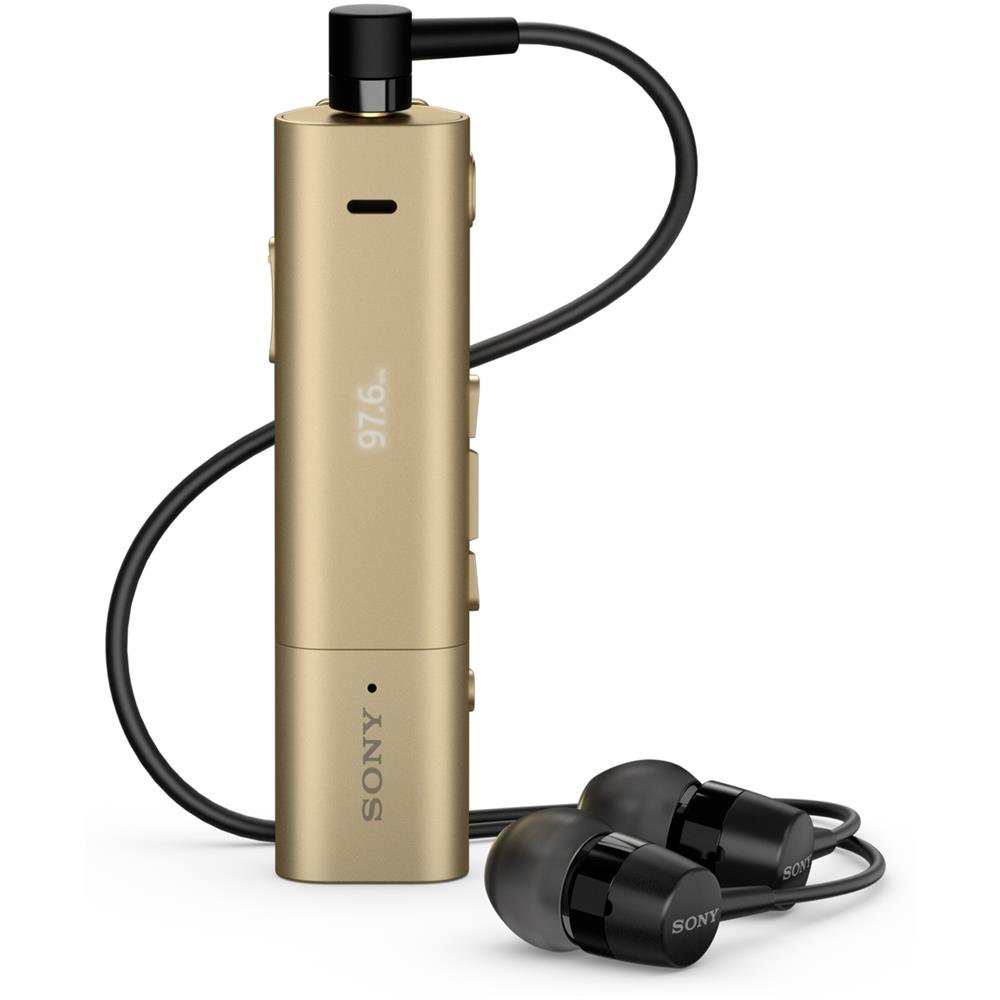
Image: Sony SBH54 Gold Stereo Bluetooth Headset. This image displays the compact, gold-colored headset with its integrated clip and display screen.
Säätimet ja ilmaisimet:
- OLED-näyttö: Shows caller ID, messages, music track information, and FM radio frequency.
- Monitoimipainike: For call answering/ending, play/pause music.
- Äänenvoimakkuuspainikkeet: Säädä äänenvoimakkuutta.
- Navigointipainikkeet: For menu navigation and track skipping.
- Mikrofoni: Integrated for voice calls.
- Kuulokeliitäntä: 3.5mm port for connecting the included premium headphones.
- Latausportti: Micro USB-portti laitteen lataamista varten.
3. Asennus
3.1 Kuulokkeiden lataaminen
- Connect the supplied USB cable to the headset's charging port and to a USB power adapter or a computer's USB port.
- Näytössä oleva akun merkkivalo näyttää latauksen tilan.
- Lataa kuulokkeet täyteen ennen ensimmäistä käyttöä.
3.2 Laiteparin muodostaminen (Bluetooth)
- Varmista, että kuulokkeet on ladattu ja sammutettu.
- Press and hold the power button until the headset enters pairing mode (indicated by a specific light pattern or message on the display).
- Ota Bluetooth käyttöön älypuhelimessasi tai muussa Bluetooth-yhteensopivassa laitteessasi ja hae käytettävissä olevia laitteita.
- Select "SBH54" from the list of found devices.
- Anna pyydettäessä salasana "0000" (neljä nollaa).
- Kun pariliitos on muodostettu, kuulokkeet ilmoittavat onnistuneesta yhteyden muodostamisesta.
3.3 Pairing with a Device (NFC)
For devices with NFC (Near Field Communication):
- Ensure NFC is enabled on your smartphone and the screen is unlocked.
- Touch the NFC detection area of your smartphone to the NFC detection area on the SBH54 headset.
- Suorita pariliitos loppuun noudattamalla näytön ohjeita.
4. Kuulokkeiden käyttö
4.1 Virta päälle/pois
- Virran kytkeminen: Pidä virtapainiketta painettuna, kunnes näyttöön syttyy valo.
- Virran sammuttaminen: Paina virtapainiketta ja pidä sitä painettuna, kunnes näyttö sammuu.
4.2 Puheluiden soittaminen ja vastaanottaminen
- Puheluun vastaaminen: When a call comes in, press the multi-function button.
- Puhelun lopettaminen: During a call, press the multi-function button.
- Puhelun hylkääminen: Press and hold the multi-function button when a call comes in.
- Soittaminen: Dial the number on your phone. The call will automatically route to the headset. You can also use voice commands if supported by your phone.
- Handset Function: The compact SBH54 can be used as an unobtrusive handset for calls.
- Melunvaimennus: The headset features echo, wind, and noise cancellation for clear voice transmission.
- HD-ääni: Enhances voice clarity for both parties during a call.
4.3 Musiikin toisto
- Toista/tauko: Paina monitoimipainiketta.
- Seuraava kappale: Press the forward navigation button.
- Edellinen kappale: Press the backward navigation button.
- Äänenvoimakkuuden säätö: Käytä äänenvoimakkuuden lisäys-/vähennyspainikkeita.
4.4 FM -radio
- Aktivoi FM-radio: Navigate through the headset menu to select the FM Radio function.
- Viritä asemia: Use the navigation buttons to scan or manually tune to FM frequencies.
- Tallenna esiasetukset: The headset may allow saving favorite stations (refer to on-screen prompts).
5. Huolto
- Puhdistus: Pyyhi kuulokkeet pehmeällä, kuivalla liinalla. Vältä voimakkaiden kemikaalien tai hankaavien materiaalien käyttöä.
- Vedenkestävyys: The SBH54 has a splash-proof design. This means it can withstand light splashes of water but should not be submerged or exposed to heavy rain. Ensure the charging port cover is securely closed.
- Varastointi: Säilytä kuulokkeita viileässä, kuivassa paikassa, poissa suorasta auringonvalosta ja äärimmäisistä lämpötiloista.
- Akun hoito: Akun käyttöiän pidentämiseksi vältä akun usein tapahtuvaa täydellistä purkamista. Lataa se säännöllisesti.
6. Vianmääritys
Yleisiä ongelmia ja ratkaisuja:
- Kuulokemikrofoni ei käynnisty: Varmista, että akku on ladattu. Liitä laite virtalähteeseen ja yritä uudelleen.
- Ei voida muodostaa pariliitosta laitteen kanssa:
- Varmista, että kuulokkeet ovat pariliitostilassa.
- Varmista, että Bluetooth on käytössä laitteessasi.
- Siirrä kuulokkeet lähemmäs laitettasi.
- Käynnistä sekä kuulokkeet että laite uudelleen.
- Tyhjennä laitteesi aiemmat Bluetooth-yhteydet ja yritä pariliitosta uudelleen.
- Ei ääntä tai äänenlaatu on huono:
- Tarkista sekä kuulokkeiden että yhdistetyn laitteen äänenvoimakkuustasot.
- Varmista, että kuulokkeet ovat laitteesi kantaman sisällä.
- Katkaise Bluetooth-yhteys ja yhdistä se uudelleen.
- Ensure the headphones are properly plugged into the 3.5mm jack.
- FM-radio ei toimi: Varmista, että olet alueella, jossa on hyvä FM-signaalin vastaanotto.
7. Tekniset tiedot
| Ominaisuus | Yksityiskohta |
|---|---|
| Merkki | Sony |
| Mallinumero | SBH54GD |
| Väri | Kulta |
| Korvien sijoitus | Korvassa |
| Muototekijä | Korvassa |
| Melunhallinta | Aktiivinen melunvaimennus |
| Tuotteen paino | 0.1 kiloa |
| Ääniohjaimen tyyppi | Dynaaminen ohjain |
| Taajuusalue | 20 Hz–20,000 XNUMX Hz |
| Kotelon materiaali | Metalli |
| Yhteensopivat laitteet | Smartphones, Laptops, Tablets, Bluetooth-enabled Devices |
| Vedenkestävyystaso | Water Resistant (Splash-proof) |
| Yhteystekniikka | Bluetooth, NFC |
| Langaton tekniikka | Bluetooth, NFC |
| Bluetooth-versio | 3.0 |
| Ohjaustyyppi | Mediaohjaus |
| Valvontamenetelmä | Kauko |
8. Takuu ja tuki
Takuutiedot ja asiakastuki löytyvät ostoksesi mukana tulleista asiakirjoista tai käymällä Sonyn virallisella tukisivustolla. websivusto. Tarkat takuuehdot voivat vaihdella alueittain ja jälleenmyyjiltä riippuen.
Online-tuki: www.sony.com/electronics/support