
1. Johdanto
This manual provides comprehensive instructions for the setup, operation, and maintenance of the EDUP EP-3701 USB WiFi Disk. The EP-3701 is a portable wireless storage device designed to expand storage and facilitate data sharing for iOS and Android smartphones and tablets without the need for cables or a computer.
Lue tämä käyttöohje huolellisesti ennen laitteen käyttöä varmistaaksesi sen oikean toiminnan ja välttääksesi vaurioita.
2. Tuote ohiview
The EDUP EP-3701 acts as a bridge between your USB storage devices (like USB flash drives or external hard drives) and your mobile devices via a Wi-Fi connection. It creates its own Wi-Fi hotspot, allowing multiple devices to connect and access stored files samanaikaisesti.
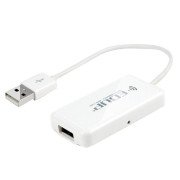
Kuva 2.1: Edessä view of the EDUP EP-3701 USB WiFi Disk, showing the USB host port and the integrated USB cable.
3. Tärkeimmät ominaisuudet
- Wireless Data Access: Pääsy files on connected USB storage devices wirelessly from smartphones, tablets, and computers.
- Usean käyttäjän tuki: Allows multiple users to connect and stream/access data simultaneously.
- Kannettava muotoilu: Compact and lightweight, ideal for travel and on-the-go use.
- Virtalähde: Powered via USB, can be connected to a USB wall adapter, power bank, or computer USB port.
- Sovelluksen hallinta: Dedicated mobile application for easy file management and device configuration.
4. Pakkauksen sisältö
Varmista, että pakkauksessa on kaikki tarvittavat osat:
- EDUP EP-3701 USB WiFi Disk
- Pikaopas (tämä käsikirja)
5. Asennus
5.1. Laitteen käynnistäminen
- Connect the integrated USB cable of the EP-3701 to a USB power source (e.g., a 5V/1A USB wall adapter, a power bank, or a computer's USB port).
- The power indicator light on the device will illuminate, indicating it is powered on.
5.2. Connecting USB Storage
- Insert your USB flash drive or external hard drive into the USB host port on the EP-3701.
- Ensure the USB storage device is properly seated.
5.3. Connecting Mobile Device
- Siirry älypuhelimellasi tai tabletillasi Wi-Fi-asetuksiin.
- Locate and connect to the Wi-Fi network named "EDUP_XXXXXX" (XXXXXX will be the last six digits of the device's MAC address).
- The default password is "12345678". It is recommended to change this password after initial setup.
- Download and install the "WiFi Disk" application from your device's app store (App Store for iOS, Google Play Store for Android).
- Open the "WiFi Disk" app. The app will automatically detect and connect to the EP-3701.
6. Käyttöohjeet
6.1. File Hallinto
- Selaa Files: Within the "WiFi Disk" app, navigate through the folders and files on the connected USB storage.
- Lataa Files: Siirtää files from your mobile device to the USB storage connected to the EP-3701.
- Lataa Files: Siirtää files from the USB storage to your mobile device.
- Suoratoisto: Toista videoita, musiikkia ja view photos directly from the USB storage without downloading.
6.2. Verkkoasetukset
The "WiFi Disk" app allows you to configure network settings:
- Change Wi-Fi Name (SSID): Modify the name of the EP-3701's Wi-Fi network.
- Vaihda Wi-Fi-salasana: Update the password for the Wi-Fi network.
- Internet Passthrough (Bridge Mode): Connect the EP-3701 to an existing Wi-Fi network to provide internet access to connected devices while still allowing access to the USB storage.
7. Huolto
- Puhdistus: Puhdista laitteen ulkopinta pehmeällä, kuivalla liinalla. Älä käytä nestemäisiä puhdistusaineita tai aerosoleja.
- Varastointi: Säilytä laitetta viileässä, kuivassa paikassa, poissa suorasta auringonvalosta ja äärimmäisistä lämpötiloista.
- Laiteohjelmistopäivitykset: Periodically check the "WiFi Disk" app or the EDUP official websivusto laiteohjelmistopäivityksiä varten optimaalisen suorituskyvyn ja tietoturvan varmistamiseksi.
- Turvallinen poisto: Always ensure data transfer is complete before disconnecting the USB storage device or powering off the EP-3701.
8. Vianmääritys
8.1. Laite ei käynnisty
- Ensure the USB cable is securely connected to a working USB power source.
- Kokeile toista USB-porttia tai virtalähdettä.
8.2. Ei voi muodostaa yhteyttä Wi-Fi-verkkoon
- Verify you are selecting the correct "EDUP_XXXXXX" network.
- Double-check the Wi-Fi password (default is "12345678").
- Restart the EP-3701 device and your mobile device.
8.3. USB Storage Not Detected
- Ensure the USB storage device is properly inserted into the EP-3701's USB host port.
- Check if the USB storage device is formatted in a supported file system (FAT32, NTFS, exFAT).
- Some high-power consumption external hard drives may require an external power source.
- Try a different USB storage device to rule out a faulty drive.
8.4. App Not Functioning Correctly
- Ensure your mobile device is connected to the EP-3701's Wi-Fi network.
- Close and reopen the "WiFi Disk" app.
- Reinstall the "WiFi Disk" app.
- Tarkista sovelluspäivitykset laitteesi sovelluskaupasta.
9. Tekniset tiedot
| Ominaisuus | Kuvaus |
|---|---|
| Malli | EP-3701 |
| Käyttöliittymä | USB 2.0 (Host), USB 2.0 (Power Input) |
| Langaton standardi | IEEE 802.11b/g/n |
| Taajuuskaista | 2.4 GHz |
| Turvallisuus | WPA/WPA2, WPA-PSK/WPA2-PSK |
| Tuettu File Järjestelmät | FAT32, NTFS, exFAT |
| Virransyöttö | DC 5V/1A (via USB) |
| Mitat | (Approximate, based on typical USB dongle size) 60mm x 25mm x 10mm |
| Käyttölämpötila | 0 °C - 40 °C (32 °F - 104 °F) |
10. Takuu ja tuki
EDUP products typically come with a limited warranty. Please refer to the warranty card included with your purchase or visit the official EDUP websivustolta tarkemmat takuuehdot omalle alueellesi.
For technical support, product inquiries, or warranty claims, please contact EDUP customer service through their official websivustolla tai tuotepakkauksessa olevissa yhteystiedoissa.
Websivusto: www.szedup.com