
1. Johdanto
The Microsoft Surface 3 is a versatile 10.8-inch tablet designed for productivity and portability. Running on Windows 10 and powered by an Intel Atom processor, it offers a full PC experience in a compact form factor. This manual provides essential information for setting up, operating, maintaining, and troubleshooting your device.

Image: Microsoft Surface 3 Tablet with an attached red Type Cover keyboard and a silver Surface Pen. The screen displays a colorful image with digital annotations, demonstrating its versatility.
2. Mitä laatikossa on
Upon unboxing your Microsoft Surface 3, verify that all standard components are present:
- Microsoft Surface 3 Tablet
- Power Supply Unit (Charger)
- Pikaopas (jos mukana)
Huomautus: The Surface Pen and Type Cover keyboard are optional accessories and are typically sold separately. Ensure you have these if your purchase included them.
3. Laite loppuview
Familiarize yourself with the physical features and ports of your Surface 3 tablet.
3.1 Portit ja painikkeet
- USB 3.0 -portti: USB-laitteiden, kuten ulkoisten asemien, hiirten tai näppäimistöjen, liittämiseen.
- Micro -USB -latausportti: Käytetään laitteen lataamiseen.
- Mini DisplayPort: Ulkoisten näyttöjen tai projektorien liittämistä varten.
- Kuulokeliitäntä: Äänen ulostulo kuulokkeisiin tai ulkoisiin kaiuttimiin.
- MicroSD -korttipaikka: For expanding storage with a microSDXC card.
- Äänenvoimakkuuspainikkeet: Äänitasojen säätämiseen.
- Virtapainike: Laitteen kytkeminen päälle/pois tai sen laittaminen lepotilaan.
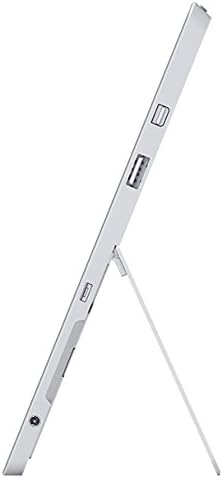
Kuva: Sivu view of the Microsoft Surface 3, illustrating the various ports including USB, Mini DisplayPort, and the kickstand in an open position.

Kuva: Lähikuva view of the microSD card slot on the Microsoft Surface 3, with a microSD card partially inserted, demonstrating storage expansion capability.
3.2 Kamerat
- Takakamera: 8 MP for capturing photos and videos.
- Etukamera: 3.5 MP for video calls and selfies.
4. Asennus
4.1 Alkuveloitus
Before first use, connect the Surface 3 to the power supply using the Micro USB charging port and allow it to charge fully. The battery indicator on the screen will show charging status.
4.2 Powering On and Windows Setup
- Paina ja pidä painettuna Virtapainike until the Microsoft logo appears on the screen.
- Follow the on-screen prompts to complete the Windows 10 setup process. This includes selecting your language, connecting to a Wi-Fi network, and creating or signing in with a Microsoft account.
- Allow the system to download and install any pending updates for optimal performance and security.
4.3 Attaching Optional Accessories
- Type Cover: Align the Type Cover with the magnetic connector at the bottom edge of the Surface 3 until it clicks into place.
- Surface Pen: The Surface Pen can be magnetically attached to the side of the Surface 3 for storage. For initial pairing, follow the instructions provided with the pen or in Windows settings.
5. Käyttö
5.1 Navigointi
- Kosketusnäyttö: Use gestures like tap, swipe, pinch-to-zoom for navigation.
- Surface Pen: Use the pen for precise input, drawing, writing, and annotating.
- Type Cover (Optional): Provides a traditional keyboard and trackpad experience.

Image: Microsoft Surface 3 in use with a Type Cover keyboard and Surface Pen, displaying a Windows 10 interface with various applications.
5.2 Windows 10:n ominaisuudet
- Käynnistä-valikko: Käytä sovelluksia, asetuksia ja virranhallinta-asetuksia.
- Toimintakeskus: Swipe from the right edge of the screen to access quick settings and notifications.
- Tehtävä View: View open applications and virtual desktops.
- Tablettitila: Switch to Tablet Mode for a touch-optimized interface.
5.3 Wi-Fi-yhteyden muodostaminen
- Avaa Toimintakeskus by swiping from the right edge of the screen or clicking the icon in the taskbar.
- Napauta Wi-Fi kuvake.
- Valitse haluamasi verkko luettelosta ja anna salasana, jos sitä pyydetään.
6. Huolto
6.1 Puhdistus
- Käytä pehmeää, nukkaamatonta liinaa dampened with water or a screen cleaner specifically designed for electronics to clean the screen.
- Vältä voimakkaita kemikaaleja, hankaavia materiaaleja tai liiallista kosteutta.
- Clean the device exterior with a soft, dry cloth.
6.2 Ohjelmistopäivitykset
Regularly check for and install Windows updates to ensure your device has the latest security patches and performance improvements. Go to Asetukset > Päivitys ja suojaus > Windows Update.
6.3 Akun hoito
- Vältä äärimmäisiä lämpötiloja, sillä ne voivat lyhentää akun käyttöikää.
- For optimal battery longevity, avoid consistently draining the battery to 0% or keeping it at 100% for extended periods.
- The Surface 3 has an average battery life of up to 8 hours under typical usage conditions.
7. Vianmääritys
7.1 Laite ei käynnisty
- Varmista, että laite on ladattu. Liitä virtalähde ja odota muutama minuutti ennen kuin yrität käynnistää laitteen uudelleen.
- Perform a force restart by holding the Virtapainike for 10-15 seconds, then release and press it again briefly.
7.2 Wi-Fi-yhteysongelmat
- Toggle Wi-Fi off and on in the Action Center.
- Restart your Surface 3 and your Wi-Fi router.
- Ensure you are within range of the Wi-Fi network and have the correct password.
7.3 Hidas suorituskyky
- Sulje taustalla käynnissä olevat tarpeettomat sovellukset.
- Tarkista ja asenna kaikki odottavat Windows-päivitykset.
- Varmista, että sinulla on riittävästi vapaata tallennustilaa.
8. Tekniset tiedot
| Ominaisuus | Yksityiskohta |
|---|---|
| Mallinumero | 7G6-00014 |
| Näytön koko | 10.8 tuumaa |
| Näytön resoluutio | 1920x1280 pikseliä |
| Prosessori | Intel Atom x7-Z8700 (2.4 GHz) |
| RAM | 4 Gt |
| Varastointi | 128GB SSD |
| Käyttöjärjestelmä | Windows 10 |
| Grafiikka rinnakkaisprosessori | Quad-core Intel Atom x7-Z8700 processor |
| Langaton tyyppi | 802.11ac Wi-Fi, Bluetooth 4.0 |
| USB-portit | 1x USB 2.0, 1x USB 3.0 |
| Keskimääräinen akun käyttöikä | 8 tuntia |
| Tuotteen paino | 1.37 kiloa |
| Tuotteen mitat | 14.02 x 8.64 x 1.58 tuumaa |
| Takaosa Webkameran resoluutio | 8 MP |
| Edessä Webkameran resoluutio | 3.5 MP |
9. Takuu ja tuki
Your Microsoft Surface 3 Tablet is covered by a limited manufacturer's warranty. For detailed warranty information, including terms and conditions, please refer to the documentation provided with your purchase or visit the official Microsoft support websivusto.
For technical assistance, software updates, and additional resources, please visit the official Microsoft Support website or contact their customer service. Keep your device's serial number (located on the back of the tablet or in Windows settings) readily available when seeking support.