
1. Tuote ohiview
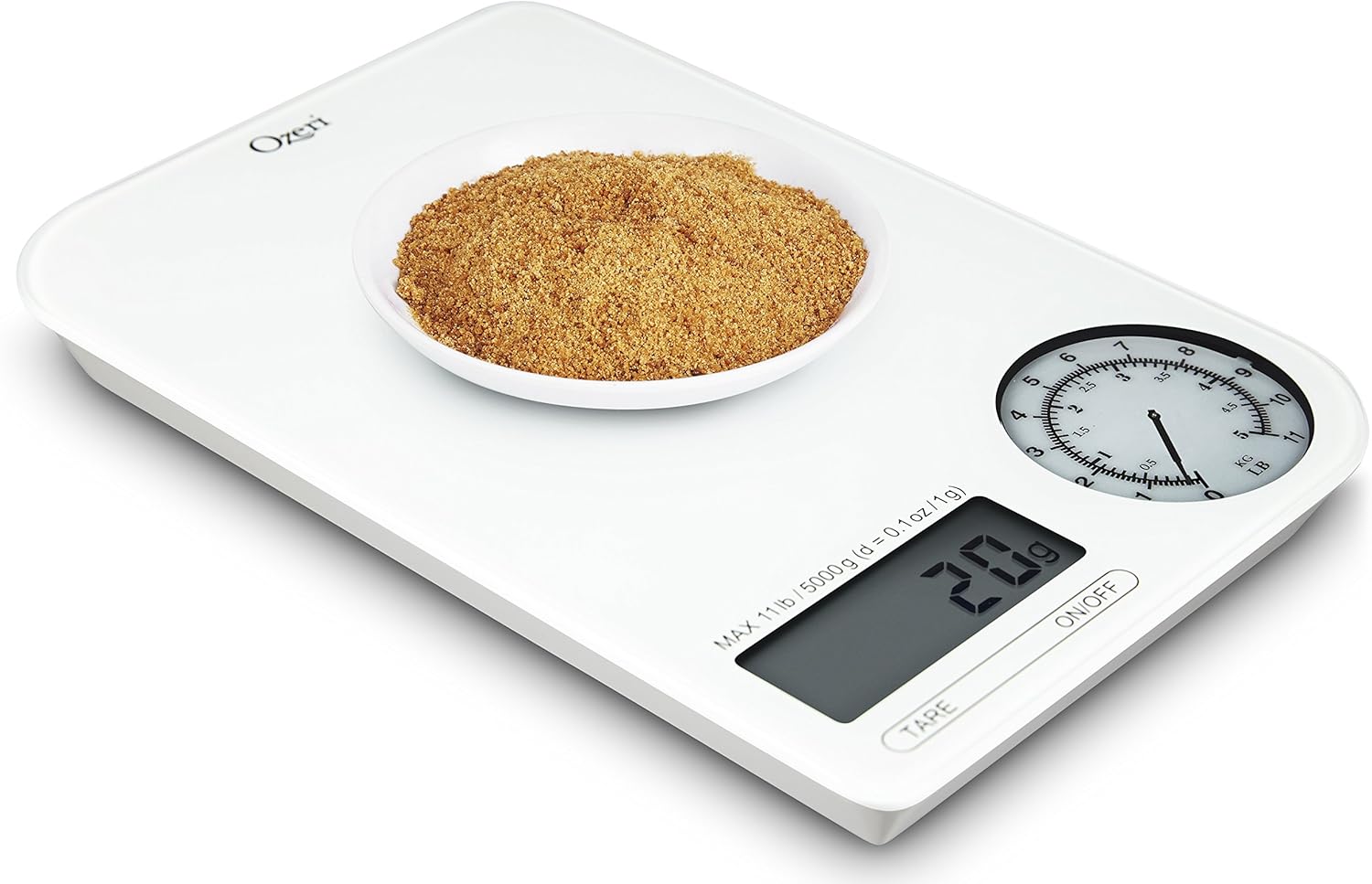
The Ozeri Rev Digital Kitchen Scale combines a digital display with an electro-mechanical dial to provide precise weight measurements. It is designed for accuracy and ease of use in various kitchen tasks.

Kuva 1.1: Yläosa view of the Ozeri Rev Digital Kitchen Scale, showing the digital display and the mechanical dial.
The scale features high-precision sensors capable of weighing items from 0.1 oz to 11 lbs (5000 g) with graduations of 0.1 oz or 1 gram. It offers a dual display system for both digital and mechanical readings.
2. Asennus
2.1 Pakkauksesta purkaminen
Poista vaaka varovasti pakkauksestaan. Tarkista vaaka mahdollisten vaurioiden varalta. Säilytä pakkaus myöhempää säilytystä tai kuljetusta varten.
2.2 Akun asennus
The Ozeri Rev Digital Kitchen Scale requires 3 AAA batteries (included). Follow these steps to install them:
- Paikanna paristolokero vaa'an alapuolelta.
- Open the battery compartment cover. No screwdriver is needed for this.
- Aseta 3 AAA-paristoa lokeroon varmistaen oikean napaisuuden (+/-) lokeron sisällä olevien merkkien mukaisesti.
- Sulje paristolokeron kansi kunnolla.
Huomautus: If the included batteries appear leaked or damaged, do not use them. Replace with new AAA batteries.
2.3 Alkuperäinen sijoittelu
Place the scale on a flat, stable, and hard surface to ensure accurate readings. Avoid placing it on soft or uneven surfaces, which can affect precision.
3. Käyttöohjeet
3.1 Virta päälle/pois
- Kääntääksesi vaakaa ON, paina ON/OFF button located on the front panel. The LCD and mechanical dial will illuminate.
- Kääntääksesi vaakaa POIS, paina ja pidä painettuna ON/OFF button for a few seconds. The scale also features an automatic shut-off function to conserve battery power if left inactive.

Kuva 3.1: Lähikuva view of the digital display, mechanical dial, TARE button, and ON/OFF button.
3.2 Yksikkömuunnos
The scale can display measurements in various units. To change the unit of measurement:
- Locate the unit conversion button. This is typically a UNIT button or a physical switch on the underside of the scale.
- Paina UNIT button or toggle the switch to cycle through available units: pounds (lb), ounces (oz), grams (g), and milliliters (ml).
- The selected unit will be displayed on the LCD screen. The mechanical dial simultaneously shows measurements in lbs and kg for heavier items.
3.3 Taaratoiminto
The Tare function allows you to weigh ingredients in a container by subtracting the container's weight. This enables you to measure multiple ingredients consecutively in the same bowl.
- Aseta tyhjä astia vaa'alle.
- Paina TAARA -painiketta. Näyttö nollautuu.
- Add your ingredient to the container. The scale will display only the weight of the ingredient.
- Toista prosessi lisäaineille.
Huomautus: Some users report a slight delay (approx. 3 seconds) for the Tare function to register. If the Tare function does not work immediately after turning the scale on, try placing the container on the scale ennen powering it on, then press Tare.
3.4 Punnitsettavat tuotteet
Tuotteen punnitseminen:
- Ensure the scale is on a flat, stable surface and powered on.
- Jos käytät astiaa, suorita taaraustoiminto yllä kuvatulla tavalla.
- Place the item(s) to be weighed gently onto the center of the scale platform.
- Read the weight displayed on the digital LCD screen and observe the mechanical dial for a visual representation of heavier weights.

Kuva 3.2: The scale accurately weighing strawberries in a bowl.
Kuva 3.3: The scale displaying the weight of chocolate chips in a measuring cup.
4. Huolto
4.1 Puhdistus
The Ozeri Rev Digital Kitchen Scale features a glass top, making it easy to clean.
- Pyyhi vaa'an pinta pehmeällä,amp kangas.
- For stubborn stains, use a mild detergent solution on the cloth, then wipe clean with a damp liinalla ja kuivaa huolellisesti.
- Do not immerse the scale in water or use abrasive cleaners, as this can damage the electronic components.
4.2 Varastointi
Store the scale in a cool, dry place away from extreme temperatures and humidity. Its compact size allows for easy storage in most kitchen drawers or cabinets.
4.3 Pariston vaihto
When the low battery indicator appears on the LCD, replace all three AAA batteries with new ones to ensure continued accurate operation. Refer to Section 2.2 for battery installation instructions.
5. Vianmääritys
5.1 Epätarkat lukemat
- Epätasainen pinta: Ensure the scale is placed on a flat, stable, and hard surface.
- Ylikuormitus: Do not exceed the maximum weight capacity of 11 lbs (5000 g). Overloading can damage the sensors.
- Akun varaus vähissä: Replace batteries if the low battery indicator is on, as low power can affect accuracy.
- Kalibrointi: While the scale is factory calibrated, consistent inaccuracies may require contacting customer support.
5.2 Tare Function Issues
- Viive: The Tare function may have a slight delay. Press the TARE button and wait a few seconds for the display to zero out.
- Initial Tare: If the Tare function is unresponsive after power-on, try placing the container on the scale ennen turning the scale on, then press TARE.
5.3 Näyttö ei toimi
- Ei virtaa: Check if the scale is turned on.
- Tyhjät paristot: Vaihda AAA -paristot.
- Akun suunta: Varmista, että paristot on asetettu oikein päin.
6. Tekniset tiedot
| Ominaisuus | Erittely |
|---|---|
| Mallinumero | ZK18-WG |
| Merkki | Ozeri |
| Painorajoitus | 11 lbs (5000 g) |
| Lukemisen tarkkuus | +/- 0.1 oz or +/- 1 gram |
| Näytön tyyppi | LCD and Electro-Mechanical Dial |
| Virtalähde | 3 x AAA-paristot |
| Materiaali | Lasi |
| Tuotteen mitat | 8.3 x 5.5 x 0.8 tuumaa |
| Tuotteen paino | 14.4 unssia (0.9 lbs) |
7. Takuu ja tuki
For warranty information or technical support, please refer to the documentation included with your purchase or visit the official Ozeri website. The product has an EU Spare Part Availability Duration of 2 Years.
For further assistance, you may contact Ozeri customer service through their official channels.