
1. Johdanto
This manual provides comprehensive instructions for the installation, operation, and maintenance of your Speco Technologies HT5941T Intense IR HD TVI Dome Camera. This camera is designed to deliver high-definition surveillance with advanced features such as True WDR, Intense IR, and day/night operation. Please read this manual thoroughly before installation and use to ensure proper functionality and safety.
2. Turvallisuustiedot
- Virtalähde: Use only the specified 12VDC or 24VAC power supply. Incorrect voltagvoi vahingoittaa kameraa.
- Asennus: Ensure the camera is securely mounted to prevent accidental falls. Professional installation is recommended.
- Ympäristö: Do not expose the camera to extreme temperatures, humidity, or corrosive environments beyond its specified operating conditions.
- Puhdistus: Disconnect power before cleaning. Use a soft, dry cloth. Avoid harsh chemicals.
- Huolto: Do not attempt to disassemble or service the camera yourself. Refer all servicing to qualified personnel.
3. Pakkauksen sisältö
Varmista, että pakkauksessasi on kaikki tarvittavat osat:
- HT5941T Dome Camera
- Chameleon Cover
- Kiinnitystarvikkeet (ruuvit, ankkurit)
- Pikaopas (jos sovellettavissa)
4. Asennus ja asennus
4.1 Kameran asennus
The HT5941T camera supports 3-axis adjustment for both wall and ceiling mounting. Ensure the mounting surface is strong enough to support the camera's weight.
- Valitse sopiva asennuspaikka.
- Use the provided mounting template (if included) or the camera base to mark drilling points.
- Poraa ohjausreiät ja aseta tarvittaessa seinäankkurit.
- Kiinnitä kameran jalusta kiinnityspintaan mukana toimitetuilla ruuveilla.
- Säädä kameran kulmaa optimaaliseksi viewing.
4.2 Johdotus ja virtaliitäntä
The HT5941T is an HD-TVI output only camera, providing full HD resolution over coaxial cable.
- Connect a coaxial cable (RG59 or similar) from the camera's BNC output to your HD-TVI DVR or monitor.
- Connect the power cable to the camera's power input. The camera supports dual voltage operation (12VDC or 24VAC). Ensure the power supply matches the camera's requirements.
- Varmista, että kaikki liitännät ovat kunnolla kiinni ennen virran kytkemistä.
4.3 Chameleon Cover Installation
The included Chameleon Cover can be painted to match your décor.
- If desired, paint the Chameleon Cover before installation. Allow it to dry completely.
- Align the cover with the camera body and snap it into place.
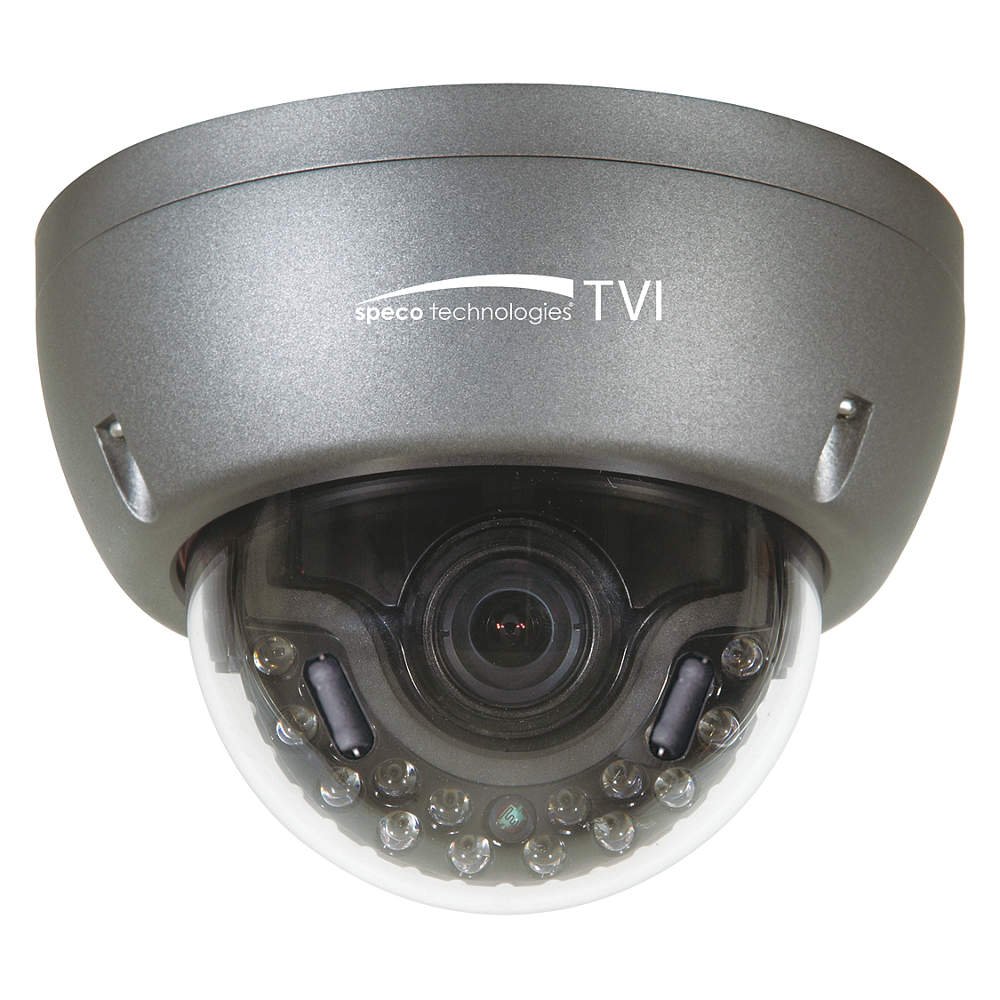
Figure 1: Speco Technologies HT5941T Dome Camera with its dark gray housing and dome design.
5. Käyttöohjeet
5.1 Virran kytkeminen päälle ja alkuasetukset View
Once the camera is properly wired and powered, it will automatically begin transmitting video. Connect your HD-TVI DVR or monitor to view live-syöte.
5.2 On-Screen Display (OSD) -valikko
The camera features a full OSD menu for configuration, accessible via on-board controls or UTC (Up The Coax) control from a compatible DVR.
- OSD-valikon käyttö: Use the joystick or buttons on the camera (if present) or the UTC control function on your DVR to bring up the OSD menu.
- Navigointi: Use the directional controls to navigate through menu options. Select options to adjust settings such as exposure, white balance, and image enhancements.
- Tärkeimmät ominaisuudet:
- Todellinen WDR: Wide Dynamic Range for clear images in high-contrast lighting.
- Intense IR: Adapts IR intensity to the subject, preventing saturation and providing vivid night vision.
- Day/Night Operation: Mechanical IR cut filter automatically switches between color (day) and monochrome (night) modes for optimal image quality.
6. Huolto
6.1 Puhdistus
Säännöllinen puhdistus auttaa ylläpitämään optimaalisen kuvanlaadun.
- Gently wipe the camera lens and housing with a soft, lint-free cloth.
- Pinttyneeseen likaan, kevyesti dampen the cloth with water or a mild lens cleaning solution. Avoid abrasive cleaners.
- Varmista, että kamera on sammutettu ennen puhdistamista.
6.2 Ympäristönäkökohdat
The HT5941T features heater circuitry and anti-moisture glass to reduce fog or condensation in various weather conditions. No specific user maintenance is required for these features, but ensure the camera's power supply is stable to allow these functions to operate effectively.
7. Vianmääritys
| Ongelma | Mahdollinen syy | Ratkaisu |
|---|---|---|
| Ei videolähtöä | No power; Loose cable connection; Incorrect video format (not HD-TVI compatible DVR) | Check power supply and connections; Ensure DVR supports HD-TVI input. |
| Huono kuvanlaatu (epätarkka, vääristynyt) | Dirty lens; Improper focus; Cable interference; Insufficient lighting | Clean the lens; Adjust focus via OSD; Use shielded coaxial cable; Verify adequate lighting or IR function. |
| IR not working at night | Insufficient power; Day/Night setting incorrect; IR sensor blocked | Check power supply; Verify Day/Night mode in OSD; Ensure nothing obstructs the IR LEDs or sensor. |
| OSD-valikko ei tule näkyviin | Incorrect control method; DVR not compatible with UTC | Try on-board controls if available; Consult DVR manual for UTC compatibility and operation. |
8. Tekniset tiedot
| Ominaisuus | Erittely |
|---|---|
| Mallinumero | HT5941T |
| Merkki | Speco Technologies |
| Videon sieppaustarkkuus | 1080p (Full HD) |
| Kuvataajuus | 30 fps |
| Yhteystekniikka | HD-TVI (Coaxial) |
| Virtalähde | 12VDC & 24VAC Dual Voltage |
| Asennustyyppi | Wall Mount (3-axis adjustment) |
| Muototekijä | Kupoli |
| Low Light -tekniikka | Day/Night, Intense IR |
| Erikoisominaisuudet | True WDR, Heater circuitry, Anti-moisture glass, Chameleon Cover |
| Kansainvälinen turva-arviointi | IP67 |
| Mitat (P x L x K) | 5.12 x 4.84 x 3.66 tuumaa |
| Tuotteen paino | 1.5 puntaa |
| Materiaali | Lasi (linssi) |
9. Takuu ja tuki
For warranty information and technical support, please refer to the official Speco Technologies websivustolta tai ota yhteyttä heidän asiakaspalveluunsa. Säilytä ostokuitti ostotodistuksena takuuvaatimuksia varten.
Speco Technologies Official Websivusto: www.specotech.com