
1. Johdanto
Thank you for choosing the Moxie KX1 Bluetooth Handsfree Car Kit. This device is designed to provide a safe and convenient way to manage calls and enjoy music wirelessly while driving. Please read this manual carefully before using the device to ensure proper operation and to maximize its performance and lifespan.
2. Tuote ohiview
2.1 Komponentit
- Moxie KX1 Bluetooth Handsfree Car Kit
- USB-latauskaapeli
- Auton laturin sovitin
- Käyttöopas
2.2 Laitteen asettelu ja säätimet
Familiarize yourself with the buttons and indicators on your KX1 device:
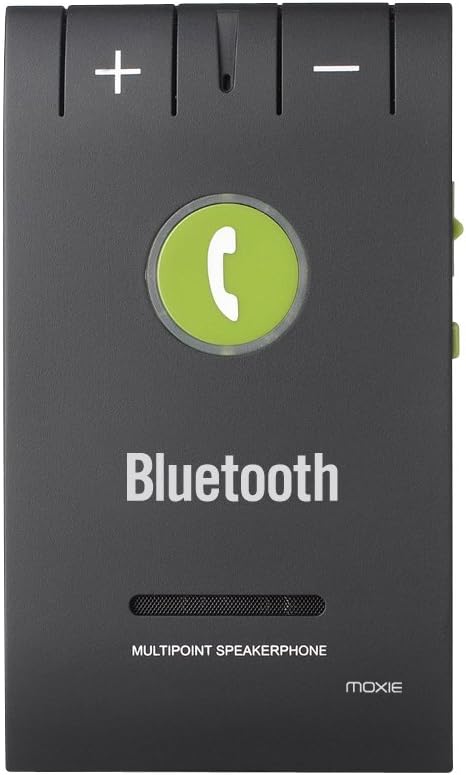
Kuva 1: Front panel of the Moxie KX1, highlighting the volume controls (+ and -), the central call button, and the 'Bluetooth' indicator.
| Ohjaus | Toiminto |
|---|---|
| + Painike | Increase Volume / Next Track (during music playback) |
| - Painike | Decrease Volume / Previous Track (during music playback) |
| Call Button (Center) | Answer/End Call, Redial, Voice Assistant Activation, Play/Pause Music |
| Power Switch (Side) | Virta päälle/pois |
| Charging Port (Side) | Connect USB charging cable |
3. Tekniset tiedot
| Ominaisuus | Yksityiskohta |
|---|---|
| Bluetooth-versio | V4.0 + EDR |
| Toimintataajuus | ISM (Ralink 3070) |
| Bluetooth-alue | Jopa 10 metriä (33 jalkaa) |
| Tuettu Profiles | HFP (handsfree Profile), HSP (Headset Profile), AVRCP (Audio/Video Remote Control Profile) |
| Monipisteyhteys | Connects to 2 phones simultaneously |
| Laitehistoria | Stores pairing history for up to 8 devices |
| Puheaika | Noin 15 tuntia |
| Valmiusaika | Noin 1000 tuntia |
| Latausaika | Noin 2 tuntia |
| Melunvaimennus | DSP (Digital Signal Processing) for noise and echo cancellation |
| Akun tyyppi | 3.7 V, 750 mAh litiumakku |
| Mitat | 98 x 57 x 45 mm |
| Paino | 64 g |
| Yhteensopivat laitteet | Acer Liquid M320, M330, Z320, Z330, Blackberry Priv, HTC One A9, Huawei G8, Lenovo IdeaTab A10-70, Microsoft Lumia 550, Sony Xperia C5 Ultra (and other Bluetooth-enabled devices) |
4. Asennus
4.1 Laitteen lataaminen
Before first use, fully charge your Moxie KX1. Connect the provided USB charging cable to the device's charging port and the other end to a USB power source (e.g., car charger adapter, computer USB port). The indicator light will show charging status (e.g., red for charging, off or blue for fully charged).

Kuva 2: Sivu view of the Moxie KX1, illustrating the location of the charging port and the ON/OFF power switch.
Täysi lataus kestää yleensä noin 2 tuntia.
4.2 Pariliitos Bluetooth-laitteen kanssa
- Ensure the KX1 is fully charged and powered off.
- Slide the power switch to the 'ON' position. The device will automatically enter pairing mode, indicated by a flashing blue/red light.
- Ota Bluetooth käyttöön matkapuhelimessasi ja hae käytettävissä olevia laitteita.
- Select "Moxie KX1" from the list of found devices.
- Jos salasanaa pyydetään, kirjoita "0000".
- Once paired, the indicator light will turn solid blue, and you may hear a confirmation tone.
The KX1 will automatically attempt to reconnect to the last paired device when powered on.
4.3 Laitteen asennus
The Moxie KX1 comes with a magnetic clip for easy attachment to your car's sun visor.

Kuva 3: Takaosa view of the Moxie KX1, displaying the integrated magnetic clip designed for secure attachment to a car's sun visor.
- Attach the magnetic clip securely to the back of the KX1.
- Slide the clip onto your car's sun visor, ensuring it is firmly in place and does not obstruct your view.
5. Käyttöohjeet
5.1 Virta päälle/pois

Kuva 4: Yläosa view of the Moxie KX1, clearly showing the ON/OFF slide switch for device power control.
- Virran kytkeminen: Slide the power switch to the 'ON' position. The device will announce "Power On" and attempt to connect to the last paired device.
- Virran sammuttaminen: Slide the power switch to the 'OFF' position. The device will announce "Power Off".
5.2 Puheluiden soittaminen ja vastaanottaminen
- Puheluun vastaaminen: When a call comes in, the device will announce the incoming number. Press the Kutsunappula kerran vastaamaan.
- Puhelun lopettaminen: Paina puhelun aikana Kutsunappula once to end the call.
- Puhelun hylkääminen: When a call comes in, press and hold the Kutsunappula for approximately 2 seconds to reject the call.
- Viimeisen numeron uudelleenvalinta: In standby mode, double-press the Kutsunappula valitaksesi uudelleen viimeksi valitun numeron.
- Voice Assistantin aktivointi: Paina valmiustilassa ja pidä painettuna Kutsunappula for approximately 2 seconds to activate your phone's voice assistant (e.g., Siri, Google Assistant).
5.3 Musiikin toisto
Once paired, you can stream music from your phone through the KX1 speaker.
- Toista/tauko: Paina Kutsunappula kerran soittaaksesi tai keskeyttääksesi musiikin.
- Seuraava kappale: Paina + Painike kerran.
- Edellinen kappale: Paina - Painike kerran.
- Äänenvoimakkuuden säätö: Paina ja pidä painettuna + or - Painike säätääksesi äänenvoimakkuutta.
5.4 Monipisteyhteys
The Moxie KX1 supports connecting to two Bluetooth devices simultaneously.
- Pair the first phone as described in Section 4.2.
- After the first phone is paired, disable Bluetooth on the first phone.
- The KX1 will re-enter pairing mode (flashing blue/red light).
- Pair the second phone as described in Section 4.2.
- Once the second phone is paired, re-enable Bluetooth on the first phone. Both phones should now be connected to the KX1.
When two phones are connected, the KX1 will manage calls from both devices. Music playback will typically come from the last connected or active device.
6. Huolto
- Puhdista laite pehmeällä, kuivalla liinalla. Älä käytä hankaavia puhdistusaineita tai liuottimia.
- Vältä altistamasta laitetta äärimmäisille lämpötiloille, kosteudelle tai suoralle auringonvalolle.
- Säilytä laitetta viileässä ja kuivassa paikassa, kun sitä ei käytetä pitkään aikaan.
- Älä yritä purkaa tai korjata laitetta itse, sillä se mitätöi takuun.
7. Vianmääritys
| Ongelma | Mahdollinen ratkaisu |
|---|---|
| Laite ei käynnisty. | Ensure the device is charged. Connect to a power source and allow it to charge for at least 30 minutes before attempting to power on again. |
| Ei voi muodostaa pariliitosta puhelimen kanssa. |
|
| Ei ääntä tai äänenlaatu on huono. |
|
| Calls are not clear (echo/noise). | Ensure the microphone is not obstructed. Try adjusting the position of the KX1 on the sun visor. The DSP technology should minimize most background noise. |
| Monipisteyhteyden ongelmat. | Ensure both phones have Bluetooth enabled and are within range. Re-follow the multipoint pairing instructions in Section 5.4. |
8. Turvallisuustiedot
- Do not operate the device while driving if it distracts you. Always prioritize road safety.
- Pidä laite poissa vedestä, kosteudesta ja äärilämpötiloista.
- Älä pudota, puhkaise tai pura laitetta.
- Pidä poissa lasten ulottuvilta.
- Hävitä akku ja laite paikallisten määräysten mukaisesti.
9. Takuu ja tuki
Moxie products are designed for reliability and performance. For warranty information or technical support, please refer to the contact details provided with your purchase or visit the official Moxie websivusto. Säilytä ostokuitti takuuvaatimuksia varten.