
1. Johdanto
The Flexson Analog to Digital Converter is designed to bridge the gap between audio devices with analog outputs and modern audio systems that primarily use digital inputs, such as the SONOS PLAYBAR. This device allows you to connect older televisions, CD players, or other audio sources with analog audio outputs (e.g., RCA or 3.5mm headphone jack) to a digital audio input (optical TOSLINK) on your sound system. It ensures reliable and lossless audio signal transmission, integrating your existing equipment with digital-only setups.
2. Turvallisuustiedot
- Virtalähde: Käytä ainoastaan laitteen mukana toimitettua virtalähdettä. Varmista, että äänenvoimakkuus ontage vastaa paikallista virtalähdettäsi.
- Kosteus: Do not expose the device to water, rain, or excessive humidity. Avoid placing liquids near the unit.
- Ilmanvaihto: Varmista riittävä ilmanvaihto laitteen ympärillä. Älä tuki tuuletusaukkoja.
- Lämpö: Pidä laite poissa lämmönlähteistä, kuten pattereista, lämmitysvastuksista, liesistä tai muista lämpöä tuottavista laitteista.
- Puhdistus: Disconnect power before cleaning. Use a dry, soft cloth. Do not use liquid cleaners or aerosol cleaners.
- Huolto: Älä yritä huoltaa tätä tuotetta itse. Anna kaikki huoltotoimenpiteet pätevän huoltohenkilöstön tehtäväksi.
3. Pakkauksen sisältö
Valitse seuraavat kohdat rastittamalla ruutu:
- Flexson Analog to Digital Converter Unit
- Virtalähde
- Käyttöopas (tämä asiakirja)
- Note: Audio cables (RCA, 3.5mm, Optical) are typically sold separately.
4. Asennus
Follow these steps to connect your Flexson Analog to Digital Converter:
- Connect Analog Audio Source: Connect an analog audio cable (e.g., 3.5mm stereo jack or RCA stereo cables) from your source device (e.g., TV headphone output, CD player RCA output) to the corresponding analog input port on the Flexson converter.
- Connect Digital Audio Output: Connect an optical TOSLINK cable from the 'Optical Out' port on the Flexson converter to the digital optical input on your SONOS PLAYBAR or other digital audio system.
- Liitä virta: Plug the provided power adapter into the 'DC 5V' input on the Flexson converter, then plug the adapter into a wall outlet. The converter will power on automatically.
- Select Input on Audio System: On your SONOS PLAYBAR or digital audio system, select the optical input as the audio source.
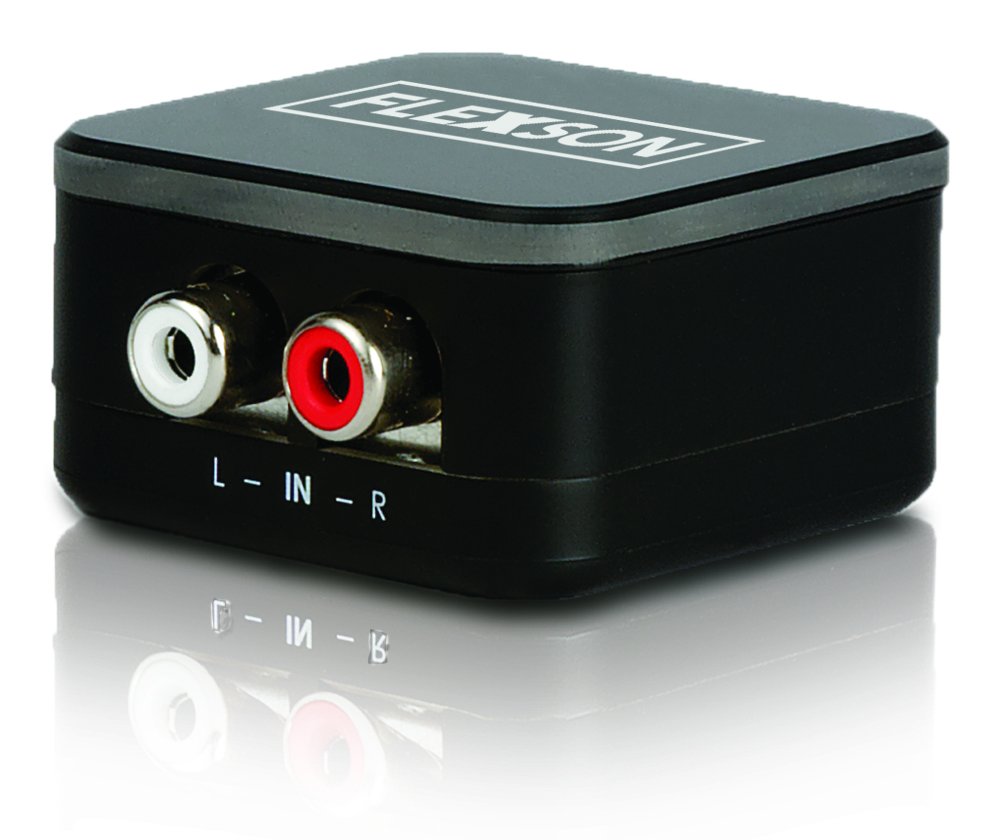
Image showing the compact Flexson Analog to Digital Converter unit with its various ports for analog input and digital optical output.
5. Käyttö
Once properly connected and powered, the Flexson Analog to Digital Converter operates automatically. It converts the incoming analog audio signal into a digital optical signal without requiring any user interaction. Ensure your source device is playing audio and your digital audio system is set to the correct input to hear sound.
6. Huolto
- Puhdistus: Use a soft, dry cloth to wipe the exterior of the converter. Do not use abrasive cleaners or solvents.
- Varastointi: Jos laitetta säilytetään pitkään, irrota se virtalähteestä ja säilytä sitä viileässä, kuivassa paikassa, poissa suorasta auringonvalosta.
- Kaapelin hallinta: Ensure all cables are connected securely and are not under strain or bent sharply.
7. Vianmääritys
Ei äänilähtöä
- Tarkista teho: Ensure the power adapter is securely connected to the converter and a working power outlet.
- Tarkista yhteydet: Double-check that all analog and digital audio cables are firmly connected to their respective ports on the source, converter, and audio system.
- Lähdelaitteen lähtö: Confirm that your analog source device (e.g., TV) is outputting audio through the connected port and its volume is turned up.
- Audio System Input: Ensure your SONOS PLAYBAR or digital audio system is set to the correct optical input.
- Kaapelin eheys: Test with different audio cables if possible, to rule out faulty cables.
Huono äänenlaatu / särö
- Lähteen määrä: Ensure the analog source device's volume is not set too high, which could cause distortion before conversion.
- Kaapelin laatu: Use high-quality audio cables to minimize interference.
- Häiriöt: Keep the converter and audio cables away from strong electromagnetic fields or other electronic devices that might cause interference.
8. Tekniset tiedot
| Merkki | Flexson |
| Malli | FLXA2D1021 |
| Input-liitäntä | Analog (e.g., 3.5mm, RCA stereo) |
| Lähtöliitäntä | Optinen (TOSLINK) |
| Tuotteen paino | 0.16 kiloa |
| Virtalähde | DC 5V (mukana toimitettavan sovittimen kautta) |
9. Takuu ja tuki
This Flexson product comes with a standard manufacturer's warranty. Please refer to the warranty card included with your purchase or visit the official Flexson website for detailed warranty terms and conditions. For technical support, troubleshooting assistance, or to inquire about replacement parts, please contact Flexson customer support through their official channels.