
1. Johdanto
This manual provides detailed instructions for the installation, operation, and maintenance of your Antec P50 Window R Mid-Tower PC Case. The Antec P50 Window R is designed for silent computing with optimized airflow and support for Micro ATX and Mini-ITX motherboards. It features a dual-chamber structure, liquid cooling support, and multiple drive bays for a versatile build.
Lue tämä käyttöohje huolellisesti ennen asennuksen aloittamista varmistaaksesi oikean asennuksen ja maksimoidaksesi järjestelmäsi suorituskyvyn ja pitkän käyttöiän.
2. Asennus ja asennus
2.1 Pakkauksesta purkaminen ja tarkastus
Carefully remove the PC case from its packaging. Inspect the case for any signs of damage that may have occurred during shipping. Retain the packaging for future transport or warranty claims.
2.2 Sivupaneelien irrottaminen
Locate and unscrew the thumbscrews on the rear of the case. Slide the side panels backward and lift them off to access the interior.

Kuva: Kulmikas view of the Antec P50 Window R PC Case, showing its compact mid-tower design and front panel.
2.3 Emolevyn asennus
- Asenna I/O-suoja kotelon takaosaan.
- Ensure the motherboard standoffs are correctly aligned for your Micro ATX or Mini-ITX motherboard.
- Aseta emolevy varovasti tukien päälle ja kohdista ruuvinreiät.
- Kiinnitä emolevy mukana toimitetuilla ruuveilla.

Kuva: Sisätilat view of the Antec P50 Window R PC Case, highlighting the motherboard tray and cable routing options.
2.4 Virtalähteen asennus
The P50 Window R supports bottom-mount power supplies. Install your power supply into the designated compartment at the bottom rear of the case and secure it with screws.
2.5 Taajuusmuuttajan asennus
The case features 6 drive bays:
- One 5.25" external drive bay (for optical drives).
- Three 3.5" HDD drive bays.
- Two 2.5" SSD drive bays.
Follow the case's internal guides for tool-less or screw-based installation of your storage devices.

Kuva: Sisätilat view of the Antec P50 Window R PC Case, showing the rear of the motherboard tray with cable management space and drive bay locations.
2.6 Laajennuskortin asennus
The case provides 4 expansion slots. Remove the slot covers as needed and install your graphics card or other expansion cards, securing them with screws.
2.7 Tuulettimen ja jäähdyttimen asennus
The P50 Window R comes with pre-installed fans: two 120mm fans and one 80mm fan at the front, and one 80mm fan at the rear. It supports additional 80mm/120mm fan mounts and a 240mm radiator in the front or top for liquid cooling.
- For liquid cooling, install the 240mm radiator in the designated front or top mounting points.
- Ensure fans are oriented correctly for optimal airflow (intake at front, exhaust at rear/top).
2.8 Kaapelin hallinta
Hyödynnä emolevyn lokeron takana olevia kaapelien reititysaukkoja ja kiinnityspisteitä kaapeleiden hallintaan. Tämä parantaa ilmankiertoa ja ulkonäköä.
2.9 Etupaneelin I/O-liitännät
Connect the front panel cables (USB 3.0, USB 2.0, HD Audio, Power Switch, Reset Switch, Power LED, HDD LED) to the corresponding headers on your motherboard. Refer to your motherboard manual for header locations.
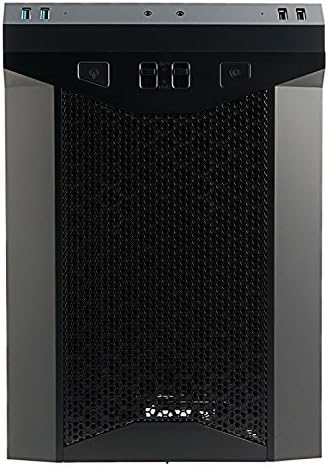
Kuva: Edessä view of the Antec P50 Window R PC Case, showing the mesh intake and front panel controls.
3. Käyttö
3.1 Etupaneelin säätimet ja portit
Etupaneeli tarjoaa kätevän pääsyn seuraaviin kohteisiin:
- Virtapainike: Järjestelmän kytkeminen päälle tai pois päältä.
- Reset-painike: Käynnistääksesi järjestelmän uudelleen.
- USB 3.0 -portit (x2): Nopeaa tiedonsiirtoa varten.
- USB 2.0 -portit (x2): Tavallisille USB-laitteille.
- Ääniliitännät: Kuulokkeille ja mikrofonille.
- Tuulettimen säätimet: Two fan control switches are available to adjust fan speeds for optimal balance between cooling and noise.
3.2 Ilmavirtaus ja jäähdytys
The P50 Window R features a dual-chamber structure designed for direct airflow, separating heat-generating components. The pre-installed fans and additional mounting options ensure efficient cooling for your system.
4. Huolto
4.1 Pölysuodattimien puhdistaminen
Regularly clean the dust filters to maintain optimal airflow and prevent dust buildup inside the case. Dust filters are typically located at the front, top, and bottom (for the power supply intake). Gently remove them and clean with compressed air or rinse with water (ensure they are completely dry before reinstallation).
4.2 Yleinen puhdistus
Käytä pehmeää, damp cloth to clean the exterior surfaces of the case. Avoid abrasive cleaners. For interior cleaning, use compressed air to remove dust from components and internal surfaces.
5. Vianmääritys
5.1 Järjestelmä ei käynnisty
- Ensure all power cables (24-pin ATX, 8-pin CPU, GPU power) are securely connected to the motherboard and components.
- Varmista, että virtakytkin on 'ON'-asennossa.
- Check that the front panel power switch cable is correctly connected to the motherboard header.
5.2 Liiallinen melu
- Tarkista, estävätkö kaapelit tuulettimen lapoja.
- Ensure all fans are securely mounted.
- Utilize the front panel fan controls to adjust fan speeds.
5.3 Huono jäähdytysteho
- Clean all dust filters to ensure unrestricted airflow.
- Verify that fans are oriented correctly (intake/exhaust).
- Ensure proper cable management to avoid blocking airflow.
5.4 Front Panel USB/Audio Ports Not Working
- Confirm that the front panel USB and audio cables are correctly connected to the corresponding headers on your motherboard.
6. Tekniset tiedot
| Ominaisuus | Yksityiskohta |
|---|---|
| Mallin nimi | P50 WINDOW R |
| Asian tyyppi | Mid Tower |
| Emolevyn yhteensopivuus | Micro ATX, Mini-ITX |
| Mitat (S x L x K) | 355mm x 260mm x 355mm (13.98"D x 355"H) |
| Materiaali | Polykarbonaatti (PC) |
| Drive Bays | 1 x 5.25" (external), 3 x 3.5" HDD, 2 x 2.5" SSD |
| Laajennuspaikat | 4 |
| Edessä olevat I / O-portit | 2 x USB 3.0, 2 x USB 2.0, Audio In/Out, 2 x Fan Controls |
| Esiasennetut tuulettimet | Front: 2 x 120mm, 1 x 80mm; Rear: 1 x 80mm |
| Nestejäähdytystuki | 240mm radiator (front/top) |
| Max Video Card Size | 300 mm |
| CPU-jäähdyttimen maksimikorkeus | 130 mm |
| Virtalähteen asennus | Pohjakiinnitys |
| Tuotteen paino | 11.7 puntaa |
7. Takuutiedot
The Antec P50 Window R PC Case comes with a Limited Warranty period (parts): 1 year. Please retain your proof of purchase for warranty claims. For specific terms and conditions, refer to the official Antec websivustolla tai ota yhteyttä asiakastukeen.
8. Tukea
For further assistance, technical support, or to inquire about replacement parts, please visit the official Antec website or contact their customer service department. You can often find FAQs, driver downloads, and additional resources on the manufacturer's support pages.
Antec Official Websivusto: www.antec.com