
DigiTech TRIO
DigiTech TRIO Band Creator Pedal Instruction Manual
Malli: TRIO | Tuotemerkki: DigiTech
Johdanto
The DigiTech TRIO is an innovative electric guitar multi-effect pedal designed to be your personal band. It listens to your guitar playing and automatically generates accompanying bass and drum parts. This manual provides comprehensive instructions for setting up, operating, and maintaining your TRIO pedal, ensuring you get the most out of its unique features.
Tärkeimmät ominaisuudet
- Seven Music Genres and Twelve Song Styles Per Genre to Choose From
- The TRIO can learn up to three different song parts that can be recalled on-the-fly
- Adjustable Tempo & Alternate Half Time/Double Time Variants Bass & Drum Level Controls
- Hands-Free Control Using a DigiTech FS3X Footswitch (optional)
- Amp & Mixer Outputs Headphone Output w/Level Control Power Supply Included
Asennusopas
Follow these steps to set up your DigiTech TRIO pedal:
- Connect the included 9V DC power supply to the POWER input on the pedal and plug it into a power outlet.
- Liitä sähkökitarasi KITARA SISÄÄN liitäntään tavallisella 6,3 mm:n instrumenttikaapelilla.
- Yhdistä AMP OUT jack kitarallesi amplifier-tuloon toisella 6,3 mm:n instrumenttikaapelilla.
- For connecting to a mixer or PA system, use the MIXER OUT Jack.
- Yksityisharjoittelua varten liitä kuulokkeet KUULOKE OUT Jack.
- Optionally, connect a DigiTech FS3X Footswitch to the OHJAUS SISÄÄN jack for extended hands-free control.
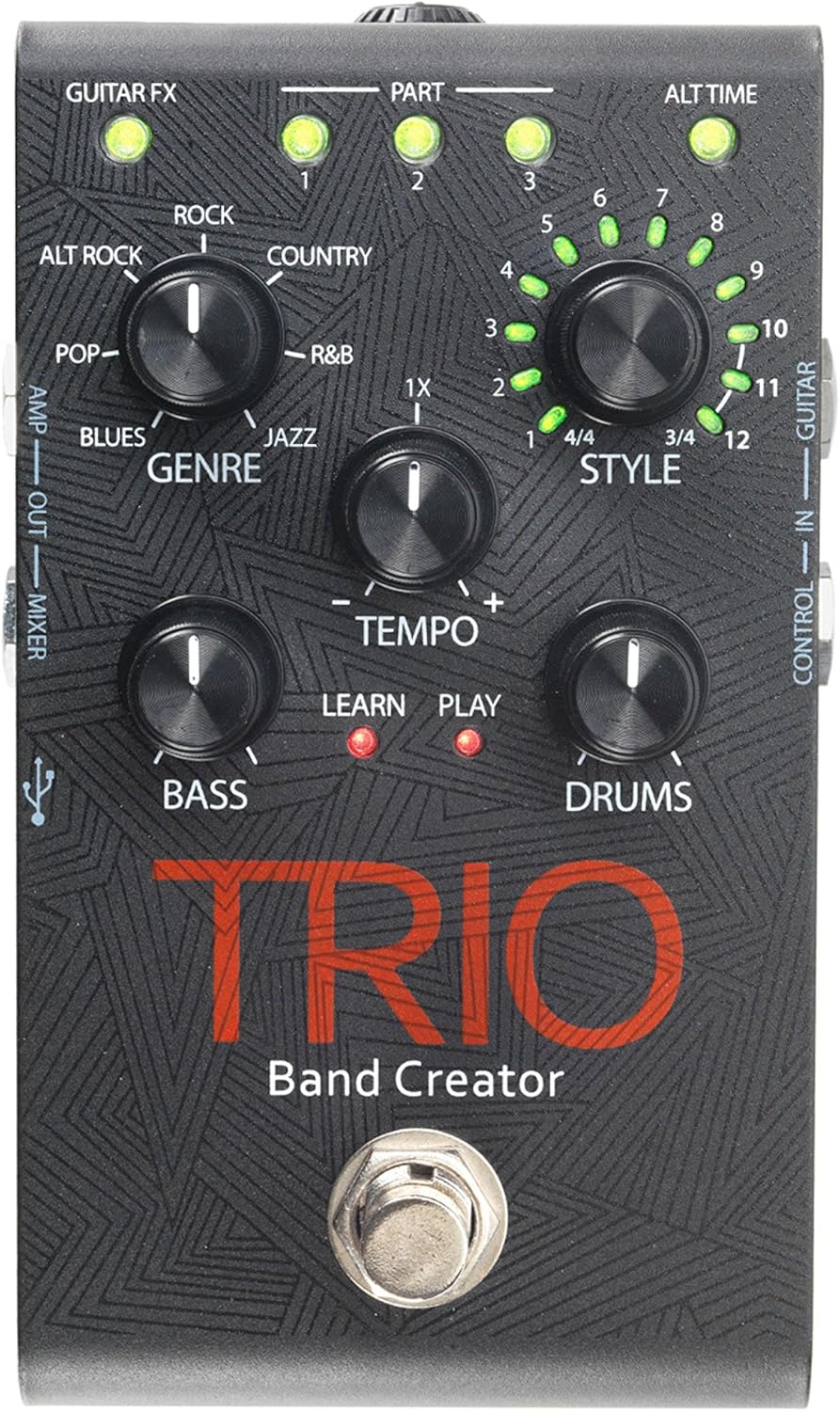
Kuva 1: Yläosa view of the DigiTech TRIO pedal, showing the main controls and footswitch.
Käyttöohjeet
Basic Operation: Teaching the TRIO a Song
- Paina BAND footswitch once to enter 'Listen' mode. The OPPIA LED syttyy.
- Play your desired chord progression and rhythm clearly. The TRIO will analyze your playing.
- Paina BAND footswitch again to stop 'Listen' mode. The PELATA LED will illuminate, and the TRIO will immediately begin playing generated bass and drum parts.
- You can now play along with your virtual band.
Genre and Style Selection
- Käytä GENRE knob to select from Blues, Pop, Alternative Rock, Rock, Country, R&B, and Jazz. The genre affects the overall feel of the generated bass and drum parts.
- Käytä TYYLI knob to choose from twelve different song styles available for each genre. This allows for further customization of the rhythm and feel.
- The ALT TIME button allows you to switch between 3/4 and 4/4 time signatures.
Looping and Song Parts
- The TRIO can learn up to 3 different song parts. To record a new part, select an empty OSA slot (1, 2, or 3) using the corresponding buttons.
- Follow the 'Basic Operation' steps to teach the TRIO the new song part.
- During playback, you can switch between learned song parts on-the-fly by pressing the corresponding OSA -painiketta.
- The LOOPER footswitch allows you to record and playback your own guitar loops. Press once to start recording, press again to stop recording and start playback, and press and hold to clear the loop.
Adjusting Levels and Tempo
- The TEMPO knob adjusts the playback speed of the band and loops.
- The BASS knob controls the volume level of the generated bass line.
- The rummut knob controls the volume level of the generated drum track.
- The LOOP knob controls the volume level of your recorded guitar loop.

Kuva 2: Kulmassa view of the DigiTech TRIO pedal, highlighting the control knobs and input/output jacks.
Säätimet ja liitännät
The DigiTech TRIO pedal features a user-friendly layout with clearly labeled controls and versatile connection options:
Etupaneelin säätimet:
- GUITAR FX: Activates built-in guitar effects tailored to the selected genre.
- PART 1, 2, 3: Buttons to select and recall different learned song parts.
- ALT TIME: Toggles between 3/4 and 4/4 time signatures.
- TEMPO Knob: Adjusts the overall playback speed.
- GENRE-nuppi: Selects the musical genre (Blues, Pop, Alt Rock, Rock, Country, R&B, Jazz).
- STYLE Knob: Selects one of twelve styles within the chosen genre.
- LOOP Knob: Controls the volume of your recorded guitar loop.
- BASS-nuppi: Säätää luodun bassolinjan äänenvoimakkuutta.
- DRUMS Knob: Säätää luodun rumpuraidan äänenvoimakkuutta.
- LOOPER-jalkakytkin: Records/plays/clears guitar loops.
- BAND-jalkakytkin: Enters 'Listen' mode to learn chords/rhythm, or starts/stops band playback.
Side and Rear Panel Connections:
- KITARA SISÄLLÄ: 1/4-inch input for your electric guitar.
- AMP OUT: 1/4-inch output to your guitar ampelävämpi.
- MIXER OUT: 1/4-inch output for connecting to a mixer or PA system.
- KUULOKE OUT: 1/8 tuuman stereolähtö kuulokkeille.
- HALLINTA: 1/4-inch input for optional DigiTech FS3X Footswitch.
- VIRTA: 9V DC input for the included power supply.
- USB: Mini-USB port for firmware updates.

Kuva 3: Takaosa view of the DigiTech TRIO pedal, showing the power input and headphone jack.
Tekniset tiedot
| Ominaisuus | Yksityiskohta |
|---|---|
| Tuotteen paino | 10.6 unssia (0.3 kg) |
| Tuotteen mitat | 4.63 x 3.19 x 2.13 tuumaa (11.76 x 8.10 x 5.41 cm) |
| Tuotteen mallinumero | TRIO |
| Paristot | 1 9V battery required (for internal use, not primary power) |
| Laitteistorajapinta | 1/4 tuuman ääni |
| Signaalin muoto | Analoginen |
| Virtalähde | Corded Electric (9V DC adapter included) |
| Voitage | 9 volttia |
| Ampkorotus | 300 miljoonaaamps |
Huolto
- Pidä poljin puhtaana pyyhkimällä se pehmeällä, kuivalla liinalla. Vältä hankaavien puhdistusaineiden tai liuottimien käyttöä.
- Säilytä poljinta viileässä, kuivassa paikassa, poissa suorasta auringonvalosta ja äärimmäisistä lämpötiloista.
- Varmista, että kaikki kaapelit on kytketty kunnolla signaalin katoamisen tai vaurioitumisen estämiseksi.
- Vältä polkimen pudottamista tai sen altistamista voimakkaille iskuille.
Vianetsintä
- Ei ääntä: Tarkista kaikki kaapeliliitännät (kitara, amp, power). Ensure the pedal is powered on and the volume knobs are not set to zero.
- Huono äänenlaatu: Varmista, että instrumenttisi ja amplifier are functioning correctly. Check for damaged cables.
- Band Not Generating Correctly: Ensure you are playing clear, distinct chords during the 'Listen' phase. Try different genres and styles to see if a different setting better interprets your playing.
- Footswitch Unresponsive: Disconnect and reconnect the power supply. If using an optional FS3X footswitch, ensure it is properly connected.
Takuu ja tuki
Takuutietoja ja teknistä tukea varten ota yhteyttä viralliseen DigiTech-sivustoon. websivustolta tai ota yhteyttä heidän asiakaspalveluunsa. Säilytä ostokuitti takuuvaatimuksia varten.