
Tuote loppuview
The Intermatic IG2200-FMK is an optional flush mount kit designed for a clean, finished installation of compatible whole house surge protective devices (SPDs). This kit allows the SPD to be recessed into a wall, providing a more integrated appearance while maintaining accessibility for maintenance.
- Designed for finished installations of compatible surge protective devices.
- Includes 2 mounting brackets and 8 screws for secure installation.
- Compatible with Intermatic's IG2240-IMS and IG2280-IM surge protective devices with consumable modules.
- Features a door with pre-aligned holes, allowing monitoring of LED indicators for power and protection status without opening the door.
- Often included with Intermatic's SmartGuard - IG2240-IMSK Whole Home Surge Protector.

Image: The Intermatic IG2200-FMK Flush Mount Kit shown installed on a wall, providing a recessed housing for a surge protective device.
Asennusohjeet
This flush mount kit is intended to house a compatible Intermatic surge protective device. Installation should be performed by a qualified electrician in accordance with all local and national electrical codes. Ensure power is disconnected before beginning any installation work.
Yleiset asennusvaiheet:
- Valmistele avaus: Create an appropriate opening in the wall for the flush mount kit, ensuring it aligns with the electrical panel if necessary. Refer to the detailed diagrams for precise dimensions and knockout locations.
- Mount the Kit: Secure the flush mount kit within the wall opening using the provided mounting brackets and screws. Ensure the kit is level and securely fastened.
- Install the SPD: Insert the compatible Intermatic surge protective device (e.g., IG2240-IMS) into the flush mount kit.
- Johdotus: Connect the SPD to the electrical system according to the SPD's specific wiring instructions and local codes. Utilize the knockouts on the kit for conduit entry.
- Kiinnitä ovi: Close and secure the kit's door. The door features holes that align with the SPD's LED indicators, allowing status monitoring without opening.

Image: Detailed installation diagrams for Intermatic IG2200 and IG2240 series, illustrating wiring configurations and mounting procedures for both surface and flush mount applications.
Operation and Status Monitoring
Once installed, the Intermatic IG2200-FMK allows for easy monitoring of your surge protective device's status without needing to open the enclosure.
- LED-ilmaisimet: The flush mount kit's door includes strategically placed holes that align with the LED indicators on the surge protective device's consumable modules.
- Status at a Glance: Observe the LEDs through these holes to determine the operational status of each module. Typically, a green light indicates the module is active and providing protection. Refer to your specific SPD's manual for detailed LED status interpretations.
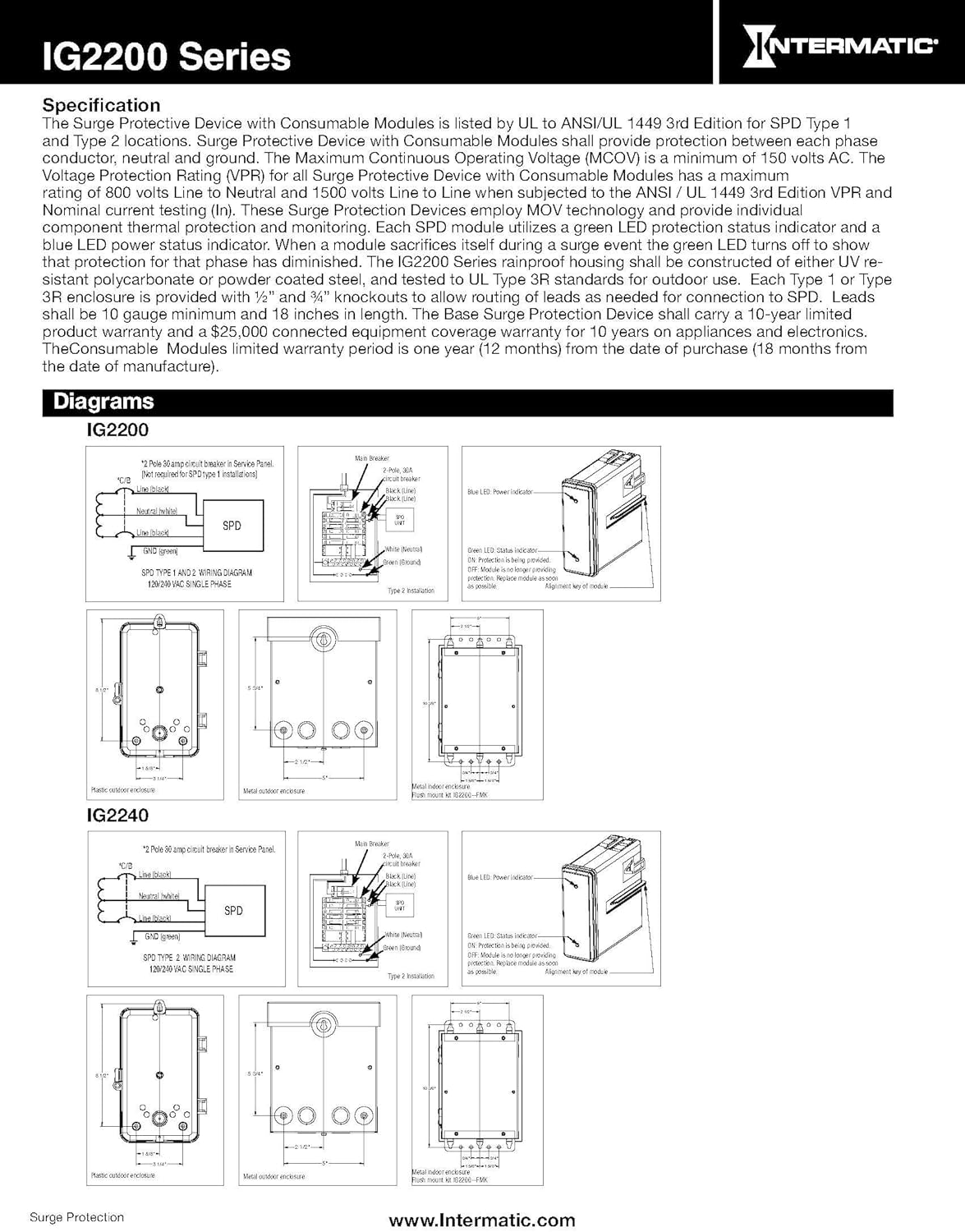
Image: The flush mount kit with its door open, revealing the individual consumable modules of the surge protective device. Note the LED indicators on each module.
Maintenance and Module Replacement
The Intermatic IG2200-FMK facilitates access to the surge protective device for routine maintenance, such as replacing consumable modules. Always ensure power is disconnected before performing any maintenance.
- Virran katkaisu: Turn off the main power to the surge protective device at the electrical panel.
- Open the Kit Door: Unlatch and open the door of the flush mount kit to access the SPD modules.
- Remove Affected Module: Carefully remove any module indicated as faulty (e.g., by a red LED or no light, depending on the SPD model).
- Lisää uusi moduuli: Insert a new, compatible replacement module into the designated slot. Ensure it is securely seated.
- Palauta virta: Close the kit door and restore power to the surge protective device. Verify that the new module's LED indicator shows a protective status (typically green).
Video: This video demonstrates the process of replacing a consumable module in an Intermatic Surge Protective Device. It shows how to safely remove an old module and insert a new one, restoring surge protection.
Tekniset tiedot
Key specifications for the Intermatic IG2200-FMK Flush Mount Kit:
| Ominaisuus | Yksityiskohta |
|---|---|
| Osanumero | IG2200-FMK |
| Tuotteen paino | 1.3 kiloa |
| Tuotteen mitat | 12 x 9 x 0.25 tuumaa |
| Compatible SPDs | Intermatic IG2240-IMS, IG2280-IM |
| Mukana olevat komponentit | 2 mounting brackets, 8 screws |
| Valmistaja | Intermaattinen |

Image: A comprehensive table detailing the ratings and specifications for various Intermatic Surge Protective Devices, highlighting models compatible with the IG2200-FMK Flush Mount Kit.
Takuu ja tuki
For detailed warranty information, please refer to the manufacturer's description provided with your Intermatic Surge Protective Device. The flush mount kit itself is designed for durability and long-term use.
Intermatic's compatible surge protective devices often come with a 10-Year Connected Equipment Warranty, offering protection up to $25,000. For technical support or further inquiries, please contact Intermatic customer service directly.
Note: Warranty details are subject to change. Always consult the official documentation included with your product for the most current information.