
1. Johdanto
This manual provides essential information for the installation, operation, and maintenance of your HGST Ultrastar He8 HUH728080ALE604 8TB SATA Hard Drive. The Ultrastar He8 series utilizes HelioSeal technology, replacing air with helium inside the drive to reduce turbulence and enable a seven-disk design within a standard 3.5-inch form factor. This design contributes to industry-leading capacity, improved power efficiency, and enhanced performance for enterprise environments.

Figure 1: HGST Ultrastar He8 8TB SATA Hard Drive, top view.
2. Turvallisuustiedot
Noudata seuraavia turvaohjeita taajuusmuuttajan vaurioitumisen estämiseksi ja turvallisen käytön varmistamiseksi:
- Sähköstaattisen purkauksen (ESD) suojaus: Käsittele kiintolevyä aina reunoista. Käytä antistaattista ranneketta tai kosketa usein maadoitettua metalliesinettä ennen aseman käsittelyä staattisen sähkön purkamiseksi.
- Fyysinen käsittely: Avoid dropping or subjecting the drive to sudden impacts. Hard drives are precision instruments and can be damaged by rough handling.
- Virtalähde: Ensure your power supply unit (PSU) provides stable and sufficient power for the drive. Incorrect voltage or unstable power can damage the drive.
- Ilmanvaihto: Install the drive in a well-ventilated area to prevent overheating. Excessive heat can reduce the lifespan of the drive.
3. Pakkauksen sisältö
Varmista, että paketti sisältää seuraavat kohteet:
- HGST Ultrastar He8 HUH728080ALE604 8TB SATA Hard Drive
- Dokumentaatio (tämä käyttöopas, jos se toimitetaan painettuna)
Note: SATA data cables, power cables, and mounting screws are typically supplied with your computer system or enclosure and are not usually included with the bare drive.
4. Asennus
4.1 Fyysinen asennus
- Valmistele järjestelmäsi: Power off your computer and disconnect the power cord. Open the computer case to access the drive bays.
- Asenna asema: Slide the HGST Ultrastar He8 drive into an available 3.5-inch drive bay. Secure the drive with appropriate mounting screws on both sides to prevent vibration.
- Kytke kaapelit:
- Kytke SATA-datakaapelin toinen pää kiintolevyn SATA-porttiin ja toinen pää emolevyn vapaana olevaan SATA-porttiin.
- Kytke SATA-virtakaapeli virtalähteestä (PSU) kiintolevyn virtaliittimeen.
- Sulje kotelo ja käynnistä: Sulje tietokoneen kotelo, kytke virtajohto takaisin ja käynnistä järjestelmä.
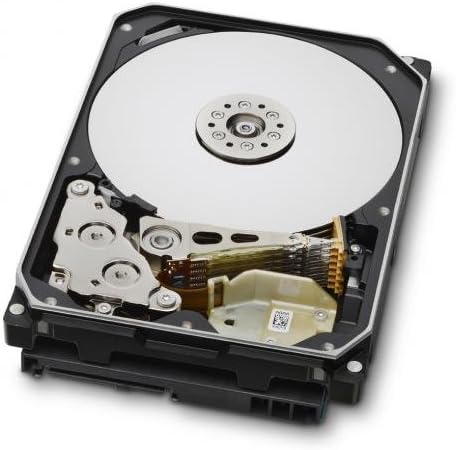
Figure 2: Internal components of the HGST Ultrastar He8, illustrating the platters and read/write head assembly.
4.2 Initial Configuration (Operating System)
Fyysisen asennuksen jälkeen käyttöjärjestelmäsi on alustettava, osioitava ja formatoitava asema, ennen kuin sitä voidaan käyttää tallennustilana.
- Levynhallinnan käyttöoikeus:
- Windows: Right-click on the Start button, then select "Disk Management."
- Linux: Käytä apuohjelmia, kuten
fdisk,gparted, taiDisks. - MacOS: Use "Disk Utility."
- Levyn alustaminen: The new drive should appear as "Unallocated Space." You may be prompted to initialize the disk. Choose GPT (GUID Partition Table) for drives larger than 2TB.
- Create New Simple Volume (Partition): Right-click on the unallocated space and select "New Simple Volume." Follow the wizard to define the partition size, assign a drive letter, and format the volume.
- Format the Drive: Valitse a file system (e.g., NTFS for Windows, ext4 for Linux, APFS/HFS+ for macOS). Perform a quick format for faster setup, or a full format for a more thorough check (which takes significantly longer).
5. Käyttö
The HGST Ultrastar He8 is designed for continuous operation in enterprise environments, offering high capacity and reliable performance. Once configured, it functions like any other storage drive within your system.
- Tiedonsiirto: Siirtää files asemaan ja asemasta käyttöjärjestelmäsi avulla file explorer or command-line tools.
- Suorituskyky: The drive operates at 7200 RPM with a SATA 6Gb/s interface, providing fast data access and transfer speeds suitable for demanding applications.
- Virranhallinta: Ensure your operating system's power settings are configured appropriately for hard drives, especially in server environments, to optimize power consumption and drive longevity.
6. Huolto
Säännöllinen huolto auttaa varmistamaan kiintolevyn ja sille tallennettujen tietojen pitkäikäisyyden ja luotettavuuden.
- Tietojen varmuuskopiointi: Regularly back up critical data to another storage device or cloud service. No storage device is infallible.
- Aseman kunnon valvonta: Käytä SMART-työkaluja (Self-Monitoring, Analysis and Reporting Technology) levyn kunnon valvontaan. Monet käyttöjärjestelmät ja kolmannen osapuolen apuohjelmat tarjoavat tämän toiminnon.
- Ympäristöolosuhteet: Maintain a stable operating environment. Avoid extreme temperatures, high humidity, and excessive vibrations.
- Laiteohjelmistopäivitykset: Tarkista Western Digitalin tuki säännöllisesti website for firmware updates for your specific drive model. Firmware updates can improve performance, stability, or address known issues. Exercise caution when performing firmware updates, as an interrupted update can render the drive inoperable.
7. Vianmääritys
If you encounter issues with your HGST Ultrastar He8 drive, consider the following troubleshooting steps:
- Asemaa ei havaittu:
- Tarkista kaikkien kaapelien (SATA-data ja -virta) liitännät varmistaaksesi, että ne ovat tukevasti kiinni.
- Verify that the SATA port on the motherboard is enabled in the system's BIOS/UEFI settings.
- Test the drive in a different SATA port or with different cables.
- Ensure the drive is initialized and formatted in Disk Management (Windows) or equivalent utility (Linux/macOS).
- Hidas suorituskyky:
- Tarkista levyresursseja kuluttavat taustalla olevat prosessit.
- Ensure the drive is connected to a SATA 6Gb/s port and that the necessary drivers are installed.
- Monitor drive health using S.M.A.R.T. tools for potential issues.
- Varmista riittävä ilmanvaihto lämpökuristuksen estämiseksi.
- Epätavalliset äänet:
- Clicking, grinding, or repetitive beeping sounds can indicate a mechanical failure. Immediately back up any accessible data and consider replacing the drive.
- A slight hum or whirring is normal for a spinning hard drive.
- Tietojen korruptio:
- Suorita levyvirheiden tarkistusapuohjelmat (esim.
chkdskon Windows,fsckon Linux). - Ensure proper system shutdowns to prevent data loss.
- Suorita levyvirheiden tarkistusapuohjelmat (esim.
8. Tekniset tiedot
| Ominaisuus | Erittely |
|---|---|
| Mallinumerot | HUH728080ALE604, 0F23668, 0F25721 |
| Kapasiteetti | 8 TB |
| Käyttöliittymä | SATA 6Gb/s (Serial ATA-600) |
| Muototekijä | 3.5 tuumaa |
| Pyörimisnopeus | 7200 RPM |
| Välimuisti | 128 Mt |
| Mitat (PxLxK) | 5.79 x 4 x 1.03 tuumaa |
| Paino | 1.43 kiloa |
| Tekniikka | HelioSeal |
| Luotettavuus (MTBF) | 2+ Million Hours (typical) |
9. Takuutiedot
The HGST Ultrastar He8 hard drive typically comes with a 3-year seller warranty, covering defects in materials and workmanship under normal use. For specific warranty terms and conditions, please refer to the documentation provided at the time of purchase or contact your seller directly.
Standard return policies usually allow for returns or replacements within 30 days of purchase, subject to the seller's terms.
10. Tukea
For further assistance, technical support, or warranty claims, please contact Western Digital customer support or visit their official websivusto:
- Western Digitalin tuki Websivusto: https://support.wdc.com
- Western Digital Store: Western Digital Store on Amazon
When contacting support, please have your drive's model number (HUH728080ALE604 or 0F23668) and serial number ready.