
1. Johdanto
The Cellet Portable Bluetooth Wireless Keyboard BKP200 offers a convenient and functional solution for typing on the go. Its foldable design and QWERTY layout with low-profile keys provide an efficient typing experience. The built-in rechargeable lithium battery ensures extended use, making it ideal for smartphones, tablets, laptops, and other Bluetooth-enabled devices.
Mitä laatikossa on
- Wireless foldable keyboard
- Keyboard case (doubles as a phone holder stand)
- Micro USB latauskaapeli
- Käyttöohje

Image: The Cellet Portable Bluetooth Wireless Keyboard, shown unfolded, alongside its protective case which functions as a phone/tablet stand, and a micro USB charging cable.
2. Tärkeitä turvallisuusohjeita
Before using this product, please read all instructions carefully and retain them for future reference. Adherence to these guidelines ensures safe operation and prevents damage.
- This product may be used by children and individuals with physical, sensory, or mental disabilities, or those lacking experience and knowledge, provided they receive proper supervision or instruction regarding safe use and understanding of associated hazards.
- Lapset eivät saa suorittaa puhdistusta ja huoltoa ilman valvontaa.
- Lapsia tulee valvoa, jotta he eivät leiki laitteella.
- Käytä tuotetta vain sen aiottuun tarkoitukseen.
- For indoor use only. Do not expose the product to water, excessive moisture, or snow.
- Do not place the product in or near flammable, explosive, or hazardous objects.
- Älä käytä tuotetta, jos johto tai pistoke on vaurioitunut.
- Älä käytä tuotetta, jos se on vahingoittunut millään tavalla.
- Älä pura tuotetta. Purkaminen voi aiheuttaa turvallisuusriskejä.
- Avoid throwing or shaking the product.
3. Asennus
Alkulataus
Before first use, fully charge the keyboard for approximately 1.5 to 2 hours using the provided Micro USB charging cable. The charging indicator light will glow red during charging and turn off once fully charged. If the battery is low, the Bluetooth status light will flash.
Bluetooth-pariliitoksen vaiheet
- Vaihe 1: Unfold the keyboard. The Bluetooth status indicator light will illuminate for 3 seconds and then turn off.
- Vaihe 2: Paina Fn+C buttons simultaneously. The Bluetooth indicator light will begin blinking, indicating it is in pairing mode.
- Vaihe 3: On your device (smartphone, tablet, etc.), activate Bluetooth and search for available devices. Select "Cellet BKP200 Keyboard" from the list to connect.
- Vaihe 4: Once successfully connected, the Bluetooth indicator light on the keyboard will turn off.

Image: The Cellet foldable keyboard displayed with a tablet and smartphone, illustrating its universal compatibility.
4. Käyttöohjeet
Käyttöjärjestelmän valinta
To optimize keyboard functionality for your device, select the correct operating system:
- For Android devices: Press and hold Fn + Q.
- For Windows devices: Press and hold Fn + W.
- For iOS devices: Press and hold Fn + E.
Pikanäppäintoiminnot
To use the shortcut keys, press and hold the Fn key while simultaneously pressing the desired shortcut key.
| Toiminto | Näppäinyhdistelmä | Huomautuksia |
|---|---|---|
| Edellinen kappale | fn+1 | |
| Äänenvoimakkuuden vähentäminen | fn+2 | |
| Äänenvoimakkuuden lisääminen | fn+3 | |
| Toista/Tauko | fn+4 | |
| Kielen vaihtaminen | fn+5 | |
| Haku | fn+6 | |
| Kopioida | fn+7 | |
| Leikata | fn+8 | |
| Valitse Kaikki | fn+9 |
System-Specific Functions:
| Android-järjestelmät | Toiminto |
|---|---|
| PgUp | Viimeinen sivu |
| PgDn | Seuraava sivu |
| iOS Systems | Toiminto |
|---|---|
| Kotiin | Kotiin |
| PgUp | Cursor to the top |
| PgDn | Cursor to the bottom |
| Windows-järjestelmät | Toiminto |
|---|---|
| Web selain | Avata web selain |
| ESC | Paeta |
| PgUp | Viimeinen sivu |
| PgDn | Seuraava sivu |

Image: The keyboard case is shown transforming into a stand, holding both a smartphone and a tablet in landscape orientation for convenient viewkirjoittamisen aikana.
5. Huolto
Proper care and maintenance will extend the life of your Cellet keyboard.
- Puhdista näppäimistö pehmeällä liinalla dampvedellä tai alkoholilla.
- Pidä näppäimistö poissa terävistä esineistä.
- Älä aseta raskaita esineitä näppäimistön päälle.
- Do not microwave the keyboard.
- Älä pakota tai vääristä näppäimistöä.
- Keep away from any oil, chemicals, or other organic liquids.
6. Vianmääritys
If you encounter issues with your keyboard, consider the following:
- Näppäimistö ei pariliitu: Ensure the keyboard is fully charged and in pairing mode (Bluetooth indicator blinking). Check your device's Bluetooth settings to ensure it's discoverable and try re-scanning for devices.
- Näppäimet eivät vastaa: Verify the keyboard is connected to your device. If connected, try restarting both the keyboard and your device. Ensure no debris is lodged under the keys.
- Ajoittainen yhteys: Ensure the keyboard is within the 10-meter operating range of your device and there are no significant obstructions. Other wireless devices might cause interference.
- Incorrect characters typed: Confirm that you have selected the correct operating system for your device (Fn + Q for Android, Fn + W for Windows, Fn + E for iOS).
- Akku ei lataudu: Check the Micro USB cable and charging port for damage. Try using a different charging cable or power source.
If problems persist, refer to the Cellet support websivustolla tai ota yhteyttä asiakaspalveluun saadaksesi lisäapua.
7. Tekniset tiedot
Detailed technical specifications for the Cellet BKP200 Portable Bluetooth Wireless Keyboard:
| Ominaisuus | Erittely |
|---|---|
| Bluetooth-versio | 5.1 |
| Käyttöliittymä | USB-C (latausta varten) |
| Toimintaetäisyys | Jopa 10 metriä |
| Modulaatiojärjestelmä | GFSK |
| Käyttö Voltage | 3.0-4.2V |
| Käyttövirta | <3.0mA |
| Valmiustilavirta | <0.3mA |
| Lepotila | <0.1mA |
| Latausvirta | <200mA |
| Valmiusaika | Noin 100 päivää |
| Latausaika | <2 XNUMX tuntia |
| Litiumakun kapasiteetti | 110 mAh |
| Keskeytymätön työaika | > 40 XNUMX tuntia |
| Litiumakun käyttöikä | 3 vuotta |
| Lithium Battery Dimensions | 30 x 15 x 23 mm |
| Key Force | 50-80g |
| Avaimen elämä | 3 miljoonaa lyöntiä |
| Käyttölämpötila | -10 - +55 ℃ |
| Tuotteen paino | 7.5 unssia |
| Tuotteen mitat (taitettu) | 5.75 x 3.5 x 0.75 tuumaa |
| Tuotteen mitat (taittamatta) | 11.5 x 3.3 x 0.27 inches (approximate, derived from image) |
| Väri | Musta |
| Yhteensopivat käyttöjärjestelmät | Android, iOS, Windows |
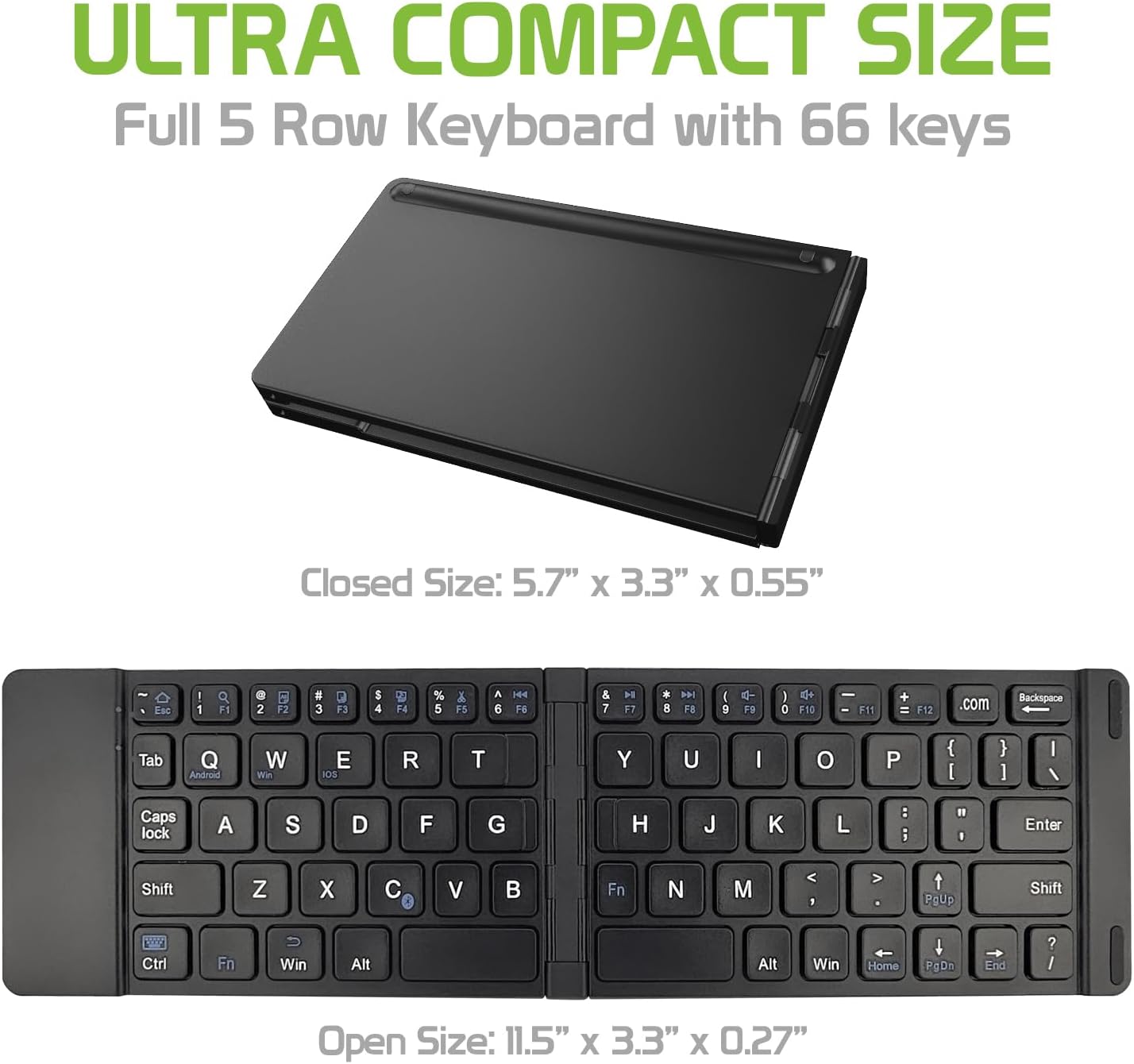
Image: The Cellet keyboard in both its closed, compact state and its unfolded, full-size state, with dimensions indicating its portability and functional size.
8. Takuu ja tuki
For warranty information or technical support, please visit the official Cellet websivustolta tai ota yhteyttä heidän asiakaspalveluunsa. Säilytä ostokuitti takuuvaatimuksia varten.
Ympäristöystävällinen hävittäminen
To dispose of the product responsibly, follow these guidelines:
- Carefully pry up the plastic top to remove it completely. This action will likely render the keyboard unusable.
- Turn the top over and remove any tape securing the battery.
- Separate the battery from the circuit board.
- Dispose of the battery according to local regulations and laws. Recycle remaining keyboard parts where possible.