
1. Johdanto
This manual provides comprehensive instructions for the safe and effective use of your Axiom 2-Pack Ni-MH rechargeable batteries. These batteries are designed as replacements for various V-Tech cordless phone models, ensuring reliable power and extended talk time.
Paketin sisältö:
- 2x Axiom Ni-MH Rechargeable Batteries (850mAh, 2.4V)
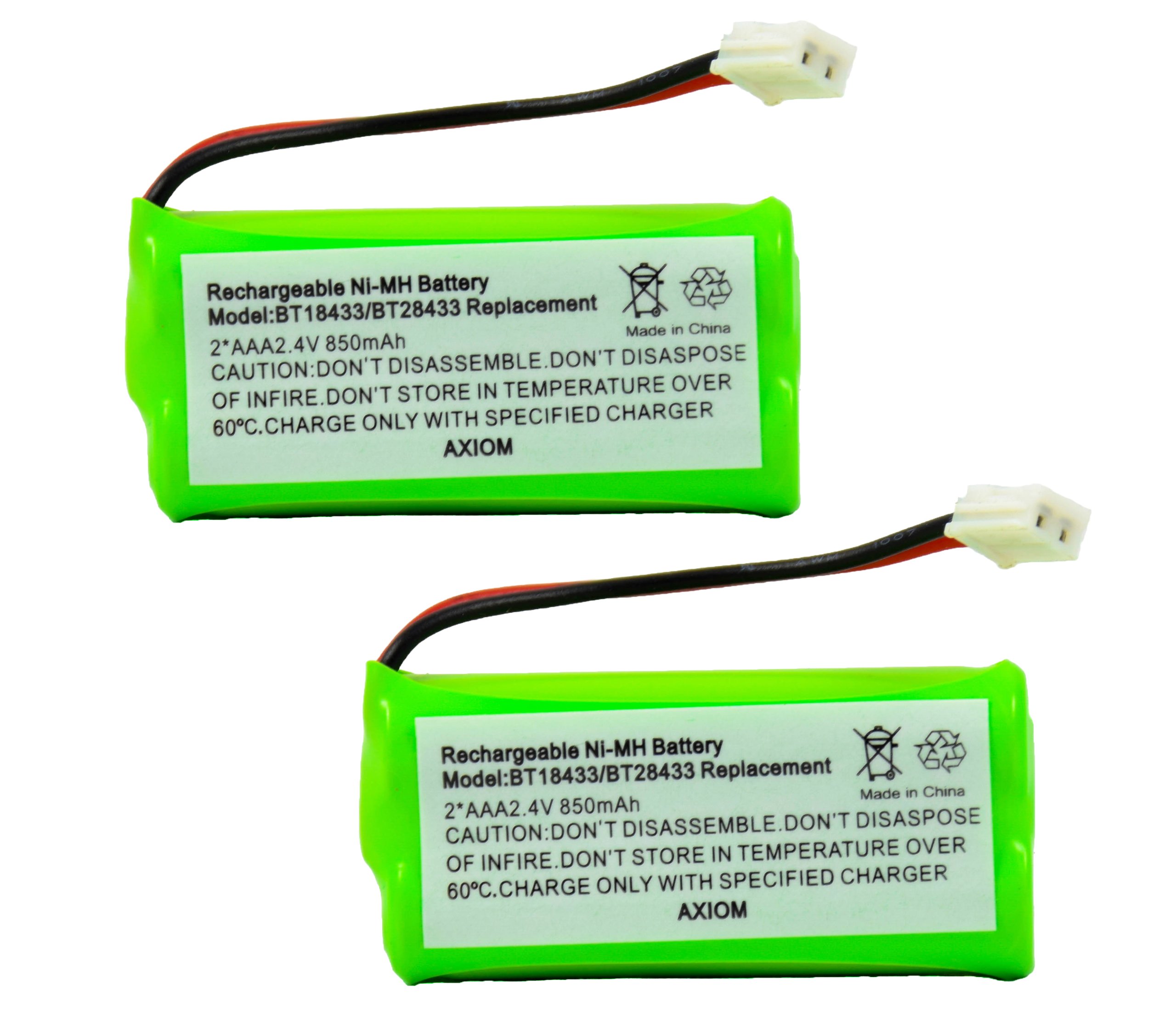
Kuva 1: Two green Axiom Ni-MH rechargeable batteries. Each battery is labeled with 'Rechargeable Ni-MH Battery', 'Model: BT18433/BT28433 Replacement', '2*AAA 2.4V 850mAh', and safety cautions regarding disassembly, disposal, fire, temperature, and charging. The batteries feature a white connector with red and black wires.
2. Turvallisuustiedot
Please read and adhere to the following safety guidelines to prevent damage to the batteries, your device, or personal injury:
- ÄLÄ PURKAA: Attempting to open or modify the battery can lead to hazardous situations.
- ÄLÄ HÄVITÄ TULEEN: Batteries may explode or leak if disposed of in fire.
- DO NOT STORE IN TEMPERATURES OVER 60°C (140°F): Korkeat lämpötilat voivat heikentää akun suorituskykyä ja aiheuttaa turvallisuusriskin.
- LATAA VAIN MÄÄRÄTYLLÄ LATURILAITTEELLA: Use only the charger provided with your cordless phone or a compatible charger designed for Ni-MH batteries.
- OVER-VOLTAGE AND SHORT-CIRCUIT PROTECTION: These batteries are equipped with protection features, but always handle them with care to avoid short circuits.
3. Asennus ja asennus
Follow these steps to correctly install the new Axiom rechargeable battery into your V-Tech cordless phone:
- Paikanna paristolokero: On most V-Tech cordless phones, the battery compartment is located on the back of the handset. Refer to your phone's original manual if you cannot locate it.
- Irrota vanha akku: Carefully open the battery compartment cover. Disconnect the old battery's connector from the phone's socket and remove the battery.
- Aseta uusi paristo: Connect the new Axiom battery's connector to the phone's socket. Ensure the connector is properly aligned and securely inserted.
- Akun sijainti: Place the new battery into the compartment, ensuring wires are not pinched.
- Sulje lokero: Sulje paristolokeron kansi, kunnes se napsahtaa tukevasti paikalleen.
4. Käyttö
Alkulataus:
After installing the new battery, place the handset on its charging cradle. For optimal performance, allow the battery to charge continuously for 12-16 hours before its first use, even if the phone indicates a full charge sooner. This conditions the battery for maximum capacity.
Säännöllinen käyttö ja lataus:
- Return the handset to the charging cradle when not in use to keep the battery fully charged.
- These Ni-MH batteries feature Ei muistiefektiä, meaning you do not need to fully discharge them before recharging. You can charge them at any time without significantly impacting their lifespan or capacity.
5. Huolto
Proper care extends the life of your batteries:
- Varastointi: If storing the batteries for an extended period, keep them in a cool, dry place, away from direct sunlight and extreme temperatures (below 60°C). It is recommended to charge them periodically (e.g., every 3-6 months) to prevent deep discharge.
- Puhdistus: Keep the battery contacts and the phone's charging contacts clean and free of dust or debris. Use a dry, soft cloth for cleaning.
- Hävittäminen: When the batteries reach the end of their life, dispose of them responsibly according to local regulations for rechargeable batteries. Do not dispose of them in household waste.
6. Vianmääritys
If you experience issues with your phone's power or battery life, consider the following:
- Phone Not Holding Charge:
- Varmista, että luuri on kunnolla paikallaan lataustelineessä.
- Verify the charging cradle is connected to a working power outlet.
- Clean the charging contacts on both the handset and the cradle.
- Allow for a full 12-16 hour initial charge cycle.
- If the battery is old, its capacity may have diminished; replacement may be necessary.
- Puhelin ei käynnisty:
- Check if the battery is correctly installed and its connector is secure.
- Ensure the battery has been charged.
- If the issue persists, the battery may be faulty or completely discharged.
7. Tekniset tiedot
| Merkki | Axiom |
| Mallinumero | AXM-28433 (Replacement for BT18433/BT28433) |
| Akun tyyppi | Ni-MH (nikkeli-metallihydridi) |
| Kapasiteetti | 850 mAh |
| Voitage | 2.4V (2*AAA cells) |
| Uudelleenkäytettävyys | Ladattava |
| Suojausominaisuudet | Yli-voltage and Short-circuit Protection |
| Muistiefekti | Ei muistiefektiä |
| Tuotteen mitat | 7.3 x 5.1 x 0.6 inches (approximate, for the 2-pack) |
| Tuotteen paino | 0.96 ounces (approximate, for the 2-pack) |
8. Compatible V-Tech Cordless Phone Models
These Axiom batteries are compatible with a wide range of V-Tech cordless phone models, including but not limited to the following series:
- DS6101, DS6111, DS6121, DS6121-3, DS6121-4, DS6121-5, DS6151
- DS6201, DS6211, DS6211-2, DS6221, DS6221-3
- DS6301, DS6321-4
- Other compatible models include: 6010, 6030, 6031, 6032, 6041, 6042, 6043, 6044, 6051, 6052, 6053, 6110, 6111, 6113, 6121, 6122, 6201, 6204, 6205, 6209, 6211, 6215, 6219, 6221, 6222, 6225, 6226, 6228, 6229, 6245, 6301, 6321, 6322, 8300, 8301, 831, CS6209, CS6219 series, CS6229 series, DS3101, DS3111-2, DS6111 series, DS6115-2, DS6121 series, DS6122-5, DS6211 series, DS6221 series, DS6222-4, DS6222-5, DS6321 series, DS6322 series, EMBARQ eGO, ip-8300, ip-831, IS6110, LS6113, LS6204, LS6205, LS6215-2, LS6226-2, LS6245, VS6121-4, VT-6042, VT-6043, VT-6052, VT-6053.
- Also compatible with AT&T/Lucent models: 3101, 3111, AT-3201, AT-3211-2, BT-18433, BT-184342, BT-28433, BT-284342, BT-6010, BT-8000, BT-8001, BT-8300, SL82000 series, TL90078, TL92278, TL92328, TL92378.
For a complete list of compatible models, please refer to the product packaging or contact Axiom customer support.
9. Takuu ja tuki
Specific warranty information for Axiom products may vary. Please refer to the product packaging or the Axiom official websivustolta lisätietoja takuusta ja asiakastuen yhteystiedoista.
For technical assistance or inquiries, please contact Axiom customer service.