
1. Johdanto
This manual provides detailed instructions for the installation, operation, and maintenance of your Axis P1355 Surveillance/Network Camera. The Axis P13 series offers high-performance fixed cameras designed for both indoor and outdoor surveillance, delivering superb image quality with H.264 compression. These models support HDTV 720p/1080p video and are equipped with features like Wide Dynamic Range and Day/Night functionality for clear imaging in various lighting conditions. Specific models within the P13 series, including HDTV 720p, incorporate Axis Lightfinder technology for enhanced low-light sensitivity, while HDTV 1080p and 5-megapixel cameras feature P-iris control for optimized depth of field and lens resolution.
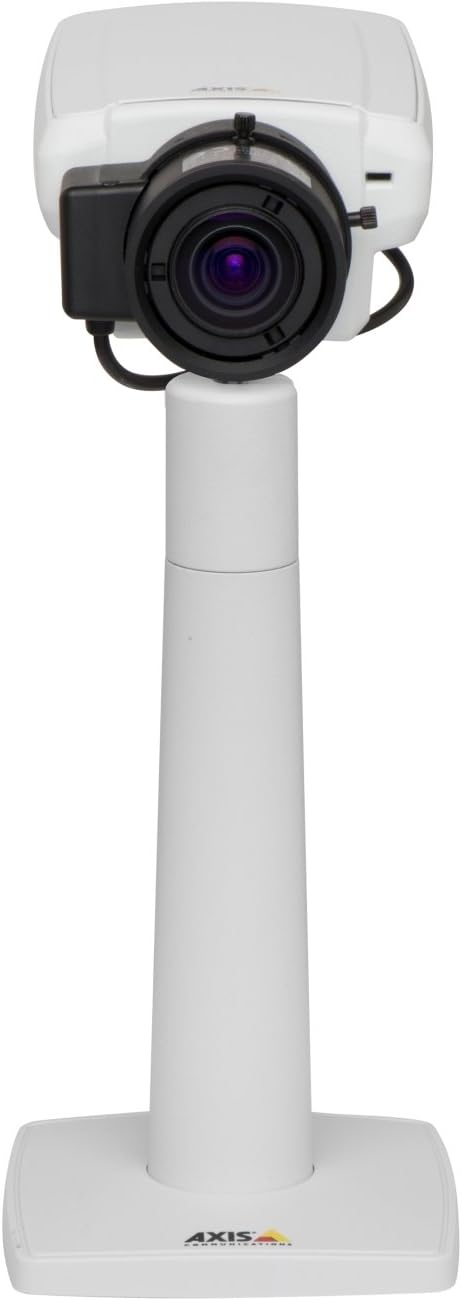
Kuva 1: The Axis P1355 Surveillance Camera shown mounted on its stand. This image illustrates the camera's physical appearance and typical mounting configuration.
2. Turvallisuustiedot
Please read all safety instructions before installing or operating the camera.
- Ensure the power source matches the camera's requirements to prevent electrical hazards.
- Asennuksen saa suorittaa vain pätevä henkilöstö paikallisten sähkömääräysten mukaisesti.
- Älä altista kameraa äärimmäisille lämpötiloille, kosteudelle tai syövyttäville ympäristöille.
- Avoid direct exposure of the lens to strong light sources, such as the sun, as this may damage the image sensor.
- Disconnect power before cleaning or servicing the camera.
3. Asennus ja asennus
The Axis P1355 camera is designed for both indoor and outdoor use and supports various mounting options.
3.1 Asennus
The camera is typically designed for wall mount installation. Ensure the mounting surface is strong enough to support the camera's weight (approximately 2 pounds). Use appropriate screws and anchors for the chosen surface.
- Select a suitable location for optimal surveillance coverage.
- Kiinnitä kiinnitysteline tukevasti seinään.
- Mount the camera onto the bracket, ensuring it is firmly in place.
- Adjust the camera's angle for the desired field of view.
3.2 Liitännät
The Axis P1355 camera primarily uses wired connectivity for reliable data transmission and power.
- Virtaliitäntä: Connect the provided power adapter to the camera's power input and then to a suitable electrical outlet. The camera operates on a corded electric power source.
- Verkkoyhteys: Connect an Ethernet cable from the camera's network port to your network switch or router. This provides wired connectivity for video streaming and control.
- Wireless Connectivity (Optional/Configuration): While primarily wired, the camera supports Wi-Fi for certain configurations. Refer to the Axis product documentation for specific wireless setup instructions if applicable to your model variant.
4. Käyttöohjeet
Once installed and connected, the Axis P1355 camera can be configured and operated via a network interface.
4.1 Alkuperäinen käyttöoikeus ja konfigurointi
- Use the Axis IP Utility or a similar network discovery tool to find the camera's IP address on your network.
- Avaa a web selaimessa ja anna kameran IP-osoite päästäksesi siihen web käyttöliittymä.
- Log in using the default credentials (refer to Axis documentation for default username/password, typically 'root' and 'pass' or similar, which should be changed immediately).
- Follow the on-screen prompts to set up basic network settings, date/time, and user accounts.
4.2 Video Monitoring and Features
- Elää View: Access the live video feed through the web interface or compatible video management software.
- Resoluutio: The camera supports video capture resolutions up to 720p and effective video resolutions of 1080 pixels, with effective still resolution of 2 MP.
- Color and Monochrome Modes: The camera can operate in both color and monochrome (black and white) modes, automatically switching based on light conditions or configured manually.
- Pimeänäkö: Utilize the integrated night vision capabilities for surveillance in low-light or complete darkness.
- Optinen zoom: Adjust the optical zoom for detailed viewtiettyjen alueiden.
- P-Iris Control: For models equipped with P-iris, this feature allows precise control over the iris position to optimize depth of field and lens resolution, enhancing image sharpness. This can be configured via the web käyttöliittymä.
- Videomuoto: Video is typically captured in MP4 format.
- Kaukosäädin: The camera supports remote control for various settings and adjustments.
5. Huolto
Regular maintenance ensures optimal performance and longevity of your Axis P1355 camera.
- Puhdistus: Puhdista kameran linssi ja kotelo varovasti pehmeällä,amp liinalla. Vältä hankaavia puhdistusaineita tai liuottimia.
- Laiteohjelmistopäivitykset: Tarkista Axis Communications säännöllisesti websivusto laiteohjelmistopäivityksiä varten. Laiteohjelmiston pitäminen ajan tasalla varmistaa pääsyn uusimpiin ominaisuuksiin, tietoturvakorjauksiin ja suorituskyvyn parannuksiin.
- Kaapelin tarkastus: Tarkista säännöllisesti kaikki kaapelit kulumisen tai vaurioiden varalta, erityisesti ulkoasennuksissa.
- Ympäristötarkastus: Varmista, että kameran käyttöympäristö pysyy määritetyissä lämpötila- ja kosteusrajoissa.
6. Vianmääritys
This section addresses common issues you might encounter with your Axis P1355 camera.
- Ei virtaa:
- Varmista, että virtalähde on kytketty kunnolla sekä kameraan että toimivaan pistorasiaan.
- Tarkista virtajohto vaurioiden varalta.
- Ei verkkoyhteyttä:
- Ensure the Ethernet cable is properly connected to the camera and the network switch/router.
- Tarkista verkkokytkimen/reitittimen tila.
- Confirm the camera has a valid IP address and is on the same network segment as your viewlaite.
- Huono kuvanlaatu:
- Puhdista kameran linssi.
- Adjust focus and zoom settings via the web käyttöliittymä.
- Check lighting conditions; enable night vision or adjust exposure settings if necessary.
- Ensure P-iris control is correctly configured for optimal sharpness (if applicable).
- Ei pääse Web Käyttöliittymä:
- Verify the camera's IP address.
- Varmista, että tietokoneesi on samassa verkossa kuin kamera.
- Try restarting the camera and your network equipment.
7. Tekniset tiedot
| Ominaisuus | Yksityiskohta |
|---|---|
| Merkki | Axis Communications |
| Mallinumero | AXIS P1355 |
| Sisä-/ulkokäyttö | Sisällä, ulkona |
| Yhteystekniikka | Wired (Wi-Fi capable for certain configurations) |
| Erikoisominaisuus | Night Vision |
| Virtalähde | Johdollinen sähkökäyttöinen (7.1 wattia) |
| Videon sieppaustarkkuus | 720p |
| Tehokas videoresoluutio | 1080 pikseliä |
| Tehokas Still-resoluutio | 2 MP |
| Zoomaustyyppi | Optinen zoom (2.9x optinen) |
| Ohjaimen tyyppi | Iris (P-iris control) |
| Asennustyyppi | Seinäteline |
| Tuotteen mitat (P x L x K) | 3.07 x 5.94 x 1.69 tuumaa |
| Tuotteen paino | 2 kiloa |
| Kansainvälinen turva-arviointi | IP54 |
| Videon kaappausmuoto | MP4 |
8. Takuu ja tuki
For detailed warranty information and technical support, please refer to the official Axis Communications websivustolta tai ota yhteyttä suoraan heidän asiakaspalveluunsa.
Valmistaja: AXIS COMMUNICATION INC.
Websivusto: www.axis.com (Käy virallisella sivustolla website for the most current support resources, drivers, and documentation.)