
1. Yliview
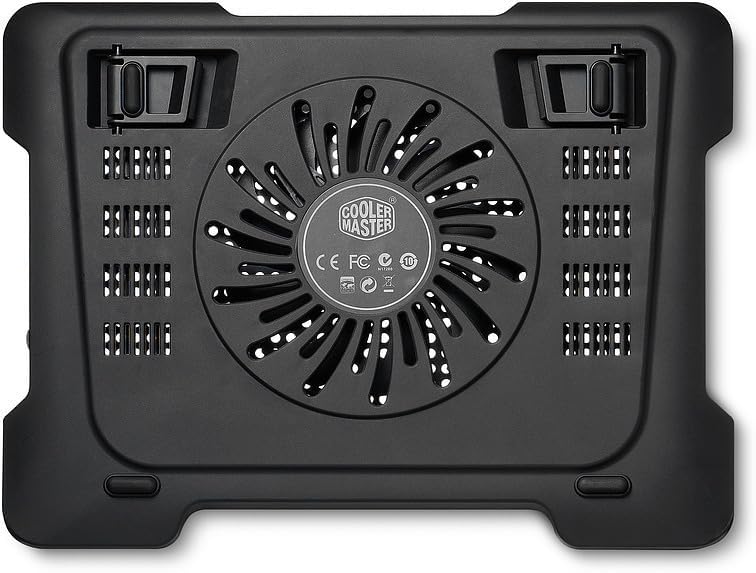
The Cooler Master Notepal X-Lite II is a laptop cooling pad designed to enhance the thermal performance of laptops up to 15.6 inches. It features a silent 140mm fan and an integrated USB hub for convenient connectivity. The ergonomic design provides a comfortable typing angle, making it suitable for extended use.

This cooling pad is engineered to provide efficient heat dissipation, preventing your laptop from overheating during intensive tasks or prolonged usage. Its slim and lightweight design ensures portability, while the adjustable height settings offer improved ergonomics.
2. Asennus
- Jäähdytystyynyn purkaminen: Carefully remove the Notepal X-Lite II from its packaging.
- Jäähdytystyynyn asettaminen: Place the cooling pad on a flat, stable surface where you intend to use your laptop.
- Säädä korkeutta (valinnainen): The cooling pad features adjustable feet at the rear. Lift the pad and extend the feet to your desired ergonomic height. There are multiple height settings available to suit your preference.
- Aseta kannettava tietokoneesi: Carefully place your laptop on top of the cooling pad. Ensure it is centered and stable. The front of the pad has a slightly curved design for wrist comfort.
- Liitä USB-virtalähde: Locate the mini USB port on the cooling pad and the USB 2.0 cable. Connect the mini USB end to the cooling pad and the standard USB-A end to an available USB port on your laptop. The cooling pad will draw power from your laptop's USB port.
- Utilize USB Hub: The cooling pad includes two additional USB 2.0 ports. These can be used to connect other USB devices, such as a mouse, keyboard, or flash drive, without occupying additional ports on your laptop.

3. Käyttöohjeet
- Virta päälle/pois: The cooling pad is powered by your laptop's USB port. Once connected, the fan should begin operating automatically. There is no separate power switch on this model.
- Tuulettimen käyttö: The integrated 140mm fan operates silently to draw heat away from your laptop's underside.
- Hiljainen toiminta: The fan is designed for quiet operation, ensuring minimal distraction during use.

4. Huolto
Regular maintenance ensures optimal performance and longevity of your cooling pad.
- Cleaning the Fan and Grille: Over time, dust can accumulate on the fan blades and the metal mesh grille, reducing cooling efficiency.
- Disconnect the cooling pad from your laptop.
- Use a can of compressed air to blow away dust from the fan and the grille.
- Alternatively, use a soft, dry cloth or a small brush to gently clean the surfaces. Avoid using liquid cleaners directly on the fan or electronic components.
- Kaapelin hallinta: Varmista, ettei USB-kaapeli ole mutkalla tai jännittynyt, jotta se ei vaurioidu.
- Varastointi: When not in use, store the cooling pad in a clean, dry place. The USB cable can be neatly tucked away in the designated storage area underneath the pad for portability.
5. Vianmääritys
- Tuuletin ei pyöri:
- Varmista, että USB-kaapeli on kytketty kunnolla sekä jäähdytyslevyyn että kannettavan tietokoneen toimivaan USB-porttiin.
- Try connecting the cooling pad to a different USB port on your laptop or another device to rule out a faulty port.
- Check for any obstructions (e.g., dust, debris) preventing the fan from spinning. Clean as per maintenance instructions.
- Riittämätön jäähdytys:
- Verify that the fan is spinning.
- Ensure your laptop's ventilation grilles are aligned with the cooling pad's fan area for optimal airflow.
- Clean any dust from the cooling pad's fan and your laptop's internal fans/vents.
- Ensure the cooling pad is on a flat, hard surface to allow proper air intake from below. Avoid placing it on soft surfaces like beds or couches.
- Unusual Noise from Fan:
- Check for any foreign objects or debris caught in the fan blades.
- If the noise persists after cleaning, the fan may be worn. Contact Cooler Master support for assistance.
6. Tekniset tiedot
| Ominaisuus | Yksityiskohta |
|---|---|
| Merkki | Viileämpi mestari |
| Mallinumero | R9-NBC-XL2K-GP |
| Väri | Musta |
| Materiaali | Alumiini |
| Tuulettimen koko | 140mm (Silent) |
| Melutaso | 15-21 dBA |
| Virtalähde | USB 5V DC |
| USB-portit | 1 x Mini USB (input), 2 x USB 2.0 (output) |
| Yhteensopivuus | Tukee kannettavia tietokoneita aina 15.6 tuumaan asti |
| Tuotteen paino | 1.75 paunaa (795 XNUMX g) |
| Tuotteen mitat (PxLxK) | 1.11 x 12.99 x 9.89 tuumaa (330 x 28 x 251 mm) |
7. Takuu ja tuki
Takuutietoja ja teknistä tukea varten ota yhteyttä viralliseen Cooler Master -sivustoon. websivustolta tai ota yhteyttä suoraan heidän asiakaspalveluunsa. Säilytä ostokuitti ostotodistuksena mahdollisten takuuvaatimusten varalta.
Cooler Masterin virallinen Websivusto: www.coolermaster.com