
1. Johdanto
The VOLTCRAFT DSO-2020 USB is a PC-based digital storage oscilloscope designed for precise signal measurement and analysis. This device connects to your computer via USB, utilizing software to display and process waveforms. It features a 20 MHz bandwidth, two independent channels, and a real-time sampling rate of 48 MSa/s, making it suitable for various electronic testing and development applications. This manual provides essential information for the safe and effective use of your oscilloscope.
2. Turvallisuustiedot
Lue ja ymmärrä kaikki turvallisuusohjeet ennen laitteen käyttöä. Näiden ohjeiden noudattamatta jättäminen voi johtaa loukkaantumiseen tai laitteen vaurioitumiseen.
- Always connect the oscilloscope to a computer using a certified USB cable.
- Ensure proper grounding of the PC and the measurement setup to prevent electrical shock.
- Älä ylitä suurinta tulotilavuuttatage ratings for each channel (e.g., MAX 45V for CH1/CH2).
- Vältä laitteen käyttöä märässä tai kuivassa paikassaamp ehdot.
- Älä avaa laitetta casing; sisällä ei ole käyttäjän huollettavia osia.
- Use only probes and accessories specified for this oscilloscope.
3. Tuote ohiview
The VOLTCRAFT DSO-2020 USB is a compact unit designed for portability and ease of use with a personal computer. Below are images illustrating the device and its key connection points.
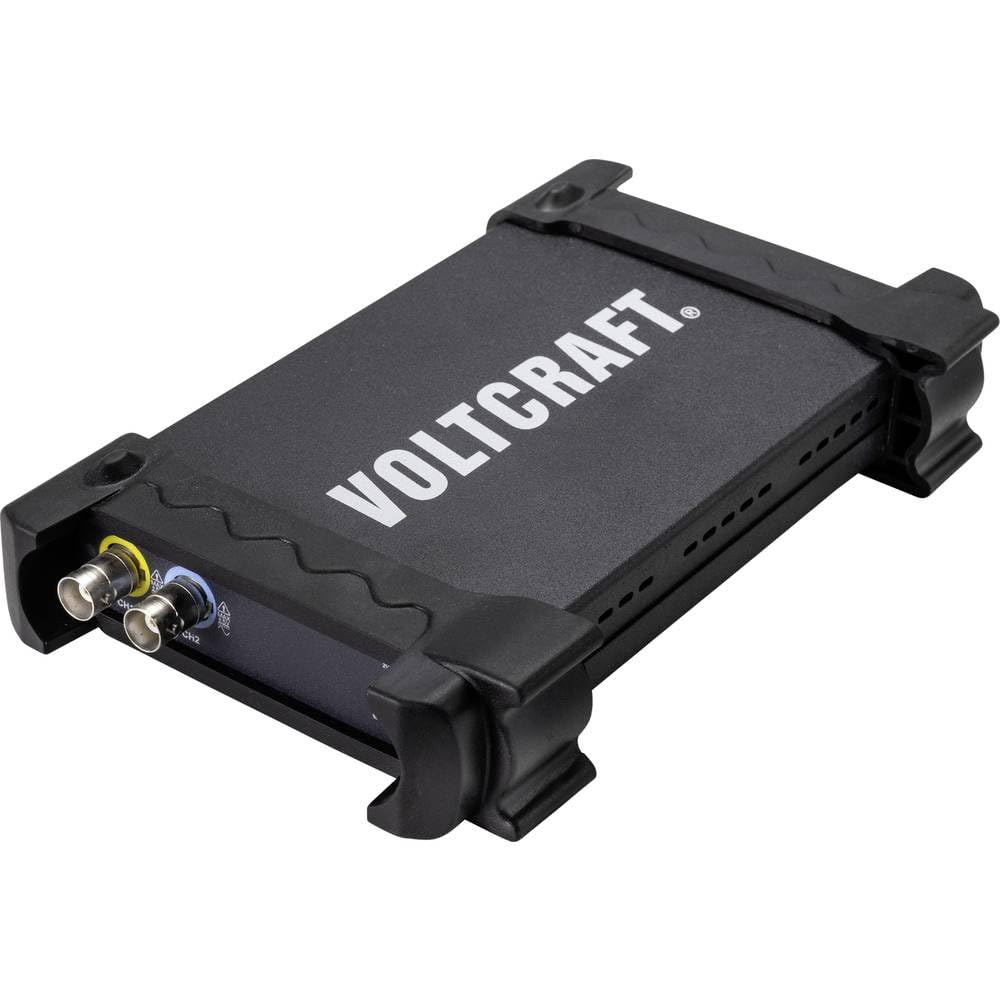
Kuva 3.1: Etuosa view of the VOLTCRAFT DSO-2020 USB PC Oscilloscope, showing its compact design and protective casing.

Kuva 3.2: Kulmassa view of the oscilloscope, highlighting the USB-B port for PC connection and the USBXI port.
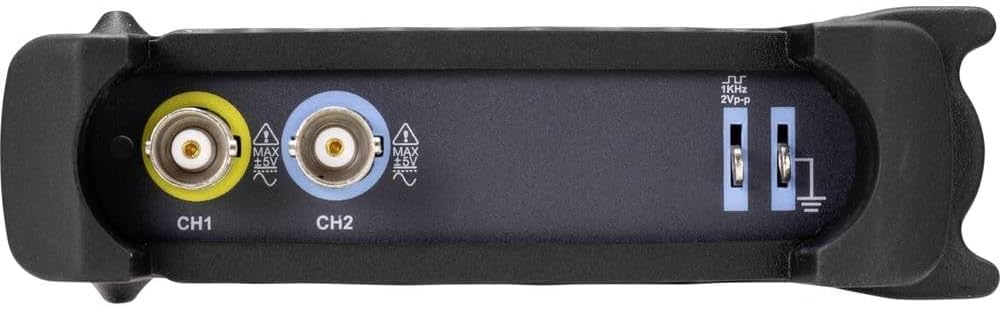
Kuva 3.3: Takaosa view showing the BNC input connectors for Channel 1 (CH1) and Channel 2 (CH2), along with the 1KHz 2Vp-p calibration output and ground terminals.
4. Asennus
4.1 Ohjelmiston asennus
Before connecting the DSO-2020 USB, install the necessary software and drivers on your computer. Refer to the included software CD or the manufacturer's website for the latest version and installation instructions. Typically, this involves running an installer and following on-screen prompts.
4.2 Laitteiston liitäntä
- Connect the USB cable from the DSO-2020 USB device to an available USB port on your computer.
- Once connected, your operating system should detect the device. If drivers were installed correctly, the device should be recognized by the oscilloscope software.
- Connect your oscilloscope probes to the CH1 and/or CH2 BNC input connectors as required for your measurement. Ensure probes are securely attached.
- For accurate measurements, perform probe compensation if using passive probes. Refer to your probe's manual for specific instructions.
5. Käyttöohjeet
This section outlines the basic steps for operating your VOLTCRAFT DSO-2020 USB oscilloscope.
5.1 Ohjelmiston käynnistäminen
After successful installation and connection, launch the VOLTCRAFT oscilloscope application from your computer's desktop or start menu. The software interface will display a virtual oscilloscope screen, similar to a traditional benchtop unit.
5.2 Basic Signal Acquisition
- Yhdistä signaali: Attach the probe to the circuit point you wish to measure.
- Kanavan valinta: In the software, enable the desired channel (CH1 or CH2).
- Pystysuuntainen asteikko (volttia/jakoalue): Säädä pystysuuntaista skaalausta signaalin mukaan ampkirkkaus ruudulla.
- Vaakasuuntainen asteikko (aika/jako): Säädä vaakasuuntaista skaalausta view signaalin jakso tai taajuus.
- Triggerin asetukset: Configure the trigger source, type (edge, pulse), and level to stabilize the waveform. The software provides controls similar to a physical oscilloscope.
- Automaattinen asennus: Utilize the automatic setup function within the software. This feature automatically adjusts the vertical and horizontal settings to display the input signal optimally.
5.3 Data Processing and Export
The DSO-2020 USB allows for advanced data processing and storage:
- Aaltomuodon tallennus: Captured waveforms can be saved directly to your computer for later analysis.
- Mittaustoiminnot: The software includes various automatic measurement functions (e.g., Vpp, Vrms, Frequency, Period).
- Tietojen vienti: Measurement data can be exported to formats such as Excel for further analysis and reporting.
- LabVIEW Yhteensopivuus: The device is compatible with LabVIEW, allowing for integration into custom measurement and automation systems.
6. Huolto
Asianmukainen huolto varmistaa oskilloskoopin pitkän käyttöiän ja tarkkuuden.
- Puhdistus: Puhdista laitteen ulkopinta pehmeällä, kuivalla liinalla. Älä käytä hankaavia puhdistusaineita tai liuottimia.
- Varastointi: Store the oscilloscope in a dry, dust-free environment when not in use. Avoid extreme temperatures.
- Anturin hoito: Handle probes carefully. Avoid bending or stressing the cables. Store them properly to prevent damage.
- Ohjelmistopäivitykset: Regularly check the VOLTCRAFT website for software and driver updates to ensure optimal performance and compatibility.
7. Vianmääritys
Tässä osiossa käsitellään yleisiä ongelmia, joita saatat kohdata.
- Laitetta ei tunnisteta:
- Varmista, että USB-kaapeli on kytketty kunnolla sekä oskilloskooppiin että tietokoneeseen.
- Varmista, että ajurit on asennettu oikein. Asenna ne tarvittaessa uudelleen.
- Kokeile toista tietokoneesi USB-porttia.
- Signaalia ei näy:
- Check that the probe is properly connected to the input channel and the circuit under test.
- Ensure the correct channel is enabled in the software.
- Säädä pystysuoraa (Volts/Div) ja vaakasuoraa (Time/Div) asteikkoa.
- Check trigger settings; an incorrect trigger level can prevent a stable display.
- Verify the signal source is active and within the oscilloscope's measurement range.
- Epävakaa aaltomuoto:
- Adjust the trigger level and trigger type (e.g., edge trigger).
- Ensure the trigger source is set to the channel with the signal.
- Check for noise in the measurement environment.
8. Tekniset tiedot
The following table details the technical specifications of the VOLTCRAFT DSO-2020 USB PC Oscilloscope.
| Ominaisuus | Erittely |
|---|---|
| Valmistaja | VOLTCRAFT |
| Mallinumero | DSO-2020 USB |
| Kaistanleveys | 20 MHz |
| Kanavat | 2 |
| Sampling Rate (Real-time) | 48 MSa/s |
| Muistin syvyys | 1 Mpts |
| Resoluutio | 8-bittinen |
| Mitat (P x L x K) | 20.5 x 3.8 x 12.5 cm |
| Paino | 430 g |
| Virtalähteen tyyppi | Hand-operated (USB powered) |
| Erikoisominaisuudet | Two independent channels, display similar to standard oscilloscope, automatic setup function, data export to Excel, LabVIEW yhteensopiva. |
| Mukana olevat komponentit | 1 unit (oscilloscope) |
| Paristot vaaditaan | Ei |
9. Takuu ja tuki
For warranty information, technical support, or service inquiries, please refer to the documentation provided with your purchase or visit the official VOLTCRAFT website. Contact details for customer support can typically be found on the manufacturer's product page or in the included warranty card.
10. Viralliset tuotevideot
No official product videos from the seller were found in the provided data for this specific model. Please refer to the manufacturer's websivustolta tai virallisilta kanavilta saatavilla olevia videoresursseja.