
Johdanto
Kiitos ostoksestasiasing the Lexibook Disney Planes Portable Color Game Console JL2800PL. This console offers a collection of 120 games, including 10 Disney Planes themed games and 110 classic titles, all displayed on a vibrant 2.4-inch (6.1 cm) color LCD screen. Designed for portability, it features a 16-bit processor and a rechargeable battery for extended playtime. This manual provides essential information for safe and effective use of your new device.
Tärkeitä turvallisuustietoja
Lue kaikki turvallisuusvaroitukset ja ohjeet ennen tuotteen käyttöä varmistaaksesi turvallisen käytön ja estääksesi vaurioita. Säilytä tämä käyttöohje myöhempää tarvetta varten.
- This device is not suitable for children under 3 years due to small parts that may present a choking hazard.
- Do not expose the console to extreme temperatures, direct sunlight, or moisture.
- Vältä konsolin pudottamista tai voimakkaiden iskujen kohteeksi asettamista.
- Only use the provided charging cable or a compatible charger specified by Lexibook.
- Do not attempt to open, disassemble, or modify the console. This will void the warranty and may cause damage or injury.
- If the console becomes hot, emits smoke, or produces unusual odors, immediately discontinue use and disconnect from any power source.
- Dispose of the battery and console responsibly according to local regulations.
Pakkauksen sisältö
Tarkista, että pakkauksessa on kaikki tarvittavat osat:
- Lexibook Disney Planes Portable Color Game Console JL2800PL
- USB-latauskaapeli
- Käyttöopas (tämä asiakirja)
Asennus
1. Konsolin lataaminen
Before first use, fully charge the console's built-in Lithium-ion battery. Connect the supplied USB charging cable to the console's charging port and the other end to a USB power adapter (not included) or a computer's USB port. The charging indicator light will typically show red while charging and turn off or change color when fully charged. A full charge may take approximately 2-3 hours.
2. Virta päälle / pois
To power on the console, press and hold the Tehoa button for a few seconds until the screen illuminates. To power off, press and hold the Tehoa -painiketta uudelleen, kunnes näyttö sammuu.
Käyttöohjeet
Console Layout and Controls
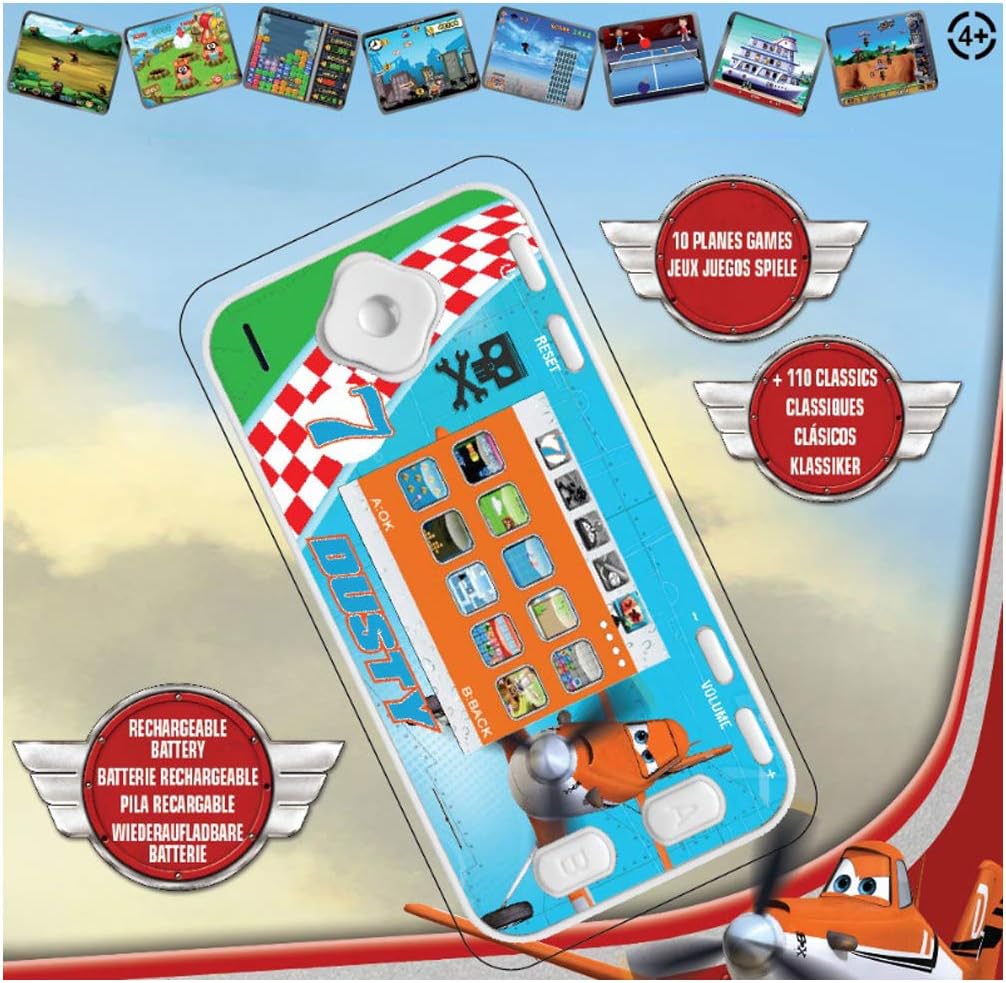
The console features a D-pad for movement, A/B/C/D action buttons, Start/Pause, Select, Reset, and Volume controls. Familiarize yourself with the button layout for optimal gameplay.
- D-Pad (suuntaohjain): Used for moving characters or navigating menus (Up, Down, Left, Right).
- Action Buttons (A, B, C, D): Perform in-game actions such as jumping, shooting, or confirming selections. Functions vary by game.
- Käynnistys/Tauko-painike: Starts a game or pauses gameplay.
- Valitse painike: Used for various in-game options or menu selections.
- Reset-painike: Resets the console to the main menu. Use a thin object like a paperclip to press the recessed reset button.
- Äänenvoimakkuuden säätö: Adjusts the sound level of the console.
Navigating Menus and Selecting Games
Once powered on, the console will display the main menu. Use the D-Pad to scroll through the available game categories or individual games. Press the A button (or equivalent action button) to select a game and begin playing.
Pelin kulku
Each game has its own specific controls and objectives. Refer to the on-screen instructions within each game, if available, to understand how to play. The console includes 10 Disney Planes games and 110 classic games covering action, sports, racing, and more.
Huolto
Konsolin puhdistus
To clean the console, gently wipe the surface with a soft, dry cloth. Do not use liquid cleaners, solvents, or abrasive materials, as these can damage the finish or internal components. Ensure no moisture enters the console's ports or openings.
Akun hoito ja säilytys
To prolong battery life, avoid fully discharging the console frequently. If storing the console for an extended period, charge it to approximately 50% before storage and recharge it every few months. Store the console in a cool, dry place away from direct sunlight and extreme temperatures.
Vianetsintä
| Ongelma | Mahdollinen syy | Ratkaisu |
|---|---|---|
| Konsoli ei käynnisty. | Akku on tyhjä. | Charge the console using the provided USB cable. Ensure the charging indicator light is active. |
| Näyttö on tyhjä tai jumiutunut. | Ohjelmistohäiriö tai tilapäinen virhe. | Paina syvennystä Nollaa button using a thin object (e.g., paperclip). If the issue persists, ensure the battery is charged. |
| Ei ääntä tai äänenvoimakkuus on alhainen. | Volume is turned down or muted. | Säädä Äänenvoimakkuus control on the console. |
| Console not charging. | Viallinen kaapeli, virtalähde tai latausportti. | Try a different USB cable or power adapter. Ensure the charging cable is securely connected to both the console and the power source. |
Tekniset tiedot
- Mallinumero: JL2800PL
- Merkki: Lexibook
- Näytön koko: 2.4 tuumaa (6.1 cm)
- Näyttötyyppi: LCD-väri
- Prosessori: 16-bittinen
- Pelien määrä: 120 (10 Disney Planes + 110 Classic)
- Akun tyyppi: 1 litiumioniakku (ladattava)
- Virtalähde: Paristokäyttöinen
- Ohjaimen tyyppi: Painikkeiden ohjaus
- Tuotteen mitat: 12.1 L x 6.1 L x 1.3 K senttimetriä
- Materiaali: Muovi
- Suositeltu ikä: 3+ vuotta

Takuutiedot
This Lexibook product is covered by a manufacturer's warranty for a period of 2 vuotta ostopäivästä lukien. Tämä takuu kattaa materiaali- ja valmistusvirheet normaalissa käytössä. Se ei kata väärinkäytöstä, onnettomuuksista, luvattomista muutoksista tai normaalista kulumisesta aiheutuneita vahinkoja. Säilytä ostokuitti takuuvaatimuksia varten.
Asiakastuki
If you encounter any issues not covered in the troubleshooting section or require further assistance, please contact Lexibook customer support. You can find contact information on the official Lexibook websivustoltasi tai jälleenmyyjän kautta.
For more information, visit the official Lexibook websivusto: www.lexibook.com