
1. Johdanto
This manual provides comprehensive instructions for the proper use and maintenance of your Horizon SF-400D Digital Precision Scale. Please read this manual thoroughly before operating the device to ensure accurate measurements and prolong its lifespan.
The Horizon SF-400D is a versatile digital precision scale designed for various weighing applications, including jewelry, coins, herbs, spices, and medication. It offers high accuracy and multiple weighing modes, along with a convenient counting function.

Kuva 1: Horizon SF-400D Digital Precision Scale. This image shows the overall design of the scale, featuring a black body, a stainless steel weighing platform, and a blue backlit LCD display with control buttons.
2. Turvaohjeet
- Älä ylikuormita vaakaa yli sen enimmäispainon, joka on 500 g.
- Vältä vaa'an altistamista äärimmäisille lämpötiloille, kosteudelle tai suoralle auringonvalolle.
- Pidä vaaka poissa voimakkaista sähkömagneettisista kentistä.
- Puhdista vaaka pehmeällä, damp liinalla. Älä käytä hankaavia puhdistusaineita äläkä upota laitetta veteen.
- Ensure the scale is placed on a stable, level surface during operation to ensure accuracy.
3. Tuotteen osat
Familiarize yourself with the main parts of your SF-400D scale:
- Punnitusalusta: Stainless steel surface for placing items.
- LCD-näyttö: Backlit screen showing weight, units, and other indicators.
- ON/OFF-painike: Kytkee vaa'an päälle tai pois päältä.
- MODE-painike: Changes weighing units (g, oz, ct, dwt, gn, T).
- TARE-painike: Nollaa näytön, hyödyllinen astiassa olevien esineiden punnitsemisessa.
- PCS-painike: Activates the piece counting function.
- CAL-painike: Used for calibration.
- Säädettävät jalat: Located on the bottom for leveling the scale.
- Kuplataso: Integrated on the scale to assist with leveling.
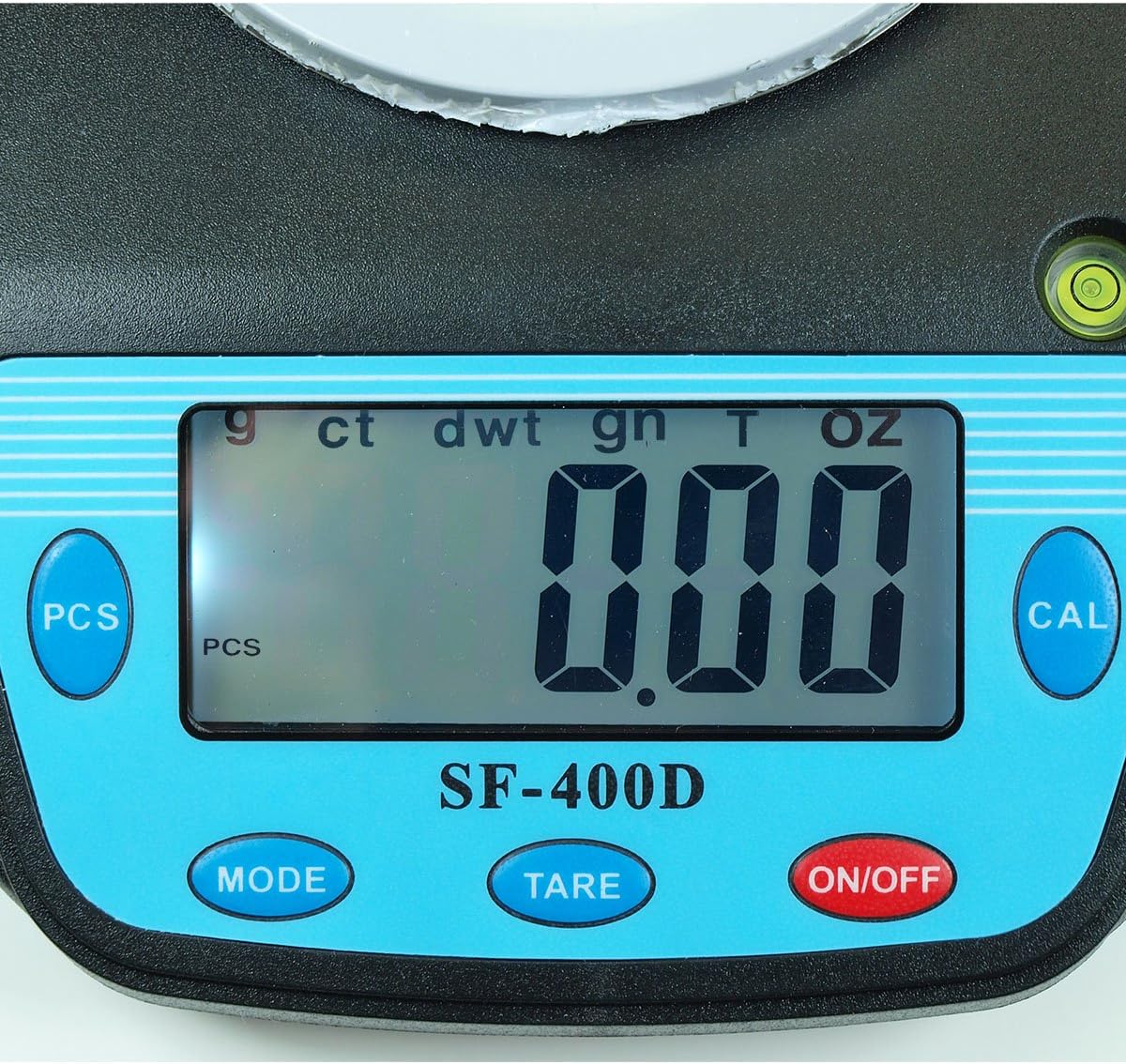
Kuva 2: Close-up of the SF-400D display and control buttons. This image highlights the LCD screen, showing various unit indicators (g, ct, dwt, gn, T, oz), and the function buttons: PCS, MODE, TARE, ON/OFF, and CAL.

Kuva 3: Underside of the SF-400D scale showing adjustable legs. Green arrows indicate the location of the four adjustable feet, which are used to level the scale for accurate measurements.
4. Asennus
4.1. Virtalähde
The SF-400D scale operates on two AA batteries (included) or an optional AC power adapter (not included).
- Avaa vaa'an alapuolella olevan paristolokeron kansi.
- Aseta kaksi AA-paristoa paikoilleen varmistaen oikea napaisuus (+/-).
- Sulje paristolokero.
- Alternatively, connect a compatible AC power adapter (6V, amperage not specified in product details, consult manufacturer if needed) to the power port.
4.2. Sijoittelu ja vaaitus
For optimal accuracy, the scale must be placed on a stable, flat, and level surface.
- Place the scale on your desired weighing surface.
- Observe the integrated bubble level.
- Adjust the four adjustable legs on the bottom of the scale by rotating them until the bubble is centered within the level indicator.
5. Käyttöohjeet
5.1. Peruspunnitus
- Paina ON/OFF button to turn on the scale. The display will show "88888" and then "0.00" (or "0.0" depending on the unit).
- If the display does not show zero, press the TAARA -painiketta nollataksesi asteikon.
- Paina MODE button to select your desired weighing unit (g, oz, ct, dwt, gn, T).
- Gently place the item(s) to be weighed on the center of the stainless steel platform.
- Read the stable weight displayed on the LCD screen.
- Sammuta vaaka painamalla ja pitämällä ON/OFF button for a few seconds. The scale also features an auto shut-off function to conserve battery power.
5.2. Taaraustoiminto
Taaraustoiminnolla voit vähentää säiliön painon, jolloin vain sisältö punnitaan.
- Aseta tyhjä astia punnitusalustalle.
- Odota, kunnes näyttö vakautuu ja näyttää säiliön painon.
- Paina TAARA button. The display will reset to "0.00" (or "0.0").
- Lisää punnittavat tuotteet astiaan. Näytössä näkyy nyt vain tuotteiden nettopaino.
- To clear the tare, remove all items from the platform and press TAARA uudelleen, jos näyttö ei palaudu nollaan automaattisesti.
5.3. Piece Counting Function (PCS)
This function is useful for counting multiple identical items.
- Turn on the scale and ensure it is zeroed.
- Paina PCS button. The display will show "PCS" and a sample size (e.g., "25", "50", "75", "100").
- Paina MODE button to cycle through the available sample sizes (25, 50, 75, 100 pieces). Select the sample size that matches the number of items you will place on the scale for sampLing.
- Place the exact number of sample items (e.g., 25 pieces) onto the weighing platform according to your selected sample koko.
- Paina PCS -painiketta uudelleen vahvistaaksesiample. The display will now show the number of pieces.
- Voit nyt lisätä lisää saman tyyppisiä esineitä, ja vaaka näyttää kokonaismäärän.
- To exit the counting mode, press the MODE -painiketta.
5.4. Kalibrointi
Calibration ensures the accuracy of your scale. It is recommended to calibrate the scale periodically or if you suspect inaccurate readings. You will need a known calibration weight (e.g., 500g) for this process.

Kuva 4: SF-400D display showing "CAL" during calibration mode. This image illustrates the scale's screen indicating it is in calibration mode, prompting the user to place a calibration weight.
- Ensure the scale is on a stable, level surface and turned off.
- Paina ja pidä painettuna CAL -painiketta ja paina sitten -painiketta ON/OFF button simultaneously. Release both buttons when the display shows "CAL".
- The display will then show a flashing weight value (e.g., "500.00g"). This is the required calibration weight.
- Place the exact calibration weight (e.g., 500g) onto the center of the weighing platform.
- Wait for the display to stabilize and show "PASS" or return to normal weighing mode. This indicates successful calibration.
- Remove the calibration weight. The scale is now calibrated and ready for use.
- If "FAIL" or an error message appears, repeat the calibration process.
6. Huolto
6.1. Puhdistus
- Pyyhi vaa'an pinta pehmeällä, hieman kosteallaamp kangas.
- Älä käytä voimakkaita kemikaaleja, hankaavia puhdistusaineita äläkä upota vaakaa veteen.
- Varmista, että vaaka on täysin kuiva ennen säilytystä tai seuraavaa käyttökertaa.
6.2. Varastointi
- Säilytä vaakaa viileässä, kuivassa paikassa, poissa suorasta auringonvalosta ja äärimmäisistä lämpötiloista.
- Jos säilytät laitetta pitkään, poista paristot vuotojen estämiseksi.
7. Vianmääritys
| Ongelma | Mahdollinen syy | Ratkaisu |
|---|---|---|
| Vaaka ei käynnisty. | Low or dead batteries; incorrect battery installation; no power from AC adapter. | Replace batteries; check battery polarity; ensure AC adapter is properly connected and functional. |
| Epätarkkoja lukemia. | Scale not level; unstable surface; needs calibration; overloaded; strong air currents or vibrations. | Ensure scale is level using adjustable legs and bubble level; place on stable surface; perform calibration; do not exceed 500g capacity; operate in a stable environment. |
| Näytössä näkyy "O_Ld" tai "EEEE". | Vaaka on ylikuormitettu. | Remove excess weight immediately. Do not exceed 500g capacity. |
| Display shows "UNST". | Unstable environment or surface. | Move the scale to a more stable location, away from vibrations or drafts. |
| Counting function not working correctly. | Väärä sample size selected; sample items not identical in weight. | Varmista, että sample size matches the number of items placed for sampling; use identical items for accurate counting. |
8. Tekniset tiedot
| Ominaisuus | Yksityiskohta |
|---|---|
| Malli | SF-400D |
| Kapasiteetti | 500 grams (g) / 17.5 ounces (oz) |
| Tarkkuus (luettavuus) | 0.01 grams (g) / 0.0005 ounces (oz) |
| Punnitustilat | g (grams), oz (ounces), ct (carats), dwt (pennyweights), gn (grains), T (troy ounces), pcs (pieces) |
| Alustan materiaali | Ruostumaton teräs |
| Alustan halkaisija | 4.2 tuumaa |
| Näyttö | LCD taustavalolla |
| Tehoa | 2 x AA batteries (included) or 6V AC adapter (not included) |
| Mitat (P x L x K) | 8.25 cm x 6.0 cm x 1.75 cm |
| Ominaisuudet | Tare function, Piece Counting, Auto Shut-Off, Backlit Display, Adjustable Legs, Bubble Level |
9. Takuu ja tuki
For warranty information or technical support, please refer to the documentation included with your purchase or contact the retailer. Specific warranty terms may vary by region and retailer.
Yleisiä kysymyksiä tai muiden tuotteiden tutkimista varten voit käydä osoitteessa Horizon Store on Amazon.