
1. Johdanto
Kiitos ostoksestasiasing the Fonestar AS-170RU Hi-Fi Amplifier. This device is designed to provide high-fidelity stereo audio amplification, featuring a built-in USB/MP3 player, AM/FM digital tuner, and multiple audio inputs. This manual provides detailed instructions for safe installation, operation, and maintenance of your ampLue tämä käyttöohje huolellisesti ennen käyttöä ja säilytä se myöhempää tarvetta varten.
2. Turvallisuusohjeet
- Virtalähde: Varmista, että amplifier on kytketty virtalähteeseen, joka vastaa jännitteelletage specified on the unit. Disconnect the power cord from the outlet if the unit will not be used for an extended period.
- Ilmanvaihto: Älä tuki tuuletusaukkoja. Varmista, että laitteen ympärillä on riittävästi tilaa asianmukaiselle ilmanvaihdolle ja ylikuumenemisen estämiseksi.
- Vesi ja kosteus: Älä altista laitetta sateelle, kosteudelle tai tippuville/roiskeille nesteille. Älä aseta laitteen päälle nesteitä sisältäviä esineitä, kuten maljakoita.
- Lämmönlähteet: Pidä laite poissa lämmönlähteistä, kuten pattereista, lämmittimistä, liesistä tai muista laitteista (mukaan lukien ampnostimet), jotka tuottavat lämpöä.
- Puhdistus: Puhdista vain kuivalla liinalla. Älä käytä nestemäisiä puhdistusaineita tai aerosolipuhdistusaineita.
- Huolto: Älä yritä huoltaa tätä tuotetta itse. Anna kaikki huoltotoimenpiteet pätevän huoltohenkilöstön tehtäväksi.
- Sijoitus: Aseta laite vakaalle ja tasaiselle alustalle. Vältä sen sijoittamista suoraan auringonvaloon tai voimakkaiden magneettikenttien lähelle.
3. Pakkauksen sisältö
Tarkista, että pakkauksessasi on seuraavat tuotteet:
- Fonestar AS-170RU Hi-Fi Ampelävämpi
- Kaukosäädin
- AM-antenni
- FM antenni
- Käyttöopas (tämä asiakirja)
4. Tuote ohiview
4.1 Etupaneeli
The front panel provides access to essential controls and the display.
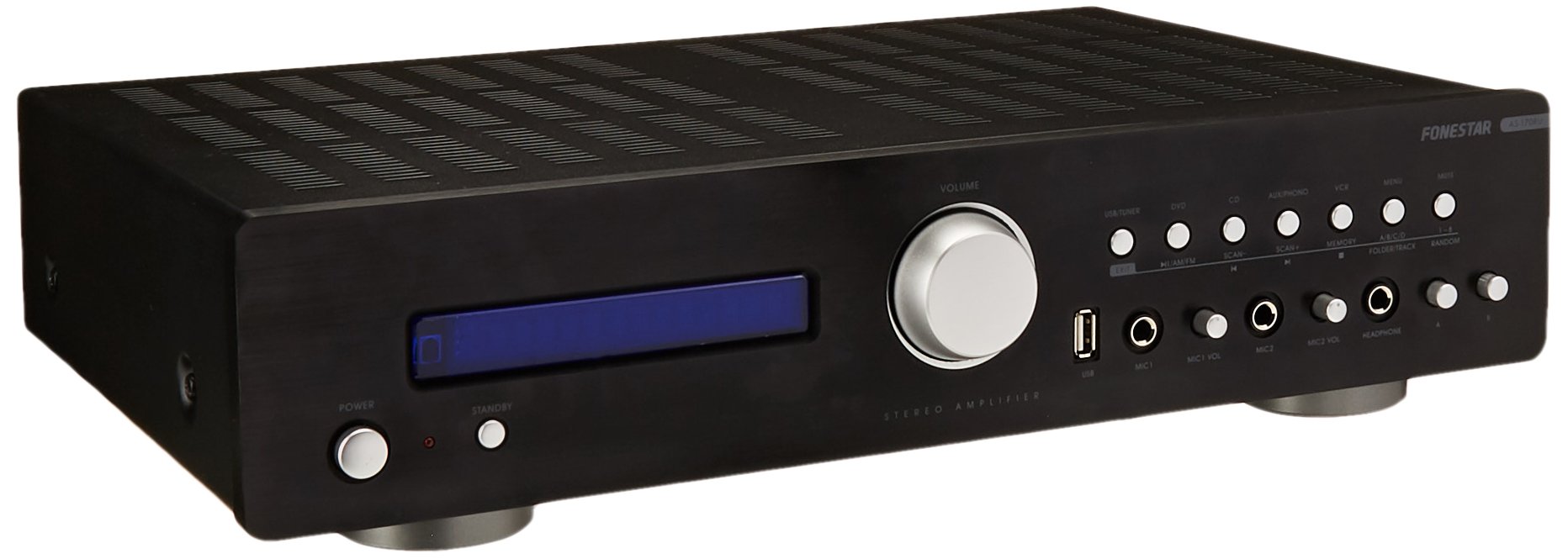
Image: Fonestar AS-170RU Front Panel. Tämä kuva näyttää etupuolen view -lta amplifier, showing the VFD display, USB port, headphone output, input selectors, volume knob, and other control buttons.
- Virtapainike: Kääntää ampelinikäisempi päälle tai pois päältä.
- VFD-näyttö: Shows current input, volume level, tuner information (frequency, RDS), and USB/MP3 track details (ID3 tag).
- USB-portti: For connecting USB storage devices to play MP3 files.
- Kuulokkeiden lähtö: 6.3 mm liitäntä kuulokkeiden liittämistä varten.
- Tulovalitsimet: Buttons for choosing audio sources (CD, DVD, VCR, AUX/Phono, USB/Tuner).
- Äänenvoimakkuuden säätö: Rotary knob to adjust the master volume level.
- Mikrofonitulot: Two 6.3mm microphone jacks with independent volume control.
- Äänen säätimet: Buttons or menu options for adjusting Bass, Treble, and Balance.
4.2 Takapaneeli
The rear panel contains all the necessary connections for your audio sources, speakers, and antennas.

Image: Fonestar AS-170RU Rear Panel. This image illustrates the rear connections of the amplifier, including speaker terminals (A/B), various RCA input jacks (CD, DVD, VCR, AUX/Phono), REC OUT, PRE OUT, AMP IN, and antenna connections (FM COAX, AM LOOP ANT).
- Speaker Outputs (A/B): Terminals for connecting two pairs of speakers. Supports 4-16 ohms for A or B, or 8-16 ohms for A+B.
- Äänitulot (RCA):
- CD-sisääntulo: For connecting a CD player.
- DVD Input: For connecting a DVD player or other audio source.
- VCR Input: For connecting a VCR or other audio source.
- AUX/PHONO Input: For connecting auxiliary devices or a turntable (Phono input may require a pre-amplifier if your turntable does not have one built-in).
- REC OUT: RCA output for connecting to a recording device.
- PRE OUT: RCA output for connecting to an external power ampelävämpi.
- AMP IN: RCA input for connecting an external pre-ampelävämpi.
- Antenniliitännät:
- FM COAX 75Ω: FM-antennin kytkemistä varten.
- AM LOOP ANT: For connecting the supplied AM loop antenna.
4.3 Kaukosäädin
The included remote control allows convenient operation of the ampnostaja kaukaa.

Image: Fonestar AS-170RU Remote Control. This image shows the remote control unit with various buttons for power, input selection, volume, mute, tuner functions, USB playback controls, and tone adjustments.
- VALMIUSTILA: Virta päälle/pois.
- Tulovalitsimet: Buttons for CD, DVD, VCR, AUX/PHONO, USB/TUNER.
- Äänenvoimakkuuden lisäys/alas (VOL +/-): Säätää päääänenvoimakkuutta.
- MYKISTÄ: Hiljentää äänentoiston.
- AM/FM: Switches between AM and FM tuner modes.
- SKANNATA: Scans for radio stations.
- MUISTI: Stores radio station presets.
- USB-toiston säätimet: Play/Pause, Stop, Skip Track, Folder/Track navigation.
- EQ OFF / BASS / TREBLE: Access tone controls.
- RDS / ID3: Displays RDS information for radio or ID3 tag MP3: lle files.
5. Asennus
5.1 Kaiuttimien liittäminen
- Varmista, että amplifier on sammutettu ja irrotettu pistorasiasta.
- Connect your speakers to the "SPEAKERS OUTPUT" terminals on the rear panel.
- Sovita positiivinen (+) napa amplifier (red) to the positive (+) terminal of your speaker, and the negative (-) terminal (black) to the negative (-) terminal.
- The AS-170RU supports two groups of speakers (A and B). You can connect one pair to "SPEAKERS A" and another to "SPEAKERS B".
- Ensure your speakers' impedance matches the amplifier's specifications: 4-16 ohms for A or B, or 8-16 ohms for A+B.
5.2 Äänilähteiden liittäminen
Use RCA cables to connect your audio components to the corresponding input jacks on the rear panel.
- CD-soitin: Liitä "CD"-tuloon.
- DVD-soitin: Connect to the "DVD" input.
- Videonauhuri: Connect to the "VCR" input.
- Auxiliary Device (e.g., smartphone, tablet): Connect to the "AUX/PHONO" input.
- Levysoitin: Connect to the "AUX/PHONO" input. If your turntable does not have a built-in pre-amplifier, you may need an external phono pre-ampelävämpi.
5.3 Antennien liittäminen
- FM-antenni: Connect the supplied FM wire antenna to the "FM COAX 75Ω" terminal. Extend the wire for optimal reception.
- AM-antenni: Connect the supplied AM loop antenna to the "AM LOOP ANT" terminals. Position the loop for best reception.
5.4 Virtaliitäntä
Once all audio and speaker connections are made, plug the amplifier's power cord into a suitable AC power outlet.
6. Käyttöohjeet
6.1 Peruskäyttö
- Virta päälle/pois: Press the Power button on the front panel or the STANDBY button on the remote control to turn the ampelinikäisempi päälle tai pois päältä.
- Valitse tulolähde: Press the desired input selector button on the front panel (CD, DVD, VCR, AUX/PHONO) or the remote control (CD, DVD, VCR, AUX/PHONO, USB/TUNER).
- Säädä äänenvoimakkuutta: Rotate the Volume knob on the front panel or use the VOL +/- buttons on the remote control to adjust the sound level.
- Mykistä: Press the MUTE button on the remote control to temporarily silence the audio. Press it again to restore sound.
6.2 USB/MP3-toisto
- Insert a USB storage device (flash drive) into the USB port on the front panel.
- Select "USB/TUNER" as the input source. The amplifier tunnistaa MP3-tiedostot ja aloittaa niiden toistamisen automaattisesti. files.
- Use the playback controls on the remote control (Play/Pause, Stop, Skip Track, Folder/Track) to navigate and control your music.
- The VFD display will show track information, including ID3 tags jos saatavilla.
- The amplifier supports up to 65,000 indexable folders and files, with a maximum of 8 folder levels.
6.3 AM/FM-virittimen käyttö
- Select "USB/TUNER" as the input source, then press the AM/FM button on the remote control to switch between AM and FM bands.
- Automaattinen skannaus: Press the SCAN button on the remote control to automatically search for and store available radio stations.
- Manuaalinen viritys: Use the tuning buttons (usually arrow keys) on the remote control to manually adjust the frequency.
- Esiasetetut asemat: The amplifier supports 64 presets. Use the MEMORY button to store and recall your favorite stations.
- RDS-toiminto: If available, press the RDS button on the remote control to display Radio Data System information (e.g., station name, program type).
6.4 mikrofonituloa
- Connect microphones to the 6.3mm MIC 1 and MIC 2 jacks on the front panel.
- Adjust the independent volume controls for each microphone to achieve the desired level.
6.5 Sävyn ja tasapainon säätö
The amplifier allows adjustment of bass, treble, and balance through its menu system or dedicated buttons on the remote control. Refer to the remote control section for specific buttons like EQ OFF, BASS, TREBLE.
7. Huolto
- Puhdistus: Disconnect the power before cleaning. Use a soft, dry cloth to wipe the exterior surfaces. Do not use abrasive cleaners, waxes, or solvents.
- Ilmanvaihto: Tarkista säännöllisesti, että tuuletusaukot ovat puhtaat pölystä ja roskista.
- Varastointi: Jos laitetta säilytetään pitkään, irrota se pistorasiasta ja säilytä sitä viileässä, kuivassa paikassa, poissa suorasta auringonvalosta ja äärimmäisistä lämpötiloista.
8. Vianmääritys
If you encounter problems with your amplifier, refer to the following table for possible solutions.
| Ongelma | Mahdollinen syy | Ratkaisu |
|---|---|---|
| Ei virtaa | Virtajohto ei ole kytketty; pistorasia viallinen; Ampnostin valmiustilassa. | Ensure power cord is securely plugged in. Test the outlet with another device. Press the Power/STANDBY button. |
| Ei ääntä | Väärä tulosignaali valittu; Äänenvoimakkuus liian alhainen; Kaiuttimet eivät ole kytketty oikein; Mykistystoiminto aktiivinen. | Select the correct input source. Increase volume. Check speaker connections. Deactivate MUTE. |
| Huono radiovastaanotto | Antennia ei ole kytketty tai se on huonosti sijoitettu; Häiriöitä. | Connect and adjust the position of the AM/FM antennas. Move the ampetäällä muista elektronisista laitteista. |
| USB-toisto ei toimi | USB-laite ei ole asetettu oikein; Yhteensopimaton file format; USB device faulty. | Ensure USB device is fully inserted. Check if files are MP3 format. Try a different USB device. |
| Amplifier turns off unexpectedly or cycles power | Overheating; Short circuit in speaker wiring; Internal fault. | Ensure adequate ventilation. Check speaker wires for frayed strands causing short circuits. If the problem persists, disconnect power and contact qualified service personnel. |
9. Tekniset tiedot
- Malli: AS-170RU
- Teholähtö: 80 + 80 W RMS at 4 Ω
- Kaiuttimen impedanssi: 4-16 Ω (A or B), 8-16 Ω (A+B)
- Suojaus: 3 circuits (short circuits, overload, overvoltage)
- USB-soitin: MP3 file playback, ID3 tag support. Max 65,000 indexable folders/files, max 8 folder levels.
- Viritin: Digital AM/FM, 64 presets, RDS.
- Tulot: 2 x Microphone (6.3mm), 4 x RCA (CD, DVD, VCR, AUX/Phono), 1 x RCA (AMP SISÄÄN).
- Lähdöt: 1 x RCA (REC OUT), 1 x RCA (PRE OUT), Headphone (6.3mm).
- Näyttö: Blue VFD.
- Äänentallennus: Bass, Treble, Balance (via menu/remote).
- Mitat: 40 x 40 x 60 cm (noin 15.7 x 15.7 x 23.6 tuumaa)
- Paino: 7.2 kg (noin 15.87 lbs)
10. Takuu ja tuki
For warranty information and technical support, please refer to the warranty card included with your product or contact your authorized Fonestar dealer. Do not attempt to repair the unit yourself, as this may void your warranty.

