
1. Johdanto
Thank you for choosing the Fonestar AS-24U Hi-Fi USB/SD/MP3 AmpTämä käyttöohje sisältää olennaisia tietoja laitteen turvallisesta ja tehokkaasta käytöstä. Lue se huolellisesti ennen käyttöä ja säilytä se myöhempää tarvetta varten.
2. Turvallisuusohjeet
- Virtalähde: Varmista, että amplifier on kytketty virtalähteeseen, joka vastaa määritettyä jännittettätage (230 V).
- Ilmanvaihto: Älä tuki tuuletusaukkoja. Jätä laitteen ympärille riittävästi tilaa asianmukaisen ilmankierron varmistamiseksi ja ylikuumenemisen estämiseksi.
- Kosteus: Pidä amplifier away from water, moisture, and high humidity environments. Do not expose it to dripping or splashing.
- Lämmönlähteet: Vältä laitteen sijoittamista lämmönlähteiden, kuten pattereiden, lämmitysventtiilien, liesien tai muiden lämpöä tuottavien laitteiden lähelle.
- Puhdistus: Irrota virtajohto pistorasiasta ennen puhdistamista. Käytä kuivaa, pehmeää liinaa. Älä käytä nestemäisiä puhdistusaineita tai aerosolipuhdistusaineita.
- Huolto: Älä yritä huoltaa tätä tuotetta itse. Anna kaikki huoltotoimenpiteet pätevän huoltohenkilöstön tehtäväksi.
- Objektin/nesteen sisääntulo: Älä koskaan työnnä mitään esineitä tähän tuotteeseen aukkojen kautta, koska ne voivat koskettaa vaarallista volyymiatage kohtia tai oikosulun osia, jotka voivat aiheuttaa tulipalon tai sähköiskun.
3. Tuote ohiview
3.1 Etupaneeli
The front panel features controls for power, input selection, volume adjustment, and USB/SD media playback. It also includes a display for media information.
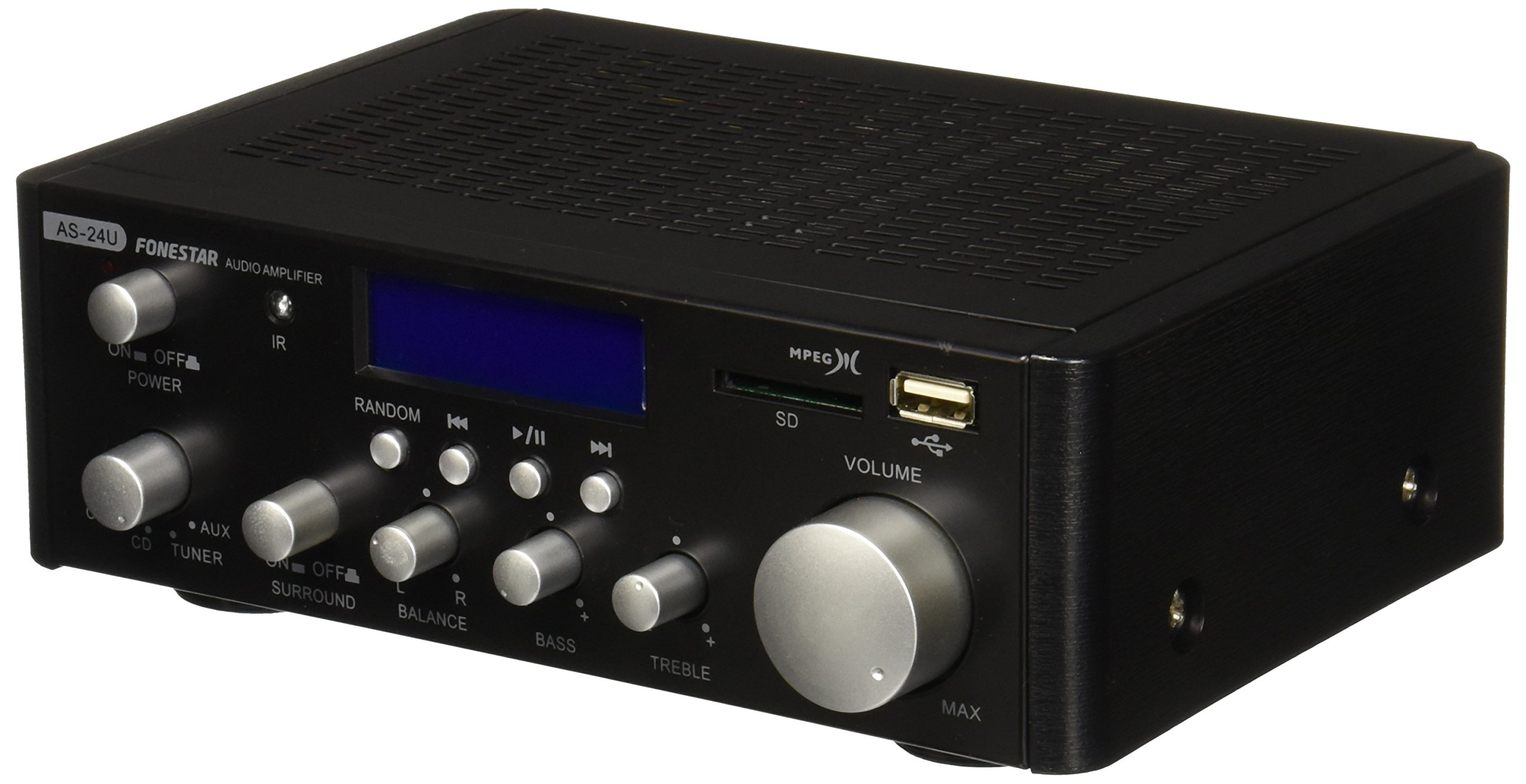
Kuva 1: Edessä view of the Fonestar AS-24U amplifier, showing the main controls and display.
3.2 Takapaneeli
The rear panel provides all necessary connections for audio input sources, speaker outputs, and power.

Kuva 2: Takaosa view of the Fonestar AS-24U amplifier, detailing input/output ports and power connection.
- INPUT (AUX, TUNER, CD): RCA stereo inputs for connecting external audio sources.
- SPEAKER OUT (STEREO): Spring clip terminals for connecting passive speakers (4-8 Ω).
- SPEAKER OUT (SURROUND): Additional spring clip terminals for surround speakers (8 Ω).
- VIRTA SISÄÄN: AC power input for the main power cable.
- VOLTAGE SELECTOR: Switch for selecting between 115V and 230V power input. Ensure this is set correctly for your region.
3.3 Kaukosäädin
Mukana tuleva kaukosäädin mahdollistaa laitteen kätevän käytön amplifier's media playback functions.
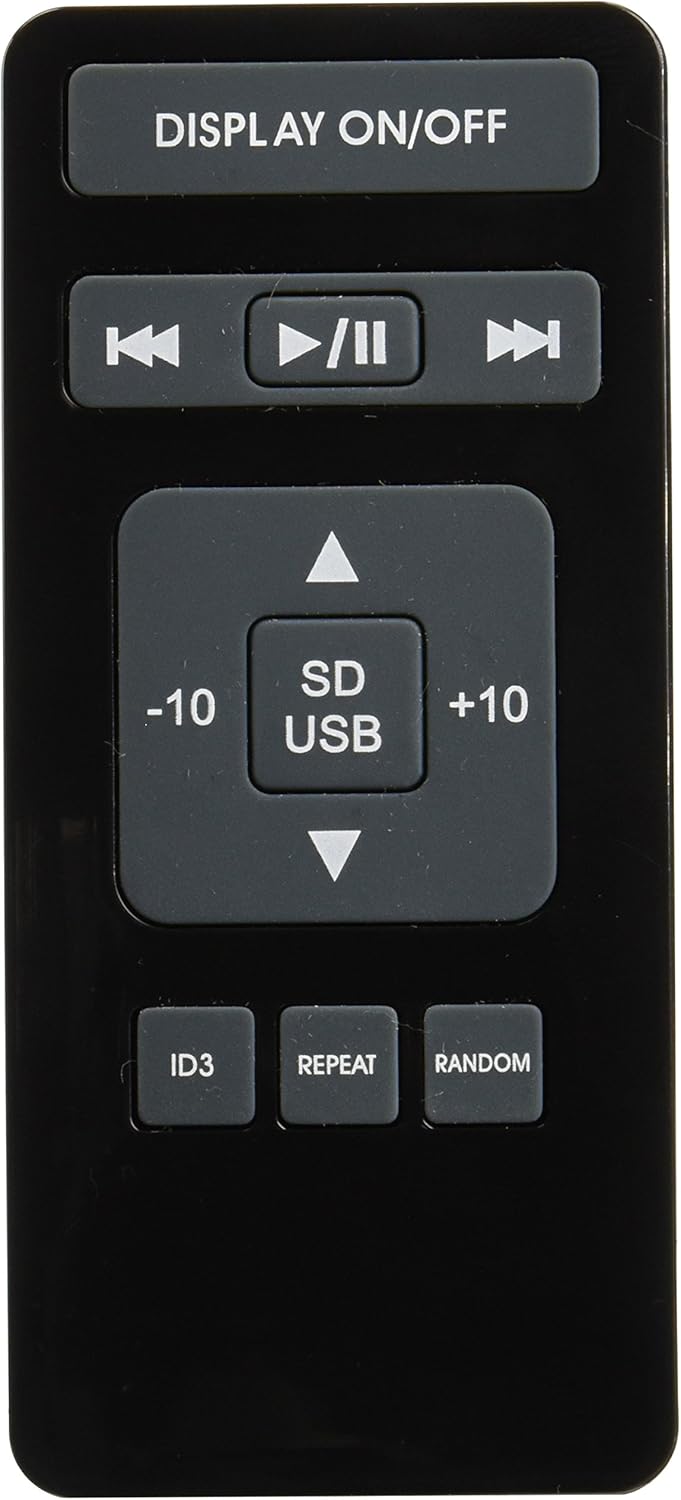
Image 3: Remote control for the Fonestar AS-24U amplifier, showing buttons for media playback and display control.
- NÄYTTÖ PÄÄLLE / POIS: Toggles the front panel display.
- PLAY/PAUSE, PREVIOUS/NEXT: Median toiston säätimet.
- SD/USB: Selects between SD card and USB drive as the media source.
- -10/+10: Skips tracks by 10.
- ID3: Displays ID3 tag MP3-tiedot files.
- TOISTAA: Toggles repeat modes (e.g., repeat one, repeat all).
- Satunnainen: Toggles random playback.
4. Asennus
4.1 Kaiuttimien liittäminen
- Varmista, että ampLifier on sammutettu ja irrotettu pistorasiasta.
- Connect your passive speakers to the SPEAKER OUT terminals on the rear panel.
- Sovita positiivinen (+) napa amplifier to the positive (+) terminal on your speaker, and the negative (-) to the negative (-).
- For stereo speakers, use the 4-8 Ω terminals. For surround speakers, use the 8 Ω terminals. Ensure your speakers' impedance matches the ampnostimen tekniset tiedot.
4.2 Äänilähteiden liittäminen
- Connect your audio devices (e.g., CD player, tuner, auxiliary device) to the corresponding RCA INPUT jacks (CD, TUNER, AUX) on the rear panel.
- Ensure left and right channels are correctly matched (red for right, white for left).
4.3 Virtaliitäntä
- Verify the VOLTAGE SELECTOR switch on the rear panel is set to the correct voltage for your region (e.g., 230V).
- Connect the power cable to the POWER IN socket on the rear panel and then to a suitable wall outlet.
5. Käyttöohjeet
5.1 Virran kytkeminen päälle/pois
Paina etupaneelin virtapainiketta kytkeäksesi laitteen päälle. amplifier on or off. A soft start protection circuit is integrated.
5.2 Tulolähteen valitseminen
Use the input selector knob or buttons on the front panel to choose between CD, TUNER, AUX, USB, or SD inputs.
5.3 Äänenvoimakkuuden säätäminen
Rotate the main volume knob on the front panel to adjust the overall sound level. Start with a low volume and gradually increase it to a comfortable listening level.
5.4 USB/SD-toisto
- Aseta MP3-ääntä sisältävä USB-muistitikku tai SD-kortti files etupaneelin vastaavaan uraan.
- Select the USB or SD input using the input selector.
- Use the playback controls (Play/Pause, Previous/Next) on the front panel or remote control to manage your music.
- The remote control allows for additional functions like skipping 10 tracks (+10/-10), displaying ID3 tags, repeating tracks, and random playback.
6. Huolto
6.1 Puhdistus
Puhdistaaksesi amplifier, first unplug it from the power outlet. Use a soft, dry cloth to wipe down the exterior surfaces. Do not use abrasive cleaners, waxes, or solvents as they may damage the finish.
6.2 Varastointi
Jos säilytät amplifier for an extended period, ensure it is unplugged, clean, and stored in a cool, dry place away from direct sunlight and extreme temperatures.
7. Vianmääritys
- Ei virtaa:
- Tarkista, että virtajohto on kytketty kunnolla molempiin ampja pistorasia.
- Varmista, että pistorasia on toimiva.
- Verify the VOLTAGE SELECTOR switch is set correctly.
- Ei ääntä:
- Confirm that the correct input source is selected.
- Tarkista kaikkien kaiutinliitäntöjen oikea napaisuus ja tiukka kiinnitys.
- Varmista, että äänenvoimakkuus on säädetty suuremmaksi eikä mykistetty.
- Testaa eri äänilähteellä.
- Vääristynyt ääni:
- Vähennä äänenvoimakkuutta.
- Tarkista kaiuttimien impedanssin yhteensopivuus.
- Ensure audio cables are not damaged and are securely connected.
- USB/SD-toisto-ongelmat:
- Ensure the USB drive or SD card is formatted to a compatible file järjestelmä (esim. FAT32).
- Varmista, että ääni fileovat MP3 -muodossa.
- Kokeile toista USB-muistitikkua tai SD-korttia.
8. Tekniset tiedot
| Merkki | FONESTAR |
| Malli | AS-24U |
| Stereo Power Output | 25 + 25 W max, 15 + 15 W RMS (4 Ω), 12 + 12 W RMS (8 Ω) |
| Surround Power Output | 10 + 10 W max, 6 + 6 W RMS (8 Ω) |
| Tulot | 3 stereo (CD, Tuner, AUX), 2 x RCA 400 mV |
| Suojaukset | Pehmeä käynnistys, oikosulku, ylikuormitus |
| Voitage | 230 volttia |
| Mitat (P x L x K) | 5 x 5 x 10 cm (noin 50 x 50 x 100 mm) |
| Paino | 1.9 kg |
| Kaiuttimien liitettävyys | Langallinen |
9. Takuu ja tuki
This Fonestar AS-24U amplifier comes with a standard manufacturer's warranty. Please refer to the warranty card included with your purchase for specific terms and conditions. For technical support, service, or warranty claims, please contact your retailer or the official Fonestar customer service.
