
1. Johdanto
This manual provides instructions for the StarTech.com SFPGLCLHSMST Cisco GLC-LH-SM Compatible SFP Module. This module is designed to deliver dependable 1GbE (1000 Mbps) connectivity over fiber cable for 1000BASE-LX/LH compliant networks. It is compatible with Cisco switches and routers, as well as MSA compliant switches from other brands.
2. Tuote ohiview
The StarTech.com SFPGLCLHSMST is a hot-swappable SFP fiber transceiver module, ensuring seamless upgrades and replacements with minimal network disruption.
2.1 Tärkeimmät ominaisuudet
- Cisco Compatibility: 100% compatible with Cisco GLC-LH-SM, designed to work with Cisco switches such as IE3400, IE3300, IE3200, ME1200, ME2400, and others.
- Tekniset tiedot: Supports 1000BASE-LX/LH, 1 Gbps data rate, Single Mode (SMF)/Multi Mode (MMF) fiber, LC Connector, 1310nm wavelength, and distances up to 20km (12.4mi).
- OEM Host Compatibility: Tested for hot-swappable operation in Cisco routers and switches.
- MSA Compliance: Also compatible with MSA compliant switches from brands like Ubiquiti, D-Link, Netgear, Supermicro, and TP-Link that accept uncoded modules.
2.2 Pakkauksen sisältö
- 1 x StarTech.com 1.25 Gbps Single Mode LC SFP Module (SFPGLCLHSMST)
2.3 Tuotekuvat

Kuva 1: Ylhäältä alas view of the StarTech.com SFP module, showing its metallic casing and connector end.

Kuva 2: Kulmassa view of the SFP module, highlighting the electrical contacts and the overall form factor.
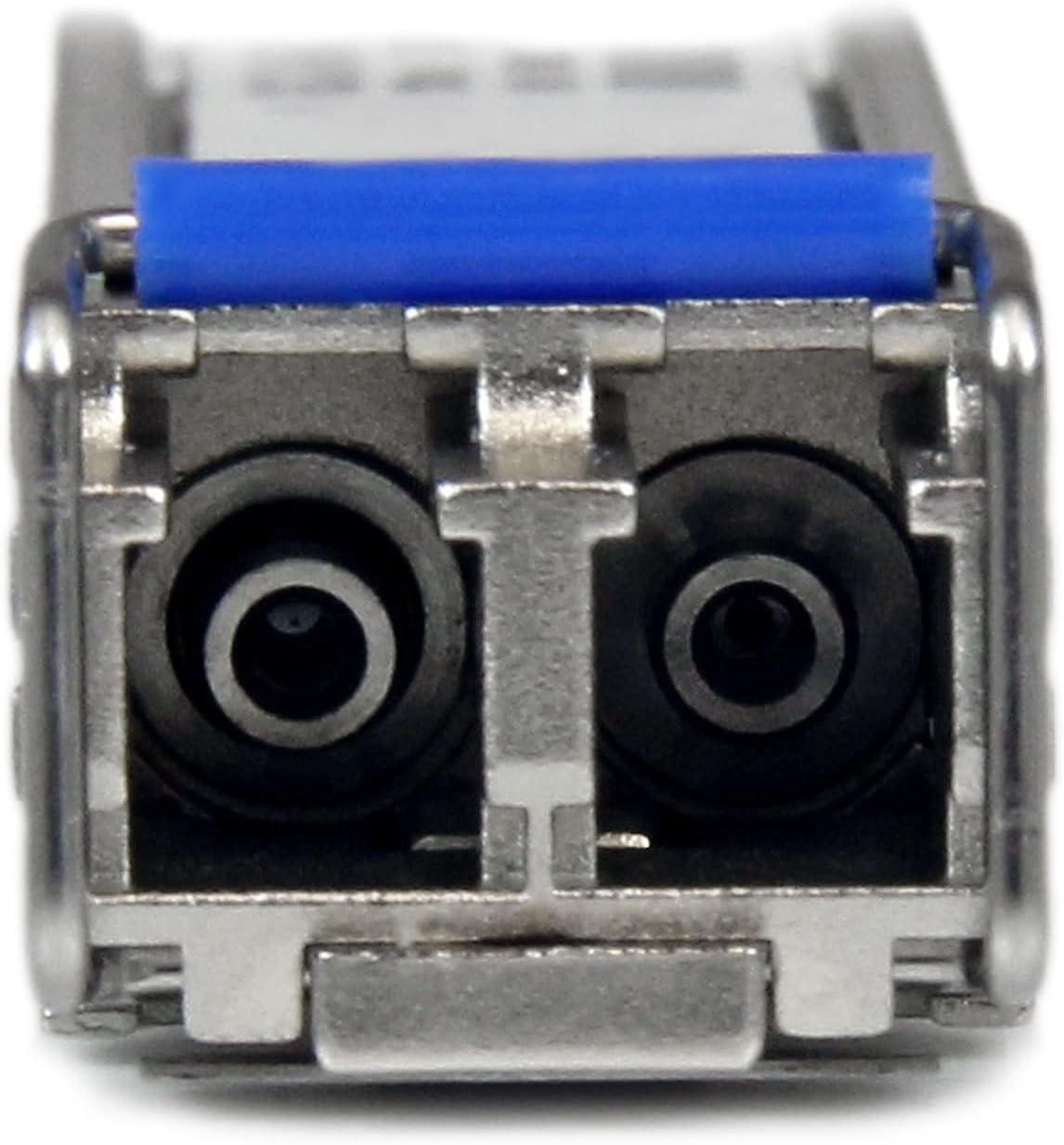
Kuva 3: Lähikuva view of the LC connector end of the SFP module, showing the two fiber ports and the blue pull tab.
3. Asennus ja asennus
Before installation, ensure your network device (switch or router) is powered off or configured to allow hot-swapping of SFP modules. Refer to your network device's documentation for specific instructions.
- Prepare the SFP Slot: Locate an available SFP slot on your compatible network switch or router.
- Aseta SFP-moduuli paikalleen: Gently slide the StarTech.com SFP module into the SFP slot until it clicks into place. Ensure the module is fully seated. The module is designed to be hot-swappable, meaning it can be inserted or removed while the host device is powered on, provided the host device supports this feature.
- Yhdistä valokuitukaapeli: Connect a compatible LC fiber optic cable to the LC connector ports on the SFP module. Ensure the cable is securely connected.
- Tarkista yhteys: Once connected, check the link status indicators on your network device. A solid green or amber light typically indicates a successful link.
Huomautus: Always handle fiber optic cables and SFP modules with care. Avoid touching the optical interfaces to prevent contamination, which can degrade performance.
4. Käyttöohjeet
Once installed and connected, the StarTech.com SFP module operates automatically to provide 1 Gigabit Ethernet connectivity over the fiber optic link.
- Tiedonsiirto: The module facilitates high-speed data transmission between your network device and another fiber-connected device.
- Linkin tila: Monitor the LED indicators on your network switch or router to confirm active link status and data activity.
- Hot-Swapped: The module can be removed and replaced without powering down the host device, allowing for flexible network maintenance and upgrades.
5. Huolto
The StarTech.com SFP module requires minimal maintenance. Follow these guidelines to ensure optimal performance and longevity:
- Pidä liittimet puhtaina: Regularly inspect and clean the LC fiber optic connectors on both the module and the fiber cable using appropriate fiber optic cleaning tools. Dust and debris can significantly degrade signal quality.
- Ympäristöolosuhteet: Ensure the operating environment adheres to the specified temperature and humidity ranges (0°C to 70°C, 30~70% RH) to prevent damage.
- Fyysinen tarkastus: Periodically check the module for any signs of physical damage or loose connections.
- Varastointi: When not in use, store the SFP module in a protective anti-static bag with dust caps on the optical ports.
6. Vianmääritys
If you encounter issues with your SFP module, refer to the following troubleshooting steps:
| Ongelma | Mahdollinen syy | Ratkaisu |
|---|---|---|
| No Link Light / No Connectivity |
|
|
| Väliaikainen yhteys |
|
|
| Slow Data Transfer Rate |
|
|
If the problem persists after trying these steps, contact StarTech.com technical support for further assistance.
7. Tekniset tiedot
| Attribuutti | Yksityiskohta |
|---|---|
| Malli | SFPGLCLHSMST |
| Merkki | StarTech.com |
| Liittimen tyyppi | LC Duplex |
| Tiedonsiirtonopeus | 1.25 Gbps (1 Gbps) |
| Max Transfer Distance | 20 km (12.4 mi) - Single Mode |
| Aallonpituus | 1310 nm |
| Fiber Operating Mode | Half/Full-Duplex |
| Kuitutyyppi | Single Mode / Multi Mode |
| Yhteensopivat verkot | 1000 Mbps (1 Gbps) |
| Käyttölämpötila | 0 °C - 70 °C (32 °F - 158 °F) |
| Varastointilämpötila | -40 °C - 85 °C (-40 °F - 85 °F) |
| Kosteus | 30-70 % RH |
| Virrankulutus | <1 W |
| Mitat (P x L x K) | 60.0 mm x 12.0 mm x 1.0 cm (2.4 in x 0.5 in x 0.4 in) |
| Paino | 20.0 g (0.7 unssia) |
| Toimialan standardit | IEEE 802.3z 1000BASE-LX/LH |
| MTBF | 3,092,408 tuntia |
8. Takuu ja tekninen tuki
8.1 Takuutiedot
StarTech.com offers a lifetime warranty on this SFP module. This warranty covers defects in materials and workmanship under normal use. For detailed warranty terms and conditions, please refer to the official StarTech.com websivustolla tai ota yhteyttä heidän asiakaspalveluunsa.
The warranty for this product is Elinikäinen.
8.2 Tekninen tuki
StarTech.com provides free lifetime multilingual technical support for this product. If you require assistance with installation, troubleshooting, or have any questions regarding the SFP module, you can contact their technical advisors.
Jos tarvitset teknistä tukea, vieraile osoitteessa StarTech.com Support Page.