
OneConcept MG3-V12-WH_SML
OneConcept V-12 Stereo System
Käyttöopas
Model: MG3-V12-WH_SML
Johdanto
This manual provides detailed instructions for the safe and efficient operation of your OneConcept V-12 Stereo System. Please read this manual thoroughly before using the device and retain it for future reference.

Kuva: Edessä view of the OneConcept V-12 Stereo System, showing the main unit with integrated CD player, control buttons, digital display, and two detachable speakers. The system is white and rests on a circular stand.
Turvallisuusohjeet
- Älä altista laitetta sateelle tai kosteudelle.
- Älä tuki tuuletusaukkoja.
- Varmista oikea virtalähde voltage, kuten laitteessa on ilmoitettu.
- Pidä laite poissa suorasta auringonvalosta, lämmönlähteistä ja voimakkaista magneettikentistä.
- Älä yritä purkaa tai korjata laitetta itse. Jätä kaikki huoltotyöt pätevän henkilöstön tehtäväksi.
Asennus
Pakkauksen purkaminen ja sisältö
Poista kaikki osat varovasti pakkauksesta. Varmista, että kaikki osat ovat mukana:
- OneConcept V-12 Main Unit
- Two Detachable Speakers
- Virtalähde
- Käyttöopas (tämä asiakirja)
Sijoitteluvaihtoehdot
The OneConcept V-12 offers versatile placement options:
- Desktop/Shelf Placement: Use the integrated stand for stable placement on any flat surface.
- Seinäasennus: The main unit and speakers can be detached from the stand and mounted on a wall using appropriate hardware (not included). Ensure the wall can support the weight of the unit.

Kuva: Sivu view of the OneConcept V-12 Stereo System, highlighting its compact design and the circular stand. This view demonstrates the unit's suitability for various placements.

Image: The OneConcept V-12 Stereo System with its two speakers detached from the central unit. This illustrates the modular design, allowing for flexible speaker placement or wall mounting.
Connecting Power and Speakers
- Connect the power adapter to the DC IN port on the back of the main unit.
- Liitä virtalähde tavalliseen pistorasiaan.
- Connect the speaker cables from the detachable speakers to the corresponding speaker output jacks on the back of the main unit. Ensure correct polarity.

Kuva: Takaosa view of the OneConcept V-12 Stereo System, showing the speaker cable connections and the main power input. This view also highlights the ventilation grilles on the back of the unit and speakers.

Image: Top-down rear view of the OneConcept V-12 Stereo System, focusing on the manual switches for AM/FM radio selection and the main mode selector (AUX, Radio, CD, Alarm). Also visible is the tuning wheel.
Käyttöohjeet
Perusohjaimet
- PÄÄLLE/POIS: Paina POWER painiketta kytkeäksesi laitteen päälle tai pois päältä.
- TILAVUUS: Käytä VOL+ ja VOL- painikkeita säätääksesi äänenvoimakkuutta.
- OHJEET: Paina MODE button to cycle through available input sources: CD, USB, SD, FM Radio, AM Radio, AUX.
CD/MP3-toisto
- Paina AUKI/KIINNI -painiketta avataksesi CD-lokeron.
- Aseta CD- tai MP3-CD-levy kelkkaan etikettipuoli ylöspäin.
- Paina AUKI/KIINNI -painiketta uudelleen sulkeaksesi lokeron.
- Ensure the unit is in CD mode. Playback should begin automatically.
- Käytä OHITA painikkeet (◀◀ / ▶▶) navigoidaksesi kappaleissa.
- Paina TOISTA/TAUKO toiston keskeyttämiseksi tai jatkamiseksi.
- Paina STOP lopettaaksesi toiston.

Image: The OneConcept V-12 Stereo System with its front-loading CD tray open, revealing the disc compartment. The detached speakers are also visible, emphasizing the system's modularity.
USB/SD-toisto
- Aseta USB-muistitikku USB-porttiin tai SD-kortti SD-korttipaikkaan.
- Paina MODE button until "USB" or "SD" is displayed.
- Laite tunnistaa automaattisesti yhteensopivan äänitiedoston ja aloittaa sen toistamisen. files (MP3).
- Käytä REPEAT/PROG button for repeat modes and programming playback.
- Käytä ALBUMI button to navigate between folders (albums) on the storage device.
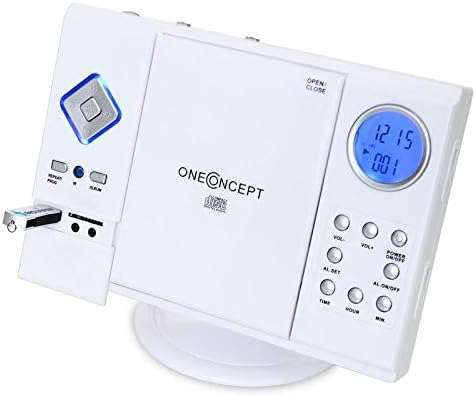
Image: Close-up of the left side of the OneConcept V-12 Stereo System, clearly showing a USB flash drive inserted into its dedicated port. This highlights the system's USB playback capability.

Kuva: Yksityiskohtainen view of the OneConcept V-12 Stereo System's left panel, featuring the USB port, SD card slot, and two 3.5mm audio jacks (likely headphone out and AUX in). This image emphasizes the various connectivity options.
Radion käyttö (FM/AM)
- Switch the AM/FM selector on the back of the unit to the desired band.
- Paina MODE button until "Radio" is displayed.
- Käytä TUNING wheel on the back of the unit to manually tune to a station.
- For better reception, extend the FM wire antenna fully.
AUX-tulo
Connect an external audio device (e.g., smartphone, MP3 player) to the AUX IN jack using a 3.5mm audio cable (not included). Press the MODE button until "AUX" is displayed. Audio from the connected device will play through the stereo system.
Hälytystoiminto
The unit features an alarm function. Refer to the buttons on the right side of the main unit for setting the alarm:
- AL. SET: Press to enter alarm setting mode.
- TIME / HOUR / MIN: Use these buttons to set the alarm time.
- AL. ON/OFF: Press to activate or deactivate the alarm.
Huolto
Puhdistus
- Irrota laite aina pistorasiasta ennen puhdistamista.
- Pyyhi ulkopinnat pehmeällä, kuivalla liinalla.
- Älä käytä hankaavia puhdistusaineita, vahoja tai liuottimia, sillä ne voivat vahingoittaa pintaa.
- Käytä CD-linssin puhdistamiseen erityistä CD-linssin puhdistuslevyä.
Varastointi
Jos laitetta säilytetään pitkään, irrota se virtalähteestä ja säilytä sitä viileässä, kuivassa paikassa, poissa suorasta auringonvalosta ja äärimmäisistä lämpötiloista.
Vianetsintä
| Ongelma | Mahdollinen syy | Ratkaisu |
|---|---|---|
| Ei Virtaa | Virtajohto ei ole kunnolla kiinni. | Tarkista virtajohdon liitäntä laitteeseen ja pistorasiaan. |
| Ei ääntä | Volume too low; incorrect mode selected; speaker cables loose. | Increase volume; select correct input mode; check speaker connections. |
| CD/USB/SD not playing | Disc/device inserted incorrectly; incompatible file format; dirty disc. | Reinsert disc/device correctly; ensure MP3 format; clean disc; try another disc/device. |
| Huono radiovastaanotto | Antennia ei ole ojennettuna; heikko signaali. | Fully extend FM wire antenna; reposition unit for better signal. |
Tekniset tiedot
| Ominaisuus | Yksityiskohta |
|---|---|
| Merkki | OneConcept |
| Mallinumero | MG3-V12-WH_SML |
| Väri | Valkoinen |
| Yhteystekniikka | USB |
| Erikoisominaisuudet | CD changer, Alarm function |
| Yhteensopivat laitteet | MP3 player, Smartphone |
| Kaiuttimen tyyppi | Stereot |
| Surround-äänikanavan asetukset | 2.0 |
| Tuetut standardit | MP3 |
| Tuotteen mitat (P x L x K) | 28 x 20 x 33 cm |
| Tuotteen paino | 2.4 kiloa |
| Virtalähde | Johdollinen sähkö |
Takuu ja tuki
This product is covered by a standard return policy. For specific warranty details and support, please refer to your point of purchase or the official OneConcept websivusto. Säilytä ostokuitti takuuvaatimuksia varten.
For technical assistance or inquiries, please contact OneConcept customer support, providing your product model number (MG3-V12-WH_SML) and a detailed description of the issue.
Asiaan liittyvät asiakirjatMG3-V12-WH_SML

Ask a question about this manual
Ask about setup, troubleshooting, compatibility, parts, safety, or missing instructions. Manuals+ will review the question and use this page’s manual context to help answer it.