Johdanto
Welcome to the user manual for your Timberland Washington Summit Digital Sensor Pacer Watch, Model 13386JPBUS_01. This guide provides detailed instructions for setting up, operating, maintaining, and troubleshooting your watch. Designed for durability and functionality, this watch features a digital display, chronograph, dual-time, alarm, compass, day-date, month display, finger touch heart rate meter, light, lap timer, digital sensor, and timer functions.
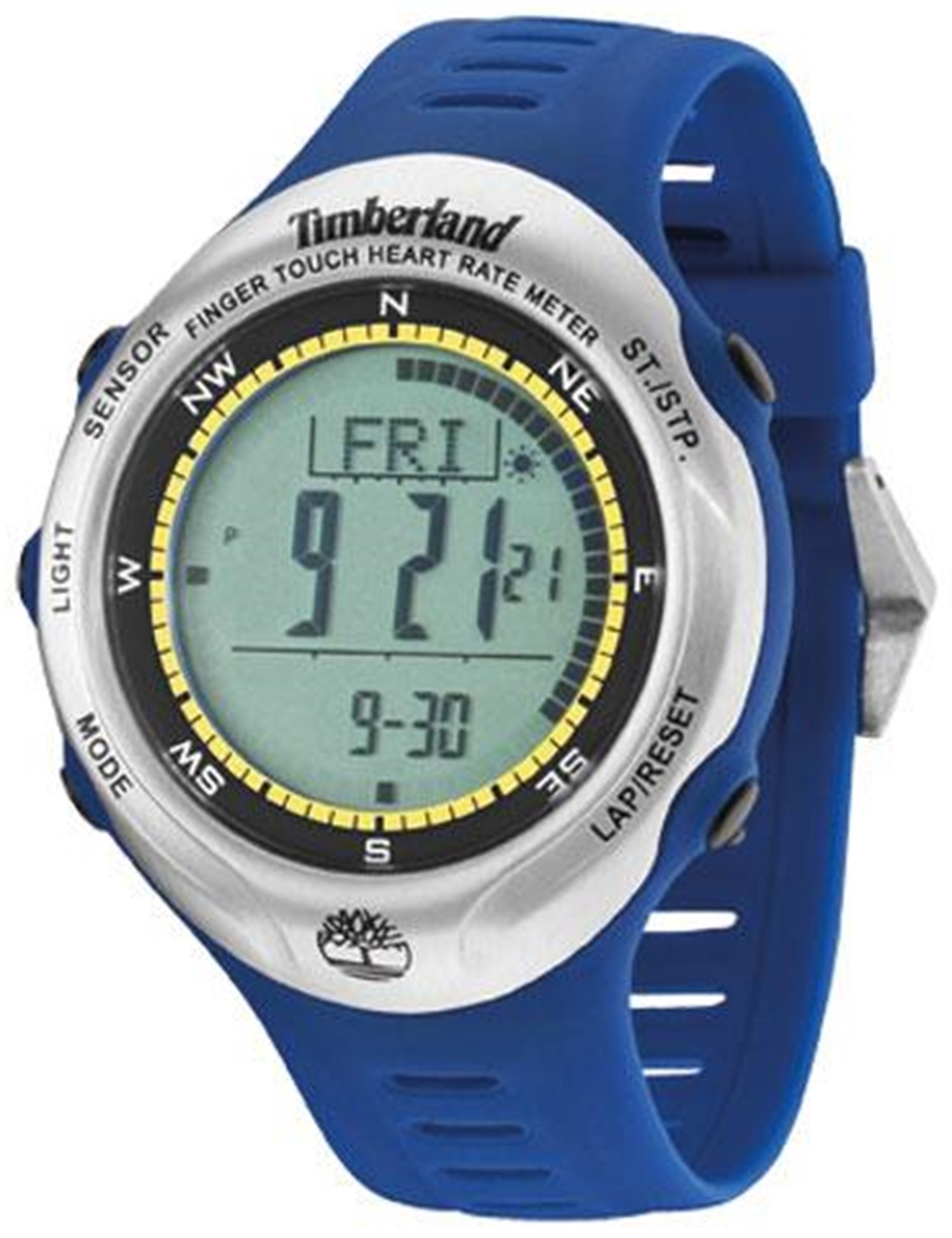
This image displays the Timberland Washington Summit Digital Sensor Pacer Watch, highlighting its digital grey dial, blue rubber strap, and function pushers.
Asennus
1. Pakkauksen purkaminen ja alkutarkastus
- Poista kello varovasti pakkauksestaan.
- Tarkista kello näkyvien vaurioiden varalta.
- Varmista, että kaikki komponentit ovat mukana.
2. Kellon aktivointi
Your watch comes with a pre-installed battery. If the display is not active, gently press any button to wake the watch. If the watch remains inactive, refer to the Troubleshooting section.
3. Kellonajan ja päivämäärän asettaminen
- Locate the mode button (usually on the left side). Press it repeatedly until the time setting mode is displayed.
- Use the adjustment buttons (typically on the right side) to change the hour, minute, year, month, and day.
- Press the mode button again to confirm settings and exit the time setting mode.
Käyttöohjeet
Tilanavigointi
Paina tila button (refer to your watch's specific button layout) to cycle through the following functions: Time, Chronograph, Dual-Time, Alarm, Compass, Heart Rate, Lap Timer, and Timer.
1. Aika- ja päivämääränäyttö
- The default display shows the current time, day, and date.
- Voit aktivoida taustavalon painamalla Kevyt -painiketta.
2. Kronografi (sekuntikello)
- Navigate to the Chronograph mode.
- Paina Käynnistä/Pysäytä -painiketta ajanoton aloittamiseksi.
- Paina Käynnistä/Pysäytä uudelleen keskeyttääksesi/jatkaaksesi.
- Paina Nollaa -painiketta ajan tyhjentämiseksi.
3. Dual-Time
Tämän toiminnon avulla voit view a second time zone. In Dual-Time mode, use the adjustment buttons to set the desired second time.
4. Hälytys
- Enter Alarm mode.
- Use the adjustment buttons to set the alarm time.
- Activate or deactivate the alarm using the designated button (refer to your watch's specific button functions).
5. Kompassi
In Compass mode, hold the watch level and allow it to calibrate. The display will indicate the cardinal directions. For accurate readings, avoid strong magnetic fields.
6. Finger Touch Heart Rate Meter
To measure your heart rate, ensure your fingers are clean and dry. In Heart Rate mode, place your finger firmly on the designated sensor area (usually on the bezel or case back). Remain still until the reading is displayed.
7. Lap Timer and Timer
The Lap Timer function allows you to record multiple lap times during an activity. The Timer (countdown timer) can be set for a specific duration, alerting you when it reaches zero. Refer to the on-screen prompts and button functions in their respective modes for detailed operation.
Huolto
1. Kellon puhdistaminen
- Pyyhi kellon kuori ja ranneke pehmeällä,amp kangas.
- Vältä voimakkaiden kemikaalien, liuottimien tai hankaavien puhdistusaineiden käyttöä.
- For rubber straps, a mild soap solution can be used, followed by rinsing with clean water and thorough drying.
2. Vedenkestävyys
Your watch is water resistant to 30 meters (99 feet). This means it can withstand splashes of water and rain. It is not suitable for showering, swimming, or submersion in water. Do not operate buttons when the watch is wet.
3. Pariston vaihto
When the display dims or functions become erratic, the battery may need replacement. This watch uses 1 product-specific battery. It is recommended to have the battery replaced by a qualified watch technician to ensure proper sealing and maintain water resistance.
Vianetsintä
| Ongelma | Mahdollinen syy | Ratkaisu |
|---|---|---|
| Näyttö on tyhjä tai himmeä. | Akku vähissä. | Vaihda paristo (ammattilaisen suosittelema). |
| Aika on väärä. | Aikaa ei ole asetettu oikein tai sitä on muutettu vahingossa. | Refer to "Setting Time and Date" in the Setup section. |
| Painikkeet eivät reagoi. | Watch may be in a locked mode or internal error. | Try pressing all buttons to see if it unlocks. If unresponsive, a battery reset may be needed by a technician. |
| Heart rate sensor not working. | Improper finger placement, dirty sensor, or dry skin. | Ensure clean, firm contact with the sensor. Moisten finger slightly if skin is very dry. |
Tekniset tiedot
| Mallinumero | 13386JPBUS_01 |
| Merkki | Timberland |
| Liikkeen tyyppi | Kvartsi |
| Kotelon halkaisija | 47 millimetriä |
| Kotelon paksuus | 14 millimetriä |
| Nauhan materiaalityyppi | Kumi |
| Band väri | Sininen |
| Kristallityyppi | Mineral glass with sapphire coating |
| Vedenkestävyyssyvyys | 30 metriä (99 jalkaa) |
| Paristot vaaditaan | 1 tuotekohtainen akku (mukana) |
| Tuotteen paino | 249 g |
Takuutiedot
This Timberland Washington Summit Digital Sensor Pacer Watch comes with a 2-year store warranty. For any warranty claims or service, please contact the seller of record directly. Keep your proof of purchase for warranty validation.
Tukea
For further assistance, technical support, or inquiries not covered in this manual, please refer to the official Timberland websivustolla tai ota yhteyttä asiakaspalveluun.
- Valmistaja: Timberland
- Verkkoresurssit: Visit the official Timberland website for product updates and additional support.
- Myyjän tuki: For purchase-specific issues, contact the retailer from whom the watch was purchased.